Prices from Amazon AU, updated daily.
Disclosure: This article contains affiliate links to amazon.com.au. If you buy through one of these links we may earn a small commission at no extra cost to you. It does not change which products we recommend. We focus on devices that genuinely change power use, not gadgets that just feel modern.
Australian power bills in 2026 are still uncomfortable. Wholesale electricity rates have eased a bit from the worst of the 2023–24 spikes, but retail rates, the ones you actually pay, haven't followed all the way down. Most NSW, VIC and QLD households are still looking at usage tariffs in the high 30s to mid-40s of cents per kWh, plus a daily supply charge that's effectively unavoidable. Anything that meaningfully reduces consumption is worth doing.
The smart home industry has spent a decade selling devices on the promise of energy savings, with very mixed honesty about whether those savings actually materialise. This guide is the version we'd give a friend: what genuinely moves the needle, what's marketing fluff, and the three categories of device worth buying in 2026 if your goal is a lower bill, not a more impressive house.
How Smart Devices Actually Save You Money
There are four real mechanisms. If a smart device doesn't do at least one of these, it isn't going to lower your bill regardless of what the box says.
Cutting vampire load
The TV, set-top box, soundbar, gaming console, modem, monitor and standby chargers in a typical lounge room can pull 30–80 watts continuously even when nothing is "on". Across a year that's hundreds of kWh of completely wasted electricity. A smart plug that fully cuts power to those devices on a schedule (bedtime to morning, or whenever you're at work) is the single most effective intervention. The savings are real and measurable.
Scheduled and condition-based switching
Lights left on in the laundry. Bathroom heat lamp running long after the bathroom emptied. Outdoor floodlights still on at 2am. Any "always on because no one remembered to flick it off" device is a candidate for either a smart switch on a schedule, or a motion sensor that turns it off after no movement for X minutes. Lights are usually the lowest-effort win here.
Visibility: you can't manage what you can't measure
Energy-monitoring smart plugs report real-time and cumulative wattage to your phone. The first time you see exactly how much your old beer fridge in the garage is costing you per year, you'll either fix it or unplug it. The same goes for that ageing pool pump, the second freezer, or the heater someone forgot was on. The plug doesn't save you money. The data does, by changing what you do.
Time-of-use shifting (where your tariff supports it)
If you're on a time-of-use or demand tariff, smart switches and plugs can shift discretionary loads, pool pump, dishwasher, EV charger, into off-peak windows automatically. This works less well on flat-rate tariffs, but if your retailer has migrated you to a demand or ToU plan recently, it's worth setting up.
What to Look For in 2026
Matter compatibility
Matter is the cross-vendor smart home standard backed by Apple, Google, Amazon and Samsung. In 2026 it's matured to the point where buying Matter-compatible devices is the obviously correct future-proof choice. The same device works with Apple Home, Google Home, Alexa and SmartThings simultaneously. You stop being locked into one ecosystem. If you switch from an iPhone to a Pixel in three years, your devices come with you.
Energy monitoring on the device, not in the app
Some smart plugs report the wattage their attached device draws (good). Others just track on/off state and let you "estimate" usage from a manual wattage you type in (useless). For genuine savings analysis, you want hardware-measured energy reporting. Brands that publish kWh and cost views in their app are usually doing it properly.
No-hub designs
Older smart home gear required a separate hub plugged into your router. Modern Wi-Fi or Matter-over-Thread devices generally don't (Thread does need a Thread Border Router, but most newer Apple TVs, HomePods and Google Nest Hubs are already Border Routers, so most households already have one without realising). Avoid devices in 2026 that demand a vendor-specific hub purely for the sake of locking you into their app.
Wi-Fi reliability and brand longevity
Pick brands you're confident will still exist in five years. Cheap unbranded plugs from a marketplace listing that disappears next month leave you with bricks. The cloud service goes down and the device stops working. Tapo (TP-Link), Eve, Aqara, Philips Hue and SmartThings all have a track record. The very cheapest "$8 each four pack" plugs almost never do.
Reliable wall-switch behaviour
If you're putting smart bulbs in ceiling lights controlled by a wall switch, you have a problem: anyone who flicks the wall switch off cuts power to the bulb, taking it offline. Either commit to a smart switch (so the wall switch becomes scene control rather than a power cut), or restrict smart bulbs to lamps where there's no wall switch involved.
Common Mistakes
- Buying smart devices and never automating them. A smart plug used as a glorified manual on/off switch saves nothing. You still have to remember to switch it off. The savings come from schedules and triggers that you set once and forget.
- Not measuring before optimising. If you don't know what's actually drawing power, you're guessing. Start with one or two energy-monitoring plugs on the suspects (entertainment unit, garage fridge, pool pump) for a week. Real data beats intuition every time.
- Smart bulbs in switched ceiling fittings. Discussed above. This kills the bulb's smart features the moment anyone flicks the wall switch. Use lamps or pair with a smart wall switch.
- Replacing a wall switch yourself. Anything wired behind a wall plate is electrical work. You need a licensed electrician under state regulations. Plug-in devices, lamps, free-standing relay modules and battery sensors are fine to install yourself.
- Picking a dead-end ecosystem. A few smart home brands have either shut down their cloud or dramatically reduced support over the past few years. If you're starting fresh in 2026, prioritise Matter-compatible products. They survive ecosystem changes.
Our Picks: Three Devices for Different Use Cases
These three picks together form a starter setup that covers retrofitting an existing wall switch, automating lighting based on occupancy, and adding smart control to fittings without rewiring, all with hardware that does what it claims.

TP-Link Tapo S110E: Smart Relay Switch with Energy Detection
★★★★½ 4.7 / 5 (140+ reviews)
The S110E is the do-it-all retrofit relay we keep recommending. It's a one-channel 10A smart relay with both Wi-Fi and Bluetooth, dry/wet contact for flexible wiring, and built-in energy detection so you can see exactly what the connected device is drawing. Use it behind an existing switch (electrician install), inline with a garage door opener, or as a smart on/off for a hardwired appliance. No hub required, works with Alexa and Google Home, and the energy data view in the Tapo app is one of the best in this price tier.
Best for: Retrofit smart-switching of existing wiring, garage door automation, energy monitoring • Capacity: 10A, 1 channel • Connectivity: Wi-Fi + Bluetooth • Hub required: No
View on Amazon AU
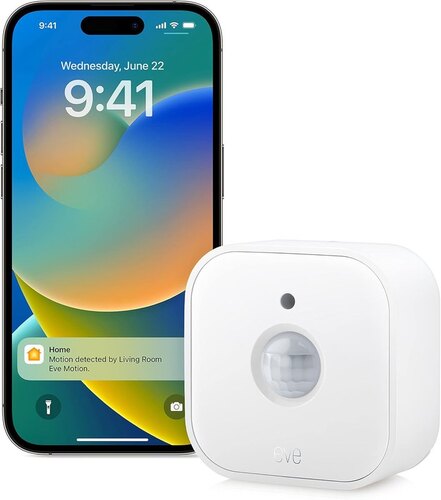
Eve Motion (Matter): Smart Motion & Light Sensor
★★★★ 4.0 / 5 (590+ reviews)
The Eve Motion is the right answer to "lights left on in rooms no one is in". A battery-powered motion and ambient-light sensor that talks Matter-over-Thread, so it works natively with Apple Home, Google Home, Alexa and SmartThings, pick whichever ecosystem you already use. Set up a rule that turns the bathroom or laundry light off after five minutes of no motion, and the savings start the same day. Requires a Thread Border Router on your network (most modern Apple TVs, HomePods and recent Nest Hubs already are). Indoor use only.
Best for: Auto-off lighting in laundry, bathroom, hallway, walk-in robe • Power: Battery (replaceable) • Standard: Matter over Thread • Hub required: Thread Border Router (not a separate purchase if you already have a recent Apple/Google smart speaker)
View on Amazon AU
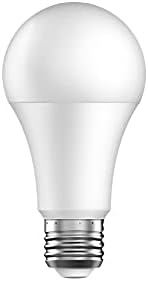
Laser 10W E27 Smart Light Bulb
★★★★½ 4.5 / 5 (35+ reviews)
If you're renting, can't justify an electrician for switches, or just want to dip a toe in without committing to an ecosystem, the Laser smart bulb is the low-stakes option. Standard E27 fitting, 1000 lumens, dimmable adjustable white, voice control via Alexa or Google. Use them in lamps where the wall switch isn't involved, bedside lamps, floor lamps, desk lamps, and put them on a daily schedule. Limited compared to Matter-native gear, but the entry price makes it a sensible "try before you scale" purchase. Works as a path into automation without re-wiring anything.
Best for: Renters, lamps without wall switches, single-room starter automation • Fitting: E27 screw • Output: 1000 lumens, adjustable white • Hub required: No (Wi-Fi)
View on Amazon AUQuick Setup Tips
- Audit before you automate. Walk around your house with the meter readout visible (most modern smart meters have an app). Note what's drawing power when nothing is supposed to be on. That standby load is your best target list.
- Start with one room. The lounge / entertainment area usually has the highest vampire load and the easiest-to-justify smart plug. Get one win there before scaling.
- Set the automation the same day you install. A device with no schedule is just a more expensive version of the original. Don't let it sit in "manual on/off" mode for a month.
- Re-check the energy data monthly. Habits change. What was on a useful schedule in summer might need a different one in winter. Five minutes a month keeps the savings working.
- Get an electrician for any wall-switch wiring. Australian regulations require it and most home insurance won't cover damage from DIY electrical work.
- Update firmware automatically. Smart home devices are network-connected. Out-of-date firmware is a security risk and sometimes drops features. Enable auto-update during the initial setup.
When You'll See the Savings
Realistic expectations matter. Here's how the timeline usually plays out for a household that follows the basic setup above:
- First month: noticeable reduction in standby loads visible in the smart plug app data. Lights actually turning off. You don't see the bill saving yet because billing cycles are quarterly for most retailers.
- First quarter bill after install: the first real comparison. Households who set up energy-monitoring on three to four big standby loads typically see a single-digit percentage drop in usage, depending on what they were wasting before.
- 12 months in: the device cost has paid back if you actually used the automations. The compounding part, that energy-data view causing you to fix or replace a hidden hog (old fridge, broken hot water timer, leaking standby power on something obscure), is often the biggest dollar contribution and shows up unevenly.
Smart home devices are not a magic discount. They're a tool that surfaces waste and lets you act on it. People who treat them as that get the savings; people who buy them for the gadget value generally don't.
If you're thinking about smart home as part of a broader small business or premises tech upgrade, especially anything around physical security, have a look at our guide to security cameras for small Australian businesses. The same Tapo app actually handles both, which is convenient for premises owners running a single phone-based control surface. We've also written a separate starter guide for smart home on a budget if you're brand-new to this and want a different on-ramp.
Quick Summary
- Retrofit + monitoring: TP-Link Tapo S110E smart relay: do-it-all 10A relay with energy detection.
- Auto-off lighting: Eve Motion (Matter) sensor: works with whichever ecosystem you already have.
- Renter / starter: Laser 10W E27 smart bulb: no rewiring, works in lamps.
- Always: set a schedule or trigger the same day you install. Pick Matter-compatible where possible. Buy from brands that will still exist in five years.
- Never: buy switches/plugs without monitoring if savings is the goal. Put smart bulbs in switched ceiling fittings without a smart switch. DIY anything behind a wall plate.
- Realistic payback: 12–18 months on most setups. Faster if you discover and fix a hidden energy hog along the way.
Setting up smart home gear and need a hand?
If you'd like help configuring a smart home system or troubleshooting devices that won't connect, we're happy to help on the Central Coast.