Disclosure: This page contains an affiliate link to amazon.com.au. If you buy through this link we may earn a small commission at no extra cost to you. It does not change which products we recommend — we only suggest gear we’d use ourselves.
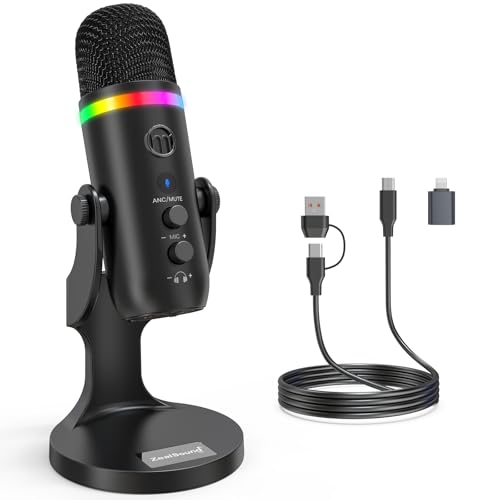
zealsound
ZealSound Podcast Microphone for PC, USB Mic with Noise Reduction, Tap-to-Mute, Gain & Echo Controls, Zero-Latency Monitoring, RGB Lighting for Mac, iPhone, iPad, Live Streaming & Voice-Over K66 Pro
$41.99
Price from Amazon · may vary
Buy on Amazon ↗
Questions? Call (02) 4311 6146
Key Features
- Studio-Quality Sound for Clear, Detailed Vocals – The K66 PROS podcast microphone combines a sensitive condenser capsule with a cardioid pickup pattern to capture your voice with clarity and accuracy. Its 48 kHz sampling rate and –45 dB ±3 dB sensitivity capture natural vocal detail with rich lows, balanced mids, and crisp highs. This USB microphone for PC and iPhone delivers clear, consistent vocals for podcast production, live streaming, voice-over work, online classes, virtual meetings, and gaming commentary.
- Intelligent Noise Reduction for Clearer Speech – Touch and hold the mute button to activate Noise Reduction Mode, which helps this microphone for PC reduce distracting background sounds while keeping your voice clear and focused. The green LED confirms that Noise Reduction Mode is active, while the blue LED indicates Default Mode, which preserves a warmer, more natural vocal tone in quieter environments.
- Independent Knobs for Personalized Sound – Dedicated controls for mic gain, headphone volume, and echo let youfine-tune the USB podcast microphone directly without opening software settings. These convenient mic controls make it easy to balance vocal input, set a comfortable listening level, or add depth and atmosphere to your voice.
- Silent Tap-to-Mute with Easy-to-See Red Indicators – Tap the mute button to silence the PC mic instantly without producing a distracting clicking sound. When mute is active, both the dedicated status light and RGB ring turn red, providing clear visual confirmation at a glance and helping prevent unintended audio.
- Hear Your Voice Clearly at a Comfortable Volume – Connect compatible headphones to the built-in 3.5 mm jack on this desktop podcast microphone for zero-latency monitoring. Adjust the monitoring volume to suit your headphones and listening preference, making vocal details easier to hear while maintaining a comfortable level during longer sessions. Real-time feedback helps you check your delivery and keep your sound clear and consistent.
- Broad Device, Platform & Software Compatibility – This podcast microphone for PC connects to Windows computers, Macs, laptops, USB-C phones, and compatible tablets through the included USB-C to USB-A/USB-C cable. The included Lightning adapter also lets it work as a microphone for iPhone 6–14 models. It is compatible with popular software and platforms, including OBS Studio, Streamlabs, Discord, GarageBand, Audacity, TikTok, YouTube, and Smule. This flexible connectivity is ideal for mobile creators producing podcast episodes, live streams, voice-over tracks, and short-form videos directly from phones or tablets.
- Make Your Setup Stand Out with Custom RGB Lighting – Add a personalized look to your microphone for PC setup with seven RGB modes, including four solid colors and three flowing gradient effects. Tap the dedicated RGB button to cycle through the lighting modes, or press and hold it to turn the lights off. The soft, low-glare glow helps the mic stand out on camera without becoming distracting.
- Capture Your Voice and Backing Track Together – Activate Inside Mode on this USB microphone to combine your voice with audio playing on the connected device in a single track. This feature is useful for singing over backing tracks, adding music to podcast introductions or voice-over projects, including device audio in live broadcasts or tutorials, and creating short-form videos without mixing separate audio files afterward. Press the bottom button to turn it on; the blue indicator confirms that the feature is enabled. Turn it off to hear the backing track through your headphones without including it in the captured audio.
- Weighted Metal Base for Stable Placement – Built with solid metal construction and a weighted base, this mic stand keeps your USB microphone for PC securely positioned while helping reduce unwanted movement and vibration. Its sturdy design provides reliable support and maintains a consistent angle and speaking distance throughout use.
- Complete Creator Kit, Ready Out of the Box – The all-in-one kit includes the K66 PRO RGB Podcast microphone, a solid metal stand with a weighted anti-vibration base, a 70.9-inch USB-C to USB-A/USB-C cable, a USB-A to Lightning adapter for iPhone 6–14, a foam windscreen, and a user manual. Simply plug in and start creating—no additional accessories or drivers required. ZealSound also provides lifetime technical support for added peace of mind.
Need help with your tech?
iFix Electronics is a Central Coast (NSW) repair shop with 16+ years' experience. If you need hands-on help, our team can sort it.