Prices from Amazon AU, updated daily. Swipe or use the arrows for more.
Disclosure: This article contains affiliate links to amazon.com.au. If you buy through one of these links iFix may earn a small commission at no extra cost to you. It doesn't change which products we recommend. We focus on what actually lasts based on 16 years of repair-shop experience.
Quick summary8 picks
- Entry PickNumark Mixtrack Go Compact Bluetooth DJ… about$105
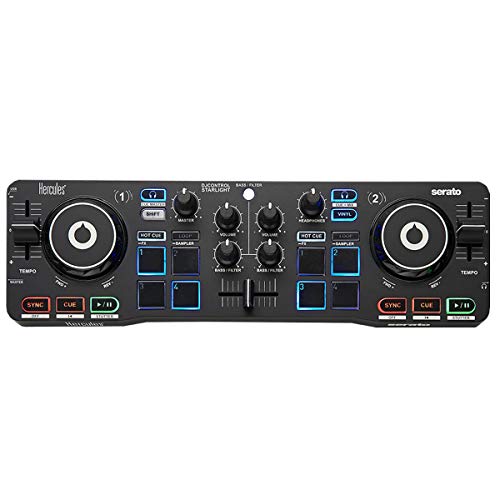
- Hercules DJControl Starlight about$137
- Numark Party Mix III Bluetooth DJ Controller about$1508" screen.
- Pioneer DJ DDJ-REV1 2-Channel DJ Controller about$375
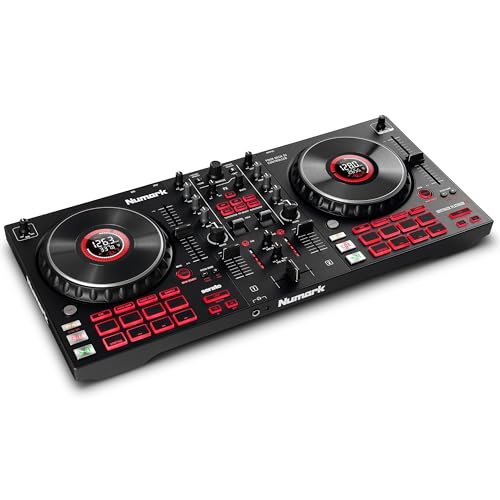
- Numark Mixtrack Platinum FX about$439
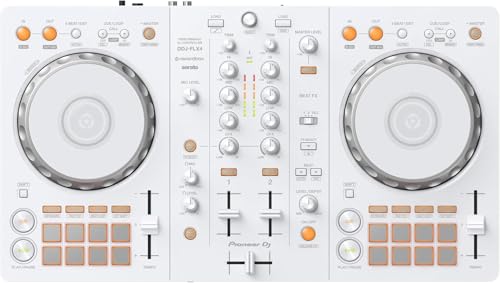
- Pioneer DJ DDJ-FLX4 2-deck rekordbox and… about$549
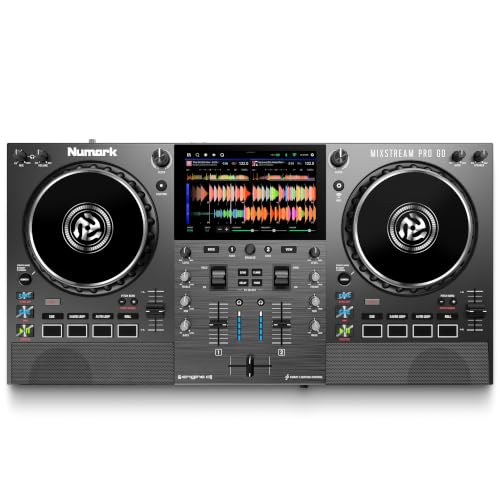
- Numark Mixstream Pro Go Portable DJ Controller about$1,2496" screen.
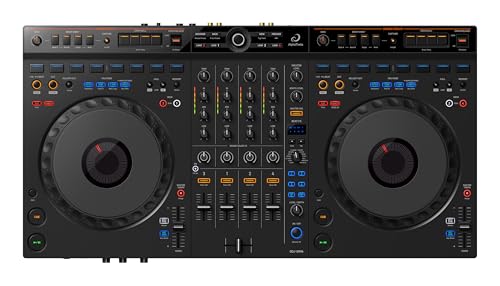
- Most PremiumAlphaTheta DDJ-GRV6 4-channel performance… about$1,299
Why a repair shop is writing about DJ controllers
DJ controllers aren't a big part of what comes through our door, but the laptops and phones that run them are, and so are the faults that come with a controller: a USB-C port worn loose from a cable pulled at an angle, a drink spilt across a laptop at a party, a headphone jack that only works if you hold the plug sideways. So when people ask which controller to buy, I end up talking as much about the cable, the software and where the drinks go as about the jog wheels.
This guide covers DJ controllers you can buy from Amazon AU, from a small USB-C controller that runs off a phone or a power bank up to a four-channel club-style unit and a standalone controller with its own screen and battery. It doesn't cover turntables, CD or media players, or separate mixers. I've worked from each listing on the day I checked it, and where a listing leaves something out, such as which outputs it has or what software comes with it, I've said so rather than filling the gap from memory.
Every pick here is sold by Amazon AU. One listing's box contents use European wording and say English isn't guaranteed in the manual, which I've noted on that pick; it's USB-C powered with no plug, so it isn't the wrong-market problem it would be on something you plug into the wall. I left out Numark's mains-powered Mixstream Pro+ because it's the same controller as the battery Pro Go without the battery, and two near-identical cards wouldn't help anyone choose.
Software decides more than the hardware
The first thing to settle is the software, because a controller is mostly a set of buttons for a program on your laptop, phone or tablet, and each controller is built to work with particular programs. The big names are rekordbox, which is Pioneer DJ's, Serato DJ, and Algoriddim djay on phones and tablets, with VirtualDJ and Engine DJ alongside them. A controller mapped for one usually works only in a limited way, or not at all, with the others. That's why the software list on each listing matters more than the colour of the pads or the number of effects.
Of the seven picks, the Pioneer DJ DDJ-FLX4 and the AlphaTheta DDJ-GRV6 list both rekordbox and Serato. The two small Numarks list Serato DJ Lite and djay, and the Mixtrack Go also lists Serato DJ Pro and VirtualDJ support. The Pioneer DJ DDJ-REV1 and the Numark Mixtrack Platinum FX are listed for Serato. The Numark Mixstream Pro Go runs Engine DJ on its own screen and also lists Serato and VirtualDJ for when it's plugged into a laptop.
This is the lock-in that catches people. If you learn on one program, build a library with cue points and playlists in it, and then want to play on club gear or a friend's setup, moving that library can be slow. Serato DJ Lite comes free with several of these controllers, but the full Serato DJ Pro is a paid upgrade, and what rekordbox's free tier includes has changed over the years, so check the current terms for your controller before you assume everything's included. If you already know which system the clubs or your mates use, I'd buy into that one from the start. For laptop setup problems beyond the controller, our computer repair page covers what we look at.
Two decks, four decks and what beginners actually use
Most people learning to mix use two decks, two channels and a crossfader, and that's what five of the seven picks give you. Two decks means one track playing out and one cued in the headphones, which is all you need to learn beatmatching, phrasing and transitions. More decks mostly add complexity before you've got the basics. In my experience most people who buy a four-deck controller as their first one end up using two decks for the first year anyway, and they'd have been better off spending the difference on decent speakers and headphones. Learn to mix two tracks cleanly by ear first, then add the extra decks.
The Mixtrack Platinum FX controls four decks in software from two physical jog wheels, switching layers with a button, which lets you layer an acapella or a loop over two tracks. The AlphaTheta DDJ-GRV6 is a four-channel controller with a club-style layout, so its four channel faders map to four decks directly. That's useful if you're heading towards club gear, because the layout carries over, but it's a lot of controller for a first year of practice.
Size is the other half of it. The Numark Mixtrack Go is about 32cm wide and the Party Mix III about 34cm, small enough for a backpack and a crowded desk. The DDJ-FLX4 and DDJ-REV1 are around 48 to 53cm wide, which is a normal two-deck size, while the DDJ-GRV6 and the Mixstream Pro Go are over 56cm wide and around 4 to 5kg in their listing data. Measure the desk or the table at the venue before you order one of the big ones.
Jog wheels and faders: the parts you touch most
Jog wheels are the big platters you nudge to bring a track into time or scratch with. Small controllers use capacitive touch wheels, which sense your hand on the top plate, and that's what the Party Mix III and Mixtrack Go list. Bigger controllers use larger wheels with more weight and resolution, and the Mixstream Pro Go lists 6 inch wheels. The Mixtrack Platinum FX has small screens in the middle of its wheels showing position and tempo, which helps you keep track of where you are without staring at the laptop.
Faders are where the wear shows. A crossfader that's slammed back and forth thousands of times eventually gets scratchy or starts cutting in early, and channel faders collect dust and spilt drink. Battle-style controllers like the DDJ-REV1 put the crossfader in the middle with the decks laid out like turntables, which suits scratch DJs, and scratch DJs are also the hardest on crossfaders. None of these listings state a crossfader's rated life, so I can't compare them on that.
If you scratch a lot, look for a controller that's popular enough to have spare faders and service parts around in a few years, which mostly means a big brand and a current model. Keep the top clean, keep drinks off the table it sits on, and don't spray cleaner straight onto faders, since liquid running down the slot is what usually ruins them. A soft brush and a puff of air from a blower do more good than any spray, and a dust cover over the controller between sessions keeps most of the grime out of the fader slots in the first place.
Outputs, headphones and plugging into a sound system
A controller has a sound card built in, and its outputs decide what you can plug it into without adapters. The small Numarks use 3.5mm outputs: the Party Mix III lists an RCA main out and a 3.5mm headphone out, and the Mixtrack Go lists 3.5mm main and headphone outputs with an adapter to stereo RCA in the box. That's fine for powered speakers at home or a party speaker, but it's not what a venue's mixer expects.
The Mixstream Pro Go lists balanced XLR main outs, RCA main outs, a quarter-inch mic input and both quarter-inch and 3.5mm headphone outputs, which is what you'd want at a function. The DDJ-REV1 lists a microphone input, and the DDJ-FLX4 listing says it mixes a mic for you if you want to talk or sing over your set. The others don't spell out their outputs on the listing, so check the maker's spec sheet if you need XLR or a booth output.
For home practice, a pair of powered bookshelf speakers and closed-back headphones are plenty. The headphone socket is one of the parts we see damaged most on any audio gear, usually from a plug yanked out at an angle when someone trips on the lead, so give the headphone cable some slack and don't leave it plugged in while the controller's packed away. If the sound drops out of one ear when you wiggle the plug, stop using that socket before it gets worse, because a cracked solder joint inside is usually a straightforward fix early and a bigger one later.
Power, laptops and the USB-C cable
Most of these controllers take their power from the USB cable to your laptop, which keeps things simple but makes that one cable the weak point. The Party Mix III and Mixtrack Go list USB-C power and say they'll also run from a phone, a tablet or a power bank. The DDJ-FLX4 listing says it plugs into a PC or Mac with the included USB cable and needs no audio driver, which takes one common setup headache away.
A USB-C cable bent sideways at the socket, night after night, wears the controller's port and the laptop's, and a loose port is what produces dropouts in the middle of a mix. Route the cable so it leaves the socket straight, tape it to the table edge at a gig, and use a short good-quality cable rather than whatever's in the drawer. If your laptop's own port has started cutting out, our guide to laptop charging faults covers what to check first.
The Mixstream Pro Go is the exception: it's a standalone unit with its own battery, screen and speakers, and it doesn't need a laptop at all. Its listing doesn't describe the charger or its plug, so I'd check you get an Australian power supply in the box, and look for the RCM mark on it, before relying on it. Standalone units cost a lot more, but there's no laptop on the table for a drink to land on.
Stems, lights and the extras worth paying for
Stems are the newest feature on lower-priced controllers. The software splits a track into vocals, drums, bass and melody in real time, and the controller has buttons to mute or isolate each one, so you can drop the vocal out of one track and run it over another. The Party Mix III and Mixtrack Go list stems control, and the Mixstream Pro Go lists standalone stems from tracks you've prepared in Engine DJ Desktop, with a one-time licence purchase noted on the listing.
Built-in lights are the other extra at the low end. The Party Mix III lists a beat-synced LED light show, which is fun at a house party and doesn't change how it mixes. The Mixstream Pro Go goes further, with control of Philips Hue, Nanoleaf and DMX lights. I'd treat both as a bonus rather than a reason to buy. Stems are more useful than lights once you've got the basics, because they open up mashups and live edits that used to need prepared acapellas, but they lean hard on the laptop's processor, so an older laptop may stutter with stems running on both decks.
What I'd actually pay more for is build, layout and a longer warranty. The Pioneer DJ and both small Numark listings give a two year manufacturer warranty, while the Platinum FX, DDJ-GRV6 and Mixstream Pro Go list one year. A controller you'll use every week for years is worth buying from a brand whose spare parts and software updates will still be around, and every pick here comes from Pioneer DJ, AlphaTheta or Numark, all established DJ makers sold through Amazon AU. A two year warranty doesn't cover wear from heavy scratching or spilt drinks, so look after it as if there were no warranty at all.
The 7 picks, $105 to $1,299
Prices are Amazon AU at time of writing (2026-11-24) and move week to week. Ranks are Amazon AU category sales ranks, checked the same day; the two small Numarks rank in DJ Mixers rather than DJ Controllers. Sizes and weights are each listing's own data, converted to metric.

Pioneer DJ DDJ-FLX4 2-Deck DJ Controller, White
ASIN B0F7Z35SDT • $549.00 • Ships from Amazon AU
The Pioneer DJ DDJ-FLX4 costs about $549 at time of writing, sold by Amazon AU, and returns #5 in Amazon AU's DJ Controllers category and #1,319 overall when I checked, the best DJ Controllers rank of the seven picks. It's my top pick because it works with both rekordbox and Serato, which keeps your options open on software while you learn, and its two-deck layout is close enough to club gear that what you learn on it carries over when you get a turn on a venue's setup. It's also the controller I'd expect to be easiest to sell on later, since it's a well-known current model from the brand most clubs use.
The listing describes a two-channel, two-deck controller for learners and improvers, with Smart Fader and Smart CFX features that help with transitions, multi-device support and integration with selected streaming services. It says it connects with the included USB cable and needs no audio driver on a PC or Mac, and that it mixes a microphone for you if you want to MC or sing over a set. This is the white limited edition, part number DDJ-FLX4-W, and the listing data gives a two year limited warranty with proof of purchase. Not needing a driver is more useful than it sounds, since driver problems are one of the most common reasons a controller won't show up in the software on a new laptop. Two jog wheels, a crossfader, channel faders with EQ and performance pads cover everything a learner needs.
The listing doesn't spell out its outputs, so check the spec sheet if you need more than home speakers. The white top shows dirt and scuffs more than black. Like every USB-powered controller here, it relies on one cable, so route it straight and don't let it hang off the edge of the table. At about $549 it's well above the small Numarks, and the smart features are something you'll grow out of using as your mixing gets better. Register it with Pioneer DJ when it arrives so the warranty is easy to claim later.
Honest caveats: Outputs aren't listed, so check the maker's spec sheet for what you need. The white finish shows dirt and wear. It's powered over one USB cable. At about $549 it costs much more than the small Numarks. The smart mixing aids are training wheels you'll turn off over time.
Best for: Learners who want rekordbox or Serato and a club-style layout.
Decks: 2 decks, 2 channels • Software: rekordbox and Serato DJ (listing) • Connection: USB, no driver needed (listing) • Mic: Mic mixing (listing) • Outputs: Not listed • Warranty: 2 years limited (listing data) • Part number: DDJ-FLX4-W • Seller: Amazon AU • Rank: #5 in DJ Controllers (Amazon AU)
View on Amazon AU
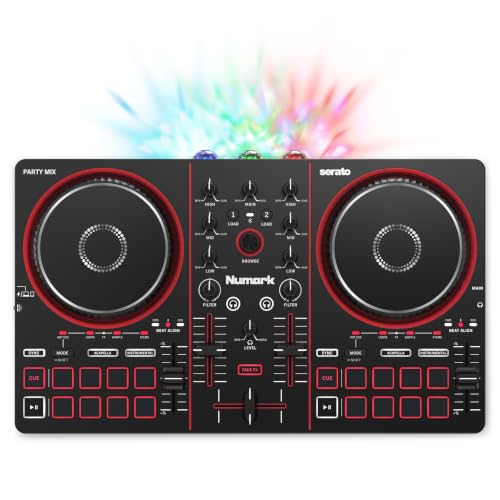
Numark Party Mix III Bluetooth DJ Controller with Lights
ASIN B0GYYZHD3T • $150.00 • Ships from Amazon AU
The Numark Party Mix III costs about $150 at time of writing, sold by Amazon AU, and returns #1 in Amazon AU's DJ Mixers category and #43 overall when I checked, by a long way the best overall rank of the seven. It's my pick for a first controller for house parties and casual mixing, because it's USB-C powered, small, comes with Serato DJ Lite and djay, and adds features like stems and a light show that make it fun from the first night. At about $150 it's also low enough that it doesn't matter much if you find DJing isn't for you. Its overall rank also says a lot of people are buying it as a first controller right now.
The listing describes a two-deck controller with two touch-capacitive jog wheels, eight backlit pads per deck for hot cues, loops, samples and effects, a three-band EQ and filter per channel, and dedicated stems buttons to drop vocals, drums or instruments in or out. It lists Bluetooth MIDI for wireless use with djay on iOS and Android, a beat-synced LED light show, Visual Beat Align guides and automatic Fade FX. The built-in sound card has an RCA main out and a 3.5mm headphone out, and the box includes a USB-C cable, a phone stand and an RCA adapter. That's a lot of controller for the price, and the stems buttons are the feature I'd expect most people to use after the first few weeks.
It's a small controller, so the jog wheels and faders are small too, and there's no microphone input on the listing. The light show is a bonus, not a reason to buy. The listing data gives a two year manufacturer warranty. Plug it into powered speakers rather than relying on a laptop's own sound, and keep drinks off the table, since a small controller sits right where they land. Run the USB-C cable straight out of the socket, and use the phone stand that comes with it if you're mixing from djay on a phone or tablet, so the screen isn't lying flat where drinks can reach it.
Honest caveats: The jogs and faders are small. No microphone input is listed. Outputs are RCA and 3.5mm only, so it needs adapters for a venue mixer. The software included is the Lite version. It ranks in DJ Mixers, not DJ Controllers, so its rank isn't directly comparable with the others.
Best for: A first controller for house parties and casual mixing.
Decks: 2 decks • Software: Serato DJ Lite, djay (listing) • Power: USB-C • Wireless: Bluetooth MIDI with djay • Pads: 8 per deck • Outputs: RCA main, 3.5mm headphone • Warranty: 2 years (listing data) • Seller: Amazon AU • Rank: #1 in DJ Mixers (Amazon AU)
View on Amazon AU
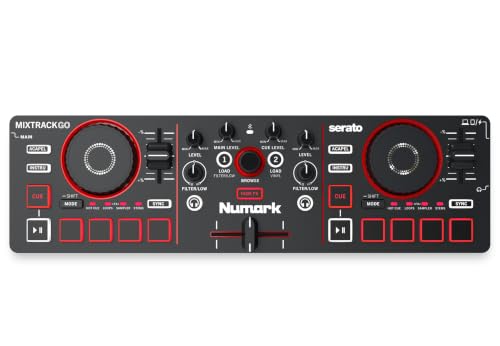
Numark Mixtrack Go Compact Bluetooth DJ Controller, Gen 4
ASIN B0GYYS6B5X • $105.00 • Ships from Amazon AU
The Numark Mixtrack Go costs about $105 at time of writing, sold by Amazon AU, and returns #2 in Amazon AU's DJ Mixers category and #155 overall when I checked, the lowest price and the second-best overall rank of the seven. It's my pick for the smallest, lightest setup, because it runs from a single USB-C cable to a laptop, tablet, phone or power bank, and at about 32cm wide it fits in a backpack beside a laptop. At about $105 it's the lowest-priced way into DJing here that still comes with real software. Its listing also names Serato DJ Pro and VirtualDJ support, so it doesn't lock you into the free software if you get serious about it later.
The listing describes a two-deck controller with capacitive touch jog wheels, eight backlit pads per deck for hot cues, loops, samples and stems, per-channel filters and gain, a crossfader and automatic Fade FX. It comes with Serato DJ Lite and djay, and lists support for Serato DJ Pro and VirtualDJ, which gives it the widest software list of the small controllers here. Bluetooth MIDI links it to djay on iOS and Android, and the built-in sound card has 3.5mm main and headphone outputs, with a 3.5mm to stereo RCA adapter in the box. It's the controller I'd hand a teenager who wants to try DJing, since there's very little to set up and very little to go wrong.
The box contents line uses European wording and notes that an English manual isn't guaranteed, so I'd expect a multi-language quick start guide. It's USB-C powered, so that isn't a plug problem. The listing data gives a two year manufacturer warranty. Everything on it is small, and there's no mic input listed. Keep the USB-C cable short and straight, since it's carrying both power and audio. It's the one I'd pick for practising on the train, at a mate's place or anywhere a full-size controller won't fit, and it's light enough to forget it's in the bag.
Honest caveats: Everything on it is small, including the jogs and faders. Outputs are 3.5mm only. No microphone input is listed. The box contents line uses European wording and says English isn't guaranteed in the manual. Its rank is in DJ Mixers rather than DJ Controllers.
Best for: The smallest setup that runs off a phone, tablet or power bank.
Decks: 2 decks • Software: Serato DJ Lite, djay; Serato DJ Pro, VirtualDJ supported (listing) • Power: USB-C, incl. power bank • Wireless: Bluetooth MIDI with djay • Outputs: 3.5mm main and headphone • Width: About 32cm (listing data) • Warranty: 2 years (listing data) • Seller: Amazon AU • Rank: #2 in DJ Mixers (Amazon AU)
View on Amazon AU
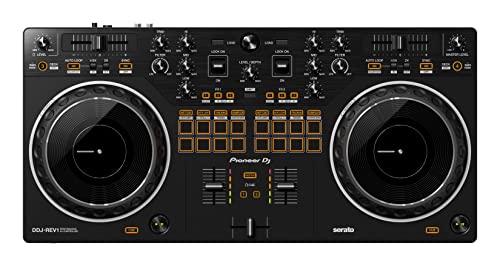
Pioneer DJ DDJ-REV1 2-Channel Battle-Style DJ Controller
ASIN B09Q83WXK6 • $375.00 • Ships from Amazon AU
The Pioneer DJ DDJ-REV1 costs about $375 at time of writing, sold by Amazon AU, and returns #8 in Amazon AU's DJ Controllers category and #2,200 overall when I checked. It's my pick for anyone who wants to learn to scratch, because it's laid out battle-style, with the mixer in the middle and the decks either side like a pair of turntables, which is the layout scratch DJs learn on and the one most battle mixers use. The listing also names a built-in microphone input, which helps for a party or a battle where you want to talk between sets. It usually costs well below a pair of turntables and a battle mixer.
This listing is short. It describes a two-deck controller for Serato DJ with a battle-style setup, a built-in microphone input and a Tracking Scratch feature, and the listing data gives a two year manufacturer warranty, part number DDJ-REV1. It doesn't list outputs, jog wheel size, the pads or what software licence comes in the box, so I'd read the maker's spec sheet before buying if any of those matter to you. In its listing data it's about 53cm wide and 2.3kg, which is a normal two-deck size. Pioneer DJ's two year warranty on it is also double what the Platinum FX and GRV6 listings give, which matters on a controller built for hard use.
It's built for Serato only, so if you want rekordbox, the DDJ-FLX4 is the Pioneer DJ to look at. Scratching is hard on a crossfader, and the listing doesn't give its rated life, so treat the crossfader as the part that'll wear first. Keep the top clean, keep drinks well away from it, and use a short USB cable that leaves the socket straight. Learn on a battle layout if scratching is the point, because moving from a standard layout to battle later means relearning where your hands go. Keep the receipt for the warranty.
Honest caveats: The listing is thin: no outputs, wheel size, pad count or included software licence are given. It's Serato only, so rekordbox users should look at the DDJ-FLX4. Scratching wears crossfaders, and no rated life is listed. At about 53cm wide it needs a full-size desk, and the battle layout takes some adjusting to if you learnt on a standard one.
Best for: Learning to scratch on a battle-style layout with Serato.
Decks: 2 decks, battle-style • Software: Serato DJ (listing) • Mic: Built-in mic input • Scratch: Tracking Scratch (listing) • Outputs: Not listed • Width: About 53cm (listing data) • Warranty: 2 years (listing data) • Seller: Amazon AU • Rank: #8 in DJ Controllers (Amazon AU)
View on Amazon AU
Numark Mixtrack Platinum FX DJ Controller for Serato
ASIN B087S1ZNNT • $439.00 • Ships from Amazon AU
The Numark Mixtrack Platinum FX costs about $439 at time of writing, sold by Amazon AU, and returns #9 in Amazon AU's DJ Controllers category and #2,888 overall when I checked. It's my pick for someone who has the basics and wants more to play with, because it controls four decks from two jog wheels, has screens in the middle of each wheel, and adds paddle-triggered effects that are quick to reach in the middle of a mix. It sits in the middle of the price range here and lists more dedicated effects controls than the two-deck picks, which is where a lot of people's interest goes after the first few months.
The listing describes four-deck control in Serato DJ, six quick-launch effects with dual paddle triggers, dedicated instant loop controls, and eight performance pads per deck for cues, loops, fader cuts and samples. The jog wheel displays show track position and tempo. It lists streaming from providers including SoundCloud and TIDAL inside Serato DJ Lite, and a built-in audio interface. The listing data gives a one year warranty, part number MIXTRACKPLATINUMFX, and a size of about 55cm wide. Six effects on paddles are faster to reach than menus, and the wheel displays mean less looking down at the laptop. Four decks also let you layer a loop or an acapella over two playing tracks without stopping either one.
It's built for Serato, and four decks in software from two wheels takes some getting used to, since you have to keep track of which layer you're on. The listing doesn't spell out its outputs. A one year warranty is shorter than the two years on the Pioneer DJ picks. Streaming in Serato needs a subscription with the provider, which isn't included. Practise with two decks first, then turn on the extra layers once you're comfortable switching between them, and keep the controller's firmware and Serato up to date together so the wheel displays keep working.
Honest caveats: It's for Serato only. Four decks from two wheels means switching layers, which takes practice. Outputs aren't listed on the listing. The warranty is one year, half the Pioneer DJ picks. Streaming needs a separate subscription with the provider. At about 55cm wide it needs a full-size desk.
Best for: Moving past the basics with four decks, wheel screens and FX paddles.
Decks: 4-deck control, 2 wheels • Software: Serato DJ (listing) • Wheels: Jog wheel displays • FX: 6 effects, paddle triggers • Pads: 8 per deck • Width: About 55cm (listing data) • Warranty: 1 year (listing data) • Seller: Amazon AU • Rank: #9 in DJ Controllers (Amazon AU)
View on Amazon AU
AlphaTheta DDJ-GRV6 4-Channel Performance DJ Controller
ASIN B0DJPS73SS • $1,299.00 • Ships from Amazon AU
The AlphaTheta DDJ-GRV6 costs about $1,299 at time of writing, sold by Amazon AU, and returns #16 in Amazon AU's DJ Controllers category and #4,466 overall when I checked, the highest price of the seven. It's my pick for someone heading towards club gear, because it's a four-channel controller with full-size jog wheels and a layout the listing says is based on the latest club-standard equipment, so practice at home transfers to a venue's booth. Working with both rekordbox and Serato also means you can follow whichever system your local venues use. It's also the biggest controller of the seven, so it's one for a permanent setup at home or in a studio.
The listing describes a four-channel controller that works with rekordbox and Serato DJ Pro, a Groove Circuit feature for reworking drum parts live, Stems FX in Serato DJ Pro, and a Smart Rotary Selector with a Discover function for picking the next track. The listing title calls the layout club-standard and the jog wheels full-size. It's the largest pick here in its listing data, at about 71cm wide and 4.6kg, and the listing data gives a one year warranty, part number DDJ-GRV6. Groove Circuit and Stems FX are aimed at DJs who rework tracks live rather than just blending them. It's built for a DJ who already knows what they're doing and wants home practice to match the booth.
This is a lot of controller for a first year of mixing, and the four channels, size and weight make it a home or booth controller rather than one for a backpack. The listing doesn't spell out its outputs. Stems FX is listed for Serato DJ Pro, which is a paid program. A one year warranty is short at this price, so keep the receipt and register it. Give it a proper desk at the right height, keep a dust cover over it between sessions, and plan for a laptop that can run stems if you want to use those features.
Honest caveats: It's the dearest pick at about $1,299. At about 71cm wide and 4.6kg it needs a big desk. Outputs aren't listed. Stems FX needs Serato DJ Pro, which is paid. The warranty is one year. It's more controller than most beginners will use.
Best for: DJs heading for club gear who want four channels at home.
Channels: 4 • Software: rekordbox and Serato DJ Pro (listing) • Wheels: Full-size (listing) • Features: Groove Circuit, Stems FX • Size: About 71cm wide, 4.6kg (listing data) • Outputs: Not listed • Warranty: 1 year (listing data) • Seller: Amazon AU • Rank: #16 in DJ Controllers (Amazon AU)
View on Amazon AU
Numark Mixstream Pro Go Battery Standalone DJ Controller
ASIN B0C2ZGR5GX • $1,249.00 • Ships from Amazon AU
The Numark Mixstream Pro Go costs about $1,249 at time of writing, sold by Amazon AU, and returns #27 in Amazon AU's DJ Controllers category and #7,523 overall when I checked. It's my pick for anyone who wants to DJ without a laptop, because it's a standalone unit with its own battery, a 7 inch touchscreen, built-in speakers and Wi-Fi streaming, so you can mix from a USB drive, an SD card or a streaming service with nothing else on the table. That also means there's no laptop on the table for a drink to land on, which takes away the most expensive mistake we see from DJ setups. It also works as an ordinary controller for Serato or VirtualDJ when you do want a laptop.
The listing describes a battery-powered controller running Engine DJ, with 6 inch jog wheels, Wi-Fi streaming from Amazon Music Unlimited, TIDAL, Beatport, Beatsource and SoundCloud Go+, SD and USB slots, and control of Philips Hue, Nanoleaf and DMX lights. It lists Bluetooth audio in, two USB ports, balanced XLR and RCA main outputs, a quarter-inch mic input and quarter-inch and 3.5mm headphone outputs, the most complete set of connections of the seven. It also works as a Serato or VirtualDJ controller, and the listing data gives 12 months manufacturer warranty. Built-in speakers mean you can practise or play a small room without carrying anything else, though they won't fill a hall. The touchscreen lets you browse a library without a laptop, which takes some getting used to.
The listing doesn't describe the charger or its plug, so check you get an Australian power supply and look for the RCM mark before relying on it. It's about 57cm wide and 4.2kg in its listing data. Standalone stems need tracks prepared in Engine DJ Desktop and a one-time licence, and the streaming services need their own subscriptions. Charge the battery fully before a gig rather than trusting what's left from last time. It's the one I'd pick for weddings, functions and outdoor parties, where setting up quickly and having proper outputs counts for more than anything else.
Honest caveats: The charger and its plug aren't described, so check for an Australian supply and the RCM mark. The warranty is 12 months. It's about 57cm wide and 4.2kg. Streaming services and standalone stems cost extra. At about $1,249 it's near the top of the price range here.
Best for: Mixing without a laptop, from USB, SD or streaming, with outputs for a venue.
Type: Standalone, battery powered • Screen: 7 inch touchscreen • Software: Engine DJ; Serato, VirtualDJ (listing) • Outputs: XLR and RCA main, 1/4 in and 3.5mm headphone • Inputs: 1/4 in mic, Bluetooth audio, USB, SD • Speakers: Built in • Warranty: 12 months (listing data) • Seller: Amazon AU • Rank: #27 in DJ Controllers (Amazon AU)
View on Amazon AUSide-by-side comparison
What we see fail in the workshop: DJ setups
DJ controllers themselves don't come in often, but the laptops, cables and headphones around them do, and the faults follow the same few patterns. These are the ones I'd plan around before your first gig, because most of them come from how the setup is laid out on the table rather than from the controller itself. None of them needs special gear to prevent, just some care with cables and drinks.
Drinks over the laptop and controller
A party table is where most spills happen, and a laptop sitting beside a controller usually takes the worst of it. Sugary drinks are worse than water, because the residue keeps corroding the board after it dries. If something goes over, unplug the USB cable and power straight away, turn the laptop off, don't try to dry it with a hair dryer, and bring it in quickly. Our MacBook liquid damage guide covers what happens next, and the same steps apply to the controller. A separate side table for drinks prevents most of it.
Worn USB-C ports
One cable carries power, audio and control on most of these controllers, and a cable that leaves the socket at an angle wears the port on the laptop and the controller a little more every night. The first sign is dropouts when the cable moves, then a port that only works with the plug held a certain way. Use a short, good cable, route it straight out of the socket, and tape it down at a gig so nobody trips on it. Worn laptop ports are something we can usually sort out.
Headphone jacks and leads
Coiled DJ headphone leads get stood on, tripped over and yanked out sideways, and that bends the jack plug or loosens the socket it's plugged into. The symptom is sound in one ear only, or crackling when you move your head. Unplug by the plug, not the lead, give it slack around the table, and keep a spare cable if your headphones have a detachable one. A loose socket on a laptop or controller is often a soldering job, so bring it in before it gets worse, and we'll tell you what it needs.
Decision tree: which one should you actually buy?
- First controller, want rekordbox or Serato? → The Pioneer DJ DDJ-FLX4 at about $549 lists both, needs no audio driver and has a club-style two-deck layout.
- House parties and casual mixing? → The Numark Party Mix III at about $150 is USB-C powered, has stems control and a light show, and ranks best overall of the seven.
- Smallest setup, off a phone or power bank? → The Numark Mixtrack Go at about $105 runs on one USB-C cable and lists the widest software support of the small pair.
- Want to learn to scratch? → The Pioneer DJ DDJ-REV1 at about $375 is battle-style for Serato, with a mic input.
- Heading for club gear? → The AlphaTheta DDJ-GRV6 at about $1,299 is four-channel with full-size jogs, or the Numark Mixstream Pro Go at about $1,249 if you want no laptop at all.
- Drink spilt on the laptop mid-set? → Unplug it, turn it off, don't charge it, and bring it into our Erina workshop quickly; we'll tell you what it needs before you spend anything.
Frequently asked questions
What is the best DJ controller for a beginner?
A two-deck controller that works with the software you want to learn is the right start, and more decks or features can wait. Of these seven, the Pioneer DJ DDJ-FLX4 is the one I'd point most beginners at, because it lists both rekordbox and Serato and has a layout close to club gear. If you mostly want to mix at parties for fun, the Numark Party Mix III or Mixtrack Go cost much less and run from a single USB-C cable.
Do I need a laptop to use a DJ controller?
Most controllers need a laptop, tablet or phone running DJ software, because the controller is mostly buttons and a sound card for that program. The small Numarks here also work with djay on iOS and Android over Bluetooth MIDI or USB-C. A standalone unit like the Numark Mixstream Pro Go has its own screen, battery and software, so it plays music from a USB drive, an SD card or a streaming service with no laptop at all, but it costs far more.
Is rekordbox or Serato better?
Neither is better for everyone. rekordbox is Pioneer DJ's software and ties in with the Pioneer DJ and AlphaTheta gear used in many clubs, while Serato is popular with scratch and open-format DJs and works with a wide range of controllers. The bigger question is which one you'll stick with, because moving a library with cue points between them takes time. If your mates or the venues you'd play at use one, start there. Controllers that list both, like the DDJ-FLX4 and DDJ-GRV6, keep that choice open.
Can I plug a DJ controller straight into a PA?
It depends on the outputs it has. The small Numarks have RCA or 3.5mm outputs, which suit home speakers and party speakers but need adapters for a venue mixer, and unbalanced leads over a long run can pick up hum. The Mixstream Pro Go lists balanced XLR outputs, which is what a PA or venue mixer usually expects. Several listings here don't state their outputs, so check the maker's spec sheet before a gig, and bring the right leads.
How do I look after a DJ controller?
Keep drinks on a separate table, keep the top clean with a dry or barely damp cloth, and never spray cleaner straight onto faders or knobs, since liquid running down the slots is what ruins them. Route the USB cable so it leaves the socket straight and tape it down at gigs. Pack it in a padded bag or case so the jog wheels and knobs aren't knocked, and let it come up to room temperature before plugging in after a cold car trip, so condensation doesn't form inside.
Why is my DJ controller dropping out or not being detected?
Most of the time it's the USB cable or port: a worn cable, a long thin one, or a port that's gone loose from cables pulled at an angle. Try a short, good cable and a different port on the laptop, and plug straight into the laptop rather than a hub. Check the software lists your controller and is up to date, and that the laptop isn't putting USB ports to sleep to save power. If a port only works with the plug held a certain way, that's wear, and it's worth getting looked at.
Related buying guides
Laptop or controller playing up?
Spilt drinks, worn USB-C ports and loose headphone sockets are the faults DJ setups bring us most, and they usually get worse with every gig. If your laptop got a drink across it, a port only works at an angle, or the sound cuts out in one ear, bring it into our Erina workshop and we'll tell you what it needs before you spend anything.
Visit our Erina workshop Book Online