Prices from Amazon AU, updated daily. Swipe or use the arrows for more.
Disclosure: This article contains affiliate links to amazon.com.au. If you buy through one of these links iFix may earn a small commission at no extra cost to you. It doesn't change which products we recommend. We focus on what actually lasts based on 16 years of repair-shop experience.
Quick summary5 picks
- Entry PickPanasonic Blu-ray and DVD Player about$148
- Laser Multi Region Blu-ray Player Full HD… about$179
- Panasonic 4K Ultra HD HDR Blu-ray Player about$298
- Laser 4K UHD Blu Ray Player Multi Region… about$479
- Most PremiumPanasonic 4K Ultra HD Blu-ray Player… about$607
Why a disc player still earns a spot under the TV
Streaming is convenient, but a 4K Blu-ray disc still carries more picture and sound than most streams. A UHD disc can run at several times the bitrate of a 4K stream, with lossless audio, and it doesn't drop to a soft picture when the internet slows. It also doesn't disappear when a licence runs out, which matters to anyone who has watched a favourite film leave a streaming service.
There's a second reason people come back to discs: a collection. Plenty of Australian households have shelves of DVDs and Blu-rays, and a modern player plays all of them, upscales the DVDs and adds 4K for new purchases. The player costs less than the collection it plays, and it's worth choosing carefully because the disc drive is the part that wears.
The five picks run from $148 to $607 at time of writing, all sold by Amazon AU, from Panasonic and Laser, an Australian company. Three play 4K UHD discs and two are Full HD players. I left out region-free conversions of Sony players resold by a marketplace seller, since their power supply and warranty can't be confirmed for Australia.
If the TV room also hides a phone with a cracked screen or a console that won't read discs, bring it into our Erina workshop and we'll tell you what it needs before you spend anything on it. Disc drives and consoles share the same kind of laser and tray, so the faults look alike.
4K UHD or Full HD: what the disc actually needs
A 4K UHD Blu-ray disc needs a 4K Blu-ray player. A regular Blu-ray player will not read it at all, even though the discs look the same. The other direction works fine: every 4K player on this list also plays standard Blu-rays, DVDs and CDs. So the question is whether you buy, or plan to buy, 4K discs, rather than whether your TV is 4K.
A 4K TV still benefits from a Full HD player, because the TV upscales the 1080p picture, and the Laser Full HD pick says it upscales DVDs for Full HD displays. What a Full HD player can't give you is the extra detail and the HDR of a UHD disc. If your collection is DVDs and Blu-rays and you rarely buy new films, a Full HD player is enough.
Check the TV's HDMI input as well. 4K HDR from a disc player needs an HDMI input that supports HDCP 2.2, which most 4K TVs sold since about 2016 have on at least one port, often labelled. Plug the player into that input, not the oldest one on the back, and use a cable rated for high speed or Premium High Speed so the signal doesn't drop out.
Our 65-inch TVs guide covers screens that make a UHD disc worth the price. A 4K disc on a small or older 1080p screen still looks good, but most of what you paid for in the player and the disc goes unseen, so match the player to the screen.
HDR10, HDR10+ and Dolby Vision
HDR is what makes a UHD disc look different from a Blu-ray, more than the extra pixels. HDR10 is the base format every UHD disc carries. Dolby Vision and HDR10+ add scene-by-scene information so the TV can map bright and dark scenes better. A player and a TV both have to support a format for it to be used, otherwise the disc falls back to HDR10.
The three 4K picks differ on this. The Panasonic DP-UB820 lists HDR10, HDR10+, Dolby Vision and Hybrid Log-Gamma. The Laser 4K player lists HDR10 and Dolby Vision. The Panasonic DP-UB150's listing names HDR10 and an HDR Optimiser that tone maps HDR10, and its wording says it does not support formats such as HDR10+; it names no Dolby Vision either.
Match the format to your TV. Samsung TVs support HDR10+ but not Dolby Vision, while LG and Sony support Dolby Vision, and several Hisense and TCL sets support both, so a player with both formats never leaves performance on the table. If your TV supports neither, the extra formats won't change the picture and a player with HDR10 alone gives you the same result.
Tone mapping is the other half. Many TVs can't reach the brightness a disc was mastered at, so something has to squeeze the highlights to fit. Panasonic's HDR Optimiser does that in the player, which helps on TVs with weaker processing. On a high-end TV that already tone maps well, it matters less, and you can switch it off and let the TV do the job.
Region codes, and why Australian players are region B
Blu-ray discs carry a region code: A for the Americas and East Asia, B for Australia, Europe and Africa, and C for most of the rest of Asia. A player sold for Australia plays region B discs, plus region-free discs, which most Blu-rays outside big studio releases are. DVDs use a different system, where Australia is region 4. A mismatched disc simply refuses to play.
4K UHD discs are almost all region free, so a 4K player from any market will play them. Region codes mostly matter for standard Blu-rays and DVDs bought overseas or from import sellers. If you collect American anime box sets or older region A releases, a multi-region player is worth paying attention to. If you buy discs in Australian shops, it probably isn't.
Both Laser picks name multi-region playback. The Laser Full HD player states Blu-ray regions A, B and C, selected manually in its settings before playback, which is the honest way to do it. The Laser 4K player says it supports compatible Blu-ray and DVD discs from different regions, but doesn't list the regions or the method, so check its manual for the DVD regions before buying.
The Panasonic listings don't state a region at all. They are Australian-market GN models with an Australian plug and warranty, which for an Australian-market player normally means region B Blu-ray and region 4 DVD. I left out modified region-free Sony players from a marketplace seller, because modification and a world-voltage supply can't be checked against Australian warranty terms.
Audio: HDMI to a soundbar, or a receiver
Every pick sends audio over its HDMI cable, which is how most people connect a player to a TV or a soundbar. The detail that matters is whether the player sends the disc's audio unchanged, called bitstream, or decodes it first. The Laser 4K listing names PCM for most TVs and bitstream for a compatible receiver or soundbar, with Dolby and FLAC support.
Lossless Dolby TrueHD, Dolby Atmos and DTS-HD Master Audio tracks only reach a receiver or soundbar intact as bitstream over HDMI. Through a TV, they usually pass over eARC, and over older ARC the TV may drop them to standard Dolby Digital. If you have a soundbar with Atmos, connect the player straight to it, or check your TV's eARC setting.
The Panasonic DP-UB820 adds a 7.1-channel analogue audio output, which is rare now and useful for an older AV receiver without HDMI inputs, or a stereo amplifier you want to keep. It also lists high-resolution audio file playback, DSD and ALAC among them, from USB or a network, which suits anyone with a music library on a hard drive.
Our Dolby Atmos soundbars guide covers the speakers that can do a UHD disc's sound justice. A disc player is often the best source in the house for lossless sound, so the link between player, TV and soundbar decides whether you hear what's on the disc.
Connections, USB and network features
A disc player needs fewer connections than it used to, but a few still matter. Every pick has HDMI. The Laser 4K player names a front USB 2.0 port for video, music and photos from FAT16, FAT32 and NTFS drives, and a wired LAN port for BD-Live, the online extras some discs use. It also includes a 12V power adaptor rather than a mains cord.
A wired LAN port is mostly for firmware updates and BD-Live. Firmware updates matter more than people think, because newer discs occasionally need a player update to play, and an update can fix a loading fault. If the player has no network connection, check the maker's site for a USB update file when a new disc won't load. Of the five listings, the DMP-BD84's is the one that mentions a wireless home network, for audio files.
Apps on disc players date quickly. The Panasonic DMP-BD84's listing describes an internet app deck with YouTube, weather and news. Services on older players can stop working as providers change their apps, so treat any app on a disc player as a bonus and use a streaming stick for streaming. The BD84 listing also includes an HDMI cable, which the others don't.
If streaming is the bigger part of your viewing, our streaming devices guide covers the sticks and boxes that do it better. A player and a stick together cost less than many all-in-one boxes, and each does its own job well.
Warranty, plug and who sells it
All five picks are sold by Amazon AU, which means a fault on arrival is an Amazon return rather than an argument with a marketplace seller. Every Panasonic listing states an Australian plug and an Australian manufacturer's warranty, and their warranty fields state one year. That's the plainest AU-market signal you can get from a listing.
Laser is an Australian company, and its Full HD listing says it has operated since 1987. Both Laser listings state a three-year warranty, which is the longest of the five picks. The 4K model's warranty field says three years limited, under Australian Consumer Law, which also gives you rights beyond the warranty for a fault that shouldn't have happened.
Consumer law in Australia doesn't end with the printed warranty. A player that fails in a way a reasonable buyer wouldn't expect, such as a drive dying at 18 months with normal use, can still be a claim with the retailer. Keep the receipt and the box, and describe the fault in writing with the date it started when you contact them.
Modified region-free players from overseas sellers are where this falls apart. A modified player may have no maker's warranty, may need a power adaptor, and is hard to return. That's why I left them out, even though their region freedom is real. For most Australian buyers, a local multi-region player like the Laser picks is the safer route.
Choosing between the five
For most people buying 4K discs, the Panasonic DP-UB820 is the one: it's the best-ranked of the five picks on Amazon AU's overall list, names every HDR format, has a 7.1-channel analogue output and an Australian plug and warranty. It's also the highest-priced. If you have a Samsung or a Dolby Vision TV, it supports both.
The Panasonic DP-UB150 is the lower-priced way into 4K UHD with Panasonic's HDR Optimiser, but it names HDR10 only. The Laser 4K player adds Dolby Vision and multi-region Blu-ray and DVD playback for a three-year warranty, though it's a new listing with a much lower overall rank, so it has the least sales history of the five.
For a DVD and Blu-ray collection with no plans for 4K, the Laser Full HD player plays regions A, B and C and upscales DVDs, with a three-year warranty. The Panasonic DMP-BD84 is the lowest-priced of the five, compact, with an HDMI cable in the box, for a player that plays your Australian discs and nothing fancy.
Whichever you choose, the setup decides the result as much as the box: the right HDMI input on the TV, a good cable, firmware kept up to date, and the audio routed to your best speakers. Our home theatre systems guide covers the next step if the TV speakers are the weak link.
The 5 picks, $148 to $607
Prices are Amazon AU at time of writing (2026-11-21) and move week to week. Amazon AU didn't return a category rank for these players when I checked, so each card shows its overall Amazon AU rank, checked the same day.

Panasonic DP-UB820 4K Ultra HD Blu-ray Player
ASIN B08PKPV7N3 • $607 • Ships from Amazon AU
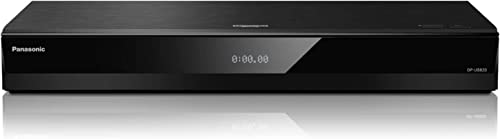
The Panasonic DP-UB820GNK is the best-ranked of the five picks, #1,168 overall on Amazon AU when I checked, at $607, the highest-priced of the five, sold by Amazon AU. It plays 4K UHD Blu-ray, and its listing names the widest HDR support of the picks: HDR10, HDR10+ dynamic metadata, Dolby Vision and Hybrid Log-Gamma, the broadcast HDR format. It uses Panasonic's HCX processor for UHD Blu-ray, and the listing says ordinary HDR10 and TV footage get optimised playback too. This listing has been up since 2022 and is the Australian GN version, so a fault is covered by the Australian manufacturer's warranty it states. It reads Australian region B Blu-rays and region 4 DVDs as an Australian-market model, even though the listing itself doesn't print a region.
On sound, it lists high-resolution audio playback in WAV, FLAC, MP3, AAC, WMA and AIFF, plus DSD at 5.6 and 2.8MHz and ALAC. It has a 7.1-channel analogue audio output for receivers and amplifiers without HDMI, which is unusual on a current player, and the listing names voice control. Its listing states an Australian plug and Australian manufacturer's warranty, with a one-year warranty in its warranty field and model code DP-UB820GNK. That analogue output also makes it a good fit for a home theatre built around an older receiver that still works well, since you keep the speakers and amplifier and only replace the source. The listing doesn't say how voice control connects, so treat it as a minor extra rather than a reason to buy it.
This is the one to buy if 4K discs are the reason you want a player, because it doesn't leave a format behind whichever brand of TV you own. Plug it into the TV's HDCP 2.2 input, or straight into an Atmos soundbar or receiver, and set audio to bitstream. Check for a firmware update once it's on your network. Keep the tray clear of dust and never push it shut by hand. If your TV is a Samsung, set HDR10+ on in the player's menu; on an LG or Sony, leave Dolby Vision on so discs that carry it use it.
Honest caveats: The highest-priced of the five picks. The stated warranty is one year, shorter than the Laser picks' three. The listing doesn't name Wi-Fi or region codes, though it's an Australian-market GN model. An HDMI cable isn't mentioned in the box. Its strengths are wasted on a TV that supports neither HDR10+ nor Dolby Vision.
Best for: 4K disc buyers who want every HDR format and a 7.1 analogue output.
Discs: 4K UHD Blu-ray, Blu-ray, DVD, CD • HDR: HDR10, HDR10+, Dolby Vision, HLG • Audio out: HDMI, 7.1ch analogue • Hi-res audio: FLAC, DSD, ALAC (stated) • Plug and warranty: Australian plug, 1 year (stated) • Model: DP-UB820GNK • Seller: Amazon AU • Rank: #1,168 overall on Amazon AU
View on Amazon AU
Laser 4K UHD Multi-Region Blu-ray Player BLU-BD4K-384
ASIN B0HKTRM5N7 • $479 • Ships from Amazon AU
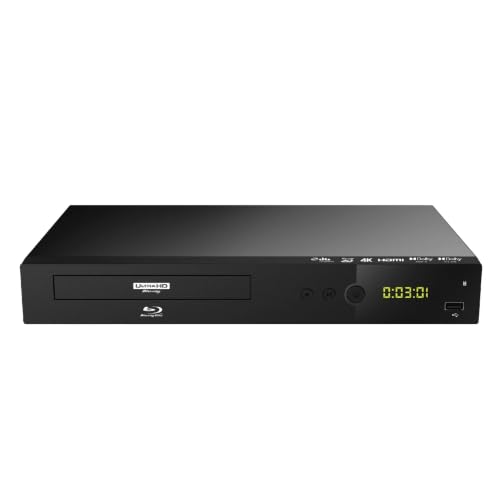
The Laser BLU-BD4K-384 is a 4K UHD player from Laser, an Australian company, at $479, sold by Amazon AU. It's a new listing with a release date in September 2026 and ranked #10,719 overall on Amazon AU when I checked, the lowest rank of the five picks, so it has the least sales history. The listing states 4K2K 2160p output for UHD Blu-ray, HDR10 and Dolby Vision, and playback of 4K UHD Blu-ray, Blu-ray, DVD, VCD and Audio CD. Laser's Full HD listing describes it as Australian-owned and operated since 1987, and this listing names a 3-year limited manufacturer warranty under Australian Consumer Law in its warranty field. Its overall rank is likely low because the listing only went up in late 2026, and the listing itself shows no fault.
Its listing says multi-region playback supports compatible Blu-ray and DVD discs from different regions, but it doesn't list which regions or how they're selected, so read the manual before ordering region A discs. It has a front USB 2.0 port for FAT16, FAT32 and NTFS drives, a wired LAN port for BD-Live, PCM or bitstream audio with Dolby and FLAC, and Last Memory resume. The box holds a remote, two AAA batteries, a 12V power adaptor and the manual, but no HDMI cable. Last Memory is handy for a long film watched over two nights, and the remote's direct buttons for subtitles, audio tracks and HDMI resolution save digging through menus. The listing doesn't mention Wi-Fi, so updates and BD-Live need the LAN cable or a USB stick.
This is the one for a 4K buyer who also has imported Blu-rays or DVDs, and who wants a longer warranty. The listing states a three-year limited warranty under Australian Consumer Law. Buy an HDMI cable rated for 4K HDR with it, since none is included. Keep the 12V adaptor's lead clear of the TV cabinet's back edge, where adaptors get crushed, and store the receipt with the box for the warranty. Check the manual for its DVD region setting the first time an imported DVD refuses to play.
Honest caveats: A new listing with the least sales history of the five picks. Its HDR list names HDR10 and Dolby Vision but not HDR10+. The listing doesn't state which Blu-ray or DVD regions it plays. No HDMI cable is included, and it runs from a 12V external adaptor.
Best for: 4K buyers with imported discs who want a three-year warranty.
Discs: 4K UHD Blu-ray, Blu-ray, DVD, VCD, CD • HDR: HDR10, Dolby Vision • Regions: Multi-region (regions not listed) • Ports: HDMI, front USB 2.0, LAN • Power: 12V adaptor included • Warranty: 3 years limited (stated) • Model: BLU-BD4K-384 • Seller: Amazon AU • Rank: #10,719 overall on Amazon AU
View on Amazon AU
Panasonic DP-UB150 4K Ultra HD HDR Blu-ray Player
ASIN B081L8SX68 • $298 • Ships from Amazon AU
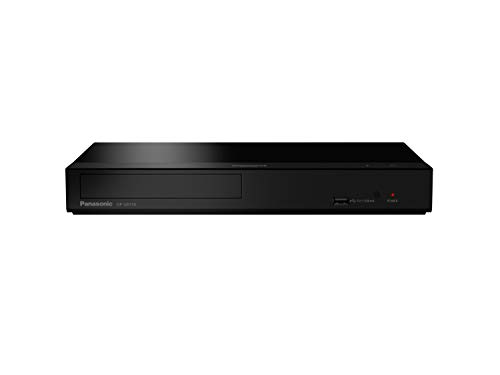
The Panasonic DP-UB150GN-K is the lower-priced 4K UHD pick, at $298 and #2,373 overall on Amazon AU when I checked, sold by Amazon AU. It plays Ultra HD Blu-ray discs in 4K with HDR10, which its listing calls the standard HDR format for films, and it has Panasonic's HDR Optimiser, which tone maps the brightness of HDR10 content to suit the TV. It also plays 4K video and JPEG photos from a camera or camcorder on an Ultra HD TV. It sits below the UB820 in Panasonic's range and shares the Australian GN model code, plug and local warranty, so a fault is covered by the Australian manufacturer's warranty it states. The listing has been up since 2020, the longest of the three 4K picks.
The listing's own wording describes HDR10+ as a format it does not support, and Dolby Vision isn't named, so on a Samsung HDR10+ or an LG Dolby Vision TV, UHD discs play in plain HDR10. On sound, it lists high-resolution audio in WAV, FLAC, MP3, AAC, WMA and AIFF, plus DSD at 2.8, 5.6 and 11.2MHz and ALAC. The listing states an Australian plug and Australian manufacturer's warranty, with one year in the warranty field. That music list is generous for a player at this price, but the listing doesn't say which ports or sources carry the files, or whether a network port is fitted, so check Panasonic's page before relying on it for a music library or network updates.
This is the one for a first 4K player on a TV that relies on HDR10, or for someone who wants Panasonic's tone mapping at a lower price than the UB820. The Optimiser helps most on mid-range TVs that can't reach a disc's mastered brightness. Use the TV's HDCP 2.2 input, set audio to bitstream for a soundbar, and keep the player on a shelf with air around it, since disc drives run warm. Turn the HDR Optimiser off if your TV has strong tone mapping of its own, and compare the two on a bright scene.
Honest caveats: It names HDR10 only, with no HDR10+ or Dolby Vision. The stated warranty is one year. The listing doesn't mention Wi-Fi, a network port, an analogue output or an HDMI cable, so check Panasonic's page for its connections. It doesn't state a region, though it's an Australian GN model.
Best for: A first 4K player for a TV that uses HDR10.
Discs: 4K UHD Blu-ray, Blu-ray, DVD • HDR: HDR10, HDR Optimiser • Hi-res audio: FLAC, DSD to 11.2MHz, ALAC (stated) • Plug and warranty: Australian plug, 1 year (stated) • Model: DP-UB150GN-K • Seller: Amazon AU • Rank: #2,373 overall on Amazon AU
View on Amazon AU
Laser Multi-Region Full HD Blu-ray Player BLU-BD5000-189
ASIN B0GCB4B235 • $179 • Ships from Amazon AU
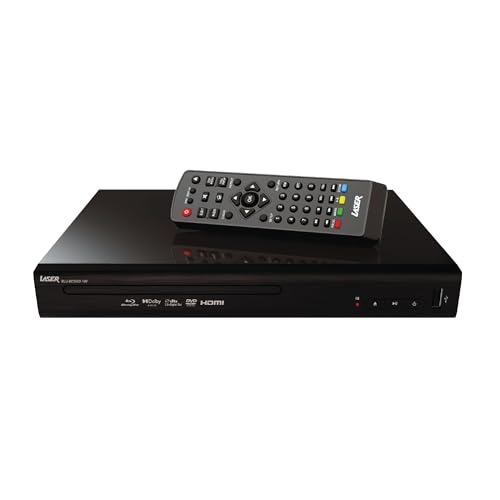
The Laser BLU-BD5000-189 is a Full HD Blu-ray player with multi-region Blu-ray playback, at $179 and #1,909 overall on Amazon AU when I checked, sold by Amazon AU. The listing states Blu-ray regions A, B and C, selected manually in the player's settings before playback, which is the clearest region statement of the five picks. It outputs Full HD 1080p over HDMI and upscales standard-definition DVDs for Full HD screens. Its listing has been up since late 2025 and ranks third of the five picks on Amazon AU's overall list, ahead of the Panasonic UB150 and the Laser 4K. Manual region selection means one setting change covers Blu-rays from the US, Japan, Europe and Asia, which is what import collectors need.
It supports Dolby Digital and DTS audio for TVs, sound systems and home theatre gear, and plays movies, music and photos from a USB drive with no internet needed. The listing names MP3, JPEG and MKV among its formats. It's small, at 26 by 19.2 by 4.3cm in its size field, and its listing states a three-year warranty from Laser, an Australian-owned company operating since 1987. It does not play 4K UHD discs. Plain Dolby Digital and DTS are fine for TV speakers and most soundbars, but a receiver owner who wants lossless audio from Blu-rays should check the manual before buying. The size makes it easy to fit on a narrow TV unit shelf or take on a trip.
This is the one for a collection of standard Blu-rays and DVDs that includes imports, where the region switch is the feature that matters. Change the region in settings before loading a disc from another region, and switch it back for local discs. Use a high-speed HDMI cable, and keep a USB stick of movies plugged in if it's used for travel or a holiday house. Keep a note of which region it's set to, since a disc that fails to load is usually the wrong setting.
Honest caveats: A Full HD player: it won't read 4K UHD discs. Regions are selected manually, not automatically. The listing names Dolby Digital and DTS but not lossless Dolby TrueHD or DTS-HD output. It doesn't mention a network port, firmware updates or an HDMI cable in the box.
Best for: Blu-ray and DVD collections with imported region A or C discs.
Discs: Blu-ray, DVD (no 4K UHD) • Output: Full HD 1080p, DVD upscaling • Regions: Blu-ray A, B, C (manual select) • Audio: Dolby Digital, DTS (stated) • Size: 26 x 19.2 x 4.3cm • Warranty: 3 years (stated) • Model: BLU-BD5000-189 • Seller: Amazon AU • Rank: #1,909 overall on Amazon AU
View on Amazon AU
Panasonic DMP-BD84 Blu-ray and DVD Player
ASIN B07B8GP39Q • $148 • Ships from Amazon AU
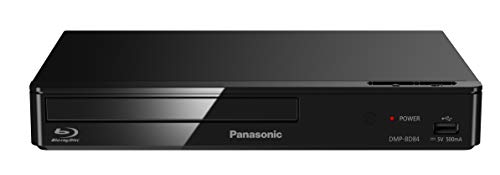
The Panasonic DMP-BD84GN-K is the lowest-priced of the five picks, at $148 and #1,798 overall on Amazon AU when I checked, sold by Amazon AU. It's a compact Full HD Blu-ray and DVD player with quick start mode, a LAN port and an HDMI cable included, per its title. Its listing names super multi-format playback, including high-resolution audio over a home network and Xvid, AAC, ALAC and MKV files on the big screen. Its listing has been up since 2018, the oldest release date of the five picks, and it's still ranked second-best of the picks on Amazon AU's overall list. Amazon AU sells it directly, so a faulty unit is an Amazon return rather than a marketplace dispute.
It also plays music, photos and camcorder videos from an external USB hard drive, with WMA, DSD, FLAC and MP3 named for music, JPEG and MPO for photos and MP4 for video. The listing describes an internet app deck with YouTube, weather, news, games and music, but apps on older players can stop working as services change, so I wouldn't buy it for apps. It states an Australian plug and Australian manufacturer's warranty, with 12 months in its warranty field. The USB hard drive support is the most useful extra for a family with camcorder videos and photos on an old drive. The listing doesn't mention lossless audio formats or a 4K upscaler, which keeps the box simple for anyone who wants a player that just works.
This is the one for a simple player that plays Australian Blu-rays and DVDs well and needs no extra cable, such as a spare TV or a parent's lounge room. Quick start mode shortens the wait from standby. Use a streaming stick rather than its apps, keep the tray clean, and check Panasonic's support page for a firmware update if a new disc won't load. Leave it unplugged from the network if you don't use its apps, and update it by USB when needed.
Honest caveats: A Full HD player that won't read 4K UHD discs. The listing doesn't state a region, though it's an Australian GN model. Its built-in apps may stop working as services change. The stated warranty is 12 months. The listing doesn't name Dolby TrueHD or DTS-HD bitstream output.
Best for: A simple player for Australian Blu-rays and DVDs.
Discs: Blu-ray, DVD (no 4K UHD) • Ports: HDMI, LAN, USB • In the box: HDMI cable (per title) • Media: MKV, FLAC, DSD, JPEG, MP4 (stated) • Plug and warranty: Australian plug, 12 months (stated) • Model: DMP-BD84GN-K • Seller: Amazon AU • Rank: #1,798 overall on Amazon AU
View on Amazon AUSide-by-side comparison
What we see fail in the workshop: Blu-ray players
Blu-ray players are reliable boxes with one moving part that does all the hard work: the disc drive. Almost every player that comes in for a look has a drive that won't load, won't read or won't eject, and most of those faults start with dust, heat or a tray forced by hand. The power supply is the other weak point after storms.
Discs that won't read
A player that reads some discs and not others usually has a dirty or weakening laser lens, a scratched disc, or firmware that's too old for a new release. Try a different disc first, then check for a firmware update on the maker's site, since new discs sometimes need one. Dust on the lens comes from a player that sits open on a dusty shelf or in a cabinet with no airflow. Don't use lens cleaning discs with brushes on a 4K drive; if updates don't fix it, the drive needs a look.
Trays that jam or won't eject
The tray is moved by a small motor and a rubber belt or gear. Pushing the tray shut by hand, or forcing it open with a coin, strips the gear or stretches the belt, and a disc left spinning on a warm player for months can warp. If the tray stops halfway or the player clicks without opening, switch it off at the wall, wait, and try the eject button once more. Repeated forcing turns a belt replacement into a broken mechanism.
Dead after a storm
A player that won't power on at all after a storm usually has a failed power supply board or, on the Laser 4K, a failed 12V adaptor. Players share a powerboard with the TV and soundbar, so one surge reaches all of them, and the HDMI ports can fail at the same time. Plug the whole TV setup into a surge-protected powerboard, and test a dead Laser with a known-good adaptor of the same voltage and polarity before assuming the player itself is gone.
Decision tree: which one should you actually buy?
- Buying 4K discs and want every HDR format? → The Panasonic DP-UB820 names HDR10, HDR10+, Dolby Vision and HLG.
- Want 4K plus imported Blu-rays and a longer warranty? → The Laser BLU-BD4K-384 names multi-region playback, Dolby Vision and three years.
- First 4K player on a TV that uses HDR10? → The Panasonic DP-UB150 plays UHD discs with Panasonic's HDR Optimiser.
- Collecting region A Blu-rays but not 4K? → The Laser BLU-BD5000-189 plays Blu-ray regions A, B and C, selected in settings.
- Just want a simple player for Australian discs? → The Panasonic DMP-BD84 is compact, with an HDMI cable in the box.
- Phone or console with a fault in the lounge room? → Bring it into our Erina workshop. We'll check it and tell you what it needs before you spend anything.
Frequently asked questions
Will a normal Blu-ray player play 4K UHD discs?
No. A 4K UHD Blu-ray disc needs a 4K UHD Blu-ray player, and a standard Blu-ray player won't read it at all, even though the discs look alike. The reverse works: a 4K player plays standard Blu-rays, DVDs and CDs too. Of the five picks, the Panasonic DP-UB820, the DP-UB150 and the Laser BLU-BD4K-384 play 4K UHD discs, while the Laser BLU-BD5000-189 and the Panasonic DMP-BD84 are Full HD players.
Do I need a multi-region Blu-ray player in Australia?
Only if you buy discs from overseas. Australia is region B for Blu-ray and region 4 for DVD, and players sold for Australia play those plus region-free discs. 4K UHD discs are almost all region free. If you collect region A Blu-rays from the US or Japan, a multi-region player matters: the Laser BLU-BD5000-189 states regions A, B and C, selected manually in its settings, and the Laser 4K player names multi-region playback.
Do I need Dolby Vision on a Blu-ray player?
Only if your TV supports it. Dolby Vision and HDR10+ add scene-by-scene picture information, but the player and the TV both need the format, otherwise the disc plays in HDR10. LG and Sony TVs support Dolby Vision, Samsung TVs support HDR10+, and some Hisense and TCL sets support both. The Panasonic DP-UB820 lists both formats, so it suits any of those TVs. On a TV with neither, HDR10 alone gives the same result.
Why won't my Blu-ray player read a new disc?
New releases sometimes need a firmware update before an older player will read them. Check the maker's support page for an update, which you can usually install over a network cable or from a USB stick. If it still won't read and other discs play, the disc may be faulty. If several discs fail, the laser lens may be dirty or worn, and the player needs a look rather than a lens cleaning disc with brushes.
How do I get Dolby Atmos from a Blu-ray player to my soundbar?
Set the player's audio output to bitstream, then connect it straight to an Atmos soundbar or receiver with HDMI, or through a TV that supports eARC. Over older ARC, many TVs pass only standard Dolby Digital and drop the lossless Atmos track. Check that the soundbar's input and the TV's eARC setting are switched on. The Laser 4K player names PCM and bitstream options in its listing; for the Panasonic picks, check the manual for the bitstream setting.
Is a Blu-ray player worth buying when I have streaming?
For a disc collection or the best picture and sound, yes. A 4K UHD disc usually carries far more data than a 4K stream, with lossless audio, and it doesn't soften when the internet slows or vanish when a licence ends. If you only stream and own no discs, a streaming stick is the better spend. Many households use both: a player for films they own and a stick for everything else.
Related buying guides
Player won't load or eject?
A tray that jams, a drive that clicks or a player that went dark after a storm is telling you something. Stop forcing the tray and switch it off at the wall. Bring it into our Erina workshop, along with any phone or tablet that needs a look, and we'll tell you what it needs before you spend anything.
Visit our Erina workshop Book Online