Prices from Amazon AU, updated daily. Swipe or use the arrows for more.
Disclosure: This article contains affiliate links to amazon.com.au. If you buy through one of these links iFix may earn a small commission at no extra cost to you. It doesn't change which products we recommend. We focus on what actually lasts based on 16 years of repair-shop experience.
Quick summary5 picks
- Entry PickLogitech Z906 500 Watts Multimedia Speakers about$388.88
- Bose Surround Sound System for Home Theater about$439
- JBL Bar 800MK2 about$717780W.
- Sony BRAVIA Theater System 6 about$719
- Most PremiumLG Home Theatre S80TR Sound Bar 5.1.3 Channels about$1,049580W.
What counts as a home theatre system
A home theatre system, in the sense people search for, is surround sound from one box: a speaker at the front, a subwoofer for bass and two speakers that sit behind or beside you. That last part is what separates it from a soundbar. A single bar can only bounce sound off walls to fake the effect, while a system with real rear speakers puts sound behind you.
This guide only picks systems with real rear speakers, or the add-on that gives a bar its rears. Single soundbars and 2.1 or 3.1 bars are covered in our Dolby Atmos soundbars guide, and separate receivers with passive speakers in our AV receivers guide. A system with rears is the step between the two, with fewer boxes and cables than a receiver setup.
The five picks run from $388.88 to $1,049 at time of writing, and all five are sold by Amazon AU, so a faulty unit or a missing speaker starts with Amazon rather than a marketplace seller. They come from Sony, LG, JBL, Logitech and Bose, and I've read every listing and said plainly where one leaves out power, ports or what's in the box.
If the TV it's going with has a fault of its own, or a phone or laptop in the house has a cracked screen or a battery that won't last the day, bring it into our Erina workshop and we'll tell you what it needs before you spend anything on the sound.
Channels, and what 5.1 and 5.1.3 mean
The channel numbers tell you where the speakers are. The first number is the speakers around you at ear height, the second is the subwoofer, and a third, when there is one, is speakers that fire upwards to bounce sound off the ceiling for height effects. So 5.1 is left, centre, right and two rears, plus a subwoofer, and 5.1.3 adds three up-firing drivers.
Of the five picks, the Sony states 5.1 channels with three front speakers, two rears and a subwoofer, and the LG states 5.1.3 with triple up-firing channels and two rear channels. The Logitech Z906 states 5.1. The JBL listing names detachable wireless speakers and a 10 inch wireless subwoofer but no channel count, and the Bose add-on gives a Bose soundbar its rears.
The centre channel matters more than the height channels for most viewers. It's where dialogue comes from, and a system with a dedicated centre keeps voices clear when the music and effects get loud. The Sony listing names a dedicated centre channel speaker and the JBL names its PureVoice dialogue processing, so both are aimed at the people who keep turning the TV up for speech.
Height channels need a ceiling to bounce off. An up-firing driver works best with a flat ceiling of normal height, and it struggles under raked ceilings, exposed beams or very high ceilings. If your lounge room has any of those, a 5.1 system with good rears gives more of the surround effect for the money than a bar with height drivers it can't use.
Room size and where the rear speakers go
Room size decides how much system you need. A typical lounge room of 15 to 25 square metres is well served by any of the five picks. In a large open-plan room the sound spreads into the kitchen and dining area and loses impact, so the higher-power systems and a subwoofer close to the seating help more than extra channels.
Rear speakers sit beside or slightly behind the main seat, at or a little above ear height, roughly the same distance from you on each side. Behind a couch pushed against a wall, the next best spot is on the wall above the couch angled in. Speakers on the floor behind a couch sound muffled, because the couch back blocks them.
Wireless rears still need power. The Bose listing says to plug its adapters into a power source, which means a power point near each rear speaker, or an extension lead run tidily along the skirting. Check where your power points are before you buy, because that's the most common reason a wireless rear ends up on the wrong side of the room.
The subwoofer is the easiest part to place and the most room-sensitive. Bass in a corner is louder and boomier, bass away from walls is tighter. Start it beside the TV cabinet, play something with steady bass, then try it a metre along the wall. Our subwoofers guide covers adding a bigger one later.
The HDMI link, and what the listings leave out
Most systems connect to the TV through an HDMI port marked ARC or eARC. ARC sends the TV's sound down the HDMI lead to the system and lets one remote control the volume. eARC is the newer version with more bandwidth, needed to pass full Dolby Atmos and DTS:X from the TV's apps and from devices plugged into the TV.
None of the five listings names its HDMI ports, which is the biggest gap in this category. The Sony and LG both state Dolby Atmos and DTS:X support, and the JBL states Dolby Atmos, but check the maker's spec page for HDMI eARC and how many HDMI inputs each one has before you buy, and check your TV's manual for which of its HDMI ports carries ARC or eARC.
The Logitech Z906 is a different kind of system. Its listing says it has multiple inputs and THX, Dolby Digital and DTS certification, but it doesn't name the inputs or mention HDMI, so check Logitech's spec sheet and make sure your TV has an output the Z906 accepts. It suits a TV or computer with a matching audio output, not a modern HDMI eARC setup.
When HDMI ARC misbehaves, the fix is usually a setting, not a fault. Turn on the TV's HDMI control setting, often called CEC or a brand name for it, set the TV's sound output to the external system, and use the HDMI lead that came in the box or a certified one. Most of the no-sound or lost-volume systems we check have one of those three wrong.
All-in-one or separates
The choice in home theatre is between an all-in-one system like these five and separates, which means an AV receiver with passive speakers. Separates sound better for the money once you get past the entry level, they let you upgrade one speaker at a time, and a good receiver lasts a decade or more. They also take more space, more cable and more setup.
An all-in-one system wins on simplicity. One box at the front, a subwoofer and two rears, set up in an hour, controlled from the TV remote. For a lounge room where nobody wants speaker wire across the floor or a receiver in the cabinet, that's the right answer, and it's what most people searching for a home theatre system want.
There's a middle path for owners of a bar they like. The Bose add-on gives a compatible Bose soundbar real rears, and its listing suggests adding Bose's Bass Module 700 for more bass. Building up over time costs more in total than buying a complete system, but it spreads the spend and keeps the bar you already have.
If you're leaning towards separates, our AV receivers guide covers 5.2 and 7.2 receivers from Denon and Yamaha, and our bookshelf speakers guide covers speakers that suit a receiver. Mixing the two approaches rarely works well, since a soundbar system and a receiver both want to be the one in charge of the sound.
Power, warranty and who sells it
Power figures on home theatre listings are measured in different ways, so compare them carefully. The LG states 580W total power, the JBL states 780W maximum output and the Logitech states 500W of peak power. The Sony and Bose listings don't state a figure. Peak and maximum figures are short bursts, not sustained output, so a higher number doesn't mean a louder system in a normal room.
Warranty varies more than price. The Sony listing states a 3-year limited warranty and labels itself AU Version, the Logitech states a 2-year limited hardware warranty, and the LG and JBL listings state 12 months and 1 year. The Bose listing doesn't state a warranty, so check Bose's own terms. Keep the receipt with the box, since subwoofer amplifiers are the part most likely to fail.
All five picks are sold by Amazon AU, which keeps returns simple and points to an Australian-market unit with an Australian plug on the subwoofer and power adapters. I left out marketplace listings in this category, because several state no plug or market, and a system with a wrong-market subwoofer is a fault waiting to happen.
Price per channel is a rough guide at best. At time of writing the Logitech is the lowest-priced of the five picks and the LG the highest, with the Sony and JBL close together in the middle. Prices move week to week, and more so in the run to Christmas, so compare on the day you buy.
Setup, calibration and getting dialogue right
Unbox everything before you mount anything. Confirm every speaker, the subwoofer, the remote and the leads are there, power the system up on the floor in front of the TV and check each speaker plays. It's far easier to return a system with a dead rear speaker before the bar is on a wall bracket and the leads are run through a cabinet.
Run the room calibration if the system has one. The JBL listing names easy sound calibration, which uses a microphone to measure the room and set each speaker's level. Systems without it need a manual level check: sit in the main seat, play the test tone or a dialogue-heavy scene, and adjust the centre and rears until voices are clear and the rears are audible but not distracting.
Dialogue is the most common complaint about any new system, and the fix is usually the centre level, not a new system. Raise the centre channel a step or two, turn on the dialogue or voice mode, and turn night mode on for late viewing. The JBL names night listening and PureVoice, and the Sony names Voice Zoom 3 when paired with a compatible BRAVIA TV.
Update the firmware early. The Sony names its BRAVIA Connect app and the LG names Alexa, Google Home and Apple AirPlay 2 support, so those systems join your Wi-Fi and can update themselves. A system that keeps dropping a feature after setup often needs one update to settle, and it's worth doing before you decide something is faulty.
Living with it: heat, dust and storms
Home theatre gear dies of heat and power more than old age. Subwoofers have their amplifier on the back panel and need air around it, so don't push one hard against a wall or into a cupboard. A soundbar on a TV unit needs space behind it too, and a closed cabinet with a set-top box and a games console in it gets hot enough to shorten the life of everything inside.
Dust settles in subwoofer ports and on speaker grilles and amplifier fins. A soft brush and a vacuum on low every few months keeps it from building up. Never spray cleaner directly onto a speaker grille or the back panel, because liquid running into a port or a switch is a repair that didn't need to happen.
Storms are the big one on the Central Coast. A surge travels in through the power, the antenna or the network cable and takes out the HDMI board or the power supply, often in the TV and the system together. A quality surge-protected powerboard is the least expensive insurance against that, and our surge powerboards guide covers the ones we'd use.
Turn the system off at the wall when you're away for a while or a big storm is forecast. Wireless rears and subwoofers sit in standby all day waiting for a signal, and standby is when a surge finds them. Unplugging the antenna lead from the TV in a severe storm protects the HDMI chain from that side too.
The 5 picks, $388.88 to $1,049
Prices are Amazon AU at time of writing (2026-11-20) and move week to week. Ranks are Amazon AU category ranks checked the same day, with each system's overall Amazon AU rank on its card. Two listings share their rank with a sibling, and those cards say so.

Sony BRAVIA Theater System 6 HT-S60
ASIN B0FG2VK4BC • $719 • Ships from Amazon AU
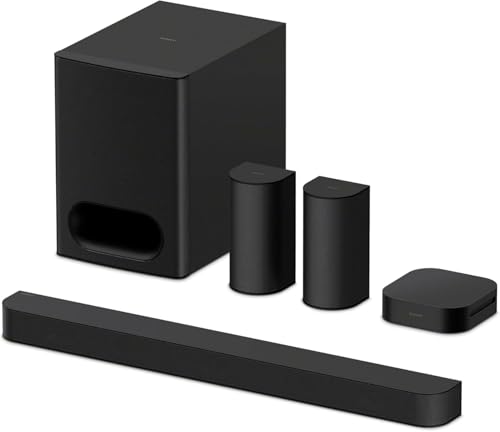
The Sony BRAVIA Theater System 6 HT-S60 is the pick that matches the search best: a complete 5.1 channel home theatre system in one box. The listing states three front-firing speakers, two rear speakers and an included subwoofer, a dedicated centre channel for dialogue, and Dolby Atmos and DTS:X support. It's labelled AU Version, carries a stated 3-year limited warranty, the longest of the picks that state one, and is sold by Amazon AU at $719 at time of writing. Everything you need for 5.1 comes in the box, so there's no second purchase to add rears or bass later. The AU Version label and the Amazon AU seller together point to an Australian-market unit with Australian power leads.
The listing names Multi Stereo, which plays the same sound from every speaker to fill a room with music, and up-mixing for music sources. Paired with a compatible BRAVIA TV it can be controlled from the TV menu and uses Voice Zoom 3 for clearer dialogue, and the BRAVIA Connect app controls volume, sound profiles and settings from a phone. It streams music over Bluetooth. The listing doesn't state a power figure or name its HDMI ports, so check Sony's spec page for eARC. That's a full feature list for a household that watches TV more than it plays music. Up-mixing means stereo music is spread across all five speakers rather than only the front, which some people like and others switch off. The phone app is the easiest place to change volume and sound profiles.
This is the one I'd buy for most lounge rooms, especially beside a Sony TV. Its rank is listing shared with the Theater Bar 6, a 3.1.2 bar without rears, so read it as the pair's rank. Place the rears at ear height beside the couch, give the subwoofer air around its back panel, and run the firmware update early through the app. Keep it on a surge-protected powerboard, since the subwoofer amplifier is the part that takes a storm. Keep the rear speaker leads tidy along the skirting so nobody trips them.
Honest caveats: The listing doesn't state a power output figure or name its HDMI ports, so check Sony's spec page for eARC before you buy. Its rank is shared with the Theater Bar 6 listing. Voice Zoom 3 and TV menu control need a compatible BRAVIA TV. The rears need a power point or lead nearby.
Best for: Most lounge rooms, and anyone with a Sony BRAVIA TV.
Channels: 5.1 (3 front, 2 rear, subwoofer) • Formats: Dolby Atmos, DTS:X • Dialogue: Dedicated centre channel, Voice Zoom 3 with BRAVIA TV • Streaming: Bluetooth, BRAVIA Connect app • Warranty: 3-year limited (stated) • Model: HT-S60, AU Version • Seller: Amazon AU • Rank: #70 in Soundbar Speakers (Amazon AU), listing shared with Theater Bar 6
View on Amazon AU
LG S80TR 5.1.3 Channel Sound Bar with Rear Speakers
ASIN B0F9WQDP36 • $1,049 • Ships from Amazon AU
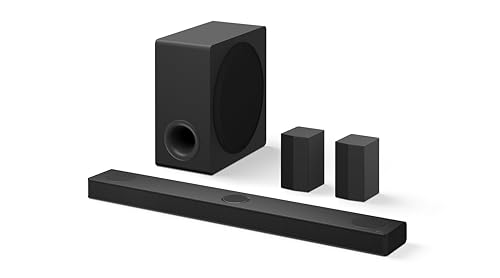
The LG S80TR is the most channels of the five picks: a 5.1.3 system with two rear channels and triple up-firing channels for height effects. The listing states 580W total power and Dolby Atmos and DTS:X support. It ranked #33 in Soundbar Speakers on Amazon AU and #14,522 overall when I checked, at $1,049, the highest-priced of the five picks, sold by Amazon AU. LG sells it under the Home Theatre name, which is the search this guide answers. It's the one of the five picks that states height channels alongside real rears, which is the closest an all-in-one box gets to a full cinema layout. Amazon AU sells it directly, so a fault or a missing speaker is handled as an Amazon return.
The listing names WOW Orchestra, which uses the sound bar and a compatible LG TV's own speakers together for a bigger sound, so it suits an LG TV best. It works with Amazon Alexa, Google Home and Apple AirPlay 2, which makes it the strongest of the picks for streaming from a phone or a smart speaker system. The .1 in 5.1.3 is the bass channel, but the listing doesn't describe the subwoofer itself, so check LG's page for its size. AirPlay 2 support means an iPhone or Mac can send music to it directly, and Google Home and Alexa support means it can join a speaker group in either system. That flexibility is the reason to pay more for it if the system will play music most days. Everything beyond that list is not stated on the listing.
This is the one for a room with a flat, normal-height ceiling and an LG TV, where the up-firing channels have something to bounce off. Its stated warranty is 12 months, shorter than the Sony and Logitech, so register it and keep the receipt. Join it to your Wi-Fi early and let it update before judging the sound. The listing doesn't name its HDMI ports, so confirm eARC on LG's spec page first. Clear the space above the bar, since a shelf over it blocks the up-firing drivers, and keep the rears clear of curtains.
Honest caveats: The highest-priced of the five picks. The stated warranty is 12 months, shorter than the Sony and Logitech. The listing doesn't describe the subwoofer or name its HDMI ports. Up-firing channels need a flat ceiling of normal height to work well. WOW Orchestra needs a compatible LG TV.
Best for: An LG TV owner with a flat ceiling who wants height channels.
Channels: 5.1.3 (2 rear channels, triple up-firing) • Power: 580W total (stated) • Formats: Dolby Atmos, DTS:X • Works with: Alexa, Google Home, Apple AirPlay 2 • TV feature: WOW Orchestra with compatible LG TVs • Warranty: 12 months limited (stated) • Overall rank: #14,522 on Amazon AU • Seller: Amazon AU • Rank: #33 in Soundbar Speakers (Amazon AU)
View on Amazon AU
JBL Bar 800MK2 with Detachable Wireless Speakers
ASIN B0FS1YP898 • $717 • Ships from Amazon AU
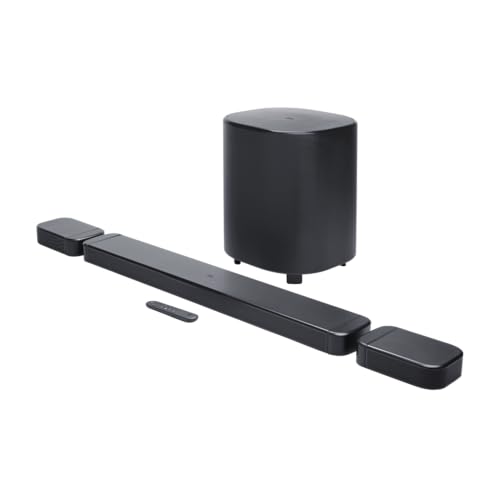
The JBL Bar 800MK2 takes a different route to rear speakers: the ends of the bar detach and become wireless speakers you place behind the couch, then clip back on when you want a single bar again. The listing states 780W maximum output, a 10 inch wireless subwoofer and Dolby Atmos. It ranked #32 in Soundbar Speakers on Amazon AU and #14,240 overall when I checked, at $717, sold by Amazon AU, and its release date is listed as September 2025. It's the one listing of the five picks with a stated release date, and the detachable design is what sets it apart from the Sony and LG, whose rears stay where you put them. Amazon AU sells it directly, so a fault or return is handled by Amazon.
The listing names MultiBeam 3.0, PureVoice 2.0 for dialogue, SmartDetails, broadcasting, night listening and easy sound calibration, and says it works with all ecosystems and music streaming services. It doesn't give a channel count, doesn't name its HDMI ports, and doesn't say how the detached speakers are powered or how long they run away from the bar, so check JBL's page for those before you buy. The stated warranty is 1 year. MultiBeam is JBL's name for bouncing sound off the side walls, which keeps some width when the rears are clipped back on. PureVoice is its dialogue processing, the setting to try first if voices get lost under effects. Night listening lowers loud peaks for late viewing, which suits a house with sleeping kids or close neighbours.
This is the one for a room that's sometimes a cinema and sometimes a lounge, where rears on stands all week would be in the way. Run the calibration once the rears are in their spots, and again if you move the couch. Clip the speakers back on when you're done so they're not knocked off a side table. Keep the subwoofer off the carpet edge and away from a closed cupboard so its amplifier stays cool. Check the rears are seated firmly each time you clip them back on, or the bar may not see them.
Honest caveats: The listing doesn't give a channel count, name its HDMI ports or say how the detached speakers are powered or how long they run. The stated warranty is 1 year. Detached speakers on side tables are easy to knock off. Maximum output is a peak figure, not sustained power.
Best for: A room that's a lounge most of the week and a cinema on movie night.
Rear speakers: Detachable wireless (stated) • Subwoofer: 10 inch wireless (stated) • Power: 780W maximum (stated) • Formats: Dolby Atmos • Setup: Easy sound calibration, night listening • Warranty: 1 year limited (stated) • Overall rank: #14,240 on Amazon AU • Seller: Amazon AU • Rank: #32 in Soundbar Speakers (Amazon AU)
View on Amazon AU
Logitech Z906 5.1 Surround Sound Speaker System
ASIN B077G72TCC • $388.88 • Ships from Amazon AU
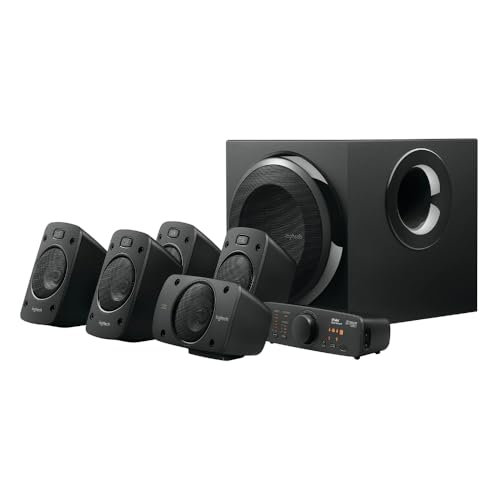
The Logitech Z906 is the separate-speaker pick: a 5.1 surround sound system with five small speakers and a subwoofer, rather than a bar. The listing states 500 watts of peak power, THX, Dolby Digital and DTS certification, multiple inputs and a remote control. It ranked #4 in Hi-Fi Speaker Systems on Amazon AU and #6,277 overall when I checked, the second-best overall rank of the five picks, at $388.88, the lowest-priced of the five, sold by Amazon AU. Five separate satellites and a subwoofer give it real placement freedom, something the bar-based picks can't match. It's also the one of the five picks you can set up at a computer desk with the speakers around the screen.
The listing states a 2-year limited hardware warranty, the second longest of the picks that state one. It doesn't name its inputs, mention HDMI or state Dolby Atmos or DTS:X, so check Logitech's spec sheet and make sure your TV or computer has an audio output the Z906 accepts before you buy. It's a system for a TV with a matching audio output, a computer setup or a games room, rather than for a modern HDMI eARC TV that wants one remote for everything. THX certification is a performance standard for volume and clarity at a set listening distance, and Dolby Digital and DTS are the surround formats used on most DVDs, Blu-rays and many TV broadcasts. None of that replaces an HDMI connection, which is why the input check matters so much before buying it for a lounge room.
This is the one for a desk, a games room or a TV with a suitable output, where real separate speakers matter more than one tidy bar. Run the speaker leads along the skirting rather than across a walkway, since a tripped lead pulls a satellite off its shelf. Give the subwoofer air around its back panel, and put the whole system on a surge-protected powerboard. Label each speaker lead at both ends during setup, so a moved speaker goes back on the right channel, and keep the remote somewhere it will not be lost.
Honest caveats: The listing doesn't name its inputs, mention HDMI or state Dolby Atmos or DTS:X. It needs a TV or computer with an audio output it accepts. Five wired speakers mean leads to run around the room. Peak power is a burst figure, not sustained output.
Best for: A desk, games room or TV with a suitable audio output, on the lowest price.
Channels: 5.1 (stated) • Power: 500W peak (stated) • Certification: THX, Dolby Digital, DTS • Inputs: Multiple, not named on the listing • Warranty: 2-year limited hardware (stated) • Part number: 980-000470 • Overall rank: #6,277 on Amazon AU • Seller: Amazon AU • Rank: #4 in Hi-Fi Speaker Systems (Amazon AU)
View on Amazon AU
Bose Surround Speakers for Bose Soundbars
ASIN B07G9JW1YW • $439 • Ships from Amazon AU
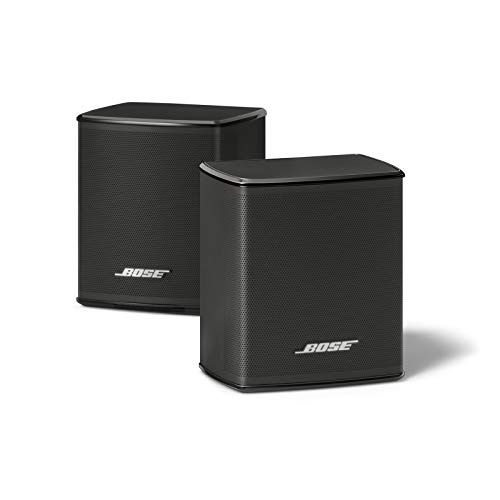
The Bose Surround Speakers are the add-on route: a pair of small wireless rear speakers that turn a compatible Bose soundbar into a home theatre system with real rears. The listing describes them as the smallest speakers Bose has designed, standing less than about 10cm tall, with a wireless range of about 9m. It ranked #2 in Hi-Fi Speaker Systems on Amazon AU and #4,725 overall when I checked, the best overall rank of the five picks, at $439, sold by Amazon AU. That rank makes it the best-ranked listing of the five picks on Amazon AU, which says a lot of Bose soundbar owners want real rears. Amazon AU sells it directly, so a return is handled by Amazon if it doesn't suit your bar.
Setup per the listing is to plug the adapters into a power source and connect the receivers wirelessly to the Bose soundbar. That means a power point or a lead near each rear speaker. The listing suggests adding Bose's Bass Module 700 for more bass, which is a separate purchase. It doesn't list which Bose soundbars are compatible or state a warranty, so check Bose's compatibility list and terms before you buy. The small size is the point: they sit on a bookshelf or a side table without dominating the room, which suits a lounge where large rear speakers would never be allowed. Wireless range of about 9m covers most lounge rooms, but walls, furniture and other wireless gear shorten it.
This is the one for someone who already owns a Bose soundbar they like and wants real rears without replacing it. On its own it does nothing, so don't buy it without a compatible bar. Its rank is listing shared with the white version. Keep the receivers clear of a Wi-Fi router and a microwave, since 9m of range shrinks fast through walls, and plug the adapters into a surge-protected board. Mount them at ear height or a little above for the clearest surround effect, and test the range from each spot before you fix them to a wall.
Honest caveats: It does nothing on its own and needs a compatible Bose soundbar, which the listing doesn't list. No warranty is stated. Each speaker needs a power point nearby. The Bass Module 700 is a separate purchase. Its rank is shared with the white version.
Best for: A Bose soundbar owner who wants real rear speakers.
Type: Wireless rear speaker pair (add-on) • Needs: A compatible Bose soundbar • Height: Under about 10cm (stated) • Wireless range: About 9m (stated) • Power: Plug-in adapters (stated) • Overall rank: #4,725 on Amazon AU • Seller: Amazon AU • Rank: #2 in Hi-Fi Speaker Systems (Amazon AU), listing shared with white
View on Amazon AUSide-by-side comparison
| Product | Price | Best for |
|---|---|---|
| Logitech Z906 500 Watts Multimedia Speakers | ~$388.88 | |
| Bose Surround Sound System for Home Theater | ~$439 | |
| JBL Bar 800MK2 | ~$717 | |
| Sony BRAVIA Theater System 6 | ~$719 | |
| LG Home Theatre S80TR Sound Bar 5.1.3 Channels | ~$1,049 |
What we see fail in the workshop: home theatre gear
Home theatre systems come into our Erina workshop for a handful of faults, and most of them start with power, heat or a setting rather than a worn-out speaker. The same three show up again and again across every brand, and each one is easier to prevent than to repair once it has happened, and none of the fixes below needs tools or a technician.
Subwoofer amplifiers after a storm
The subwoofer carries the system's biggest amplifier and power supply on its back panel, and it sits in standby all day waiting for a wireless signal. A surge through the power or the antenna lead finds it in standby, and the usual result is a sub that powers up but won't pair, or won't power up at all. A quality surge-protected powerboard and switching it off at the wall before a big storm prevents most of these. Give it air around the back panel, since heat shortens the same parts.
HDMI ARC that drops out
The commonest complaint is sound that drops out, a TV that forgets the system, or a remote that stops controlling the volume. It's rarely a hardware fault. Check the TV's HDMI control setting is on, the system is plugged into the TV's ARC or eARC port, and the lead is the one from the box or a certified one. Then update the firmware on both, the system first and then the TV, and power both off at the wall for a minute. When the HDMI port itself has failed, it's usually after a surge, and the TV's board often goes with it.
Wireless rears that won't stay connected
Wireless rear speakers and subwoofers share the airwaves with Wi-Fi, cordless phones and microwaves. A rear that cuts out when someone uses the kitchen, or drops after the router moves, is interference, not a dead speaker. Move the router or the rear a metre, keep the rear's receiver off the floor and away from metal, and re-pair it once. We see far more rear speakers with a loose power adapter or a dead powerboard socket than with a failed wireless module, so check the plug first.
Decision tree: which one should you actually buy?
- Want a complete 5.1 system for most lounge rooms? → The Sony BRAVIA Theater System 6 has three front speakers, two rears and a subwoofer in one box.
- Have an LG TV and a flat ceiling? → The LG S80TR adds three up-firing channels to its two rears.
- Want rears that go away when the movie's over? → The JBL Bar 800MK2's end speakers detach for movies and clip back on after.
- Setting up a desk or games room with separate speakers? → The Logitech Z906 is a 5.1 speaker system with five satellites and a subwoofer.
- Already own a Bose soundbar? → The Bose Surround Speakers add real rears to a compatible Bose bar.
- TV or phone playing up? → Bring it into our Erina workshop. We'll check it and tell you what it needs before you spend anything.
Frequently asked questions
What is the difference between a soundbar and a home theatre system?
A soundbar is one speaker at the front, sometimes with a subwoofer, and it fakes surround sound by bouncing sound off the walls. A home theatre system adds real speakers behind or beside you, so effects come from behind rather than seeming to. All five picks in this guide either include real rear speakers or, in the Bose add-on's case, give a compatible Bose soundbar its rears. If you already own a bar you like, adding rears is often the simpler upgrade.
Do wireless rear speakers need power?
Yes. Wireless means no speaker lead from the front, not no power lead. The Bose listing says to plug its adapters into a power source, and every wireless rear needs a power point or a lead nearby. Check where your power points sit before you buy, because a rear speaker placed where the power is, rather than where it sounds best, is the most common setup mistake we see. An extension lead run along the skirting solves it tidily.
Do I need HDMI eARC for a home theatre system?
eARC is needed to pass full Dolby Atmos and DTS:X from the TV's apps and the devices plugged into the TV. Plain ARC handles most standard surround sound. None of the five listings names its HDMI ports, so check the maker's spec page for eARC before you buy, and check your TV's manual for which HDMI port carries ARC or eARC, since usually a single port does. Using the wrong port is a common cause of no sound at all.
Is a 5.1.3 system better than 5.1?
A 5.1.3 system adds three up-firing drivers that bounce sound off the ceiling for height effects. They work best under a flat ceiling of normal height and struggle under raked ceilings, beams or very high ceilings. In those rooms, a 5.1 system with good rears gives more of the surround effect for the money. In a room with a flat ceiling, the height channels add a layer that 5.1 can't. Measure your ceiling and note any beams before you buy.
Why is dialogue hard to hear on my home theatre system?
It's usually the centre channel level, not the system. Raise the centre a step or two in the settings, turn on the dialogue or voice mode, and use night mode for late viewing so effects don't drown out voices. Also check the TV is sending sound to the system rather than playing through both. Running the room calibration again after moving furniture helps as well, since the levels were set for the old layout.
Can you repair a home theatre system or subwoofer?
We check subwoofers, soundbars and the TVs they plug into at our Erina workshop. Most faults are a failed power supply or amplifier after a surge, a damaged HDMI port, or a setting rather than a fault. We'll tell you what's wrong and what it costs before any work starts, and if a repair isn't worth it against the price of a new system, we'll say so plainly. Bring the remote and power leads in with it.
Related buying guides
TV, phone or laptop playing up?
Christmas brings a run of TVs, phones, tablets and laptops with cracked screens, tired batteries, charging faults and storm damage. If a device has stopped charging, won't turn on or has a cracked screen, bring it into our Erina workshop. We'll check it and tell you what it needs before you spend anything.
Visit our Erina workshop Book Online