![Samsung Galaxy Tab S11 Ultra 5G [AU Version]](/images/affiliate-products/B0FMX5PQ3B.jpg)
![Samsung Galaxy Tab S11 [AU Version]](/images/affiliate-products/B0FMXR3MFM.jpg)
Prices from Amazon AU, updated daily.
Disclosure: This article contains affiliate links to amazon.com.au. If you buy through one of these links iFix may earn a small commission at no extra cost to you. It doesn't change which products we recommend. We focus on what actually lasts based on 16 years of repair-shop experience.
Quick summary3 picks
- Biggest screenSamsung Galaxy Tab S11 Ultra [AU Version] about$2,34712GB RAM.
- Best valueSamsung Galaxy Tab S11 [AU Version] about$1,79912GB RAM.
- Entry PickLenovo Idea Tab Pro Gen 2 about$1,199Keyboard and pen included.
Why this matters now
Most "best tablet" lists are written by people who have never opened one after it failed. I have opened plenty. The useful thing a repair bench teaches you about tablets is not which one benchmarks fastest: it is which ones survive a cracked-glass repair, which charge ports wear out, and which batteries swell and lift the screen. That is the difference between a tablet you keep for five years and one that becomes a write-off after a bad drop.
The timing is about the maths, too. Real household disposable income per capita in Australia sits roughly 3.8% below its 2019 level on ABS and RBA figures. Households are running harder to stand still. When money is tighter, buying one device that does two jobs beats buying a laptop and a tablet separately. A premium tablet with a keyboard and pen can stand in for the second laptop, the notepad and the e-reader all at once, and you carry one thing to the café instead of a bag full. That consolidation is the whole reason to spend up here rather than buy a low-cost tablet that only ever plays video.
This is the tablet counterpart to our business-laptops guide. If your work genuinely needs a full desktop operating system, buy the laptop and read that first. If it does not, a premium tablet may be the smarter single purchase, and if you are shopping at the other end of the range for the kids, our best tablets for kids guide covers that job instead.
What separates a premium tablet from a low-cost one
The price gap between a $300 tablet and a $2,000 one is not just the badge. It is the handful of things that decide whether the tablet is a laptop replacement or a glorified video screen.
- The chip and the memory. A budget tablet chokes the moment you open a second app or a heavy web page. The silicon in the Galaxy Tab S11s, like the M5 in Apple's iPad Pros, stays smooth across a dozen browser tabs, a video call and a document at once, the multitasking that makes it a work machine, not a toy.
- The display. The two Galaxy Tabs here use AMOLED panels with high brightness and 120Hz, and the Lenovo uses a paper-like anti-glare LCD instead, trading the deep blacks for a matte surface that is kinder under office lights. Either way, the panel is what makes hours of reading and drawing comfortable, and it is also the expensive, fragile part: the glass, panel and digitiser are bonded into one unit, so a crack is a real repair.
- Keyboard and pen support. The thing that turns a tablet into a laptop is the accessory. A proper keyboard with a trackpad and a pressure-sensitive pen is what lets you actually work, not just consume. Budget for it. A premium tablet without a keyboard is only half the machine.
- Storage you can actually add. Apple solders iPad storage, so what you buy is what you keep for life. Both Galaxy Tabs take a microSD card, which changes the calculation entirely: you can start at the capacity you need and grow it for the price of a card.
- Battery and charge-port longevity. The two failures we see most on tablets are worn charge ports, from years of plugging in at an angle, and swollen batteries that push up on the bonded screen. Better cells and better charge management on premium tablets push those failures out past the useful life, but no tablet is immune, so how you charge it matters.
- Software support life. Apple and Samsung both back these platforms with years of OS and security updates. A low-cost tablet stops getting updates in a year or two and quietly becomes unsafe to bank on. Long support is part of what you pay for at this tier.
The three picks, by what you actually do
Prices are checked against Amazon AU every morning and move week to week on premium gear, so treat every figure as "around". The list leads with the big-screen pick and runs down to the bundle. Two are Galaxy Tabs and one is a Lenovo, and the split below is by the job, not the logo. On the Apple side, iFix sells Apple hardware through our own refurbished Apple stock rather than an affiliate link, so if you want an iPad Pro, start there and read the ecosystem section below first.
Samsung Galaxy Tab S11 Ultra, 14.6", 12GB, 256GB, 5G (AU version)
14.6" AMOLED · 12GB memory · 256GB + microSD · S Pen included · Samsung DeX · 5G mobile data · USB-C · around $2,347 · Ships from Amazon AU
If you are on Android and want the tablet that comes closest to a laptop monitor, this is it. The 14.6-inch AMOLED is the biggest screen in this guide by a wide margin, and it is the reason the Ultra exists. It is a canvas for split-screen work, drawing and film. The real trick, though, is Samsung DeX. Flip it on and the tablet becomes a windowed desktop with a taskbar and free-floating apps, either on the tablet itself or output to an external monitor over USB-C. For a lot of workflows that is genuinely a desktop stand-in, not a phone interface stretched wide.
Two things Apple charges extra for, included here. The charge-free hexagonal S Pen is in the box, no battery, no pairing, nothing to go flat, and the tablet takes a microSD card, so you are not locked into the storage you bought. That matters when Apple's storage upgrades cost what they do.
What to be sure of. It is a big tablet, so it wants a keyboard case and a desk more than a couch. This is the 5G version, so it takes a SIM and works away from Wi-Fi, and you pay a little for that over the Wi-Fi-only model. It is an AU-version listing with local warranty, which is what you want. Check you are buying that one and not a grey-import when prices look too good. As with any big bonded OLED, treat the glass with respect.
Best for: Android and Samsung users who want the largest screen, DeX desktop multitasking, an included pen, expandable storage and mobile data without tethering.
Display: 14.6" AMOLED, 120Hz · Memory: 12GB · Storage: 256GB + microSD expansion · Pen: S Pen included (no charging) · Desktop mode: Samsung DeX, on-device or external monitor · Connectivity: 5G mobile data · Port: USB-C · Warranty: 1 year + Australian Consumer Law
Check current AU price
Samsung Galaxy Tab S11, 11", 12GB, 512GB, Wi-Fi (AU version)
11" AMOLED · 12GB memory · 512GB + microSD · S Pen included · Samsung DeX · USB-C · around $1,799 · Ships from Amazon AU
This is the one I would default most people to. It undercuts the Ultra above it by several hundred dollars, and yet it carries 512GB of storage, double the pricier Ultra above it, plus the same charge-free S Pen in the box and the same Samsung DeX desktop mode. The 11-inch AMOLED is the lightest, most one-handed screen here, the kind you actually pick up off the couch rather than lift with two hands. For reading, notes, browsing, video and light work with a keyboard case, it does nearly everything the Ultra does for a lot less money.
Where it stops. The screen is smaller, so it is less of a two-app split-screen workhorse than the 14.6-inch Ultra, and the DeX desktop has less room to spread out. If your reason for buying is the big canvas, step up. If your reason is a fast, light, well-supported Android tablet that does the daily jobs and takes a pen, you do not need to.
What to be sure of. As with the Ultra, buy the AU-version listing for the local warranty, and budget for a keyboard case if it is standing in for a laptop. The 512GB plus microSD means storage is the one thing you will not have to worry about.
Best for: the value buyer who wants a genuinely premium Android tablet, pen, DeX and plenty of storage, without paying Ultra money for a screen they do not need.
Display: 11" AMOLED, 120Hz · Memory: 12GB · Storage: 512GB + microSD expansion · Pen: S Pen included (no charging) · Desktop mode: Samsung DeX · Port: USB-C · Warranty: 1 year + Australian Consumer Law
Check current AU price
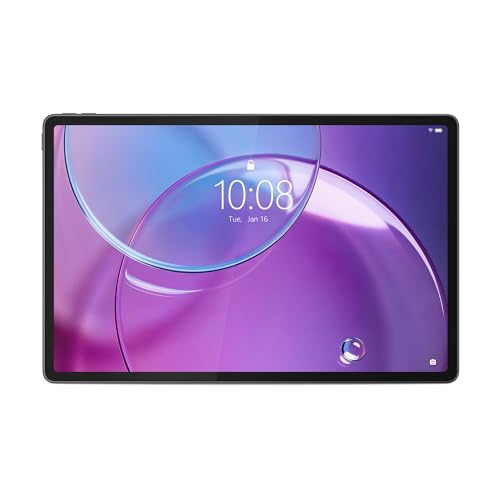
Lenovo Idea Tab Pro Gen 2, 13" 3.5K, Snapdragon 8 Gen 4, keyboard and Tab Pen Plus included
13" 3.5K PureSight Pro with Dolby Vision · paper-like anti-glare LCD · Snapdragon 8 Gen 4 · 10200mAh battery, 45W rapid charging · 2-in-1 keyboard pack and Tab Pen Plus in the box · around $1,199 · Ships from Amazon AU
The thing I keep telling people about tablets is that the keyboard is half the machine, and this is the only pick here that does not ask you to buy that half separately. Lenovo ships the Idea Tab Pro Gen 2 with a 2-in-1 keyboard pack and the Tab Pen Plus in the box, which is the difference between a tablet that works on day one and a tablet plus a shopping list. The 13-inch 3.5K PureSight Pro panel is the second-largest screen in this guide, it carries Dolby Vision, and the Snapdragon 8 Gen 4 keeps it moving across a document, a browser and a video call without the stutter a budget tablet gives you the moment you open the second app.
The part that surprises people. It is a paper-like anti-glare LCD rather than a glossy AMOLED. If you read and mark up documents under office lights or outdoors, that matte surface is easier on the eyes than a mirror finish, and Lenovo pairs it with its own eye-care tuning. What you give up is the deep black an AMOLED gives you for film. Which of those matters more depends on whether you are mostly watching or mostly working. The 10200mAh cell and 45W charging are the other quiet win: that is a big battery for a 13-inch tablet, and it refills fast enough that a lunch break carries you through the afternoon.
What to be sure of. The Amazon AU listing for this bundle does not spell out the memory and storage, so confirm both on the product page before you buy, because Lenovo sells this line in several capacities. The panel is LCD, not AMOLED, which is the honest trade at this price. And a keyboard that comes in the box is a keyboard you did not choose, so try the layout if you get the chance rather than assuming it will suit you.
Best for: the buyer who wants one purchase that arrives ready to work, with a big matte screen for reading, notes and markup, and who would rather put the money into the bundle than into a bare tablet and a list of accessories.
Display: 13" 3.5K PureSight Pro, Dolby Vision, paper-like anti-glare LCD · Chip: Snapdragon 8 Gen 4 · Battery: 10200mAh, 45W rapid charging · Included: 2-in-1 keyboard pack and Tab Pen Plus · Software: Lenovo Smart AI Input · Warranty: 1 year + Australian Consumer Law
Check current AU priceSide-by-side comparison
Prices are approximate and move week to week. Both Galaxy Tabs take a microSD card, so unlike a soldered-storage iPad you are not locked into the capacity you buy on day one.
| Product | Price | Best for |
|---|---|---|
| Samsung Galaxy Tab S11 Ultra [AU Version] | ~$2,347 | Biggest screen and DeX desktop mode |
| Samsung Galaxy Tab S11 [AU Version] | ~$1,799 | Best value, 512GB and the lightest body |
| Lenovo Idea Tab Pro Gen 2 | ~$1,199 | Keyboard and Tab Pen Plus in the box |
iPad Pro or Galaxy Tab: how to actually choose
The honest answer is that both are excellent and the hardware is not the deciding factor. What decides it is the rest of your gear.
Buy the iPad Pro if you are already in the Apple world. If your phone and your computer are Apple, the iPad slots straight in: AirDrop a file off your phone, answer a text on the tablet, hand a document from Mac to iPad mid-sentence. iPadOS 26's windowing finally makes it a serious multitasker, and the App Store still has the best tablet-first apps. The costs are real, though: soldered storage you pay a premium for, and a Pencil and keyboard that are both extra.
Buy the Galaxy Tab S11 if you are on Android, or you want DeX and value. Samsung DeX is the single best desktop-mode on any tablet, a real windowed environment on the tablet or an external monitor. You get the S Pen in the box, a microSD slot so storage is never a trap, and on the standard S11 a lot more storage per dollar. If you already carry a Samsung or Google phone, this is the natural pick.
Neither choice is a mistake. Match the tablet to the phone and computer you already own, and you will be happier than if you chase a spec-sheet win into the wrong ecosystem.
How to make one of these last
A premium tablet earns its price only if you get years out of it. The habits that matter, from the bench:
- Case it, and mind the corners. A drop onto a corner is what cracks a bonded OLED. A slim case with raised corners is low-cost insurance against the single dearest repair a tablet can need.
- Charge gently, watch for swelling. Leaving a tablet plugged in hot at 100% all day is what swells batteries early. Use the charge-limit setting if it has one, and if the screen ever stops sitting flush in the frame, stop and get it looked at.
- Do not force the charge cable. Worn charge ports come from plugging in on an angle and forcing it in the dark. Line it up. A worn USB-C port is a common, avoidable repair.
- Buy the storage you need on the iPads. You cannot add it later. Running an iPad near full for years is how it starts to feel slow. Do not save $150 you will regret in year three.
- Keep a backup: tablets are the worst offenders. Almost no one backs up a tablet, and yet they hold photos, notes and work files. Turn on iCloud or Samsung Cloud, or sync to a computer. It is the lowest-cost insurance you will ever buy.
Common mistakes from the repair shop
The premium tablets that end up on my bench early usually got there through a buying or usage decision, not bad luck. The ones worth avoiding:
- Buying the tablet without the keyboard. If the plan was to replace a laptop and there is no keyboard, the plan quietly fails and the tablet becomes a video screen. Budget for it up front.
- Skimping on soldered iPad storage. The 256GB iPad bought to save money is the full, sluggish tablet of year three. On an iPad you cannot fix that later.
- Ignoring a screen that no longer sits flat. That gap at the edge is usually a swelling battery lifting the panel. Caught early it is a battery job; left alone it becomes a battery-and-screen job and a fire risk.
- Low-cost third-party charge cables and dodgy ports. A no-name fast charger and a forced cable are how charge ports and boards die early. Use a decent cable and line it up.
- No backup on a device with no removable drive. When a tablet takes a hard knock or the board fails, everything on it is at risk. This is the job I most wish people had avoided, because a two-minute backup setting would have.
Which one is right for you?
- Want the biggest screen and a desktop mode? Galaxy Tab S11 Ultra at around $1,847, for the 14.6-inch panel and Samsung DeX.
- Best value that still does almost everything? Galaxy Tab S11, 512GB, the S Pen in the box and DeX, for hundreds less.
- Want it ready to work on day one without buying accessories? Lenovo Idea Tab Pro Gen 2 at around $1,199, with the 2-in-1 keyboard pack and the Tab Pen Plus included.
- Set on an iPad Pro instead? We do not sell Apple tablets through Amazon. Our Apple stock is refurbished, warranted and listed on our own store.
- Shopping for the kids, or for a machine that needs a full desktop OS? Start with our best tablets for kids guide, or the business-laptops guide, different jobs, different maths.
Frequently asked questions
Can a tablet really replace a laptop?
For a lot of people now, yes, and the reason is the keyboard and the software rather than the chip. Both of these tablets have laptop-class silicon, quick enough that you never feel the chip as the limit. Add the Magic Keyboard or a DeX setup and you have a trackpad, real windows and an external monitor. Where it still falls short is heavy desktop software: full video suites, engineering tools, anything that expects a mouse and a file system that behaves like Windows or macOS. If your work is email, documents, browser tabs, notes, drawing and video calls, a premium tablet does it and travels lighter. If you live in desktop apps, keep the laptop and let the tablet be the second screen.
iPad Pro or Galaxy Tab S11: which should I buy?
It comes down to the ecosystem you are already in, not the hardware, because both are excellent. Buy the iPad Pro if your phone and computer are Apple: AirDrop, iMessage, Handoff and the App Store's tablet apps are the reason, and iPadOS 26 finally has a windowing system that behaves. We do not sell Apple tablets through Amazon, so if that is your answer, buy it from Apple or from our own refurbished Apple stock. Buy the Galaxy Tab S11 if you are on Android and Samsung, want the bigger screen, or value Samsung DeX, which turns the tablet into a proper windowed desktop on the tablet itself or on an external monitor. The Galaxy also includes the S Pen in the box and takes a microSD card, where Apple charges for the Pencil and every gigabyte of storage. Neither is a mistake. Match the tablet to the rest of your gear.
Galaxy Tab S11 or S11 Ultra: which should I get?
Buy the S11 Ultra for the screen and the S11 for everything else. The 14.6-inch Ultra is the one that makes two apps side by side genuinely comfortable and gives Samsung DeX room to behave like a desktop, which is the whole reason it exists. The 11-inch S11 is lighter, easier to hold one-handed, several hundred dollars less, and it ships with 512GB against the Ultra's 256GB. Both include the S Pen and both take a microSD card, so storage is the one thing neither will trap you on. Decide whether you will run out of screen or patience with the weight first, and buy for that.
How repairable are these tablets if I crack the screen?
Tablets are harder to repair than phones, and premium tablets are the hardest, because the glass, the OLED panel and the digitiser are bonded into one part and the battery is glued down under it. A cracked screen on an iPad Pro or a Galaxy Tab is a genuine repair, not a five-minute swap, and on the big panels the part itself is dear. That said, we replace tablet screens, charge ports and batteries in the workshop every week, and it is almost always less costly than a new tablet. The thing that decides the outcome is heat and patience during the glass removal. Rush it and you crack the panel underneath. That is exactly why it is worth having done properly rather than with a kit off eBay.
Do I need the keyboard and pen, or are they optional?
If the tablet is a laptop replacement, the keyboard is not optional. It is the half of the machine that makes it one. Budget for the Magic Keyboard on an iPad or a keyboard case on the Galaxy from the start, because typing on glass gets old fast for real work. The pen is more personal. The Galaxy Tabs include the S Pen in the box, so there is nothing to decide there. On the iPad the Apple Pencil Pro is a separate purchase, and whether it is worth it depends entirely on whether you draw, mark up documents or take handwritten notes. If you do, it is superb. If you do not, skip it and put the money toward storage.
Will a swollen battery wreck a premium tablet?
It can, and it is the failure we most want people to catch early. A tablet battery that swells pushes up on the bonded screen from underneath, and left long enough it lifts or cracks the panel and bows the chassis, turning a battery job into a battery-and-screen job. The warning signs are a screen that no longer sits flush in the frame, a case that rocks on a flat table, or a gap opening at the edge. If you see any of those, stop charging it and bring it in. A battery replacement caught in time is straightforward. A swollen cell that has already lifted the display is a much bigger repair, and a swelling lithium battery is a fire risk you do not want charging on the bedside table.
Does Australian Consumer Law cover a $2,000 tablet past the one-year warranty?
Yes. The manufacturer's twelve-month warranty is a floor, not a ceiling. Australian Consumer Law guarantees that goods last a reasonable time for the price paid, and for a tablet costing $1,199 to $1,847 a reasonable person would expect well more than a year before a major fault. If the screen delaminates, the battery swells or the board dies at eighteen months or two years through no fault of yours, you have grounds for a repair, replacement or refund regardless of what the warranty card says. Keep your tax invoice, put the fault in writing, and cite the consumer guarantees when you contact the retailer. This holds even on an AU-version device bought through a marketplace seller.
Do you repair iPads and Galaxy Tabs on the Central Coast?
Yes, both brands, at our Erina workshop. We handle the jobs these tablets actually come in for: cracked screens, worn or bent charge ports from being plugged in on an angle, swollen batteries, and boards that have taken liquid or a hard drop. Because the screen and battery are bonded and glued, we take the time to do the glass removal with proper heat rather than forcing it, which is the difference between a clean repair and a cracked panel. If the data matters, photos, notes, work files on a tablet with no backup, we recover it first before anything else. Bring it in and we will diagnose before we quote.
Related buying guides
Cracked tablet, dead charge port, or need the data off the old one?
Before you write off a damaged iPad or Galaxy Tab, bring it into our Erina workshop. In my experience, most tablets are economically fixable, and a cracked one usually still holds a fully recoverable set of photos and files. We diagnose for free, protect the data before we touch anything, and quote before any paid work. See our pricing guide for what common jobs cost, read how computer repairs on the Central Coast work, or walk in to our Erina workshop.
Visit our Erina workshop Book Online