Prices from Amazon AU, updated daily. Swipe or use the arrows for more.
Disclosure: This article contains affiliate links to amazon.com.au. If you buy through one of these links iFix may earn a small commission at no extra cost to you. It doesn't change which products we recommend. We focus on what actually lasts based on 16 years of repair-shop experience.
Quick summary8 picks
- Entry PickGas Leak Detector about$49.99
- Klein Tools Pinless Moisture Meter with EMF… about$89
- Gas Leak Detector Portable Combustible Gas… about$99.99
- Thermal Master P1 USB-C Thermal Camera about$169.1525HZ refresh.
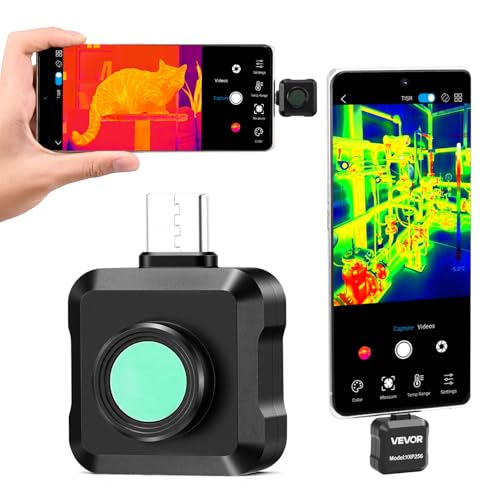
- VEVOR Thermal Imaging Camera for Android about$231.9025HZ refresh.
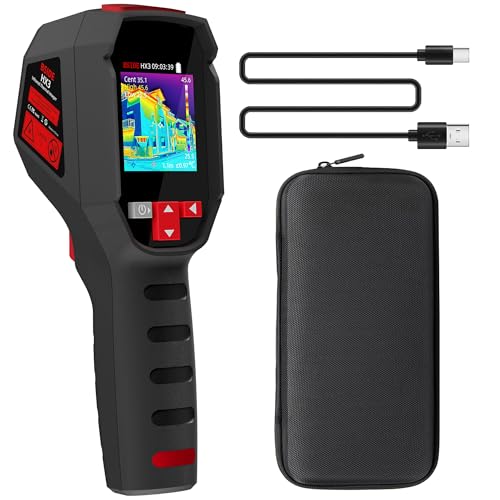
- BSIDE HX3 Handheld Thermal Camera about$199.9925Hz refresh.
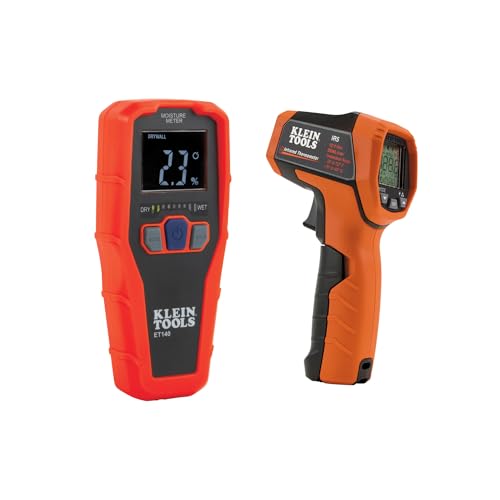
- Klein Tools Thermal & Moisture Leak… about$203.70
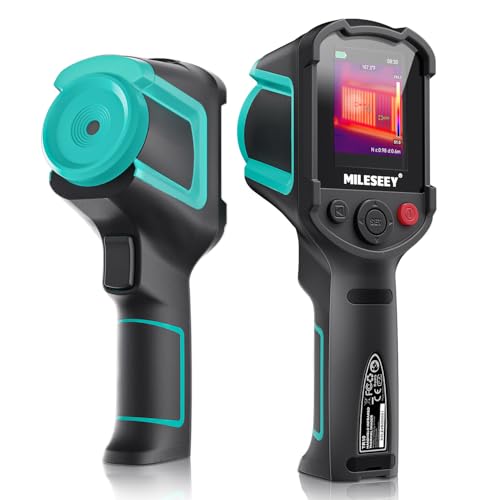
- Most PremiumMiLESEEY TR10 Handheld Thermal Imaging Camera about$24925Hz refresh.
The two house faults your eyes can't see
The fastest way I find a dead short on a phone logic board isn't a multimeter, it's a thermal camera. Feed the board a little current and the faulty component lights up on screen like a campfire, because a short turns electricity into heat and heat is the one thing a thermal sensor can't miss. The same physics works on a house. A wet patch inside a wall sits colder than the plaster around it, a missing batt of insulation glows through a ceiling on a hot day, and a draught under a door drags a cold streak across the frame that the camera paints in blue.
Those two faults, damp and heat leakage, share a nasty property: by the time you can see them with your eyes, they've been running for months. Damp announces itself as a paint bubble, a stain, or that musty smell in one corner of a room, and every one of those means the water has already won a long head start. Heat leaks never announce themselves at all, they just sit quietly inside your electricity bill every quarter, which is exactly where nobody looks for them.
This guide covers five tools between $89 and $249 that make both visible early: a Klein pinless moisture meter, two USB-C thermal cameras that plug into a phone, and two standalone units that need no phone at all. All five were in stock new on Amazon AU, and the main thing I'll push through the whole article is how to read the resolution numbers, because this category has a marketing habit that deserves daylight.
Why the timing matters: claims and kilowatt hours
Water damage sits near the top of home insurance claim categories year after year, and the direction of premiums has a lot of people carrying higher excesses or quietly dropping cover they used to have. That changes the maths on early detection. A slow leak found in month one is a plumber's visit and a repaint. The same leak found in month eight is stripped walls, drying fans, and either a claim that follows you to every renewal or a bill you're carrying alone. The whole argument for a $150 camera is moving that discovery date forward by half a year, and it only has to do it once.
The energy half is smaller per event and bigger per year. Heating and cooling dominate most household bills, and both leak through the same holes: gaps around doors and windows, thin or missing insulation, and glass. A thermal camera turns that from theory into a picture of your own hallway, which in my experience is what actually gets people to act. The fixes are mostly in the draught proofing kit price bracket, and the camera's job is telling you which three of the thirty possible gaps are the ones doing the damage.
These tools also pair with the sensors I've written about before. Leak sensors sit at the known risk points and scream when water arrives; a thermal camera and moisture meter hunt the leaks that start where no sensor is looking, inside walls, above ceilings, under showers. One is the alarm, the other is the search party, and a house with real water exposure eventually wants both.
What a thermal camera actually sees
A thermal camera measures surface temperature, nothing else. It doesn't see water, it doesn't see through walls, and it doesn't see inside anything. What it sees is that one patch of plasterboard sitting at 16 degrees while the wall around it reads 19, and it's your job to know why. Wet materials read cold for two reasons: evaporation pulls heat out of the surface, and damp plaster conducts heat differently to dry plaster. That cold signature is how a camera finds a leak, and it's also how it gets fooled, because a cold water pipe or a draught paints a similar patch.
The camera needs a temperature difference to work with. Scan a wall on a mild afternoon when inside and outside sit at the same temperature and everything reads flat grey, and people conclude the tool is a toy. Scan the same wall on a cold morning with the heating on, or a hot afternoon with the cooling running, and the building's faults appear like a developed photograph: draughts as streaks, missing insulation as warm or cold blocks, damp as a soft-edged cold stain. Ten degrees of difference between inside and out is where the picture gets easy to read.
One more honesty note: shiny surfaces lie to thermal sensors. Foil insulation, polished metal, even glossy paint reflect the heat of the room, including your own body heat, so a scan of a foil-backed wall shows you your own silhouette, not the wall. Matte surfaces tell the truth. None of this is a flaw in any particular camera, it's how the physics works, and knowing it is the difference between finding a leak and photographing your own reflection.
Resolution honesty: native pixels versus software upscaling
Here's the marketing habit. Most listings in this category lead with a big resolution and the letters TISR or similar, meaning super resolution, and the real sensor is a quarter of the headline. The Thermal Master and VEVOR listings in this guide are at least upfront about it: the Thermal Master P1 says its 320 x 240 picture is upgraded from a standard 160 x 120 sensor, and the VEVOR 512 x 384 model carries a native 256 x 192. The BSIDE HX3 goes the other way and prints one number, 240 x 240, without ever saying what sensor sits underneath it, which tells you something in itself. Upscaling smooths and sharpens the picture, and it can look better, but it can't create detail the sensor never captured.
So compare cameras on the native number, and calibrate your expectations to it. A native 160 x 120 sensor is 19,200 measurement points, which sounds small and is honestly plenty for house-scale work at two to four metres: damp patches, insulation gaps and draughts are big targets. Native 256 x 192 is 49,152 points, and the extra detail starts paying off on smaller, further targets, a warm crack in a ceiling, one warm breaker among twenty, a thin pipe run behind plaster. Past that, prices jump hard and the buyers are mostly professionals billing for reports.
The two spec lines that matter after resolution are sensitivity and refresh rate. Sensitivity, quoted in millikelvin, is the smallest temperature difference the sensor can distinguish, and the VEVOR and Thermal Master units quote 40 mK or better, which is enough to pull a subtle damp stain out of a flat wall. Refresh rate is comfort: every camera here runs 25 Hz, so the image pans smoothly instead of smearing, and that matters more than it sounds when you're sweeping a whole ceiling looking for one cold blotch.
The moisture meter confirms what the camera suspects
A thermal camera is a suspicion machine, and a moisture meter is the confirmation. The Klein unit in this guide is a pinless meter: hold it flat against the wall and it reads relative moisture through the surface to about 19 millimetres deep using an electromagnetic field, no holes, no pinpricks in the paint. The workflow that works is camera first to find the cold patch, then the meter over the patch and the dry wall beside it. If the cold spot reads wet and the surrounding wall reads dry, you've found water, not a draught, and you can hand a plumber a located problem instead of a vague worry.
Read the word relative properly. A pinless meter's number isn't litres or a percentage of anything absolute, it's a comparison scale, and the Klein is calibrated for drywall, masonry, hardwood and softwood specifically. Used that way, comparing like surface against like surface, it's a decisive little tool. Chasing exact numbers across different materials is how people talk themselves into or out of real problems, so map the wet zone's edges instead: where the readings fall back to match the rest of the wall, that's your boundary, and it tells you how long the water has been travelling.
The meter also answers the question the camera can't: is it still wet, or just stained? An old leak that's been fixed leaves a mark that looks alarming and reads bone dry, and that reading saves you ripping open a wall for a ghost. It works the other way too. After any water event, the meter tells you when the wall has actually finished drying, which takes weeks longer than it looks, and if a room persistently reads damp with no leak found, the fix is usually airflow or a dehumidifier rather than a plumber.
Phone plug-in or standalone
The two plug-in cameras here hang off a phone's USB-C port and use the phone's screen, battery and storage, which is why a native 256 x 192 sensor costs $232 instead of the four figures the same class of sensor commanded in a dedicated housing a few years back. The compromises are real, though. The VEVOR states Android support only, Android 8 and up, while the Thermal Master P1 also lists Apple's USB-C phones (the 15 and 16 series) and Windows tablets. They also depend on an app, and the app depends on permissions, updates and the phone maker's USB quirks, so check the app reviews for your exact phone model before buying.
There's a hardware cost I see from the repair side too. A USB-C port is soldered to the board through a few small pads, and a rigid dongle sticking 30-odd millimetres out of the port is a lever waiting for a bump. We replace ports killed exactly this way at our Erina workshop, and a port replacement costs more than the camera did. Treat a plugged-in camera like the delicate instrument it is: two hands, no pocket-carrying while attached, and pull it straight out, not sideways. The Thermal Master P1 is the lighter of the two dongles at 17g by its listing and asks the least of a port; the point stands for both.
The two standalone picks answer all of that at once. The BSIDE HX3 gives you a pistol grip, a 2.4 inch screen, a 2,500mAh battery and a memory card rated for more than 30,000 images, with no dependence on whichever phone you own next. The MiLESEEY TR10 takes the same shape for about $49 more, adding a native 192 x 192 sensor, 8 hours of runtime, 8GB of storage built in and a 6.6 foot drop test. That's why tradies buy standalone, and it's why one of those two is what I'd hand to anyone planning to use a thermal camera more than a few times a year, or anywhere dust and drops are part of the job.
Using them without fooling yourself
The classic mistakes are all avoidable. Scanning with no temperature difference tells you nothing, so pick your moment: early morning in winter, mid-afternoon in summer, heating or cooling running. Expecting to see the pipe inside the wall misreads the tool, you're looking for the surface symptom, a cold stain that doesn't match its surroundings. Condensation fools people constantly, a cold corner behind a wardrobe reads damp because it is damp, just from room air rather than a leak, and the meter plus a look at ventilation sorts that out. And a window scan that glows isn't broken glass, it's just glass doing what single glazing does, which is where window film earns its spot.
On electrical: a thermal camera is brilliant at spotting a warm powerpoint, an overloaded powerboard or one breaker running hotter than its neighbours, and that's a genuinely useful early warning. Looking is yours; touching is not. Anything inside a switchboard or behind a plate is licensed electrician territory in Australia, full stop. Use the camera to take a picture of the warm thing and show the sparky, which turns a vague call-out into a targeted one. The same look-don't-touch rule applies to anything on a roof.
Last, keep your findings. Save the thermal image and the meter readings with dates, because a documented history changes conversations: with a plumber quoting the fix, with a landlord who reckons the damp patch is new, with an insurer assessing when a leak started. The camera that found the problem is also the camera that proves you found it early and acted, and I've watched that evidence pay for the tool several times over.
The 5 picks, $89 to $249
Want one answer? If you're after a handheld thermal leak detector, it's the BSIDE HX3: its own screen, its own rechargeable battery and a pistol grip, so you aren't tying up your phone while you're lying under a vanity. The MiLESEEY TR10 is the other standalone if you'd rather a slimmer body. A thermal picture only shows you a cool patch, though, so the Klein pinless moisture meter at the end of the list is what tells you the patch is actually wet before anyone cuts plaster.
Prices are Amazon AU at time of writing (21 September 2026) and move week to week. Ranks are Amazon AU category sales ranks, checked the same day.

BSIDE HX3 Handheld Thermal Camera
ASIN B0DY7NV8SP • $199.99 • Sold by AIMOmeter-AU on Amazon AU
The HX3 is the point where you stop borrowing your phone. Pistol grip, 2.4 inch colour screen, a 2,500mAh rechargeable battery on board and a zip case in the box, so what goes up the ladder with you is one object rather than a phone with something rigid hanging off its charge port. BSIDE aims the listing squarely at home inspection, HVAC and heat pump work, which is the same sweep this article is about: ceilings, cornices, the wall behind a shower, and the perimeter of every external door on a cold morning.
It runs at 25 Hz across a -20°C to 550°C range with 15 selectable palettes, and it writes to a memory card the listing rates for more than 30,000 images, with USB to a computer when you want a scan on a screen bigger than 2.4 inches. That 550°C top end is the same ceiling the VEVOR and the MiLESEEY reach, and only 50°C short of the Thermal Master's 600°C, so the temperature range is not what limits this one to house work.
Where it earns its place is the format, not the sensor. At $199.99 it is the entry to this page's standalone shelf, and it removes the two failures that actually strand people mid-job: a flat phone, and a USB-C port that has been levered on once too often. If the plan is to keep a thermal camera in the cupboard for the next damp patch rather than to chase fine detail all day, start here.
Honest caveats: BSIDE prints a single 240 x 240 figure and never splits it into a native sensor and an upscaled output the way the MiLESEEY and VEVOR listings do, so on the one number this article cares most about you are taking the listing at its word. The listing states no sensitivity figure in mK, no IP rating and no drop rating, so treat it as indoor gear and read the two picks below it if faint damp shadows are the job. The 2.4 inch screen is the smallest on this page.
Best for: A first thermal camera that needs no phone, no app and no adapter, for occasional scanning around the house.
Type: Standalone handheld, built-in screen • Resolution: 240 x 240 (listing states one figure, native not disclosed) • Screen: 2.4 inch 320 x 240 colour TFT • Refresh: 25 Hz • Range: -20°C to 550°C • Palettes: 15 • Battery: 2,500mAh rechargeable, charging cable included • Storage: Memory card, over 30,000 images, USB export • Price: $199.99 at time of writing • Rank: #3,013 in Amazon AU overall
View on Amazon AU
MiLESEEY TR10 Standalone Thermal Camera, 192x192
ASIN B0D93Q8HRN • $249 • Sold by Mileseey AU Direct on Amazon AU
This is the less costly way to stop depending on a phone. The TR10 is a handheld with its own screen and its own battery, and its listing does the thing this page keeps asking for: it quotes the native sensor, 192 x 192, separately from the 240 x 240 super resolution figure on the front of the box. That native grid is 36,864 real measurement points, nearly double the Thermal Master P1's, and it is enough to pick a thin warm pipe run out of the plaster around it. Refresh is 25 Hz, stated accuracy is within 2°C, and the range runs -20°C to 550°C.
The rest of the specification is aimed at people who will actually use it. Thermal sensitivity is quoted under 50 mK, high and low temperature alarms fire the moment a reading crosses a threshold you set, and the unit locks and displays maximum and minimum on its own. Emissivity is adjustable per material, which is the setting that keeps readings honest when you move from a painted wall to bare metal and wonder why the numbers moved with you. Storage is 8GB built in, so images stay on the camera instead of filling a phone, and the 3,000mAh battery is rated for 8 hours of continuous work.
Against the BSIDE HX3 above it the trade reads cleanly. Both work without a phone, but the TR10 states a native 192 x 192 sensor and a sensitivity figure where the HX3 states neither, and for about $49 more it adds 8GB of built-in storage, a 6.6 foot drop test and a recessed lens, which covers the failure that actually happens: a camera going off a workbench onto a concrete floor, lens first. The HX3 answers with the lower entry price and the same 550°C top end, which is a fair answer if the camera is going in a cupboard rather than a tool bag. Neither of them hangs off a USB-C port, and that on its own is worth something.
Honest caveats: sensitivity is stated as under 50 mK, a step behind the 40 mK or better the VEVOR and Thermal Master claim, so the faintest damp shadows will be harder work. The native 192 x 192 sensor also sits below the 256 x 192 the dearer VEVOR starts from, so if you already own an Android phone that plug-in still resolves more per dollar. And there is no IP rating on the listing, only the drop test.
Best for: A thermal camera that does not depend on a phone, an app or a USB-C port, without paying the top of this page for it.
Type: Standalone handheld, built-in screen • Native sensor: 192 x 192 IR (super resolution display 240 x 240) • Sensitivity: NETD under 50 mK (listing) • Accuracy: within 2°C • Refresh: 25 Hz • Range: -20°C to 550°C • Battery: 3,000mAh, 8 hours continuous • Storage: 8GB built in • Durability: 6.6 foot drop test, recessed lens • Price: $249 at time of writing • Rank: #1,651 in Amazon AU overall
View on Amazon AU
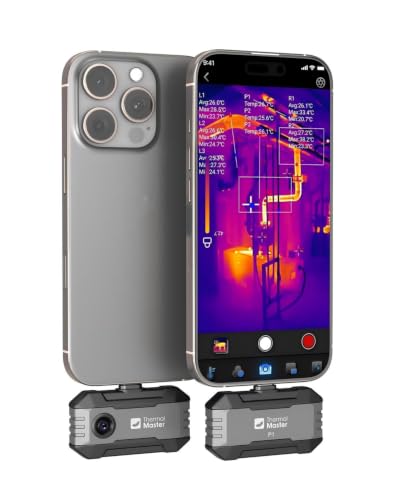
Thermal Master P1 Thermal Camera for Phones, 160x120 Native Sensor
ASIN B0GGGPFMZC • $169.15 • Sold by Thermal Master Official on Amazon AU
This is the lowest-priced thermal camera on this page and still a genuinely usable one, and the listing is clear about what you're buying: its X³ processing upgrades a standard 160 x 120 sensor to a 320 x 240 picture on screen. At $199 from Thermal Master's own Amazon AU store, it plugs into the USB-C port of an Android phone, one of Apple's USB-C phones in the 15 and 16 series, or a Windows tablet, and the phone provides the screen, the battery and the storage. Sensitivity is quoted at under 40 mK, the refresh rate is a smooth 25 Hz, and the measurement range runs -20°C to 600°C with accuracy of ±2°C or ±2%, which covers everything from a cold damp stain to a cooktop element.
The feature list is the practical one. The listing gives 15x digital zoom, high and low temperature auto-tracking, an isotherm mode for picking out hotspots quickly, and manual settings for emissivity, ambient temperature and distance, which is what keeps readings honest when you move from a painted wall to bare metal. It weighs 17g and draws 0.32W from the phone, and the listing quotes 5 to 8 hours of continuous use with no battery of its own to charge. The box includes a zipper carry case and a 50cm extension cable for hard-to-reach spots. Setup is install the Thermal Master app and plug in. For house-scale targets at house-scale distances, damp patches, missing insulation, draughts, warm powerpoints, the native 160 x 120 sensor resolves what you need it to resolve. The app store reviews for your exact handset are worth two minutes before you order.
Buy this one if you're curious, doing one house audit and a handful of follow-ups, and want the lesson without the bigger spend. My honest experience with entry thermal gear is that the sensor stops being the limit long after the user does: at this level, picking the right scanning conditions matters more than extra pixels, and everything you learn about reading a thermal image transfers straight up the range. Plenty of people will find this is the only thermal camera they ever need, and the ones who outgrow it will know exactly why, and exactly which spec to pay for next time.
Honest caveats: Native resolution is 160 x 120, not the 320 x 240 headline, so fine detail at distance is beyond it. It has no screen or battery of its own, so it depends on your phone and the app, and app quality on your specific handset is worth checking before buying. Apple phones with a Lightning port need an adapter that is sold separately. The dongle levers on your USB-C port, so handle it like an instrument.
Best for: A first thermal camera for one energy audit, damp hunting and the occasional curiosity scan.
Native sensor: 160 x 120 IR (X³ display 320 x 240) • Sensitivity: under 40 mK (listing) • Refresh: 25 Hz • Range: -20°C to 600°C, ±2°C or ±2% • Connection: USB-C: Android phones, Apple's 15 and 16 series, Windows tablets • Modes: 15x zoom, isotherm, high/low tracking • Weight: 17g • Price: $199 at time of writing • Rank: Not stated on the listing (Amazon AU)
View on Amazon AU
VEVOR Thermal Camera for Android, 256x192 Native Sensor
ASIN B0GVHB1NNH • $231.90 • Sold by VEVOR Store AU on Amazon AU
This is the bigger of the two plug-ins, and the same honesty applies: the 512 x 384 on the box is TISR upscaling, and the native sensor underneath is 256 x 192, the highest native resolution on this page. At $231.90 from the VEVOR Store AU storefront, what the extra spend buys over the Thermal Master P1 is a sensor with about two and a half times the measurement points feeding the upscaler, and the difference on screen is obvious: edges hold, small targets stay distinct at distance, and the upscaled image starts from enough real detail that the processing flatters it rather than inventing it. Sensitivity is the same 40 mK or better, refresh is 25 Hz, and the range runs -20°C to 550°C.
The rest of the feature list is the standard VEVOR set. The PIP overlay that pins the thermal image onto the visible camera view, fifteen palettes, automatic hot and cold tracking with centre, max and min readouts, configurable high and low temperature alarms that flag a fault the moment it crosses your threshold, photo and video capture, and the same QR-code app setup on Android 8 or newer. It also carries the only sales rank of the two plug-ins, #2800 in Amazon AU's Automotive Diagnostic, Test & Measuring Tools, which tells you who's buying it: people pointing it at engines and brakes as well as walls.
Choose it over the Thermal Master P1 if you want the biggest, smoothest on-screen picture and a native 256 x 192 sensor rather than 160 x 120, and you're happy paying about $33 more for it. Where this one earns its keep is communication: a landlord, a strata manager or a client who has never read a thermal image before will follow the upscaled 512 x 384 picture without any coaching, and sometimes the argument the image wins is worth more than the pixels underneath it.
Honest caveats: The 512 x 384 headline is software upscaling from a native 256 x 192 sensor, so compare it on that basis, not the box number. Android only, nothing stated for Apple devices. A rigid dongle on your phone's USB-C port is a lever, so handle it like an instrument.
Best for: The best-looking phone-based image here, and a 550°C range that suits automotive jobs.
Native sensor: 256 x 192 IR (TISR display 512 x 384) • Sensitivity: 40 mK or better (listing) • Refresh: 25 Hz • Range: -20°C to 550°C • Connection: USB-C, Android 8 and up • Modes: PIP overlay, 15 palettes, alarms, photo and video • Price: $231.90 at time of writing • Rank: #2800 in Automotive Diagnostic, Test & Measuring Tools (Amazon AU)
View on Amazon AU
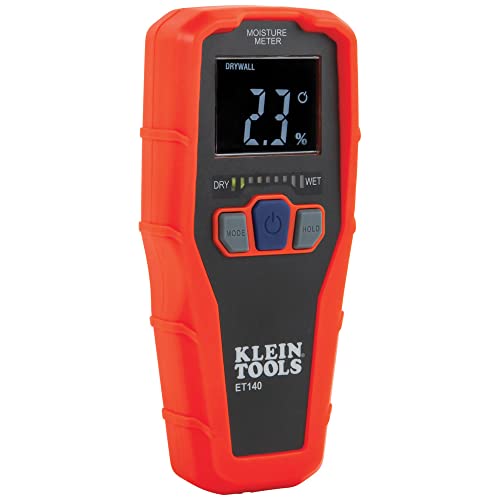
Klein Tools Pinless Moisture Meter, 19mm Depth
ASIN B07SZX8QXH • $89 • Ships from Amazon AU
Start here if the question is specifically about damp, because this is the tool that gives you an answer instead of a picture. It's the top seller of the whole page for a reason, sitting at #11 in Amazon AU's Measuring & Layout Tools at $89, sold by Amazon AU. Pinless means non-invasive: it reads relative moisture through the surface to a depth of about 19 millimetres using an electromagnetic field, so you can sweep a whole wall in a minute without leaving a single pinhole in the paint. For renters documenting a damp problem for a landlord, that no-marks part isn't a nicety, it's the whole reason this style of meter exists.
Klein built it like a jobsite tool rather than a gadget. There are four calibrated material modes, drywall, masonry, hardwood and softwood, a bright reverse-contrast display with a nine-segment LED bar graph you can read in a dark cupboard, and the housekeeping features that matter in practice: reading hold, a low battery warning and auto power-off. It ships with the 9V battery and it's rated to survive drops to 2 metres, which is less about clumsiness and more about what happens to everything that lives in a toolbox. There's no app, no pairing and no firmware, and for a tool you might grab twice a year in a hurry, that's exactly right.
The honest frame: this meter and a $150 thermal camera answer different questions, and the meter's answer is the one a plumber acts on. Wet or dry, spreading or contained, still wet or long dried out. If you only buy one tool from this page for a suspected leak, buy this one, and add the camera later when you want to hunt for problems rather than confirm them. It's also the pick I'd point renters at first, because a dated set of readings from a named brand meter is the kind of evidence that moves a landlord conversation from opinion to fact.
Honest caveats: Readings are relative, not absolute percentages, and it's calibrated for drywall, masonry, hardwood and softwood only, so results on tile, carpet or metal surfaces aren't meaningful. Sensing depth is 19 millimetres, which covers linings and won't reach deep into a cavity or slab.
Best for: Confirming whether a suspect patch is actually wet, mapping its edges, and proving a wall has dried.
Type: Pinless moisture meter, EMF sensing • Depth: Up to 19mm below the surface • Modes: Drywall, masonry, hardwood, softwood • Display: Reverse-contrast, 9-segment LED bar graph • Extras: Reading hold, low battery warning, auto power-off • Durability: Rated for drops to 2m • Includes: 9V battery, manual • Price: $89 at time of writing • Rank: #11 in Measuring & Layout Tools (Amazon AU)
View on Amazon AUSide-by-side comparison
| Product | Price | Best for |
|---|---|---|
| Gas Leak Detector | ~$49.99 | Gas leaks only, no thermal image |
| Klein Tools Pinless Moisture Meter with EMF… | ~$89 | Confirming damp, no heat image |
| Gas Leak Detector Portable Combustible Gas… | ~$99.99 | Gas leaks only, many gases |
| Thermal Master P1 USB-C Thermal Camera | ~$169.15 | Lowest-priced thermal camera, phone powered |
| VEVOR Thermal Imaging Camera for Android | ~$231.90 | Sharpest phone image |
| BSIDE HX3 Handheld Thermal Camera | ~$199.99 | First standalone camera, no phone |
| Klein Tools Thermal & Moisture Leak… | ~$203.70 | Damp and heat in one kit |
| MiLESEEY TR10 Handheld Thermal Imaging Camera | ~$249 | Standalone with 8 hour battery |
What we see fail at the bench: heat, damp and the boards they kill
A repair bench is where the consequences of invisible heat and slow water end up, which is why I own thermal gear in the first place. The camera that finds a damp wall on Saturday finds a shorted capacitor on Monday, and the failure patterns from both jobs overlap more than you'd think. Three of them are worth knowing before you buy anything on this page, because two of them change how you should use it.
The short that glows before it dies
In the workshop, thermal imaging earns its keep finding shorts. A board that draws current with nothing on screen has a component quietly turning that current into heat, and under the camera it glows against the cold board like a porch light. The same trick works at house scale: a powerpoint running warm with nothing plugged in, one breaker hotter than the row, a powerboard working harder than its load justifies. Those are early warnings worth photographing and showing an electrician. Heat before failure is one of the most consistent patterns in electronics, and a thermal sensor is the one tool at this price that sees it coming.
Slow damp, dead electronics
Devices that live in persistently damp rooms corrode from the inside long before anyone notices the room has a problem. We open laptops from damp flats and find green crust on connector pins and corrosion tracking across boards that never met a spilled drink, just months of humid air cycling through cooling vents. The write-up on what water does inside a device covers the mechanism, but the prevention is exactly this article: find the damp source early, fix it, and dry the room properly. If a wall reads wet, assume the electronics nearest it are living the same life.
USB-C ports killed by levering
The port replacement jobs that come through the shop have a recurring cause: something rigid plugged in, then a knock, a drop, or a pocket. A thermal dongle is exactly that shape, and some weigh enough to matter. The port itself rarely rips clean off; instead the solder joints crack, charging goes intermittent, and the fault gets blamed on cables for a month first. If you buy a plug-in camera, treat the paired phone as a bench instrument while the dongle's attached: two hands, no walking around with it hanging, straight-out removal. The Thermal Master P1, at 17g by its listing, is the kindest option here, and neither of them forgives being levered.
Decision tree: which one should you actually buy?
- Suspect a specific damp patch and just want the truth about it? → The Klein pinless moisture meter at $89. Wet or dry, spreading or contained, still wet or long dried. It's the reading a plumber will act on.
- First thermal camera, one house audit in mind? → The Thermal Master P1. A native 160 x 120 sensor, 25 Hz, and every scanning skill you build transfers up the range later.
- Want the sharpest on-screen picture, or scanning cars as well as walls? → The bigger VEVOR at $232. A native 256 x 192 sensor upscaled to 512 x 384, the highest native resolution here, with the 550°C range automotive work wants.
- Want a camera that does not depend on a phone, without paying the top of the page? → The BSIDE HX3 at $199.99. Its own screen and a 2,500mAh battery, 15 palettes, a 550°C top end and a memory card rated for more than 30,000 images.
- Using it often, sharing it, or no phone that suits a USB-C dongle? → The MiLESEEY TR10 at $249. A native 192 x 192 sensor, its own screen and 8 hour battery, 8GB of storage built in and a 6.6 foot drop test, with no phone port at risk.
- Already found water near a phone, laptop or drive, or a device from a damp room acting up? → Power it off and don't charge it. Bring it to the workshop in Erina early, corrosion is progressive and the good outcomes belong to the early arrivals.
Frequently asked questions
Can a thermal camera see water inside a wall?
Not directly. A thermal camera only reads surface temperature, so what it actually shows is the symptom: a damp section of plaster sits colder than the dry wall around it because evaporation pulls heat out of the surface. That cold patch is a strong clue, not proof, since draughts, cold pipes and condensation paint similar shapes. The reliable method is camera first, moisture meter second. The camera tells you where to look, the meter pressed on the suspect patch tells you whether it's genuinely wet and how far the wet zone extends. Used as a pair, they'll locate most hidden leaks to within a hand-span.
Do I need a thermal camera, or is a moisture meter enough?
For a known damp spot, the meter alone answers it, and at $89 the Klein is the smaller spend on the way to a decision. The camera earns its place when you're hunting rather than confirming: scanning whole rooms for a leak you can smell but can't find, auditing a house for draughts and missing insulation before winter, or checking a ceiling after a storm without getting into the roof space. They answer different questions. The camera says something is odd here, the meter says it's wet and this is its boundary. If you're only buying one and there's a specific worry, buy the meter; if you're auditing, buy the camera.
What resolution do I actually need in a thermal camera?
Compare native sensor resolution, not the upscaled headline number, because super resolution processing can't create detail the sensor never captured. For house-scale targets at two to four metres, damp patches, insulation gaps, draughty frames, a native 160 x 120 sensor does the job, and that's the Thermal Master P1. Native 256 x 192, which the dearer VEVOR carries, starts resolving small and distant targets like individual breakers or thin pipe runs. The MiLESEEY TR10 sits between the two at a native 192 x 192. Past that, prices climb steeply into professional territory. Sensitivity matters as much as pixels for damp work: 40 mK or better pulls subtle stains out of a flat wall.
Do these thermal cameras work with Apple phones?
Only one of the two plug-in units lists Apple support. The Thermal Master P1 lists Apple's USB-C phones in the 15 and 16 series and says older Lightning models need a separate adapter, while the VEVOR states Android support only, Android 8 and newer. If your Apple phone is older, or you'd rather not rely on an adapter, the practical answer is either of the standalone units, the BSIDE HX3 or the MiLESEEY TR10: their own screens and batteries mean phone compatibility stops being a question at all, and they sidestep the USB-C port-strain problem that comes with hanging any rigid dongle off any phone.
Can I use a thermal camera to check my switchboard or wiring?
You can look, and looking is genuinely useful: a powerpoint running warm with nothing plugged in, one breaker hotter than its neighbours, or a powerboard glowing under load are all early warnings worth catching. What you can't do is go past looking. Anything inside a switchboard, behind a wall plate or in a ceiling's wiring is licensed electrician work in Australia, and the rules exist because the failure mode is lethal. The best use of the camera is evidence: photograph the warm component, note when and under what load, and hand that to a sparky. It turns a vague call-out into a fast, targeted one.
When is the best time to scan my house for draughts and insulation gaps?
When the temperature difference between inside and outside is biggest, because the camera can only show contrast that exists. A cold winter morning with the heating running, or a hot summer afternoon with the cooling on, gives you ten degrees or more of difference, and at that point faults are obvious: draughts show as cold streaks around doors and frames, missing ceiling insulation as distinct warm or cold rectangles, and thermal bridges as stripes along studs. A mild spring afternoon shows you a flat grey nothing. Scan from inside, work room by room, and save the images so you can check your fixes against them later.
Related buying guides
Found damp near your electronics? Move fast
Corrosion doesn't wait for the plumber. If a wall reads wet near a phone, laptop, console or drive, or a device from a damp room has started playing up, power it down and bring it in to Erina. We'll open it, check the board for corrosion and tell you honestly what it needs, and what it doesn't, before you spend anything.
Visit our Erina workshop Book Online