Prices from Amazon AU, updated daily. Swipe or use the arrows for more.
Disclosure: This article contains affiliate links to amazon.com.au. If you buy through one of these links iFix may earn a small commission at no extra cost to you. It doesn't change which products we recommend. We focus on what actually lasts based on 16 years of repair-shop experience.
Quick summary4 picks
- Entry PickMeta Quest 3S 128GB | VR Headset | 33% More… about$568
- PlayStation VR2 about$629
- Meta Quest 3 512GB | VR Headset | 30%… about$968
- Most PremiumMeta Quest 3 512GB + Elite Strap w Battery about$1,186
Standalone or tethered: the first decision
Most of the VR headsets that come into the shop are Meta Quests, and the reason is simple: a Quest is a whole computer strapped to your face. The Snapdragon XR2 Gen 2 chip, the battery, the cameras and the storage all live in the headset, so there's no console or gaming PC to buy first and no cable to trip over. A PlayStation VR2 works the other way round. It's a display and a set of sensors, and the PS5 does all the rendering, which is why Sony's listing pins its 4K HDR picture and 110-degree field of view on the power of the console rather than the headset.
That split matters more than any resolution number on the box. If there's already a PS5 under the TV and the person who'll use the headset mostly plays Sony's games, the PS VR2 is usually the sensible add-on, because you're paying for a headset rather than a second computer. If there isn't a PS5, a Quest makes more sense nine times out of ten, and it's the one I'd hand to a family, since anyone can pick it up and play without a console being switched on in another room and without anyone else needing the TV.
PC VR is the third option and it's the one I'd be careful with. Quest headsets can run PC VR games through Meta's Link app, either over a USB-C cable or over Wi-Fi, but none of the listings on this page mention it, so check Meta's current PC requirements before you buy on that basis. A dedicated PC-only headset wasn't available on Amazon AU from an Australian seller in this price band when I checked, which is why there isn't one in the picks. I'd rather leave a category out than send you to an overseas seller with no local returns.
What the spec sheets actually tell you
VR listings are written by the same people who write TV listings, so expect a lot of capital letters. Strip them back and the numbers worth comparing are fairly few. Both Quests on this page run the same Snapdragon XR2 Gen 2 chip with 8GB of RAM, which means they'll run the same games at broadly the same speed. The real difference between them is the screen, and Meta's own listing for the Quest 3 claims a nearly 30 percent jump in resolution. You'll notice that most on text, on menus and on anything far away in a game, and much less in fast games where nothing sits still long enough to read.
The 3S listing doesn't state its lens type or its per-eye resolution, and I'd treat that as a hint rather than an accident. In my experience the entry headset in a range is the one where the spec that costs money quietly goes missing from the box. That doesn't make the 3S a bad buy at all. It's the number one seller in Amazon AU's Virtual Reality Hardware & Accessories category for a reason, and for most of the games people actually play on it, the gap in picture is smaller than the gap in price would suggest.
PS VR2 is the odd one out because it lists features the Quests don't: eye tracking, a feedback motor in the headset itself and 3D audio. Eye tracking is the interesting one, because it lets the console render sharply only where you're looking, which is part of how a PS5 keeps up with two high-resolution screens at once. It's also one more sensor and one more ribbon cable inside the headset, which is the trade every extra feature makes. More parts usually means more to go wrong, though I haven't seen eye tracking itself fail often.
Storage, and how much you actually need
Storage is where the Quest range catches people out, because you can't add any later. There's no memory card slot, so whatever you buy is what the headset has for its whole life. The 3S on this page is the 128GB model and the Quest 3 is the 512GB model, and the price gap between them pays for the sharper screen as much as for the extra storage, so don't judge it on gigabytes alone.
For most households 128GB is enough. Most Quest games are a few gigabytes each, a handful of the big ones run well past that, and the headset also keeps recorded clips and passthrough captures until you clear them out. If one person plays a few favourites and deletes what they've finished, 128GB lasts for years. If a family shares one headset and nobody ever deletes anything, it'll fill, and the usual symptom is a game update that refuses to install the night before someone's birthday party.
PS VR2 games live on the PS5's own drive, which you can upgrade with an M.2 SSD, so storage simply isn't a headset question on that side. If you're comparing the two on total cost, remember to count the console you already own on one side of the sum and the bigger Quest on the other, because a 512GB Quest 3 and a PS VR2 aren't as far apart in real cost as the shelf prices make them look.
Straps, face pads and fit
The part of a VR headset that wears out first is almost never the electronics. It's the strap and the foam face pad, because they take sweat, skin oil and the pull of the headset every single session. The standard Quest strap is a soft fabric band, and in my view that's the weak point of an otherwise well-built headset: it lets the weight hang off your face rather than sitting on the back of your head, and it stretches a little more every month it's used.
That's why the Quest 3 bundle with the Elite Strap with Battery is on this list. The listing says the rigid strap spreads the weight more evenly and reduces pressure on the face, and the battery built into the back of it adds up to two hours of play. Moving weight to the back of your head balances the headset better than any third-party foam pad ever does. The bundle costs more than the Quest 3 on its own, so check the current gap on the day before you order, because it only makes sense when it's less than buying the two separately.
Face pads are a hygiene part, not a lifetime part. If a headset is shared, buy a spare wipeable cover early and swap between them, and never use alcohol wipes or household spray on the lenses, because the coatings on VR lenses mark more easily than the coatings on glasses do. A dry microfibre cloth, wiped in circles from the centre out, is all they need. If you wear glasses, use the spacer that comes with the headset or a prescription insert rather than pressing your frames against the lenses.
Battery life and charging habits
Every headset on this page except the PS VR2 runs on a sealed lithium-ion battery, and both Quest listings quote two-plus hours per charge. That's a fair figure for a new headset, and it'll drop as the cells age, the same as it does on a phone. Lithium-ion packs lose capacity fastest when they're kept full and warm, and a headset left sitting on its charger in a sunny room all week is pretty close to the worst case you could design.
The habit that does the most damage is charging while playing. The cable sits in the USB-C port at an angle, the player turns and pulls on it, and over months the port's solder joints crack or the socket wears loose until it only charges at a certain angle. We see the same fault on game controllers and phones, and it's the same repair at the Erina shop: a new port, soldered to the board. If you want longer sessions, the Elite Strap's built-in battery is a much kinder answer than a cable hanging off the side of your head.
Use a decent charger, too. A no-name USB-C brick that sags under load can make the headset charge slowly or drop the connection halfway, and the problems with bad chargers are the same here as they are on phones. If you'd like to top up between sessions away from a wall socket, a good USB-C power bank does the job well, as long as it sits on the table and not on the headset.
Sunlight, heat and the screens you can't see
This is the one fault I'd warn every VR owner about, because it's permanent and it takes seconds. The lenses in a VR headset are magnifiers. Leave the headset face-up on a windowsill, a desk by the window or a car seat, and they'll focus sunlight onto the screens behind them, exactly like a magnifying glass on paper, and burn a mark into the display that you'll then see in every game from that day on.
There's no repair for that short of a new display module, and on a Quest that usually costs enough that people replace the headset instead. The prevention is simple and boring: store it in its box or a closed case, lenses facing down, away from windows. If the headset lives in a kid's bedroom with a sunny window, that rule is worth writing on the lid of the box, because a curtain left open on a Saturday morning is all it takes.
Heat is the slower version of the same problem. A headset left in a hot car in an Australian summer can see cabin temperatures well past what a lithium-ion pack is comfortable with, and the glue holding the lenses and the face interface softens too. Treat it the way you'd treat a phone: it can travel in the car, but it shouldn't live there, and it should never be left on the dashboard while you duck into the shops.
Controllers and tracking
Quest controllers run on AA batteries and track using the headset's own cameras, so there are no base stations to mount on the walls. That's simple, but it means tracking only works where the cameras can see your hands, and quick movements behind your back or tight against your chest can drop out for a moment. Good, even lighting helps more than any setting does. A very dark room or bright sun through a window both make tracking worse.
The faults we see on controllers are mostly the boring ones: battery doors that crack, contacts that corrode when a leaking AA is left in a drawer for a year, and thumbsticks that start to drift. Drift happens on VR controllers for the same reason it happens on console pads, which is a worn sensor under the stick, and it's usually fixable rather than a reason to buy a whole new headset or a new pair of controllers.
PS VR2 uses its own Sense controllers, which charge over USB-C rather than taking AAs. Tracking on that side is handled from the headset too, so the same lighting advice applies. Whichever headset you buy, take the batteries out of any controller that goes in a drawer for more than a few weeks, and keep the wrist straps on, because a controller thrown into a TV is a much more expensive fault than stick drift.
Space, Wi-Fi and the room you'll play in
A standalone headset needs less gear than people expect, but it needs more room. Plan on a clear patch of floor about two metres square for standing games, with nothing breakable at arm's height and a rug or a mat underfoot so the player can feel where the middle is. Ceiling fans are the one I'd mention twice, since an arm swung overhead finds the blades quickly and neither the fan nor the controller enjoys it.
Wi-Fi matters for downloads, updates and any wireless PC streaming. Quest game files are big, so a slow connection at the far end of the house turns a new game into an evening's wait. If the headset will be used in a back room the router barely reaches, a mesh Wi-Fi system will usually fix that better than moving the headset closer to the router.
Audio is the last piece. Both Quests and the PS VR2 have their own sound built in, and many players are happy with it. If you want closed-back sound or a better microphone for multiplayer, check what audio output the headset you choose offers on its current listing before you plan around a wired set, then have a look at the picks in our gaming headsets guide.
The 4 picks, $568 to $1,186
Prices are Amazon AU at time of writing (13 October 2026) and move week to week. Ranks are Amazon AU category sales ranks, checked the same day.

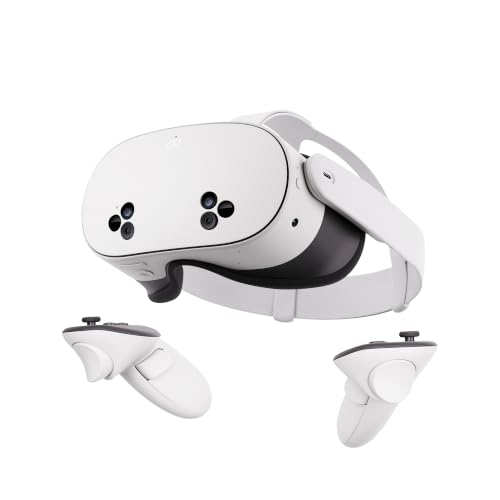
Meta Quest 3S 128GB Standalone VR Headset
ASIN B09MJRJD4K • $568 • Ships from Amazon AU
The Meta Quest 3S is the headset I'd point most people towards, and Amazon AU's rank agrees: it was number one in the Virtual Reality Hardware & Accessories category when I checked, ahead of its own bigger sibling. It's a completely standalone headset, so there's nothing else to buy before you can play. Inside is the same Snapdragon XR2 Gen 2 chip and 8GB of RAM as the Quest 3, which means it runs the same games, and the listing quotes two-plus hours of battery and full-colour passthrough from two RGB cameras. Passthrough is the part people underrate. It lets you see the room through the headset without taking it off, so you can find a drink or check where the coffee table went, and it's what makes mixed-reality games possible at all.
The compromise is the screen. Meta's listing for the 3S doesn't state its resolution or its lens type, while the Quest 3 listing leans hard on a nearly 30 percent jump in sharpness, and in my experience you notice that gap on text and distant detail far more than in fast games. The 128GB of storage is the other limit worth thinking about. There's no card slot, so it's fixed for life, and a shared family headset will fill it faster than a single player who deletes finished games. For a first headset, a gift, or a second headset in a house that already has one, it's the right amount of headset for the money.
What I'd do on day one: put it straight into a case or its box whenever it isn't on someone's head, lenses facing down, because sunlight through the lenses can burn the screens in seconds. Swap the standard fabric strap for something more rigid if sessions run past half an hour, since the soft band lets the weight hang off the face. And don't charge it while playing. A cable pulled sideways out of the USB-C port is the most common way these end up needing a new port soldered in.
Honest caveats: Honest caveats: the listing doesn't state the display resolution, the lens type or a field-of-view figure, so you're comparing it with the Quest 3 partly on trust. The 128GB is fixed with no expansion. The three-month Horizon+ trial included on the listing rolls into a paid subscription if you don't cancel it, so put the end date in your calendar.
Best for: First-time VR buyers and families who want a standalone headset with no console or PC needed.
Chip: Snapdragon XR2 Gen 2 • RAM: 8GB • Storage: 128GB, no expansion • Battery: 2+ hours (listing) • Passthrough: Dual RGB colour cameras • Needs: Nothing else, fully standalone • Seller: Amazon AU • Rank: #1 in Virtual Reality Hardware & Accessories (Amazon AU)
View on Amazon AU
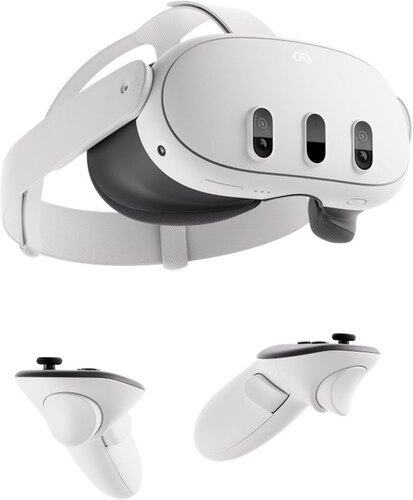
Meta Quest 3 512GB Standalone VR Headset
ASIN B0CDFGCRW6 • $968 • Ships from Amazon AU
The Quest 3 is the one I'd buy for myself, mostly for the screen. Meta's listing claims a nearly 30 percent leap in resolution on what it calls the 4K+ Infinite Display, and that's the difference you notice in the first five minutes: menus are crisper, text in games is readable without leaning in, and distant detail holds together instead of shimmering. It was number two in Amazon AU's Virtual Reality Hardware & Accessories category when I checked, right behind the 3S. Under the screen it's the same Snapdragon XR2 Gen 2 chip and 8GB of RAM, so it isn't faster than the 3S, just clearer, and the listing quotes the same two-plus hours per charge and the same pair of RGB colour cameras for passthrough.
The 512GB of storage is the other half of the price gap, and for a shared headset it's the half I'd value most. It's four times what the 3S has, and like the 3S there's no card slot, so you're choosing the headset's storage for life on the day you buy it. Big games, recorded clips and a few kids' worth of installs fit without anyone having to delete somebody else's favourite. If the plan is to stream PC VR games over Meta's Link app, the sharper screen is also what makes PC titles look like their screenshots, though check Meta's current PC requirements first, because none of these listings cover it.
The care advice is the same as the 3S, and it matters more on a headset that costs nearly twice as much. Store it lenses down and out of the sun, keep a spare face cover if it's shared, and wipe the lenses only with a dry microfibre cloth. The standard strap is the weak point here too. If you already know sessions will run long, the Elite Strap bundle further down the list costs more up front but saves you buying a third-party strap a month later. It's also the version I'd pick if the headset is a gift for someone who'll use it most evenings, since the strap is the upgrade they'd ask for next.
Honest caveats: Honest caveats: it isn't faster than the Quest 3S, so you're paying for the screen and the storage rather than performance. Battery life is the same two-plus hours. The standard strap is a soft band that most long-session players end up replacing. As with the 3S, the included Horizon+ trial renews as a paid subscription unless you cancel it.
Best for: Anyone who reads menus and text in VR, shares a headset, or wants the clearest Quest picture.
Chip: Snapdragon XR2 Gen 2 • RAM: 8GB • Storage: 512GB, no expansion • Display: 4K+ Infinite Display (listing) • Battery: 2+ hours (listing) • Passthrough: Dual RGB colour cameras • Seller: Amazon AU • Rank: #2 in Virtual Reality Hardware & Accessories (Amazon AU)
View on Amazon AU
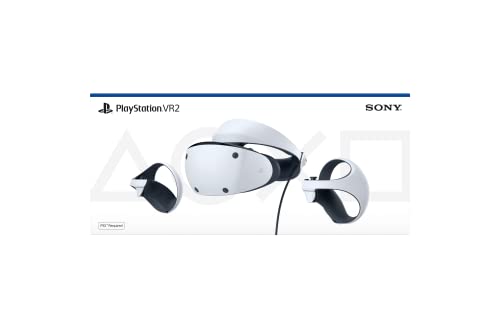
Sony PlayStation VR2 Headset for PS5
ASIN B0BM4Q5DR6 • $629 • Sold by KOGAN on Amazon AU
If there's already a PS5 in the house, the PlayStation VR2 is the headset I'd look at first, because the console does the heavy lifting and you're only paying for the headset. The listing names eye tracking, a feedback motor in the headset, 3D audio and the PS VR2 Sense controllers, plus 4K HDR visuals in compatible games and a 110-degree field of view. Eye tracking is the clever part. It lets the PS5 render sharply only where you're looking, which is part of how it keeps the picture clean without needing more power than the console has. It was number 65 in Amazon AU's PlayStation 5 Accessories category when I checked, and it's sold here by Kogan rather than by Amazon itself.
The catch is that it's a tethered headset tied to one console. It won't do anything on its own, so if the PS5 is in the lounge, that's where you'll play, with a cable running from the headset to the console. That cable is also the part I'd watch. It takes the same twisting and tugging as a charging lead, and a headset cable that's stood on, or yanked when someone turns around quickly, is the most likely thing to fail. Route it over your shoulder, keep chair legs out of the play area and you'll avoid most of it. On the plus side, there's no headset battery to age.
Before you buy, check two things. First, confirm the box contents on the listing on the day, since this is a Kogan listing and bundles change. Second, look at which games you actually want to play, because the PS VR2 library is smaller than the Quest store and some titles are only on one side. The listing says it isn't recommended for children 12 and under, so it isn't the pick for a younger kid's present, whatever the box art suggests. For an older teenager in a PS5 house it's a much easier fit, since the console is already where they play.
Honest caveats: Honest caveats: it needs a PS5, and the listing ties its 4K HDR and field-of-view figures to the console's power. It's tethered by a cable, so it can't be used as a standalone headset or taken to a friend's place without the console. The seller is Kogan, an Australian retailer, rather than Amazon AU, so read the returns terms on the listing first.
Best for: PS5 owners who want console VR without buying a second computer.
Needs: PS5 console • Features: Eye tracking, headset feedback, 3D audio • Display: 4K HDR in compatible games (listing) • Field of view: 110 degrees (listing) • Controllers: PS VR2 Sense • Age: Not recommended for 12 and under (listing) • Seller: KOGAN on Amazon AU • Rank: #65 in PlayStation 5 Accessories (Amazon AU)
View on Amazon AU
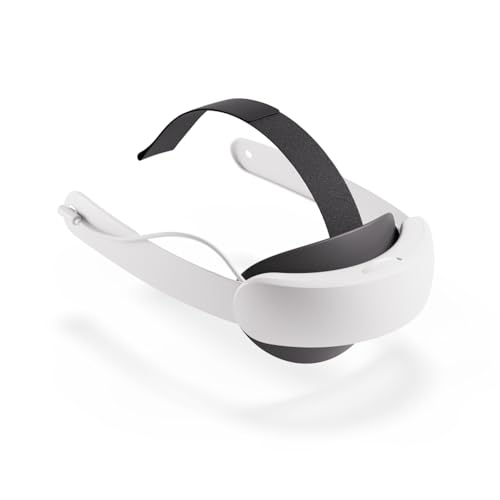
Meta Quest 3 512GB with Elite Strap with Battery
ASIN B0D4TMNB6Y • $1,186 • Ships from Amazon AU
This is the Quest 3 512GB with Meta's Elite Strap with Battery in the same box, and it's the setup I'd suggest for anyone who already knows they'll play for longer than an hour at a time. The headset is identical to the pick above. What changes is the strap. The listing says the rigid design spreads the weight more evenly and reduces pressure on the face, and the battery built into the back adds up to two hours of extra play. One cable charges the headset and the strap together, which matters more than it sounds, because a second thing to remember to charge is a second thing that's flat when you want to play.
From a repair point of view the battery strap is the best thing you can do for a Quest's charging port. Players who want long sessions otherwise end up running a cable or a power bank to the side of the headset, and that sideways pull is what wears the USB-C socket loose and cracks its solder joints. Moving the extra battery into the strap takes that strain away entirely. The weight at the back also balances the headset, so it sits on your head rather than hanging off your cheekbones, which is why most people who try a rigid strap don't go back to the fabric band. It also keeps the face pad from being squashed as hard, so it lasts longer.
The rank is the weak point on paper. It was number 1,585 in Amazon AU's PC Consoles, Games & Accessories category when I checked, a long way behind the plain Quest 3, mostly because most people buy the headset first and the strap later. Check the current price of the Quest 3 on its own plus the Elite Strap bought separately before you order, since the bundle only makes sense when it costs less than the two bought apart. If it does, it's the most complete Quest setup on this page, and the one I'd expect to need the fewest add-ons later.
Honest caveats: Honest caveats: it's the same headset as the Quest 3 pick, so you're paying for the strap and its battery rather than a better screen. The strap battery is a second lithium-ion pack that will age like the first, and the listing doesn't state its capacity or the bundle's total weight. The included trial renews as a paid subscription unless cancelled.
Best for: Long-session players who want the Quest 3 with the strap they'd otherwise buy a month later.
Headset: Quest 3 512GB • Strap: Elite Strap with Battery • Extra play: Up to 2 hours (listing) • Charging: One cable for headset and strap • Chip: Snapdragon XR2 Gen 2 • Seller: Amazon AU • Rank: #1,585 in PC Consoles, Games & Accessories (Amazon AU)
View on Amazon AUSide-by-side comparison
| Product | Price | Best for |
|---|---|---|
| Meta Quest 3S 128GB | VR Headset | 33% More… | ~$568 | |
| PlayStation VR2 | ~$629 | |
| Meta Quest 3 512GB | VR Headset | 30%… | ~$968 | |
| Meta Quest 3 512GB + Elite Strap w Battery | ~$1,186 |
What we see fail in the workshop: VR headsets
VR headsets are newer to the repair counter than phones or consoles, but the faults have already settled into a pattern. Most of them aren't electronic failures at all. They come from where the headset is stored, how it's charged and how hard the controllers get swung. These are the three I'd plan around on any of the picks above.
Screens burnt by sunlight through the lenses
This is the saddest one, because it's permanent and preventable. The lenses focus sunlight onto the display exactly like a magnifying glass, and a headset left face-up near a window for a few minutes can come back with a dark line or a discoloured patch that shows in every scene. The display module is the fix, and on a Quest that often costs close to a new headset. Store it lenses down in its box or a closed case, and keep it off windowsills, car seats and the desk by the window. A curtain left open is enough to do it.
Charging ports worn loose by play-and-charge
A USB-C cable plugged in while someone plays gets pulled sideways every time they turn. Over months the socket loosens and its solder joints crack, and the first sign is a headset that only charges with the cable held at an angle. Caught early it's a port replacement at board level, which costs far less than a new headset. Don't charge mid-session, use a decent charger, and if you need longer play, put the extra battery in the strap rather than on a cable. A port that's still mostly working is a simpler job than one that has lifted a pad.
Drifting sticks and corroded controller contacts
Controllers take the knocks. Thumbstick drift comes from a worn sensor under the stick, the same as on console pads, and it's usually fixable. The other common one is corrosion from an AA battery left in a controller in a drawer until it leaks, which eats the springs and the contacts. Take the batteries out of any controller that won't be used for a few weeks, and keep the wrist strap on, because a controller that hits a wall or a TV is a much bigger repair. We'd rather see a drifting stick early than a cracked shell later.
Decision tree: which one should you actually buy?
- First headset, no console or gaming PC? → The Meta Quest 3S at about $568. It's standalone, it was the top seller in its category, and it runs the same games as the Quest 3.
- Shared headset, or you read a lot of menus and text? → The Meta Quest 3 512GB at about $968. The sharper screen and four times the storage are what a shared headset needs.
- Already own a PS5 and play mostly Sony games? → The PlayStation VR2 at about $629 from Kogan. The console does the work, so you're only paying for the headset.
- Planning sessions longer than an hour? → The Quest 3 with Elite Strap with Battery at about $1,186, if it still costs less than the headset and strap bought separately.
- Buying for a child 12 or under? → Not the PS VR2, which its listing doesn't recommend for that age. Check Meta's current age guidance for the Quest before you buy.
- Headset, controller or charging port already playing up? → Bring it to our Erina workshop. Worn ports and drifting sticks are usually fixable, and we'll tell you what it needs before you spend anything.
Frequently asked questions
Is the Quest 3 worth it over the Quest 3S?
For most first-time buyers the Quest 3S is enough, because it runs the same games on the same Snapdragon XR2 Gen 2 chip and 8GB of RAM. The Quest 3 is worth the extra if you care about a sharper picture, since Meta's listing claims a nearly 30 percent jump in resolution, or if the headset will be shared, because the 512GB model has four times the storage and neither headset can be expanded later. If you're mostly playing fast games and only one person uses it, the 3S is the better value.
Do I need a PC or a console for a Meta Quest?
No. A Quest is a standalone headset with its own chip, battery and storage, so you can set it up with a phone app and play straight away. Quest headsets can also run PC VR games through Meta's Link app over a cable or Wi-Fi, but that's optional, and none of the listings on this page cover it, so check Meta's current PC requirements if that's the plan. PlayStation VR2 is different: it needs a PS5 to work at all and won't run on its own.
How long does a Quest battery last?
Both Quest listings quote two-plus hours per charge on a new headset, and that figure drops as the lithium-ion battery ages, the same way a phone's does. Keeping it off the charger once it's full, out of hot cars and out of direct sun slows that wear down. The Elite Strap with Battery adds up to two hours of play according to its listing, and it's a much better way to get longer sessions than charging through the headset's port while you play.
Can sunlight really damage a VR headset?
Yes, and it's one of the most common permanent faults on VR headsets. The lenses act like a magnifying glass, so sunlight hitting them focuses onto the display behind and can burn a mark into it in seconds. That damage needs a new display module, which often costs close to a new headset. Store the headset lenses down in its box or a closed case, and keep it off windowsills, desks next to windows and car seats.
Can a VR headset charging port be repaired?
Usually, yes. A loose or intermittent USB-C port on a headset is normally a worn socket or cracked solder joints, often caused by charging while playing, and it can be fixed by replacing the port at board level. The earlier it's looked at the better, because a socket that's left to wiggle can damage the pads on the board underneath. If the headset only charges with the cable held at an angle, that's the time to have it checked.
Is PS VR2 worth it if I already own a PS5?
For a PS5 owner who plays mostly Sony titles, it often is, because the console does the rendering and you're only paying for the headset. Its listing names eye tracking, a feedback motor in the headset and 4K HDR in compatible games. The trade-offs are a cable to the console, a smaller game library than the Quest store and no standalone use, so look at the specific games you want before deciding. Its listing also says it isn't recommended for children 12 and under.
Related buying guides
VR headset not charging, or a controller drifting?
Most VR headsets that stop charging have a worn USB-C port from being played while plugged in, and most drifting controllers have a worn stick sensor. Both are often fixable at board level for far less than a new headset. Bring it into our Erina workshop and we'll check the port, the battery and the controllers, and tell you what it needs before you spend anything.
Visit our Erina workshop Book Online