Prices from Amazon AU, updated daily.
Disclosure: This article contains affiliate links to amazon.com.au. If you buy through one of these links iFix may earn a small commission at no extra cost to you. It doesn't change which products we recommend. We focus on what actually lasts based on 16 years of repair-shop experience.
Quick summary4 picks
- Entry PickLenovo Legion Go S Ryzen 8.8' 40-120Hz… about$1,299120Hz refresh, 8" screen.
- ROG Xbox Ally X RC73XA-NH011W about$1,798.9824GB RAM, 1TB SSD.
- MSI Claw 8 AI+ A2VM Glacier Blue Edition about$2,09932GB RAM, 1TB SSD, 80Wh battery.
- Most PremiumLenovo Legion Go 2 AMD Ryzen Z2 Extreme… about$2,1991TB SSD, 144Hz refresh, 8.8" screen.
Why this matters now
Most "best handheld" lists are written by people who have played the review unit for a fortnight. I see the same devices two years later, when the stick has started to drift and the fan sounds like a hairdryer. That later view is the useful one, because a $2,000 handheld is only good value if it is still yours and still working when the novelty has worn off.
The timing is worth a word too. Australian households are saving less than they have in years: the household saving ratio sat at 2.4% of income in early 2026, down from around 5.3% in 2019, on ABS National Accounts figures. When the buffer is that thin, the maths on entertainment changes. A night at the movies or an arcade for a family of four is gone in an hour and leaves nothing behind; a handheld you already own turns a big back-catalogue of games you have bought over the years into evenings that cost nothing extra. Insourcing the entertainment, playing what you own, at home, instead of paying per outing, is exactly the sort of quiet swap that adds up when money is tight. That only holds, of course, if the device lasts. A handheld that dies in eighteen months is the expensive option, which is why I care more about the sticks and the cooling than the frame-rate charts.
This guide is the portable, buy-once end of gaming. If you would rather a machine that plays everything at full settings on a big screen, that is a different tool. See our premium gaming laptop picks, or the gaming laptop under $1,500 guide for the value end. A handheld is for playing your library on the couch, on the train and in the spare half-hour, not for chasing the highest numbers.
What actually breaks on a gaming handheld
The price differences between these four are real, but the things that decide whether a handheld survives are the same across all of them. From the bench, in the order I see them:
- Stick drift. The number one handheld and controller fault, full stop. It comes from low-cost potentiometer joysticks whose carbon wiper wears a groove in a track. Every device in this list uses Hall-effect sticks, magnetic sensors with no physical contact and nothing to wear out, which is the single most important reliability feature on a handheld. It designs the most common failure out.
- Battery wear. A handheld runs its battery harder than a phone, high draw, real heat, frequent full cycles, so the cells age faster and runtime drops after a couple of years. The good news is the pack is replaceable on all of these, so a swap brings the runtime back. Watch for a swelling battery: a creaking case, triggers sitting proud, a back panel bowing. That is a fire risk, not a nuisance.
- Thermals and dust. You are cooling a full gaming PC in the size of a paperback. The fan pulls dust into the heatsink, the fins clog, and a year in the fan gets loud and the chip throttles. That is a service, not a death sentence: a strip-down, a dust-out, sometimes a new fan and a repaste.
- Charge port and screen. The USB-C port takes the strain of daily plugging and the cable being knocked while you play; a worn port is a common charge-fault. The screen is the other exposure. A handheld gets dropped more than a laptop ever does. Both are bench-repairable.
- Serviceability. The quiet one. Some handhelds open cleanly with standard screws and a replaceable battery and SSD; others fight you. All four here are on the sane side of that line, which is part of why they made the list.
The four picks, by what you actually do
Prices are checked against Amazon AU every morning and move week to week on premium gear, so treat every figure as "around". The list runs in price order, top to bottom. Every one runs Windows 11, so Steam, Game Pass, Epic and emulation all live on the same device.
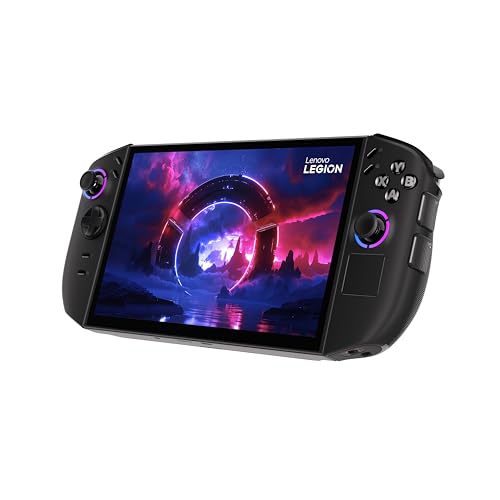
Lenovo Legion Go 2: Ryzen Z2 Extreme, 32GB, 1TB, 8.8" OLED
Ryzen Z2 Extreme · 32GB LPDDR5X · 1TB SSD · 8.8" OLED 144Hz VRR · detachable Hall-effect controllers · 74Wh · around $2,199 · AU model 83N00014AU
This is the best handheld you can buy in Australia right now, and it earns the top price by getting the things that matter right. The Ryzen Z2 Extreme is the fastest chip in the category, the 32GB of memory gives games room to breathe, and the 8.8-inch OLED is a genuine OLED: true blacks and instant response, not the LCD every rival ships at this size. The controllers detach, so you can prop the screen on its kickstand and play with the pads in your hands, and both sides use Hall-effect sticks, so drift is engineered out.
The feature that justifies the money. It is the whole package rather than one trick: a top-tier chip, the only real OLED here, a big 74Wh battery to feed it, and USB4 on both ends for a dock or an external GPU. If you want the handheld that does not leave anything on the table, this is it.
What to be sure of. It is big and it is heavy. This is a two-handed, sit-down device, not something you slip in a jacket pocket. And a fast chip plus an OLED costs battery: play a demanding game at full tilt and the 74Wh pack still drains quickly, so keep the charger handy. As with any OLED, a static HUD at high brightness for thousands of hours can retain a faint ghost, but on a handheld that sleeps and plays mixed games it is rare.
Best for: the enthusiast who wants the best screen and the most power and will play sitting down, at home or on a plane, more than on the move.
Chip: AMD Ryzen Z2 Extreme · Memory: 32GB LPDDR5X · Storage: 1TB SSD (M.2, replaceable) · Display: 8.8" OLED, 144Hz VRR · Controls: detachable, Hall-effect sticks · Battery: 74Wh · OS: Windows 11 · Warranty: 1 year + Australian Consumer Law
Check current AU price
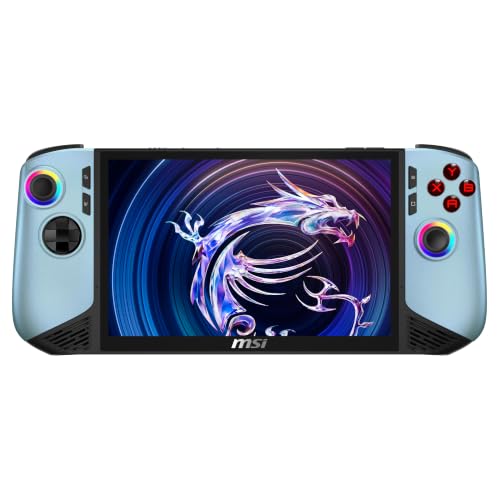
MSI Claw 8 AI+ A2VM: Core Ultra 7 258V, 32GB, 1TB
Core Ultra 7 258V · Intel Arc graphics · 32GB LPDDR5x · 1TB SSD · 8" FHD+ 120Hz touchscreen · 80Wh · around $2,099 · Sold by Amazon AU
The Claw 8 AI+ is the one Intel handheld that genuinely competes with the AMD flagships, and its trump card is stamina. The Core Ultra 7 258V is a Lunar Lake chip built for efficiency, and paired with an 80Wh pack, the largest battery on this page alongside the Ally X, it lasts a real session away from a wall, the thing most handhelds are worst at. The 8-inch FHD+ touchscreen runs at 120Hz and is bright and sharp, and 32GB of memory puts it level with the Legion Go 2 rather than the entry machines.
From the bench. MSI took the criticism of the first Claw seriously. The sticks are Hall-effect, the cooling in this generation is better, and at 0.8kg the chassis is comfortable for its size. Intel's Arc graphics have also matured on the driver side, so the compatibility gap with AMD that hurt the original Claw has largely closed. It is a properly sorted device now, not a first attempt.
What to be sure of. This is the Glacier Blue Edition (251AU) of the A2VM, with a 1TB SSD, so a very large library will still want an external drive or a bigger internal one down the track. AU stock on this listing runs thin, so check availability before you settle on it.
Best for: the traveller and the commuter, anyone who plays away from a charger and wants the longest runtime here, in a device that is a touch more pocketable than the Legion Go 2.
Chip: Intel Core Ultra 7 258V · Graphics: Intel Arc · Memory: 32GB LPDDR5x · Storage: 1TB SSD · Display: 8" FHD+ touchscreen, 120Hz · Controls: Hall-effect sticks · Battery: 80Wh lithium polymer · Weight: 0.8kg · OS: Windows 11 Home · Warranty: 1 year + Australian Consumer Law
Check current AU price
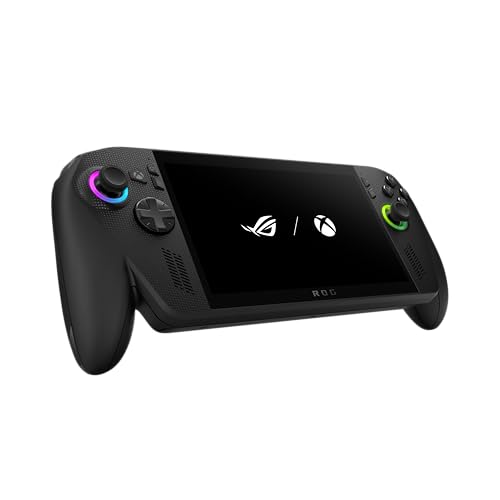
ROG Xbox Ally X: Ryzen AI Z2 Extreme, 24GB, 1TB, 7" FHD
Ryzen AI Z2 Extreme · 24GB LPDDR5X · 1TB SSD · 7" FHD 120Hz VRR · contoured ROG grips · 80Wh · around $1,798.98
ASUS partnered with Xbox on this one, and it shows in two good ways. It boots straight into a full-screen Xbox experience, Game Pass, cloud, remote play to your console and native PC games all in one clean shell, which takes a lot of the Windows fiddliness off the table. And the ROG grips are, to my hands, the most comfortable in the category: the contoured shape and the 7-inch screen make it the pick you can hold for hours without your palms complaining.
The reliability angle nobody markets. The 7-inch panel and the lower-power chip config mean this runs cooler and quieter than the bigger flagships, and heat is what ages a handheld. Less thermal stress on the board and the battery is a genuine longevity advantage, not just a comfort one. Hall-effect sticks, an 80Wh battery and a solid vapour-chamber cooler round it out.
Best for: the Game Pass household and anyone who wants a handheld that feels friendly rather than fiddly, the most comfortable, most console-like device here, at a price below the two flagships.
Chip: AMD Ryzen AI Z2 Extreme · Memory: 24GB LPDDR5X · Storage: 1TB SSD (M.2, replaceable) · Display: 7" FHD 120Hz VRR · Controls: contoured grips, Hall-effect sticks · Battery: 80Wh · OS: Windows 11 (Xbox full-screen) · Warranty: 1 year + Australian Consumer Law
Check current AU price
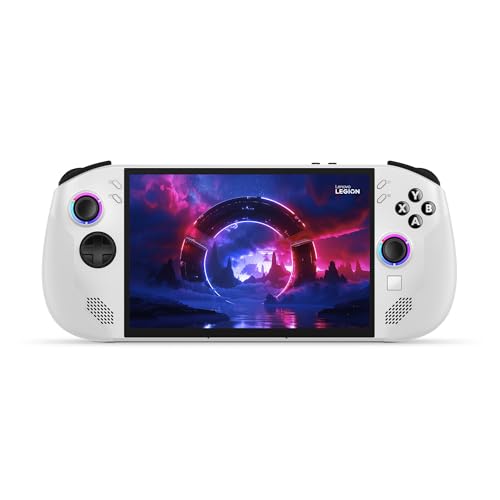
Lenovo Legion Go S: Ryzen Z2 Go, 16GB, 512GB, 8" 120Hz
Ryzen Z2 Go · 16GB LPDDR5X · 512GB SSD (upgradeable) · 8" 1920×1200 IPS 120Hz VRR · fixed grips, Hall-effect sticks · around $1,299 · Ships from Amazon AU
For most people getting into handheld gaming, this is the machine to default to, and it is the one I recommend to parents most often. The Ryzen Z2 Go is the value chip, tuned for 720p-native play at settings that actually run, and the 8-inch 120Hz IPS screen is bright and sharp. Crucially, it does not skimp where it counts: the sticks are the same drift-resistant Hall-effect design as the flagships, so the most common failure mode is engineered out even at this price.
The value angle. The fixed grips (no detachable pads) mean fewer moving parts and fewer connectors to fail. On a device that gets handled and dropped, simpler is more robust. The 512GB SSD is a standard M.2 2242 drive you can swap for a bigger one down the track, so storage is not a dead end. It is well under half the flagship price and does the core job, play your library, comfortably, without asking you to gamble a fortnight's savings.
Where it stops. The Z2 Go is the entry chip, so the most demanding new releases will want their settings turned down, and 16GB of memory is the sensible floor rather than headroom. If you want to play everything at high settings, one of the flagships above is the buy. For everyone else, this is enough handheld.
Best for: first-time buyers, teenagers and anyone who wants a genuinely good handheld without flagship money, the sensible starting point that still gets the reliability basics right.
Chip: AMD Ryzen Z2 Go · Memory: 16GB LPDDR5X · Storage: 512GB SSD (M.2 2242, upgradeable) · Display: 8" 1920×1200 IPS, 120Hz VRR · Controls: fixed grips, Hall-effect sticks · OS: Windows 11 · Warranty: 1 year + Australian Consumer Law
Check current AU priceSide-by-side comparison
Prices are approximate and move week to week. Every one uses Hall-effect sticks and runs full Windows; the differences that matter are the chip, the screen and the battery.
| Product | Price | Best for |
|---|---|---|
| Lenovo Legion Go S Ryzen 8.8' 40-120Hz… | ~$1,299 | First-timers and teenagers |
| ROG Xbox Ally X RC73XA-NH011W | ~$1,798.98 | Game Pass households |
| MSI Claw 8 AI+ A2VM Glacier Blue Edition | ~$2,099 | Longest battery life |
| Lenovo Legion Go 2 AMD Ryzen Z2 Extreme… | ~$2,199 | Best screen and power |
How to make one of these last
A handheld earns its price only if you get the years out of it. The habits that matter, from the bench:
- Keep the vents clear and blow the dust out. The fan is the thing that ages. Don't play with the intakes pressed against a blanket, and give it a can-of-air clean a couple of times a year. A clogged cooler is the number one cause of a handheld that got loud and slow.
- Don't leave it charging hot at 100% all day. Heat plus a full charge is what swells batteries early. Use the charge-limit setting if the device has one, and unplug it once it is full rather than leaving it docked for days.
- Mind the charge port with the cable in. Playing while plugged in and yanking the cable sideways is what wears the USB-C port. A short magnetic or right-angle cable takes the strain off.
- Case it for transport. A handheld gets dropped far more than a laptop. A hard case for the bag is low-cost insurance against the cracked screen that is otherwise the most common accidental job we see.
- Use the Consumer Law claim on a fault. An imported or grey-market unit is a headache for warranty; every pick here is an AU-version listing for exactly that reason. Keep the invoice and use your rights if something major fails inside a couple of years.
Common mistakes from the repair shop
The handhelds that land on my bench early usually got there through a buying or usage decision, not bad luck. The ones worth avoiding:
- Buying a grey-import to save a bit. A handheld with a foreign plug and no local warranty is the one you cannot get fixed under warranty when the stick goes. Buy the AU version.
- Ignoring a swelling battery. A case that has started to creak or triggers that no longer sit flush is a swollen cell. Stop using it. It only gets worse, and it is a fire risk.
- Never cleaning the cooler. People assume the throttling and the fan noise are the device wearing out. Nine times out of ten it is dust, and a service brings it back.
- Skimping on the stick fix. When a stick does eventually fail, a proper Hall-effect module swap is the fix. Gluing or ignoring it just delays the inevitable.
- Treating the 12-month warranty as the limit. For a device at this price, Australian Consumer Law reaches well past a year. People write off fixable, claimable faults because a card said "one year".
Which one is right for you?
- Getting into handhelds, or buying for a teenager? Lenovo Legion Go S at around $996. The reliability basics done right, well under half the flagship price.
- Want the best handheld, screen and all? Lenovo Legion Go 2, for the Z2 Extreme and the only real OLED here.
- Play away from a charger? MSI Claw 8 AI+. The Lunar Lake chip and the 80Wh battery go the distance, and a 1TB SSD holds a real library.
- Live in Game Pass and want the comfiest hold? ROG Xbox Ally X at around $1,767, straight into the Xbox shell.
- Want a machine that plays everything at full settings instead? That is a laptop's job. See our premium gaming laptop guide, or the sole GPU that matters in our graphics card picks.
- Building a small-footprint gaming setup at home? A compact desktop docks a handheld or stands alone. See our premium mini PC picks.
Frequently asked questions
Do these handhelds get stick drift like a Switch or PS5 controller?
Far less, because of how the sticks are built. Stick drift comes from the low-cost potentiometer joysticks in most controllers: a carbon wiper scrapes a track, the track wears, and the stick starts reading movement that isn't there. Every handheld in this list uses Hall-effect sticks instead, which read a magnetic field with no physical contact and no track to wear out. That is the single biggest reliability upgrade over a Nintendo Switch or a standard Xbox pad. It is not a lifetime guarantee, a knock can still damage a module and grit can still get in, but drift is designed out rather than baked in. When one does fail, a Hall-effect module is a clean part swap in the workshop rather than a whole-controller write-off.
What's the difference between a Windows handheld and a Steam Deck or Switch?
Openness and library. All four picks here run full Windows 11, so your Steam, Game Pass, Epic, GOG and emulator libraries all run on the one device: nothing is locked to a single store. A Nintendo Switch only plays Switch games you buy from Nintendo. A Steam Deck runs Valve's Linux-based SteamOS, which is smoother and better battery-tuned than Windows but occasionally trips over anti-cheat or a Windows-only launcher. The trade with Windows is that it is a full PC in your hands: more setup, the odd driver update, and battery life you manage rather than ignore. If you already own a big PC game library, a Windows handheld lets you take it with you.
Can you replace the battery in a gaming handheld?
Yes, and it is one of the more common jobs we do on these. A gaming handheld runs its battery hard, high draw, lots of heat, frequent full charge-discharge cycles, so the cells age faster than a phone's, and after a couple of years of heavy use the runtime drops noticeably. The battery in all of these is a replaceable pack, not soldered to the board, so a swap restores the original runtime for a fraction of a new unit. If a handheld's battery has started to swell, a creaking case, triggers that no longer sit flush, a back panel bowing outward, stop using it and bring it in. A swollen lithium cell is a fire risk, not just a performance issue.
Which handheld should I buy for a teenager?
The Lenovo Legion Go S at around $996 is the one I point most parents at. It has the same drift-resistant Hall-effect sticks as the flagships, a bright 120Hz screen, and fixed grips with fewer moving parts to break than the detachable-controller designs. The Ryzen Z2 Go chip is tuned for the 720p-native play that suits the screen, so it runs real games well without the flagship price. It is the sensible first handheld: enough performance to enjoy a big library, affordable enough that a dropped-off-the-couch accident is not a catastrophe, and serviceable when it does take a knock. Spend the flagship money only if the gaming is the main event, not an after-school thing.
Do gaming handhelds overheat, and can that be fixed?
They run hot by nature, you are cooling a full gaming PC in something the size of a paperback, but overheating that hurts performance is usually a maintenance problem, not a design one. The fan and heatsink pull dust in, and after a year or two of play in a lounge room the fins clog and the fan bearing gets noisy, so the chip throttles to protect itself and your frame rate drops. That is a clean fix: a strip-down, a dust-out, a fresh fan if the bearing has gone, and often a repaste of the thermal compound. We do exactly that in the workshop. If a handheld that used to run cool has started getting loud and hot, it is asking for a service, not a replacement.
Is the OLED screen on the Legion Go 2 worth the extra money?
For the picture, yes; for the price jump, it depends on how you play. OLED gives you true blacks, punchy colour and instant pixel response, and on an 8.8-inch handheld held close to your face the difference over an LCD is obvious in dark games. The Legion Go 2 is the only pick here with a real OLED panel. The catch is cost, you are paying flagship money, and, as with any OLED, static elements like a game's HUD can leave a faint retained image after thousands of hours at high brightness. In practice, with mixed games and a screen that sleeps, that is rare on a handheld. If you mostly play bright, fast games in a lit room, a good LCD like the Claw's or the Ally's is money better spent on the chip.
Does Australian Consumer Law cover a handheld after the 1-year warranty ends?
Yes. The manufacturer's 12-month warranty is a floor, not a ceiling. Australian Consumer Law guarantees that goods last a reasonable time for the price paid, and for a handheld costing $1,000 to $2,000 a reasonable person would expect well more than a year before a major fault. If a stick, the screen, the charge port or the board fails at eighteen months or two years, you have legitimate grounds for a repair, replacement or refund regardless of what the warranty card says. Keep your tax invoice, put the fault in writing to the retailer, and cite the consumer guarantees. This matters most on imported or grey-market units, which is why every pick here is an AU-version listing.
Do you repair gaming handhelds if one breaks?
Yes, sticks, batteries, charge ports, cracked screens and thermal servicing, at our Erina workshop on the Central Coast. Handhelds are, underneath, small gaming PCs, and we treat them like one: component-level diagnosis before any quote, and the data on the drive protected first if it matters to you. The jobs we see most are worn or drifting sticks, batteries that no longer hold a session, and dust-clogged coolers that make the unit run hot and loud. Most of those are a straightforward part swap or a service rather than a write-off. Bring it in and we will tell you honestly whether it is worth fixing before you spend anything.
Related buying guides
Handheld drifting, overheating or not charging? Bring it in.
Before you replace a handheld that has started to drift, throttle or die on charge, bring it into our Erina workshop. In my experience, most are a straightforward stick, battery, port or cooling fix rather than a write-off. And we protect the data on the drive before we touch anything. We diagnose before we quote. See our pricing guide for what common jobs cost, or walk in to our Erina workshop.
Visit our Erina workshop Book Online