Your AI forgets everything the moment you close the tab. This fixes that. The memory, rules and pipeline that turn Claude from a forgetful chat into an operator that runs your business your way, every session. The exact system running a 16-year repair business and several others alongside it.
It sets itself up
Drop all the kit files into your AI assistant (Claude or ChatGPT) and send one line, read START-HERE.md and begin. It interviews you about your business and writes every file in your voice, ready to save. Prefer to fill them in by hand? A manual path is included.
AUD 650, one-time. No subscription, nothing recurring. Download link emailed straight after checkout.
Someone tells me their AI is letting them down. It forgets what they told it. It makes things up. It loses the thread halfway through a job. Different people, different businesses, the same short list of complaints every time.
After enough of these I stopped hearing different problems and started hearing one. It's almost never the model. It comes down to two things nobody sets up. First, an implementation pipeline: a way for work to move from an idea, to a plan, to a finished result. Second, a process of thinking the AI runs on every single job.
If you just nodded, the problem isn't the model. You're handing a brilliant operator a blank slate, again and again. Give that operator memory, rules, and a record of every decision, and your AI starts running your operation, your way, every session.
An implementation pipeline.
A way for work to move in one direction: idea, to plan, to implementation, to verified done. Not dumped on the AI in one lump while you hope it lands. Every stage has a defined finish line before the next one begins.
A process of thinking.
The routine the AI runs on every job: it never kills the same bug twice, it records why a decision was made, it fixes which sources it's allowed to trust, it holds your brand and your voice, and it respects the hard limits you set.
Your AI is a brilliant new hire with no memory. This is the set of notes that lets it run your operation, your way.
You write the plan first, hand it over to build, and it can't call the job done until it has run every check itself. No "assumed OK". It checkpoints as it goes. It commits its progress to version control as it goes, so it resumes exactly where it stopped, and reverts to the last good commit if a risky step fails. This is the half that does the real work of catching bugs and keeping the build reliable. In the setups I see on the bench, it is the part almost everyone skips.
How this place runs and what to read first, the rules and the hard limits, your brand and your voice, the sources it may trust, every decision and the reasoning behind it, the live state of the work, and the bugs already solved. Written down once, followed every session, by every agent that picks up the work.
The six memory items, orientation, rules, trusted sources, live state, solved bugs and decisions, feed a four-stage loop of idea, plan, implementation and record, and the record writes back into memory so the system compounds each run.
What the AI reads first, the memory and rules layer:
These feed the thinking process: idea, plan, implementation, record. The record writes back into memory, so the system compounds with every run.
You've probably heard Claude, Claude Code, and OpenClaw thrown around without ever getting a straight answer on what each one actually is. Here it is, plain.
Claude is the AI itself: the app you chat with in a browser or on your phone. You type, it answers. The brain you talk to.
Claude Code is that same brain living on your computer with its hands on the keyboard. It runs in a terminal or your editor, reads your real files and projects, and does the work, writing, changing and running things, not just talking about them. This is the engine the whole system is built on.
OpenClaw is an open-source, self-hosted agent gateway that has picked up a following among people who like to self-host. You run it on your own hardware, point it at whatever AI model you like, and wire it into your messaging apps so you can reach an agent in the background from anywhere. Powerful, but it's the heavy, self-managed end, and it isn't the coding tool this system runs on. For that you want Claude Code.
For this system you only need two: Claude to think and plan with, and Claude Code to do the work. Everything from here is how you turn that pair into a system that runs your business, starting with what it can see.
An AI is only as good as what it can see. Give it nothing and it guesses. Connect it to your real data and it stops reasoning about a generic business and starts reasoning about yours.
So before you write a single rule, do the groundwork. Map everything you run on, and connect it. Stand up an MCP server, on your machine, on a VPS, or both, and wire your tools in. Give the AI real access: Google Analytics, Search Console, your CRM and customer data, your email and calendar, whatever your operation actually runs on.
What's an MCP server? It's the standard way to plug a tool into an AI. MCP, the Model Context Protocol, is an agreed format for exposing one of your systems, your analytics, your CRM, your files, so the AI can read it and act on it directly instead of you copying data into a chat box by hand. One server wires up one tool. Each one is another nerve into the brain.
I run my whole stack on a Hostinger VPS.
Affiliate link. I only recommend tools I actually run, and it costs you nothing extra.
Every service you connect is another sense added to the brain. Apart, they're scattered dashboards you never open. Connected, they become one operation the AI can reason across.
This is the step I see skipped most often, and it's exactly why their AI stays a clever toy instead of an operator. Do it first, because it compounds. Every asset you connect today makes every task tomorrow sharper.
The files in this kit are how the brain remembers and follows your rules. The connections are how it sees. You want both, and you want the connections first.
There's a trend doing the rounds right now: creators showing off Obsidian, all those satisfying graphs of notes linked to notes, telling you the magic is in the connections. It looks impressive. The graph glows.
There's a catch, though. A tool that links everything together only helps you if your information is a mess in the first place. The web of backlinks is a search engine for chaos. It's a very good way to find a thought you filed badly. It does nothing to make the thought, or the next decision, any better. You're still the one holding the structure in your head.
That's the wrong problem to solve. The goal isn't to retrieve a scattered idea faster. The goal is to never scatter it.
This system goes the other way. It doesn't link everything to everything; it works like an assembly line, moving work forward through defined stages:
An idea gets captured. It becomes a plan with a defined finish line. The plan becomes an implementation with rules and limits attached. The result gets written back into the record. Nothing floats. Nothing needs to be found later, because everything has already moved to where it belongs.
Underneath, this runs on a small set of plain files, each with exactly one job: gate what information is allowed in, hold the rules and limits the work has to respect, log every failure and its real fix, and keep the live state of the work. The files themselves, and exactly what goes in each, are the kit.
Set up that way, four things change:
It doesn't forget, because state is written down, not held in your head or the AI's short memory.
It starts from good information, because sources are gated up front.
It learns from its own errors, because failures are logged and fed back in.
It is built to hallucinate less, because the AI reasons from a defined, trusted, structured context instead of filling gaps with confident guesses.
A graph of backlinks is a nice way to admire your chaos. This is a way to stop producing it.
How you talk to it matters as much as what you ask. A handful of phrases reliably lift the result. A taste:
Step-by-step for reasoning; on agentic tools, escalate with think hard or ultrathink for genuinely knotty problems. These spend far more reasoning, so save them for the hard ones.
A claim of done isn't done. Make it produce the evidence.
That's two of them. The lever is real: how you phrase the ask moves the output more than most people expect. The full card, every phrase and exactly when to reach for it, ships in the kit.
One catch: the heavy modes, ultrathink especially, burn tokens fast. Another reason to be on Claude Max before you lean on them.
Use the right tool for each half of the job. The Claude app in your browser is where you plan. Claude Code is where you execute.
You have an idea, usually two or three sentences. You drop it into the Claude app and let it interview you. It runs you through your own pipeline: the goal, the constraints, what could go wrong, what done looks like. You answer, ideally out loud with voice to text, and what started as a throwaway sentence comes out the other side as a long, precise, fully specified prompt.
You copy that prompt into Claude Code, and it executes. Files, commands, real changes. The chat is built for thinking and shaping a plan with no risk of it touching anything. Claude Code is built for doing. Plan in the one good at planning, execute in the one good at executing.
That division is the whole trick. Once that manual loop is working, the next move is to stop pasting prompts in yourself and let it run on a schedule. For that, it needs to live on a machine that never switches off.
You can run Claude Code on almost anything. I don't know why people got so obsessed with Mac minis, or why they thought you needed a powerful computer, because you need neither. All of the heavy processing happens in Claude's data centre. All your computer is really doing is editing text. One of my Raspberry Pi devices even has Claude Code running on it. I think buying any flashy, powerful device to run Claude Code on demonstrates a complete misunderstanding of how this works.
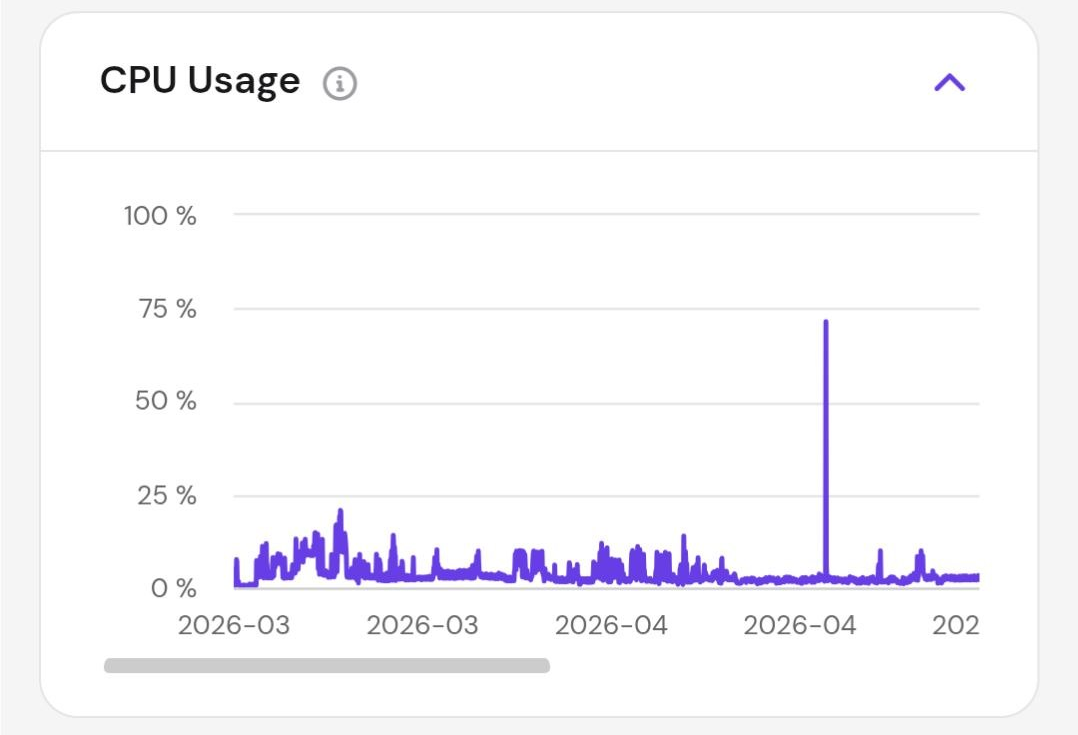
The machine I run all of this on is a standard VPS with a two-core CPU. It's hosting eleven websites right now, one of them with over 200,000 data points, and I'm in the middle of building an AI health doctor with a full 3D model of my entire body that'll add a few hundred thousand more. It still averages below 10% CPU.
So this was never about power. The only thing that matters for an agent meant to work overnight is a machine that stays on and stays reachable while you aren't sitting at it. That leaves you two options.
The popular answer, and it does work. But it's a chunk of upfront capital, several hundred dollars or more depending on the model, for a box that doesn't even need to be powerful and that you then have to run, update and keep online yourself. If your home internet drops or the power blinks, your always-on agent is suddenly not on. And it only runs while it's sitting there on your desk.
A computer that lives in a data centre. Always on, powered and managed for you, and reachable from anywhere: your laptop, your phone, a hotel room. No upfront capital. You pay monthly and stop whenever you like. For an operator whose agent plans by day and builds by night, that's the right tool.
Standing one up is shorter than you think. These are the steps.
Open my entry KVM plan link. It drops you straight onto the right plan with it already in the cart, so there is nothing to hunt for. Pick how long you want to pay for up front (a longer term is cheaper per month, but the shortest one is fine to start), create your account with an email and password, and pay. That plan is plenty to begin with.
You land in the Hostinger dashboard. Find your new VPS and press Setup to start the one-time wizard. When it asks for an operating system, choose Ubuntu, the latest version, plain, with no extra control panel like CyberPanel or cPanel bolted on. Set a root password when prompted and keep it somewhere safe. When it finishes, the dashboard shows your server's IP address, you will want that for the next step. Buttons and screens move around over time, so if something looks different, follow the same intent.
Easiest is the in-browser terminal in your Hostinger dashboard, with no SSH client to install. If you would rather use your own terminal, connect with this, swapping in your server's IP address from the last step, and enter your root password:
Paste this in and press enter. It is the official installer, and it needs nothing else set up first. If you want to see exactly what it runs before you trust it, open https://claude.ai/install.sh in a browser and read it first, then run the command.
Run Claude Code. The first time, it walks you through signing in with your Claude subscription: open the link it prints, approve it, and you're in. You will need a paid Claude plan here, the free tier does not include Claude Code. That's the setup, done.
Want to check it landed first? claude --version prints the version number.
Open the folder you want to work in, and it's running.
Right now your VPS only listens when you're sitting in its terminal. One more step lets the Claude you already chat with, in the browser and on your phone, talk to this machine directly: read a file, kick off a task, check how an overnight job went, without opening a terminal at all.
While you're in Claude Code on the VPS, just ask it. It writes the server, runs it, and exposes it over HTTPS behind an access token, so it is reachable from anywhere but only by you. Keep that token on, and don't hide the server behind a VPN or a closed firewall: Claude reaches it from Anthropic's own servers, not from your phone, so it has to be reachable on the public internet. A standard VPS already is. An MCP server is simply the bridge that lets Claude reach this machine.
Now point the Claude app at it. Open your Settings, go to Customize > Connectors, and click the + next to Connectors (this is the Add custom connector option). Give it a name and paste in the HTTPS address from the last step. If your server asks you to sign in, click Add and approve it when Claude prompts you; if it needs an OAuth client ID and secret instead, those go under Advanced settings first.
At the time of writing in 2026, custom connectors work on the free, Pro, Max, Team and Enterprise plans, with free limited to a single one. Plan features change, so check the current Claude plan page before you rely on this.
The Claude in your browser and on your phone can now reach that machine wherever you are: read a file, run a task, check on a job, all without touching a terminal.
That last step matters more than it looks. With the connector live you stop logging into the server at all. From the same Claude app you already have open, on your laptop or your phone, you tell it to change a page, fix something that broke, or check how a site is doing, and it goes and does it on the VPS for you. The terminal becomes optional.
Which means you can talk instead of type, and that is the real shift. The slow part of working with an AI was never the AI, it is how fast you can get what is in your head into it. Typing is the narrow point. Speaking is several times faster, so you stop shrinking a request down to whatever you can be bothered to type and start handing over the whole picture in one go. The more you give it, the better it works, and a change can land in about the time it takes to describe it.
Stuck on any of it? You don't need me for this. Open the Claude app, paste the prompt below, and it will walk you through the whole thing, asking what's on your screen and telling you the next move, including working out why if the connector won't connect.
That's your always-on AI computer. Installing the tool was the easy part, you just did it in one command. The hard part, the part that turns a blank agent into something that actually runs your business, is the system you give it next: the memory, the rules, the pipeline, and the scheduling that drives it while you sleep. That's what the kit is.
Now automate that hand-off. Once work moves idea to plan to implementation, the next step is scheduling. You queue a planned task to run at a set time instead of babysitting it live.
The workflow this creates: spend your day planning, not typing. Talk your plan into the Claude app with voice to text. Your thoughts move faster than your fingers, so dictate everything: the goal, the constraints, the context, the edge cases. Pack the plan full while you go about your day.
Then schedule it to run overnight while you sleep, so you can wake up to work that ran without you.
You plan by day, it builds by night. Your operation stops being limited by the hours you can sit at a keyboard. That's a 24/7 workflow, and it's the single biggest multiplier in the whole system.
A single AI gives you a single perspective. The next level is a panel of specialists, each reviewing from one angle: a sales eye, a designer's eye, a technical fact-checker, a legal check, a skeptic that hunts weak claims, and more.
Two ways to use them: have the specialists create content from all those angles at once, or have them review content you already have and tell you exactly where it's weak.
Two more agents run the team. The manager takes every specialist's input, resolves the conflicts, and decides what actually gets actioned, so you never get contradictory changes. The synthesiser takes that agreed plan and produces one clean, unified final piece, so the output reads as one voice, not a committee.
The result is content stress-tested from every angle before it ever reaches a customer.
This is powerful and it's token-heavy. A panel of specialists plus a manager plus a synthesiser is a lot of model calls. On a Claude Pro plan it'll burn your limit fast and frustrate you.
So do it in order. Start with the standard files and the pipeline. They work on any plan and they get your output actually working for you. Once it's doing useful work for you and you're ready to scale, move to a Claude Max plan before you switch specialists on. The top Max tier runs around AUD 200 a month at the time of writing, so check the current Claude plan page, and by then you'll be better placed to judge whether the heavier plan is worth it for your operation.
You don't need everything on day one. Get the foundation working, prove the value, then add the heavy layers.
If you have bought AI bundles before and felt cheated when they turned out to be a list of prompts, that wariness is fair. This isn't a prompt pack scraped together for a side hustle. It's the actual framework running iFix Electronics, our 16-year repair shop in Erina on the Central Coast, and several other businesses alongside it, refined through real failures, real recoveries and real money on the line.
Founders and operators already using AI agents who are sick of re-explaining context, tired of inconsistent output, and done watching the AI forget the rules or abandon a job at 90 percent.
People who want a magic prompt. This is an operating system, not a one-liner.
Could you build this yourself? Probably, if you've got the next six months to lose sleep and smash caffeine at all hours of the night like I did. Or you can take mine and give yourself a head start.
It sets itself up. Drop the files into your AI, send one line, and it interviews you and fills every file in. Manual fill-in included if you prefer.
This is the real system I run my own businesses on. If your download ever fails or the link expires before you save it, email me and I will sort it personally.
Secure one-time Stripe payment · your download link is emailed straight after checkout
By purchasing you agree to our Terms and Refund Policy.
A real look at the structure, with the working content held back until it is yours. What is blanked out is the actual material you are paying for, not a gap or a placeholder. The shape you see here is exactly what you receive, filled in and ready to use.
The three above are a taste. The download is 18 files. Every one of them, no extras sold later:
CLAUDE.mdthe note on the front door, read first every sessionbuild-rules.mdlimits, permissions and the bright linesbrand.mdyour voice, so it stops sounding generictrusted-sources.mdthe only facts it may rely onprogress.mdthe live state of the whole operationdebug.mdbugs already solved, and the fix that workedhistory.mdwhy past decisions were madeSPEC.template.mdthe plan for a jobDONE_CRITERIA.template.mdthe finish line, nothing assumed OKBUILD_PROGRESS.template.mdthe checkpoint, so work is never lostSTART-HERE.mddrop it in, send one line, it interviews you and writes your kitREADME.mdorientation, where to beginMETHODOLOGY.mdthe whole system explainedSETUP.mdfrom zero to a working engineCONNECT.mdwire in your real data, analytics to emailPOWER_PHRASES.mdthe phrases that reliably lift outputSCHEDULING.mdplan by day, build by nightSPECIALISTS.mda panel of review agents, not one voiceEverything here ships in the download. Get the full system above.
No. You plan in plain English in the Claude app and paste into Claude Code. The kit shows you the steps.
You can start the foundation on any plan. The heavier specialist and scheduling layers are where Claude Max earns its keep.
A set of Markdown files and templates as a downloadable zip: the memory file, the power-phrase card, the build spec, worked examples and the setup walkthrough.
The standard bridge that lets the AI read one of your tools, your analytics, CRM or files, directly instead of you pasting data in.
Because it downloads after checkout, there are no change-of-mind refunds once the link is issued. Your Australian Consumer Law rights still apply in full.
Yes.