Prices from Amazon AU, updated daily. Swipe or use the arrows for more.
Disclosure: This article contains affiliate links to amazon.com.au. If you buy through one of these links iFix may earn a small commission at no extra cost to you. It doesn't change which products we recommend. We focus on what actually lasts based on 16 years of repair-shop experience.
Quick summary5 picks
- Entry PickVTech CLS22150 DECT6.0 Cordless Phone with… about$74
- Oricom CARE80S Big Button Amplified Corded… about$89.95
- Panasonic Digital Cordless Phone with… about$99
- Gigaset Comfort 600 4G Mobile Feature Phone… about$1191000mAh.
- Most PremiumOpel Mobile 4G Home Phone 2 about$197
Why the home phone is where the scam calls land
Most of the scam calls I hear about from customers didn't arrive on a smartphone. They came through the cordless phone on the kitchen bench, usually at a parent's place, usually from a number that looked local, and usually while the person who'd normally screen it was out. Smartphones have had spam labelling and silence-unknown-callers settings for years. The old DECT handset sitting in its cradle has none of that, so it rings, and whoever's home answers it.
The telcos are doing more upstream than they used to. ACMA rules now require carriers to identify, trace and block scam calls before they reach you, and plenty get stopped in the network. What gets through is the stuff that looks legitimate: spoofed local numbers, calls that sit just under the detection thresholds, and the follow-up call from someone who already has a name and an address. The conversations worth having with older parents about scams matter more than any hardware, but hardware can take a lot of the volume off, and volume is what wears people down until they slip once.
The pattern I hear about is nearly always the same. A parent gets five or six of these calls a week and hangs up on every one of them, and then one Tuesday the caller has the bank's name and the last four digits of a card, and the conversation goes further than it should. Cutting the number of calls that ring through is the simplest protection there is, because the scam call that never rings can't work.
How call blocking on a home phone actually works
There are three kinds of blocking on the phones in this guide, and they're not equal. The first is a block list: you add a number once it's called you, and the phone refuses it next time. That's useful for the same telemarketer ringing every afternoon and close to useless against scammers, who rotate and spoof numbers constantly. A block list of 1,000 numbers sounds impressive on a box but it's still reactive, because it only knows about numbers that have already got you once.
The second kind blocks by category: withheld numbers, private numbers, unavailable numbers, or whole country and area codes. That's a much bigger net for very little effort, and blocking international prefixes alone catches a good share of the overseas call centre traffic. The catch is that it relies on Caller ID being switched on at the telco end, which some providers still charge for, and it'll also block the occasional legitimate private-number call from a hospital or a government office.
The third kind is the one I'd actually set up for a vulnerable parent: an allow list, sometimes called a trusted list, where known contacts always ring through and everything else is screened or silenced. The Gigaset in this guide states one on the listing. It flips the problem around, because the scammer now has to be on the list instead of you having to guess which number they'll use next. It's also the setting that annoys people the most for the first week, so set expectations before you turn it on.
NBN phones stop in a blackout, 4G phones don't
This catches people out more than anything else in the category. On most NBN connections the home phone plugs into the modem, not the wall, so when the power goes off the modem goes off and the phone goes dead with it. A cordless DECT base needs mains power too. That's fine for most households with a mobile in every pocket, but it's not fine for someone whose home phone is their main line, and it's exactly the person this guide is written for.
Two of the picks get around it by not using the NBN at all. They're 4G phones that take a SIM card and talk to the mobile network, so they keep working through an NBN outage, and the Opel states a back-up battery on the listing. If the house already has a 4G backup internet setup on a battery that keeps the modem alive, a normal cordless phone gets most of that resilience back. Without one, a SIM-based phone is the simpler answer.
One thing to check before buying any SIM-based phone: since the 3G networks closed in 2024, a mobile phone in Australia needs to make calls over 4G (VoLTE) to work at all, including emergency calls. Both 4G picks here are sold as 4G devices on Amazon AU, and the Gigaset states VoLTE on its listing. Older 3G-era seniors phones still turn up second hand and on marketplace listings, and they won't make a call on today's networks.
Big buttons, loud earpieces and hearing aid modes
Blocking is half the brief. The other half is making the phone easy to use for someone whose eyesight or hearing isn't what it was, and that's where the plainest-looking phones sometimes do best. Large backlit keys, a volume boost on the earpiece and a hearing aid (T-coil) mode are the three features that come up most when families ask me what to buy. Picture buttons, where you put a photo of each person on a one-touch key, are brilliant for anyone who struggles with a keypad.
Hearing aid compatibility on these phones means an inductive coupler in the earpiece that the hearing aid picks up when it's switched to its T setting, which cuts down on the whistling feedback you get holding a speaker against a hearing aid mic. The Oricom, Panasonic, VTech CLS22052 and Gigaset all mention it on their listings in some form. If someone in the house uses hearing aids, check which mode their aids actually support with their audiologist before you choose, because not every aid has a telecoil enabled.
Cordless, corded or SIM-based: picking the right type
A DECT cordless set is the default for most homes and it's what three of these picks are, give or take. You get handsets you can carry around the house, an answering machine in the base, and the call-blocking features are usually best on this type because there's a screen and a menu to manage them. The downsides are the power dependence I mentioned and a rechargeable battery in every handset that'll need replacing every few years.
A corded phone has no handset battery to fail and, on some older copper lines, it'll even keep working in a blackout, although that's rare now on the NBN. The Oricom here is corded and it's the most reliable thing in this guide by a long way for the simple reason that there's very little in it to go wrong. What it doesn't do is block anything, so it's the pick for ease of use, not scam defence.
The SIM-based 4G phones sit in between. They behave like a landline, with a desk phone or cordless-style handset and big buttons, but they run on a mobile plan instead. You'll pay for that plan, prepaid is usually fine, and you'll want decent indoor reception in the room where it lives. If you're not sure, check what bars a mobile on the same network gets in that spot before you order. Battery life is longer than a smartphone's because there's no big screen running apps all day, but it's still a lithium battery that needs charging, so a cradle or dock it lives in is worth more than the spec sheet suggests.
Setting one up so it actually blocks something
Nearly every call-blocking phone I've seen come back from a family member's house was blocking nothing, because nobody turned the feature on. Block features usually ship disabled, and the menus are buried. Do the setup yourself before you hand it over: switch on withheld and private number blocking, add international prefixes if the household never gets overseas calls, and load the first few known nuisance numbers into the list while you're there.
Check Caller ID is active on the line, because every Caller ID based feature in this guide does nothing without it. On many NBN voice services it's included, on some it's an add-on, and a two minute check with the provider saves a lot of confusion. Register the number on the free Do Not Call Register too. It won't stop scammers, but it takes legitimate telemarketers out of the mix so whatever still rings is more likely to be worth a second look.
Last, write the setup down. A one-page note taped inside a kitchen cupboard with how to block the last caller and how to turn off the answering machine saves a lot of grief later. If something about the phone stops working and you can't tell whether it's the handset, the base or the line, bring it into our Erina workshop and I'll tell you which before you spend anything.
What one of these costs to own
The sticker price is the small part of owning a home phone. A cordless or corded phone on the NBN rides on whatever voice service comes with the internet plan, so the running cost is whatever the provider charges for the phone line, if anything, plus Caller ID if that's an extra. A 4G home phone needs its own mobile service, and a basic prepaid plan for a phone that mostly receives calls usually runs from a few dollars to the low tens of dollars a month, depending on the carrier and how long each recharge lasts. Over three years that can easily cost more than the phone did, so price it before you choose the 4G route for convenience alone.
Power is close to nothing. A DECT base and a handset charger draw a few watts between them around the clock, and assuming about 3W continuous, that's roughly 26kWh a year, or about $8.70 at the AU average tariff of roughly 33c/kWh.
The real long-term cost is batteries: handset cells every three to five years, a lithium pack on the Gigaset in roughly the same window, and the occasional plug pack. None of that is expensive, and it's the reason a five-year-old cordless phone that has just died is usually worth a battery before it's worth a replacement. That's the case I'd make to any family about to throw one out.
How I picked these five
Every pick is sold new, sits inside a $74 to $197 band, and is sold by Amazon AU or a named Australian storefront, with no import-version listings. Amazon AU doesn't publish a category rank for home phones through its product data, so where a rank is shown it's the website-wide sales rank, which is a blunt number but it's a real one. Two of the DECT sets carry no published rank at all on the day I checked, and I've said so rather than guessed.
I've left out the plug-in call blocker boxes that sit between the phone and the wall. A few are on Amazon AU, but the ones that came up were sold by bare marketplace names with thin listings, and on an NBN service with the phone plugged into the modem they're one more box and one more power supply to fail. I've also left iPhones out entirely. If a parent is ready for a smartphone instead of a home phone, the refurbished phones we sell and warranty ourselves and our guide to choosing a phone for seniors are the better starting point.
The 5 picks, $74 to $197
Prices are Amazon AU at time of writing (27 October 2026) and move week to week. Amazon AU doesn't publish a home phone category rank, so ranks are its website-wide sales rank, checked on 9 October; two picks had no published rank.

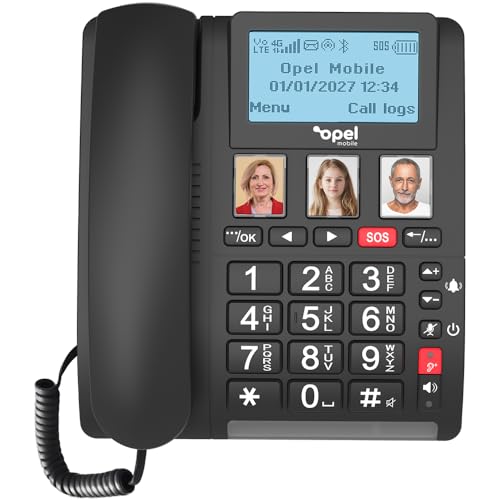
Opel Mobile 4G Home Phone 2
ASIN B0F3218WFL • $197 • Sold by POP PHONES on Amazon AU
The Opel leads this guide because it solves the problem the others can't: it doesn't need the NBN or a fixed line at all. It's a desk phone with big buttons that takes a SIM card and makes calls over the 4G network, so it keeps working when the modem's off, and the listing states a back-up battery on top of that. For a parent whose home phone is their main line, that's the feature I'd put ahead of everything else. It's also the best-selling phone in this guide by Amazon AU's own numbers, sitting at #10,959 across the whole site on the day I checked, which for a home phone is a strong showing.
The rest of the listing is short and plain. It states dual SIM slots, big buttons, speed dial and an SOS emergency button, and that's about it. Dual SIM is handier than it sounds: you can keep one prepaid service just for the home number and leave the second slot for a backup carrier if reception's patchy where you live. The SOS button is the kind of feature families tend to ask about, but I'd test exactly what it does and who it calls before relying on it, because the listing doesn't spell that out. It's also the only phone here where a power cut doesn't end the conversation, because the listing describes the battery as a back-up rather than the only supply.
You'll need a mobile plan for it, and prepaid is usually plenty for a phone that mostly receives calls. Check indoor reception on the same network in the spot where it'll live before you buy, since a 4G desk phone has a smaller antenna than most people expect and a brick wall can cost you a bar or two. At $197 it's the most expensive pick here, and most of that is the 4G radio and battery. If the household already pays for a second mobile service that sits unused in a drawer, that SIM can go straight in and the running cost drops to nothing extra.
Honest caveats: The listing doesn't state any call-blocking feature, so this is the pick for resilience, not scam defence. It also doesn't state battery capacity, standby time or what the SOS button does. You'll need a 4G mobile plan and decent indoor reception. Sold by POP PHONES on Amazon AU.
Best for: A main home line that keeps working through NBN outages and blackouts, for someone who wants a desk phone, not a mobile.
Type: 4G desk phone, SIM-based • Network: 4G mobile, no NBN or fixed line required (stated) • SIM: Dual SIM (stated) • Power: Back-up battery (stated, capacity not stated) • Keys: Big buttons, speed dial, SOS button • Call blocking: Not stated on the listing • Sold by: POP PHONES • Rank: #10,959 overall on Amazon AU
View on Amazon AU
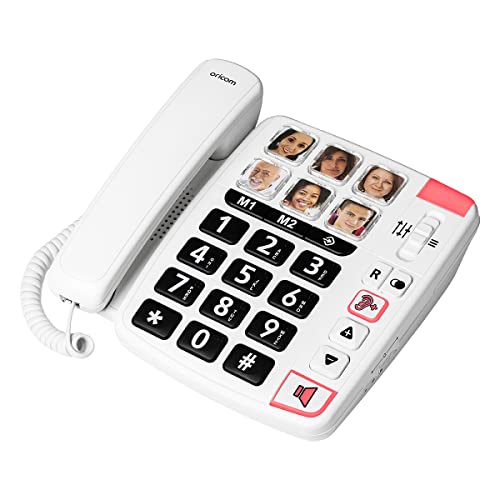
Oricom CARE80S Big Button Amplified Corded Phone
ASIN B09GXMCJ83 • $89.95 • Sold by ORICOM on Amazon AU
The Oricom CARE80S is the simplest phone in this guide, and for a lot of households that's the point. It's a corded phone with six large one-touch memory buttons that take a photo of each person, so dialling a son or a GP's surgery means pressing a face rather than remembering ten digits. It's $89.95 from Oricom on Amazon AU and it's the second best seller here at #13,107 overall on Amazon AU, which tells me plenty of families have landed on the same answer for a parent who finds keypads hard work. It's also the phone here that needs the least explaining to the person using it, which counts for a lot when you're setting it up on a weekend visit and won't be there on Monday.
The earpiece is amplified, with the listing stating up to 24dB of boost, and there's an inbuilt inductive coupler for hearing aids on the T setting. There's also a visual ring indicator, a red light that flashes on an incoming call, which matters more than people think for anyone who doesn't always hear a ring from the next room. It's wall-mountable too, which keeps a corded phone off a crowded bench and puts it at the same spot every time. If you're buying it for someone else, print the photos small and square before you go over, because the buttons take a printed picture and a fuzzy phone snapshot of a face is harder to recognise than you'd think at that size.
From a repair point of view, a corded phone like this is about as dependable as consumer electronics gets. There's no handset battery, no radio link between base and handset, and nothing to pair or charge. The weak points are the coiled handset cord and the line cable, and both are standard parts you can replace for a few dollars. In my experience these outlive two or three cordless sets, and when one finally fails it's usually the keypad after years of the same six presses rather than the electronics. If calls go crackly, try a new line cord before anything else, because a cord that's been yanked a few times is the usual culprit.
Honest caveats: There's no call blocking on this phone at all, so pair it with telco-level blocking or the Do Not Call Register. It needs a working fixed voice service, and on most NBN connections it plugs into the modem, so it goes dead in a blackout. Six memory buttons is the limit.
Best for: Someone who struggles with keypads and needs the easiest possible way to ring the same six people.
Type: Corded desk or wall phone • Memory keys: 6 large one-touch photo buttons • Earpiece: Amplified, up to 24dB (stated) • Hearing aid: Inductive coupler, T setting (stated) • Ring alert: Visual flashing indicator • Mounting: Desk or wall • Call blocking: None • Sold by: ORICOM • Rank: #13,107 overall on Amazon AU
View on Amazon AU
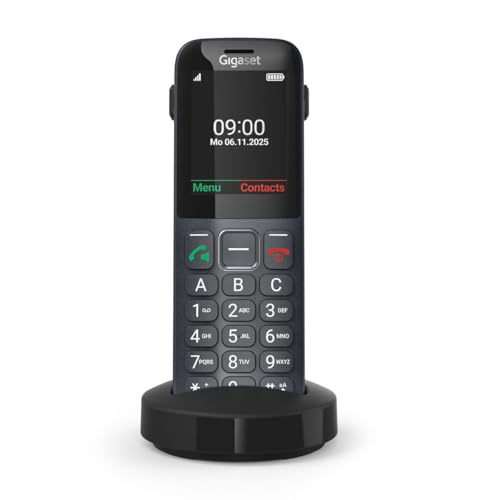
Gigaset Comfort 600 4G Mobile Feature Phone
ASIN B0GZKCMW6H • $119 • Sold by Gigaset Australia Store on Amazon AU
The Gigaset Comfort 600 is the one I'd pick for a parent who's getting a lot of scam calls, because it's the only phone here that states an allow list on the listing. You can block up to 50 numbers, and separately store up to 50 trusted contacts who always ring through. That second list is the useful one: switch the phone to favour trusted callers and the rotating, spoofed numbers that make block lists pointless stop mattering. It's $119 from the Gigaset Australia storefront and sits at #23,463 overall on Amazon AU. Most families I talk to don't need a bigger block list, they need a shorter list of people who are allowed through, and that's the feature this phone is built around.
It's built like a landline but runs on 4G with VoLTE, so it needs a SIM and works without the NBN. It sits in a charging cradle on the kitchen bench and lifts out like a cordless handset, with a 2.4-inch colour screen and three direct dial keys marked A, B and C for the people called most. Bluetooth 5.0 LE is stated for headsets and hearing aids, and the listing calls it hearing aid compatible on the M4/T4 rating. The cradle matters more than it sounds for an older user: the phone always lives in the same spot, it's always charged, and picking it up to answer feels like a landline rather than a mobile, which is what makes people comfortable with it.
The battery is a replaceable 1000mAh lithium-ion pack, which I like, because that's the part that wears out first on any phone and a clip-in battery means it isn't the end of the phone. The listing states up to 300 hours standby and 9 hours talk time, and it charges by USB-C or the cradle. Expect to replace that pack every few years with daily use, and buy the genuine part rather than a no-name lookalike, because a poorly made lithium cell is the one thing in a phone that can swell or overheat. USB-C charging also means one less proprietary charger to lose.
Honest caveats: Fifty entries is a small block list, though the trusted list matters more. It needs a 4G plan with VoLTE and decent reception. The listing doesn't explain how unlisted callers are handled once the trusted list is in use, so test it with a second phone. Sold by Gigaset's own AU storefront, not Amazon.
Best for: A parent being worn down by scam calls who'd be better off with only known contacts ringing through.
Type: 4G mobile feature phone in a desk cradle • Network: 4G VoLTE (stated) • Call blocking: Block list up to 50, trusted list up to 50 • Screen: 2.4-inch colour TFT, 240 x 320 • Keys: 3 direct dial keys (A, B, C) • Battery: 1000mAh Li-ion, replaceable; 300h standby, 9h talk (stated) • Hearing aid: Bluetooth 5.0 LE, M4/T4 (stated) • Sold by: Gigaset Australia Store • Rank: #23,463 overall on Amazon AU
View on Amazon AU
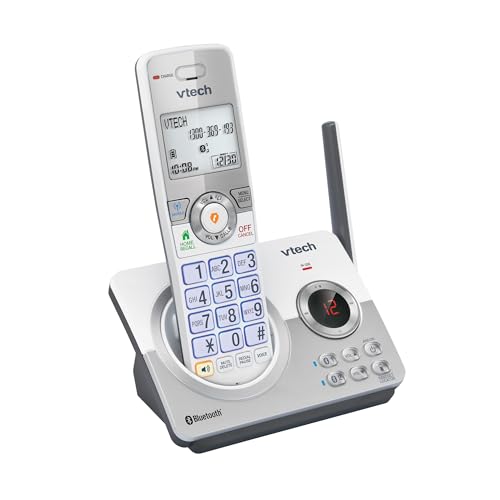
VTech CLS22150 DECT Cordless Phone with Smart Call Blocker
ASIN B0FHZBZ2QV • $74 • Ships from Amazon AU
The VTech CLS22150 is the most capable blocker for the money in this guide. It's $74 from Amazon AU, it's a single-handset DECT cordless set with an answering machine, and it states a smart call blocker that screens robocalls, telemarketers and unknown numbers automatically, plus a one-touch block key and room for 1,000 blocked numbers. That's twenty times the Gigaset's list, and the one-touch key means blocking the call you just hung up on is a single press rather than a trip through the menus. For a household that gets the same nuisance numbers over and over, a big list and a one-press block is what clears the afternoon calls within a few weeks.
It also does something none of the others do: MobileConnect pairs up to two mobile phones over Bluetooth, so mobile calls ring on the cordless handsets and you can transfer up to 1,000 contacts across. In a mobile-only household that means you can drop the home line entirely and still have a cordless phone in the kitchen. The answering machine records up to 30 minutes, the screen and keypad are backlit, and the listing claims 12 hours of talk time. It's sold as NBN ready, which in practice means it plugs into the phone port on the modem like any other cordless set, and the listing title also states a volume booster and a handsfree speakerphone on the handset.
The listing doesn't explain how the smart screening decides who's unknown, so set it up and test it with a number that isn't in the phonebook before you rely on it. Some cordless phones still let a blocked or screened caller through to the answering machine, which defeats part of the point if the person you're protecting listens to every message and rings back. Test that as well with a spare mobile before you hand it over, and show them how to delete a message without returning the call.
Honest caveats: Amazon AU had no published sales rank for this listing on the day I checked. It needs mains power at the base, and on NBN it plugs into the modem, so it stops in a blackout. Only one handset in this pack; the CLS22151 and CLS22152 are the 2 and 3 handset versions.
Best for: The most blocking for the money, and the pick for a mobile-only household that still wants a cordless handset at home.
Type: DECT 6.0 cordless, 1 handset • Call blocking: Smart call blocker; one-touch block key; up to 1,000 numbers • Mobile link: MobileConnect, up to 2 phones over Bluetooth • Phonebook: Up to 1,000 entries transferable • Answering machine: Up to 30 minutes • Talk time: 12 hours (stated) • Sold by: Amazon AU • Rank: Not published by Amazon AU (checked 9 October 2026)
View on Amazon AU
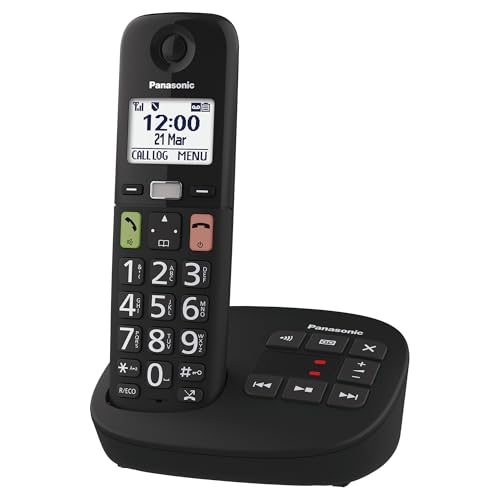
Panasonic KX-TGU120AZB Big Button Cordless Phone
ASIN B0DBV8NTCY • $99 • Ships from Amazon AU
The Panasonic KX-TGU120AZB is the pick when the person using it needs big buttons and blocking in the same handset. The keypad is large and illuminated with extra large coloured answer and end keys, which is the detail that matters for anyone who presses the wrong one under pressure. It's $99 from Amazon AU and it's the most familiar shape in this guide: a cordless handset, a base with an answering machine, and a menu that most people can get through. Panasonic has made this style of cordless phone for a long time and the menus are close to what most older users already know, which shortens the learning curve more than any feature list. The base carries the answering machine too, so there's one box to find a spot for, not two.
The blocking is the category type. The listing states nuisance call block by country and area code, plus an automated call block that recognises and screens out auto-dialled calls, both using the telco's Caller ID service. Blocking whole international prefixes with one setting takes out a lot of overseas call centre traffic, and that does more for most homes than a long list of single numbers. There's also a Favourites key that stores three special numbers and flashes when one of them rings, and it doubles as speed dial. Do the setup yourself, add the prefixes for countries the household never calls and leave the automated block switched on, and you've covered most of what reaches a typical home.
The handset is listed as hearing aid compatible for induction pick-up coil aids, which reduces the buzzing you can get from a cordless earpiece. That matters on a phone like this, because the people most likely to need big buttons are also the most likely to wear hearing aids. The listing doesn't state the battery type or talk time, so plan on replacing the handset cells every few years, which is a few dollars and five minutes. If the base ever shows no lights, check its plug pack before blaming the phone, since that's the part that fails most often on cordless sets of every brand.
Honest caveats: Every blocking feature relies on Caller ID being active on the line, which some providers still charge for. Amazon AU had no published sales rank for this listing on the day I checked. The listing doesn't state handset battery type or talk time. Mains-powered base, so it's out in a blackout on NBN.
Best for: A home that wants big, clear buttons and simple area-code blocking on a familiar cordless phone.
Type: DECT cordless with answering machine • Keys: Large illuminated keypad, extra large answer/end keys • Call blocking: Nuisance call block by country/area code; automated call block (Caller ID required) • Favourites: 3 numbers, flashing key on incoming call • Hearing aid: Induction coil compatible (stated) • Model: KX-TGU120AZB • Sold by: Amazon AU • Rank: Not published by Amazon AU (checked 9 October 2026)
View on Amazon AUSide-by-side comparison
What we see fail at the bench: home phones
Home phones don't come in for repair often, because most people replace them, but they come up all the time when a family brings in a parent's tablet or mobile and mentions the phone at home stopped working too. Three faults account for nearly all of it, and two of them cost almost nothing to sort out once you know what you're looking at.
Worn-out handset batteries
A cordless handset that used to last all day and now dies by lunchtime has a tired battery, not a faulty phone. Most DECT handsets run on rechargeable cells that lose capacity over three to five years of sitting in a warm cradle, and the symptom looks like a dead phone because the handset can't hold a call long enough to finish it. Replacement cells are usually a few dollars, but buy the type and capacity printed on the old ones, and never put standard alkaline batteries in a charging cradle. On a SIM-based phone like the Gigaset, the clip-in lithium pack is the same story.
Dirty or corroded charging contacts
The next most common one is a handset that sits in its cradle overnight and still shows a flat battery in the morning. Nine times out of ten that's the little spring contacts in the cradle, coated in kitchen grease or lightly corroded, so the handset isn't charging at all. A cotton bud with a little isopropyl alcohol on both the cradle pins and the handset pads usually fixes it in a minute. If the contacts are green or the springs have lost tension, the cradle itself needs replacing, which generally costs less than a new phone.
Dead plug packs and storm damage
Cordless bases and NBN modems both run on small external power supplies, and those fail more often than the phones do. A base with no lights at all is almost always a dead plug pack, and a matching replacement with the right voltage, polarity and connector fixes it. Storms are the other cause: a surge coming in on the power or the line can take out the base, the modem or both. If a phone and a modem both died the same night, check both before buying either, and a surge-protected powerboard is worth having in the corner where they live.
Decision tree: which one should you actually buy?
- Is the home phone their main line, and do blackouts or NBN outages worry you? → The Opel Mobile 4G Home Phone 2 at $197. It runs on 4G with a back-up battery, so it doesn't care what the modem's doing.
- Is a parent getting worn down by scam calls? → The Gigaset Comfort 600 at $119. Its trusted list lets known contacts through and stops the rotating numbers that defeat block lists.
- Want the most blocking for the least money on a normal cordless phone? → The VTech CLS22150 at $74, with a 1,000-number block list, a one-touch block key and mobile pairing.
- Do they need big buttons and simple area-code blocking together? → The Panasonic KX-TGU120AZB at $99, with large illuminated keys and Caller ID based country and area code blocking.
- Do they struggle with keypads altogether? → The Oricom CARE80S at $89.95. Six photo buttons, a loud earpiece and nothing to charge.
- Phone, base or modem stopped working and you can't tell which? → Bring the lot into our Erina workshop and I'll tell you which part has failed before you spend anything on a replacement.
Frequently asked questions
Do call-blocking phones stop scam calls completely?
No, and any box that says so is overselling it. A block list only stops numbers that have already called, and scammers rotate and spoof numbers constantly. Category blocking, like withheld numbers or international prefixes, catches a lot more for very little effort. The strongest setup is an allow list, where only saved contacts ring through, which the Gigaset Comfort 600 states on its listing. Combine whichever phone you buy with the blocking your telco already does in the network and the free Do Not Call Register, and most households see the nuisance calls drop sharply rather than disappear.
Will a call-blocking phone work on the NBN?
Yes, the cordless and corded picks work on an NBN voice service, plugged into the phone port on your modem rather than the wall socket. The catch is that the modem needs power, so the phone stops in a blackout unless the modem is on a battery backup. Caller ID based blocking also needs Caller ID switched on for your NBN voice service, which most providers include but a few still charge for. The two 4G phones in this guide don't use the NBN at all, so neither of those limits applies to them.
What is the best phone for an elderly parent in Australia?
It depends on two things: whether they struggle with dialling and whether the home phone is their main line. For keypad trouble, the Oricom CARE80S with photo buttons is hard to beat at $89.95. For scam calls, the Gigaset Comfort 600 with its trusted list. If the home phone is the main line and blackouts are a concern, the Opel 4G Home Phone 2. If they're ready for a smartphone instead, a refurbished phone with large text settings is often the better long-term answer than any home phone.
Do 4G home phones need a mobile plan?
Yes. A 4G home phone takes a SIM card and runs on the mobile network, so it needs an active service from a carrier that covers your address well. For a phone that mostly receives calls, a basic prepaid plan is usually plenty. Since the 3G networks closed in 2024 the phone must support 4G calling (VoLTE) to work at all, including for emergency calls, so avoid older 3G-era seniors phones on marketplace listings. Check indoor reception where the phone will sit before buying, because desk phones often have smaller antennas than a modern mobile.
Can I keep my existing home phone number with a 4G home phone?
Usually you can port a landline number to a mobile service, but not every carrier accepts fixed-line numbers on a mobile plan, and some will only port it to a fixed wireless or home phone product. Ask the new carrier before you cancel anything, because cancelling the old service first can lose the number. If keeping the number isn't possible, the simplest fix is a recorded message on the old line for a few weeks and telling the people who matter. Don't port a number during a week when you're expecting important calls.
Why does my cordless phone battery die so quickly?
In nearly every case it's the handset batteries wearing out, not a fault in the phone. Rechargeable cells in a cordless handset lose capacity over three to five years, especially sitting in a warm cradle all day, and eventually they can't hold a call. The other common cause is dirty or corroded charging contacts in the cradle, which stop the handset charging at all. Clean the contacts with isopropyl alcohol first, then replace the cells with the same type and capacity printed on the old ones. Never use non-rechargeable batteries in a charging cradle.
Related buying guides
Phone dead, or the modem? Bring both in
When a home phone stops working it's usually a tired handset battery, a dirty cradle contact or a dead plug pack, and sometimes it's the modem it plugs into. Bring the handset, the base and the power supplies into our Erina workshop and I'll tell you which part has actually failed, and what it'll cost to fix, before you spend anything on a new phone.
Visit our Erina workshop Book Online