Prices from Amazon AU, updated daily.
Disclosure: This article contains affiliate links to amazon.com.au. If you buy through one of these links iFix may earn a small commission at no extra cost to you. It doesn't change which products we recommend: we focus on what actually lasts, based on 16 years of repair-shop experience.
Why this matters now
The numbers from the regulators tell the story.
The Australian Signals Directorate's Annual Cyber Threat Report 2024-25 logged over 84,700 cybercrime reports in the financial year, one every six minutes. Identity fraud, online shopping fraud and online banking fraud were the top three categories reported by individuals. The ACSC responded to more than 1,200 cyber security incidents, an 11% increase year-on-year.
The ACCC's Targeting Scams Report for calendar 2025 puts financial losses at $2.18 billion across 274,577 reports, losses up 7.8% on 2024. Investment scams alone cost Australians $837.7m. Phishing was $97.6m. Remote-access scams were $69.9m. Investment, romance, phishing, remote-access and payment-redirection together account for roughly 60% of total losses.
The pattern in those numbers is consistent and important: the attack vector is almost always credential takeover, not exotic exploits. A scammer tricks you into typing a password into a fake page, or harvests it from a leaked breach, and from there everything else follows. SMS codes can be intercepted (SIM-swap), redirected (carrier social-engineering), or simply phished onto the same fake page that took your password.
A hardware security key breaks that whole chain. It physically signs a cryptographic challenge that the real site issues. A fake site issues a different challenge, the key refuses to sign, and the attacker is locked out even with your password and your phone. That's the protection you're paying around $110 for. In the context of a $24,000 average loss for over-65s in scam incidents per the OAIC's Notifiable Data Breaches reporting, it's the cheapest insurance most households will ever buy.
I run a repair shop on the Central Coast. After 16 years in the workshop, the failure mode I see most often when someone walks in panicking about a hacked Gmail is the same one: a stolen password they reused, plus an SMS-based 2FA the attacker bypassed in real time. Every single one of those incidents would have been stopped by a hardware key registered before the attack.
What to look for in a hardware security key
Five things actually matter. Marketing pages talk about a lot more, but most of it doesn't change the outcome.
1. FIDO2 / WebAuthn support
This is the modern standard and the one that supports passkeys. Anything you buy in 2026 should be FIDO2-certified. Older U2F-only keys still work for second-factor logins on sites that support U2F, but they won't act as a primary passkey for passwordless login. All three keys below are FIDO2 and WebAuthn capable.
2. Connector
USB-A is fading on phones, laptops and tablets, and USB-C is now standard. Here's the honest part for Australian buyers: the FIDO2 keys an AU seller actually stocks in 2026 are mostly USB-C or cabled, with one USB-A option, and none of the three adds NFC tap. If every machine in your house still runs the full-size USB-A port, the Guard USB-A below is the one that plugs straight in. USB-C covers modern phones, laptops and iPads, so it is the better pick for anything recent.
3. Build quality
A portable key lives on your keyring. It will be banged, dropped, washed, sat on, and dropped in the dust under a car seat. Look for a compact potted body with a protective cap and a tether, which is what the Kensington VeriMark portable keys use. Avoid the folding or swivel keys where the connector retracts on a hinge: a hinge is a moving part, and a moving part is a failure point. After 16 years of seeing what survives daily abuse, I'd take a fixed-body key every time.
4. Number of credentials it can store
A FIDO2 key can hold "discoverable credentials" (resident keys / passkeys) up to a hardware limit, typically a few dozen depending on the key. For non-resident U2F second-factor use, the credential count is effectively unlimited. If you only ever use it as a 2FA token, this won't matter. If you use passkeys for many accounts, it does.
5. Biometric or PIN-protected
This used to be the premium tier. In 2026 the AU-available field is all fingerprint: the three Kensington VeriMark picks below carry a built-in sensor. The difference from a touch-only key is worth understanding. A touch-only key works for whoever is holding it, so a lost or stolen key stays a risk until you de-register it; a fingerprint key won't authenticate for anyone but you. The fingerprint is matched on the key itself and never leaves it, so there's no biometric database to breach. For the key riding on your keyring every day, the sensor earns its place.
What doesn't matter for most people: open-source firmware (nice in theory, marginal in practice for non-experts), exotic protocols like OpenPGP (only useful if you specifically need to sign emails), and "made in country X" claims (the chip silicon comes from a small handful of foundries regardless of where the key is assembled).
Top picks for 2026
Three picks: three Kensington VeriMark fingerprint keys, one for each way you are likely to plug one in. That is very close to the entire AU-retail field. Local FIDO2 supply is genuinely thin, and most of what else you will see listed ships from an overseas exporter with no Australian warranty behind it. Prices accurate at time of writing; buybox availability moves around on Amazon AU, so the on-page price may differ slightly.
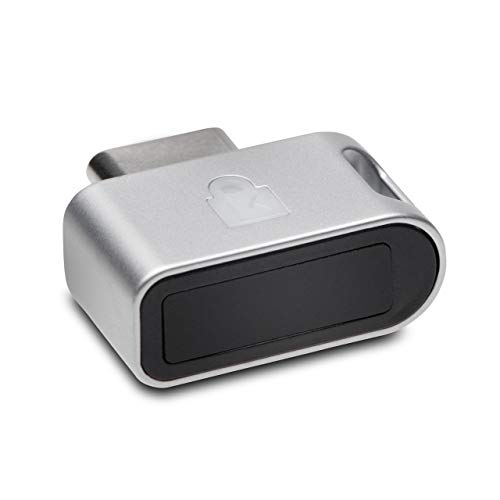
Kensington VeriMark Guard USB-C: FIDO2 + Fingerprint, Pocket-Sized
If you only buy one key, this is it. The VeriMark Guard is a compact USB-C key that plugs into modern phones (including iPhone 15 and later), USB-C laptops and USB-C iPads. It's FIDO2 and FIDO U2F certified, works as a passkey for passwordless login, and its Match-in-Sensor fingerprint reader stores up to 10 prints on the key itself, so a lost or stolen key is useless to whoever finds it. Cross-platform across Windows, macOS, Chrome OS and iOS, with a protective cap and tether so it survives keyring life.
Best for: Anyone protecting an inbox, a password manager or a major cloud account from both a phone and a laptop. The single key most households should start with.
Connector: USB-C • Standards: FIDO2, WebAuthn, U2F, on-key fingerprint • Form: compact body, cap + tether
View on Amazon AU Full specs
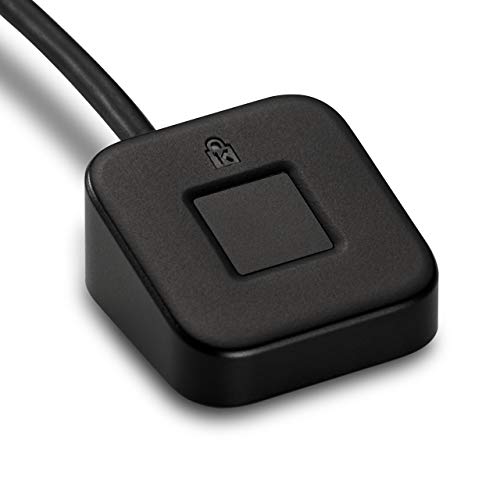
Kensington VeriMark Desktop: A Fingerprint Puck That Lives by the Keyboard
Same authentication, different shape. Instead of a key you slot into a port, this is a small fingerprint puck on a 1.2m USB-A cable that sits on the desk, always in reach. If your machine stays put and you're tired of fishing a key out of a rear USB port, that ergonomics win is real. It's FIDO U2F certified and FIDO2/WebAuthn compatible, and it's Windows Hello certified (including Windows Hello for Business), with Office 365, Azure and Outlook support. The trade-off is obvious: it's tethered to one desk, so it's the wrong choice for travel or phone logins.
Best for: A desktop that stays in one place, and Windows-centric households or small offices that want the sensor sitting out on the desk.
Connector: USB-A on a 1.2m cable (desktop unit) • Standards: FIDO U2F, FIDO2, WebAuthn, Windows Hello • Form: cabled desktop reader
View on Amazon AU Full specs
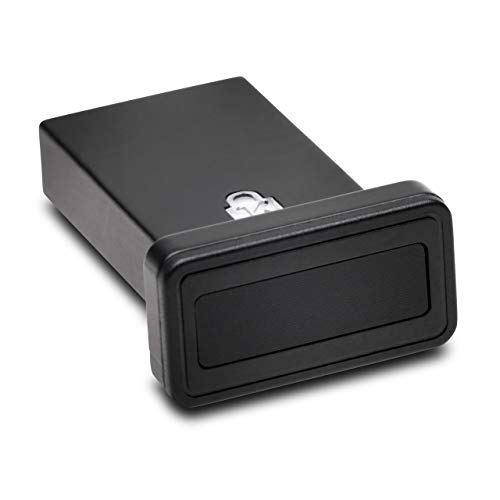
Kensington VeriMark Guard USB-A: Fingerprint FIDO2 Key for Older Ports
Plenty of offices and home desktops still run full-size USB-A ports, and this is the Guard for them. It is a FIDO2 / WebAuthn and FIDO U2F key with a fingerprint reader built in. It stores up to 10 fingerprints, and Kensington quotes a 2% false rejection rate and a 0.001% false acceptance rate. It works with Google and Microsoft accounts, password managers and the major browsers on Windows, macOS and ChromeOS, and it ships with a protective cap and case plus a safety strap. Know the limits before you buy. It is for logging in to online services, not for signing in to the PC itself, and Windows Hello only supports it in corporate Microsoft Entra ID setups, not on a private machine. It plugs in rather than taps, so it is a computer key, not a phone key.
Best for: Anyone whose main computer or dock only has USB-A ports and who wants a fingerprint-protected key without buying an adapter. Register a second key alongside it and keep that one at a different address.
Connector: USB-A • Standards: FIDO2, WebAuthn/CTAP2, U2F • Biometrics: fingerprint, up to 10 prints • Accuracy: 2% false rejection, 0.001% false acceptance • Includes: protective cap and case, safety strap
View on Amazon AU Full specsAll three keys support FIDO2 / WebAuthn, the standard that actually beats phishing. Hardware keys block the credential-theft side of fraud; for the order-side patterns Australian shoppers see weekly, our Amazon scams targeting Australians guide covers fake seller detection and brushing scam recognition.
How FIDO2 actually beats SMS, app codes and passwords
Worth understanding why a hardware key is qualitatively different from any 2FA method that came before it.
Passwords alone: Trivially defeated by phishing, breach reuse and keyloggers. Every major breach in the OAIC's Notifiable Data Breaches register lists credentials as the entry point.
SMS codes: Stop automated credential-stuffing but fall to SIM-swap (carrier social engineering) and real-time phishing (a fake login page asks for the SMS code as you type it, then forwards it to the real site). The ACCC has documented thousands of Australian SIM-swap incidents.
Authenticator app codes (TOTP): Better than SMS, because code generation happens on your device, but still phishable in real time. Type a six-digit TOTP into a fake page and the attacker has 30 seconds to relay it.
FIDO2 hardware keys: Cryptographically immune to phishing. When you register a key, the site stores a public key and your key holds the matching private key. At login, the site issues a challenge scoped to its own domain. Your key signs only if the requesting domain matches the registered one. A phishing site at g00gle.com.au issues a challenge from a different domain, so the key refuses to sign. There is no shared secret to steal because none is transmitted.
This is why Cloudflare survived a 2022 phishing campaign that compromised dozens of other companies: every staffer used a hardware security key, and the keys simply refused to sign for the attacker domain. The same primitive protects your inbox.
How to use them properly
Four rules that matter more than which key you pick.
- Always buy two. Single-key setups fail catastrophically when the key is lost. Buy a primary and a backup, register both on every important account, and store the backup in a different physical location: a fireproof safe, a parents' house, a safety deposit box. A backup that lives in the same drawer as the primary fails the same flood, fire or burglary.
- Register the keys before you turn off SMS. Walk your most important accounts (email, banking, password manager, Apple ID, Google account) and add both keys. Verify both work. Then, and only then, remove SMS as a recovery option from accounts that allow it.
- Use it as a passkey wherever the option exists. Passkey support means the key replaces the password entirely on that account, so there's no longer a password for an attacker to steal. As of 2026, Google, Apple, Microsoft, Amazon, GitHub, and most major password managers all support passkeys with hardware keys.
- Don't tape it to your laptop. I see this once a month. The whole point of the second factor is physical possession that's separate from the device. A key taped to the laptop is a single factor again. The key lives on a keyring or in a wallet, not on the device it protects.
Common mistakes I see at the repair shop
After 16 years in the workshop, certain failure patterns repeat.
The "I'll set it up later" mistake. A customer came in last month with a hacked Gmail. He had a security key in the drawer, bought after a previous scare, that he never registered to the account. Buying the key isn't the protection. Registering it is. The key doesn't do anything sitting in a drawer.
The "I lost my only key" disaster. A small-business owner I helped last year had locked herself out of her admin Microsoft 365 because her one and only security key went through the washer. The recovery for a primary admin account without a registered backup is a multi-day Microsoft support process, and during those days she couldn't access her email, billing or customer records. A second key would have saved a week of business chaos.
Buying a "no-name $20 FIDO key" off a marketplace listing. Some are FIDO-certified and fine. Some are knock-offs with no firmware update path, no published vulnerability disclosure, and questionable random-number generation on the chip. If the certification number isn't on the FIDO Alliance's certified-products list, don't trust it with your bank login.
Trusting one biometric key with no backup. A fingerprint sensor is a real upgrade, because a thief who finds your key can't use it. But the sensor does nothing if the key itself is lost, damaged or put through the wash. Biometric or not, the rule is the same: register a second key. The fingerprint protects against theft, not against loss.
Frequently asked questions
Do I really need a hardware key if I already use an authenticator app?
If your accounts hold money, contain identity documents, or are the recovery method for other accounts (your email particularly), yes. Authenticator apps stop bulk credential stuffing but they don't stop a real-time phishing page that asks for the code as you type it. A hardware key does. For low-stakes accounts, an app is fine.
Will these security keys work with an iPhone?
The VeriMark Guard USB-C plugs straight into an iPhone 15 or later, and into any USB-C iPad or laptop. The Guard USB-A is for computers and hubs, so for a phone buy the USB-C one. Older Lightning iPhones need a USB-C adapter, or you register the key on a laptop instead. If you're shopping for an iPhone itself, our refurbished iPhones all carry a 12-month warranty.
What happens if I lose my hardware security key?
If you registered a backup key (you should have), you log in with the backup, remove the lost key from your accounts, and order a replacement. If you didn't register a backup, the recovery process depends on the site: most allow recovery via a verified email or recovery codes, but it's slow and stressful. A backup key turns a crisis into a five-minute task.
Is a hardware key better than a passkey on my phone?
A hardware key is independent of the phone. If the phone is lost, stolen, factory-reset, or its biometric is bypassed, the hardware key is unaffected. Phone-based passkeys are convenient and a real upgrade over passwords, but a hardware key is the higher-security tier, and the two work together (you can register both on the same account).
Can I use one security key for multiple accounts?
Yes. A single key registers to as many accounts as you want. Most people register their primary key to 10 to 30 accounts. The hardware limit on resident credentials (passkeys) is per-key, but most accounts can be registered as non-resident U2F second-factor with no practical limit.
Do Australian banks support hardware security keys?
Coverage is patchy. ANZ supports security keys for some business accounts. Most consumer retail-bank logins still rely on SMS or app-based 2FA. The accounts where hardware keys make the biggest difference are your email (which is the recovery path for the bank login), your password manager, and your major cloud accounts (Google, Microsoft, Apple). Lock those down with a key and you've protected the path attackers actually use.
How I'd choose
For a typical Central Coast household in 2026:
- Just protecting your email and main accounts? Two VeriMark Guard USB-C keys (~$218 total). Register both, store one as backup.
- Want a primary plus a properly separated backup? One Guard USB-C plus the Guard USB-A (~$204 total). Register both on every account that matters, then store the second at a different address.
- Mostly desk-bound? One Guard USB-C for when you travel, plus one Desktop unit that lives by the keyboard (~$218 total).
- Small business with admin access to billing or customer data? Two Guards for the admins plus two backups stored off-site. Still cheaper than one ransomware incident or a redirected supplier payment.
The biggest mistake is buying one key and not registering it. The second biggest is buying one key and not buying a backup. Spend the extra money on the second key.
For wider context, see our best portable power stations guide for blackout backup, our small-business security cameras guide for premises hardening, and how to protect your parents from online scams when you're locking down accounts for older household members. Browse the full security keys category for every model we've vetted in the workshop.
If you have specific questions, drop into the iFix shop in Erina. We register security keys for customers at the bench routinely, and we're happy to walk through a setup if you'd rather not figure it out alone.
Need help locking down your accounts?
If you'd like a hand registering keys to email, banking and cloud accounts, or recovering an account that's already compromised, we're happy to help on the Central Coast.