Prices from Amazon AU, updated daily. Swipe or use the arrows for more.
Disclosure: This article contains affiliate links to amazon.com.au. If you buy through one of these links iFix may earn a small commission at no extra cost to you. It doesn't change which products we recommend. We focus on what actually lasts based on 16 years of repair-shop experience.
Quick summary8 picks
- Entry PickLa Bella NOVA Kids Study Desk Chair with… about$119.95
- Kids Functional Desk and Chair Set about$112.00
- HONEY JOY Kids Study Desk about$145.95
- Adjustable Height Children Kids Study Desk… about$121.99
- Adjustable Height Children Kids Study Desk… about$125.99
- Costway Kids Study Desk about$139.95
- HONEY JOY Kids Study Desk and Chair Set about$172.95
- Most PremiumHONEY JOY Kids Study Desk & Chair Set about$185.95
Why the height range matters more than anything else
A kids desk gets bought for the child standing in front of you, and that child is gone within a year. Most primary-school kids grow somewhere around five or six centimetres a year, so a desk that fits a seven-year-old in January is sitting low by the following summer, and a fixed-height desk bought for a Year 1 student is usually a toy table by Year 4. The question worth asking isn't whether it fits now. It's whether the height range on the listing covers where your kid will be in three years' time.
That's how I sorted the picks. Every one of them adjusts, and I've leaned towards listings that actually state their range in centimetres, because 'height adjustable' on its own can mean anything from two notches to a proper crank. The HONEY JOY desk states 50.5 to 73cm, which is a big spread. The HONEY JOY desk-and-chair set states 67 to 75cm for the desk and 34.5 to 42.5cm for the chair, a narrower range that starts higher, so it suits older kids. The Segden and XICEN sets say they adjust but don't give numbers, which I've flagged in each pick.
I left out a well-ranked fixed-height desk from Costway for exactly this reason. It's a decent bit of furniture with plenty of storage, but its listing pitches it at three to six year olds with no adjustment at all, and that's a short working life when an adjustable desk costs about the same.
How to measure your kid for a desk
You don't need a chart, just a tape measure and five minutes. Sit your child on a chair with their feet flat on the floor and their thighs roughly level. Measure from the floor to the back of the knee, and that's about the seat height they need. Then, with their arms relaxed at their sides and elbows bent to about a right angle, measure from the floor to the underside of the elbow. The desktop should sit at or a little below that line.
Do it again with the chair you actually plan to use, because the chair decides everything. A desk at the right height with a chair that's too low leaves the kid reaching up to write, and a chair that's too high leaves their feet dangling. That's why desk-and-chair sets make sense for younger kids, since the two are designed to move together. If you're buying a desk on its own, a footrest or a sturdy box under the feet fixes a chair that's too tall far more easily than anything fixes a chair that's too short.
As a very rough guide, a kid around 120cm tall usually ends up with a desktop somewhere in the mid to high 50s in centimetres, and a kid around 150cm tall wants something closer to the low to mid 60s. Adult desks sit around 72 to 75cm. So a desk that tops out at 73cm can carry a child right through to adult height, while one that starts at 67cm is too tall for most younger kids unless the chair goes up to match. Measure rather than trusting my numbers, though, because kids vary a lot at the same height.
Tilting tops, and what they mean for tablets and laptops
Three of the four picks have a desktop that tilts, anywhere from 0 up to 40 or 60 degrees depending on the model. For reading and drawing that's handy, and plenty of kids like working on a slope. From my side of the counter, though, a tilting desktop and a tablet are a combination worth thinking about, because a tablet on a tilted surface is one bump away from sliding off onto the floor.
A good share of the tablets and laptops that come into the shop with cracked screens were dropped from exactly this height, usually by a kid reaching across for something else. Flat is the answer whenever a device is on the desk. The HONEY JOY set includes a reading rack that the listing says holds tablets or books, and the Segden has a rotatable book stand, both of which beat a bare slope, but I'd still keep the top flat whenever a laptop's open on it. If a new laptop is on the school list this year, the student laptop guide covers what survives a school bag.
The other thing a tilting top does is put strain on cables. A charger plugged into a laptop on a sloped desk pulls downward on the charge port the whole time, and cables hanging off the front edge get caught by knees and chair legs. Run cables over the back edge rather than the front, and don't let the weight of a cable hang off the port.
The desk becomes the charging station
Once a kid has a desk, it tends to become where the tablet, the laptop, the headphones and everything else gets charged overnight. That's fine, and it's much better than charging under a pillow, but it's worth setting up properly rather than letting it grow into a nest of adaptors. A single powerboard fixed to the back of the desk or sitting on the floor behind it, with a cord long enough that it isn't stretched, is the tidy way to do it.
Check the chargers too. The ones that cause trouble are almost never the originals that came in the box; they're the spare cables and plug packs picked up from a servo counter or a no-name marketplace listing. Look for the RCM tick on anything that plugs into the wall, and have a read of why no-name chargers fail if you're not sure what you've got. A surge-protected powerboard is worth having on a desk that holds a laptop, and never plug one powerboard into another.
The Segden's detachable LED lamp is the only powered part on any of these desks. Its listing doesn't state how it's powered or charged, so check that before you plan the cable run. If it runs off USB, plug it into a proper wall charger rather than the kid's laptop, so the lamp isn't draining the laptop battery every evening.
Stability, storage and what the listings actually say
Every listing here claims sturdy construction, and none of them give a load rating, so I read the construction details instead. The HONEY JOY desk states thick boards on metal legs with a reinforced crossbar and adjustable foot pads. The Segden set states MDF panels on a steel frame. The HONEY JOY set has non-slip adjustable feet on every leg and a built-in footrest bar. The XICEN listing talks about the adjustable legs and rounded corners but says very little about the frame material, which is one reason it isn't the lead pick.
Adjustable feet matter more than people think. Australian houses, and a lot of older Central Coast homes especially, rarely have perfectly flat floors, and a desk that rocks on one corner loosens its own fittings over a few months as it works back and forth. Level it properly on day one and check it again after the first month, once the carpet has settled under the feet.
Hutches and shelves are the other thing to think about. A tall hutch loaded with books shifts the weight up and forward, and a kid who climbs or leans on an open drawer can tip a light desk. None of these listings mention a wall anchor or anti-tip kit, so if you've got a climber, fit one anyway. A furniture strap costs a few dollars at the hardware shop and takes ten minutes to put in.
If the desk is going against a window, keep it out of the afternoon sun where you can. Hot sun through glass fades the laminate and warms anything left on the desktop, and a laptop or tablet left baking on a desk in a west-facing room is running its battery a lot hotter than it should, which shortens its life over a couple of summers.
Assembly is where most of these are won or lost
Flat-pack kids desks are mostly MDF or particleboard held together with cam locks and machine screws into metal inserts. The first assembly is the strongest they'll ever be, so take your time with it. Don't use a drill driver on the cam locks or on screws going straight into board, because it's very easy to strip the thread or crack the panel around the fitting, and once that happens the joint never holds as well again. A hand screwdriver and some patience does a better job.
Get to know the adjustment mechanism before you build around it. The HONEY JOY desk adjusts by rotating a lever and fixing it with locking knobs, the HONEY JOY set uses a crank for stepless adjustment, and the chair on that set has five fixed height positions. Run each one through its full range once before the desk is loaded with books, so you know it moves freely and you're not discovering a stiff mechanism two years in when the kid needs the next setting.
Keep the Allen keys and the instructions in a zip-lock bag taped under the drawer. Every desk in this guide is meant to be adjusted a few times over its life, and every one of them will want its fittings nipped up at some point. You'll be glad the right key is right there when that day comes.
What wears out first on a kids desk
Kids desks don't usually fail all at once, they loosen over time. The first thing to go is typically the hardware at the adjustment points: locking knobs that strip their threads in the board, cam locks that stop biting after the desk's been moved between rooms a few times, and plastic handles on cranks or tilt levers. None of that is a disaster if you catch it early, and most of it can be fixed with a screwdriver and a replacement part from the seller or a hardware shop.
Next is the desktop surface. MDF and particleboard hate water, and a spill left to soak into an edge or a screw hole will swell the board so the fitting never sits properly again. Wipe spills straight away, and if an edge starts to lift, seal it before it spreads. Tilt struts and cranks come after that, usually a few years in, and the fix is almost always a replacement part rather than a new desk.
The chair tends to outlast the desk if it's a simple fixed-position design like the ones in these sets, because there's no gas lift cylinder to wear out. The weak points are the backrest mounts and the height-adjustment pins, so check both whenever you move it up a setting. A chair that's started to creak at the backrest is usually telling you a screw has worked loose, and it's much easier to tighten it now than to repair a cracked mount later.
Where a standing desk fits in
Older kids and teenagers sometimes ask for a standing desk, and for a high-school student with a laptop and a monitor that's a reasonable ask. Kids desks like these top out at adult sitting height, so they aren't standing desks and won't become one. If your teenager is heading that way, the adult standing desk picks are the next step up, and they have the frame and motor to carry a monitor properly.
For primary-school kids, I'd stick with a desk like the ones below and put the effort into getting the chair fit right. A younger kid does most of their desk work on paper, a tablet or a school laptop, and the thing that makes the biggest difference day to day is a desk and chair at the right heights, adjusted as they grow. Add a pair of volume-limited kids headphones for tablet work and the setup's pretty much done.
One more thing for older kids: if your teenager is already doing a few hours a night on a laptop, an external keyboard and a stand that raises the screen make a bigger practical difference than the desk itself, and they move with the kid when the desk eventually gets replaced.
The 4 picks, $112 to $186
Prices are Amazon AU at time of writing (1 October 2026) and move week to week. Ranks are Amazon AU category sales ranks, checked the same day.

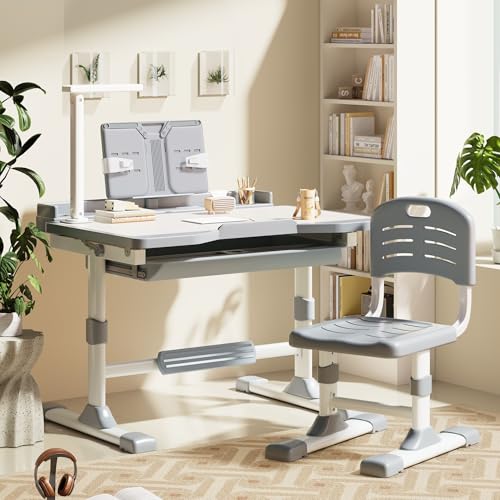
Segden Kids Functional Desk and Chair Set with Tilt Desktop and LED Lamp
ASIN B0G91P36TY • $112.00 • Sold by Segden-AU on Amazon AU
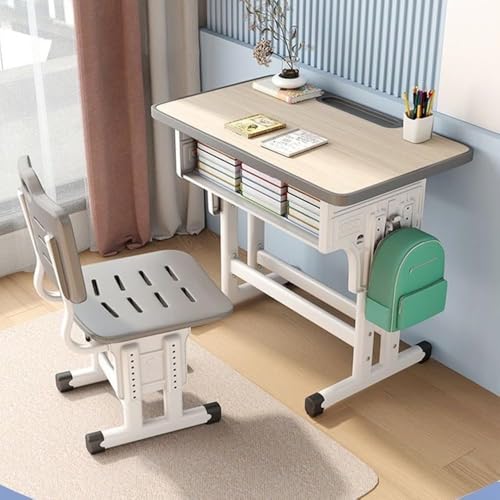
#1 in Amazon AU's Kids' Desk Sets category at $112, sold by Segden-AU, and the strongest all-round package for primary-school kids. The listing pitches the chair at ages 7 to 12, and both the desk and chair adjust in height, though the listing doesn't state the range in centimetres, which is the one number I'd most want. The desktop tilts from 0 to 40 degrees with anti-pinch stoppers at the hinge, and there's a rotatable book stand, a large drawer, steel hooks on the side for a school bag and a drink bottle, and a detachable LED lamp with three brightness levels. For the money, that's a lot of desk.
Construction is MDF panels on a steel frame, which is the usual recipe at this price and fine if it's assembled carefully. The lamp is the part I'd look at hardest. The listing says it's detachable and adjustable for direction and brightness, but not how it's powered, so check the current listing or the box before you plan where the cables go. If it's USB powered, a proper wall charger is the right thing to run it from. I'd also check for an RCM compliance mark on any plug that goes into the wall, since the lamp is the one electrical part on the whole set. Everything else on the frame is standard flat-pack hardware.
The unstated height range is the main reason I'd measure your child before ordering and compare against the dimensions on the current listing or the A+ page, which Segden says carries the assembly instructions. If the range suits your kid now and in three years, this is the set I'd buy. The 7 to 12 age band on the chair is a decent sign it's designed to cover most of primary school, and the #1 rank says plenty of families have found it does the job. It's the one I'd start with.
Honest caveats: The listing doesn't state the desk or chair height range in centimetres, so check dimensions before ordering. MDF panels on a steel frame need careful assembly, so don't power-drive the screws. How the LED lamp is powered isn't stated. Sold by a marketplace storefront (Segden-AU) rather than Amazon AU, so check the returns terms.
Best for: A primary-school kid who needs one matched desk and chair to cover the next few years.
Includes: Desk and chair • Height adjustment: Desk and chair, range not stated on the listing • Tilt: 0 to 40 degrees, anti-pinch stoppers • Build: MDF panels, steel frame • Extras: Detachable LED lamp (3 levels), rotatable book stand, side hooks, drawer • Chair age band: 7 to 12 years • Seller: Segden-AU • Rank: #1 in Kids' Desk Sets (Amazon AU)
View on Amazon AU
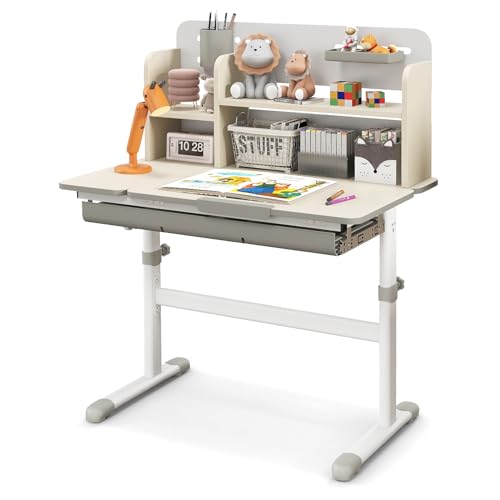
HONEY JOY Height Adjustable Kids Study Desk with Tilt Desktop and Hutch
ASIN B0D2R73BWL • $116.76 • Sold by Baby Joy AU on Amazon AU
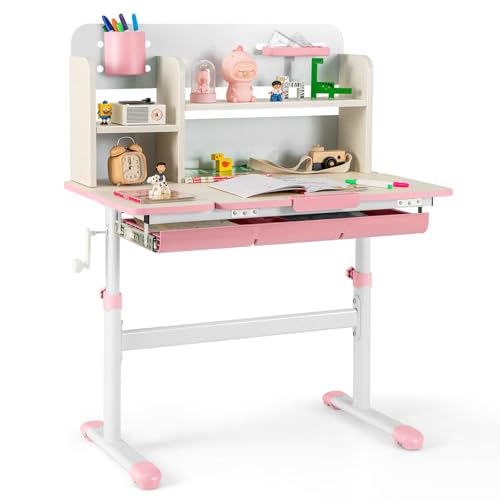
#1 in Kids' Desks at $117, sold by Baby Joy AU, and the pick with the widest stated height range in this guide: 50.5 to 73cm, set by rotating a lever and fixed with locking knobs. That's the range that matters. At the bottom it suits a small child, and at the top it's standard adult desk height, so in principle this one desk can follow a kid from early primary all the way through. The listing pitches it at 3 to 12 years, which I'd treat as conservative given the top of that range. It's a desk only, so plan on a chair that adjusts as well. A fixed chair won't keep up with it.
The desktop tilts in three stated bands, 0 to 15 degrees for writing, 15 to 30 for reading and 30 to 60 for drawing, with an air pump rod, a safety hinge and an anti-pinch cut-out handle. There's a hutch of multilayer open shelves on top, a large drawer with dividers below, a pen holder, a storage tray and a scale ruler along the edge. The frame is described as thick boards on solid metal legs, with a reinforced crossbar between the legs and adjustable foot pads. On paper it's the most thoroughly specified desk here, and the #1 rank backs that up. Few desks at this price state this much detail about their frame.
The air pump rod is the gas strut that controls the tilt, and it's the part most likely to lose its push after a few years, the same way a car's boot strut does. It's usually a replaceable part on desks like this, but check whether the seller stocks spares before you need one. Also mind the hutch: with shelves loaded up top, fit a wall strap if your kid is a climber. Paired with a matching adjustable chair, this is the desk that should last the longest. I'd start here for a younger child.
Honest caveats: Desk only, no chair included. The tilt gas strut is the wear part and may need replacing after a few years. No load rating or wall anchor is mentioned on the listing. Sold by a marketplace storefront (Baby Joy AU), so check the returns terms. Colour variants have separate listings and prices.
Best for: A younger child whose desk needs to keep up all the way to adult height.
Includes: Desk only • Height range: 50.5 to 73cm • Adjustment: Lever with locking knobs • Tilt: 0 to 60 degrees in three bands • Storage: Hutch shelves, drawer with dividers, pen holder, tray • Frame: Thick boards, metal legs, reinforced crossbar • Age (listing): 3 to 12 years • Seller: Baby Joy AU • Rank: #1 in Kids' Desks (Amazon AU)
View on Amazon AU
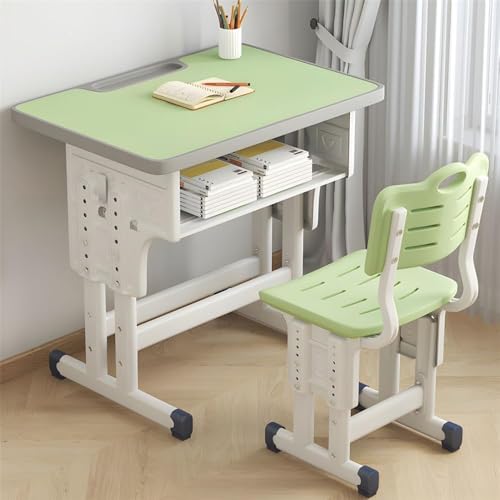
XICEN Adjustable Height Kids Study Desk and Chair Set with Drawer
ASIN B0DMW3MF8R • $125.99 • Sold by PDD-Au on Amazon AU
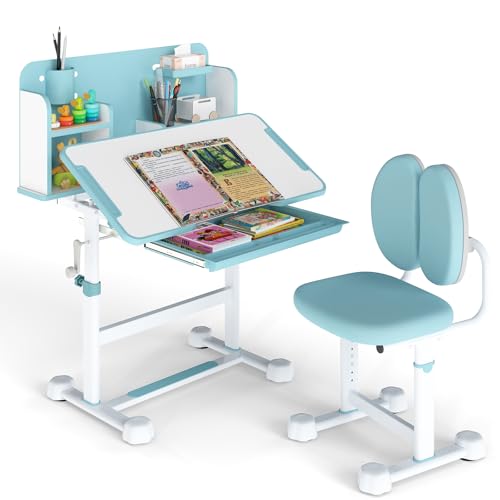
#3 in Kids' Desk Sets at $126, sold by PDD-Au. The XICEN set is the plainest of the four, and for a lot of kids that isn't a bad thing. The desk and chair both lift to adjust for height, the desktop has rounded corners and a curved front edge with an anti-pinch design, and there's a drawer for books and a hook on the side for the school bag. The listing doesn't state the adjustment range in centimetres or mention a tilting top, so going on the listing data alone, it's a flat, height-adjustable desk with a matching chair, and nothing more complicated than that. Simple has its advantages with kids.
The chair is the feature XICEN leans on hardest. The listing describes a PP and PVC double-sided backrest that flexes rather than staying rigid, with a multi-angle twist so it moves with the kid rather than fighting them. In practice that's a more forgiving chair than a solid moulded shell, and in my experience flexible backrests put up with being leaned back on better than rigid ones, which tend to crack at the mounting points. The listing also claims assembly in a few minutes, which I'd take with a grain of salt, though with no hutch it's likely simpler than the HONEY JOY desks. The seat itself isn't described in any detail.
What I can't tell you from the listing is the frame material or the height range, and those are the two things I'd most want to know. Measure your child, then check the current listing's dimensions and photos before buying. If the range covers where your kid will be in three years, it's a sensible, uncomplicated set. If you can't confirm it, the Segden at a similar price gives you more stated features for your money. It's a reasonable choice, but the less the listing tells you, the more checking you have to do yourself before you order.
Honest caveats: The listing doesn't state the height range, frame material, desktop size or any tilt function. Assembly time claims are the seller's own. Sold by a marketplace storefront (PDD-Au) rather than Amazon AU, so check the returns terms and the product dimensions before ordering.
Best for: A kid who wants a plain flat desk and a chair that flexes, with no hutch to climb.
Includes: Desk and chair • Height adjustment: Desk and chair, range not stated on the listing • Desktop: Rounded corners, curved edge, anti-pinch design • Chair: PP and PVC flexible double-sided backrest • Storage: Drawer, side bag hook • Tilt: Not stated on the listing • Seller: PDD-Au • Rank: #3 in Kids' Desk Sets (Amazon AU)
View on Amazon AU
HONEY JOY Kids Study Desk and Chair Set with Crank Height Adjustment
ASIN B0HCBF4VSV • $185.95 • Sold by Baby Joy AU on Amazon AU
The most complete set here at $186, #33 in Kids' Table & Chair Sets and sold by Baby Joy AU. It's also the one with the most useful numbers on the listing. The desk adjusts steplessly from 67 to 75cm with a crank, and the chair has five fixed heights between 34.5 and 42.5cm. The tabletop tilts from 0 to 40 degrees and comes with a reading rack that the listing says holds tablets or books, plus multi-layered open shelves, a large pull-out drawer with dividers, a removable pen holder and a separate stationery case. It's the most feature-complete desk in the guide by a fair margin, and the price reflects that.
Those numbers tell you who it's for. A 67cm minimum is too tall for most younger primary kids even with the chair at its highest, so this is a set for upper primary into high school, and at 75cm the top of the range is full adult desk height. Buy it for a kid of around ten or older and it should see them well into their teens, which passes the three-year test with room to spare. For a six-year-old, the HONEY JOY desk with its 50.5cm floor is the better fit, and I'd point you there instead. The age label on the box matters much less than those centimetres do, so measure first.
The chair has a double backrest with what the listing calls a soft adjustment device, and high-density sponge in the seat and back. Every leg has an adjustable non-slip foot, and there's a built-in footrest bar on the desk, which helps a kid whose feet don't quite reach the floor yet. The crank is the part I'd treat gently: wind it steadily, don't force it, and stop if it binds rather than leaning on the handle. A crank that's forced past a bind usually strips a plastic gear inside the mechanism, and that's the one repair on these desks that can be hard to source parts for.
Honest caveats: The 67cm minimum desk height is too tall for most younger children, so check your child's measurements first. The crank mechanism is the wear point, so don't force it. No load rating or wall anchor is mentioned. Sold by a marketplace storefront (Baby Joy AU), so check the returns terms before ordering.
Best for: A kid of around ten or older who needs a matched set to carry them into high school.
Includes: Desk and chair • Desk height: 67 to 75cm, stepless crank • Chair height: 34.5 to 42.5cm, 5 positions • Tilt: 0 to 40 degrees • Extras: Reading rack, drawer, shelves, pen holder, stationery case • Stability: Adjustable non-slip feet, built-in footrest • Seller: Baby Joy AU • Rank: #33 in Kids' Table & Chair Sets (Amazon AU)
View on Amazon AUSide-by-side comparison
| Product | Price | Best for |
|---|---|---|
| La Bella NOVA Kids Study Desk Chair with… | ~$119.95 | |
| Kids Functional Desk and Chair Set | ~$112.00 | |
| HONEY JOY Kids Study Desk | ~$145.95 | |
| Adjustable Height Children Kids Study Desk… | ~$121.99 | |
| Adjustable Height Children Kids Study Desk… | ~$125.99 | |
| Costway Kids Study Desk | ~$139.95 | |
| HONEY JOY Kids Study Desk and Chair Set | ~$172.95 | |
| HONEY JOY Kids Study Desk & Chair Set | ~$185.95 |
What we see fail at the bench: kids desk setups
I don't repair desks, but a kids desk is where a lot of the tablets, laptops and chargers I do repair spend their lives, and the damage follows a pattern. Most of it comes back to three things: devices coming off the edge at desk height, charge ports getting levered by cables, and drinks sitting right next to a keyboard. All three are easy to set the desk up against.
Tablets and laptops off the edge
Desk height is the classic drop height for a cracked screen. It's high enough to do real damage and low enough that nobody thinks of it as risky. The usual story is a tablet propped on a tilted top, or a laptop left open near the edge, and an elbow or a school bag does the rest. A case with raised edges helps a lot, and so does keeping the top flat whenever a device is on it. On laptops, a drop with the lid open often cracks the screen and damages the hinge mounts at the same time, which turns one repair into two.
Charge ports levered by cables
A charge cable that hangs off the front of a desk, or one plugged into a device on a sloped surface, puts constant sideways load on the port. Over months that loosens the socket, cracks solder joints and wears the contacts, until the device only charges with the cable held just so. It's one of the most common faults I see on kids devices, and it's almost entirely avoidable. Route cables over the back of the desk, give them slack, and teach kids to pull the plug out straight rather than by the cord at an angle.
Drinks next to the keyboard
Water bottles and cordial cups live on kids desks, and sooner or later one goes over. Plain water on a laptop is often recoverable if it's switched off straight away and brought in quickly, while sugary drinks leave a sticky residue that corrodes the board over the following weeks, even if the laptop seems fine at first. The Segden's side hooks for a drink bottle are a small, useful detail for exactly this reason. Wherever the drink lives, keep it off the desk surface and away from the device's side.
Decision tree: which one should you actually buy?
- Primary-school kid, one set to cover the next few years? → The Segden desk and chair set at $112, #1 in Kids' Desk Sets, with a tilting top and a chair pitched at ages 7 to 12. Check the dimensions first.
- Younger child and you want the longest-lasting desk? → The HONEY JOY desk at $117, with its 50.5 to 73cm range. Pair it with an adjustable chair.
- Kid aged ten or older, heading towards high school? → The HONEY JOY desk and chair set at $186, with a 67 to 75cm crank desk and a five-position chair.
- Just want a plain flat desk and a flexible chair? → The XICEN set at $126, once you've confirmed the height range on the current listing.
- Tablet or laptop came off the desk, or the charge port's loose? → Bring it to our Erina workshop and I'll tell you what's damaged and what the fix involves before any work starts.
Frequently asked questions
What height should a kids desk be?
It should sit at or a little below your child's elbow height when they're seated with feet flat and elbows bent to about a right angle. The easiest way to find that number is to sit them on the chair they'll use and measure from the floor to the underside of the elbow. As a rough guide, a kid around 120cm tall usually needs a desktop in the mid to high 50s in centimetres, and adult desks sit around 72 to 75cm. Because kids grow quickly, buy a desk whose stated height range covers both where they are now and where they'll be in about three years.
Is a desk and chair set better than buying them separately?
For younger kids, usually yes. A set is designed so the desk and chair adjust together, which makes it much easier to keep the two in the right relationship as your child grows. Buying separately gives you more choice, especially for older kids who might want a proper adjustable office-style chair, but you have to check that the chair's height range actually matches the desk's. If you buy a desk on its own, like the HONEY JOY desk here, measure your child first and choose a chair that adjusts across the same years the desk does.
At what age does a child need a study desk?
Most families set one up somewhere around the start of primary school, when homework, reading and drawing start needing a regular spot. Younger kids can happily use a small table, but a height-adjustable desk bought at around six or seven can follow them for years if its range is wide enough. The listings here span ages from 3 to 12 and beyond, and the stated height range is a better guide than the age band on the box. Measure your child and compare the numbers rather than trusting the age label alone.
Are tilting desks good for kids?
A tilting top is useful for reading and drawing, and many kids like working on a slope for those jobs. For writing, most people find a flat or nearly flat surface easier. The main practical downside is devices: a tablet or laptop on a tilted desk can slide off with one bump, and that's a common cause of cracked screens. If you buy a tilting desk, keep it flat whenever a device is on it, or use the book stand or reading rack if the desk has one. The tilt mechanisms themselves are generally simple and last well if they aren't forced.
How do I stop a kids desk wobbling?
Start with the feet. Most of these desks have adjustable foot pads, so level the desk on the floor it's actually standing on, rather than assuming the floor is flat. Then check every screw and cam lock and nip them up by hand, without over-tightening into the board. A desk that rocks slowly loosens its own joints, so it's worth checking again a month after assembly. If a joint has stripped and won't hold, a slightly larger screw or a threaded insert can usually fix it. For tall hutches, fit a wall strap as well.
Can a kids desk hold a laptop and a monitor?
A laptop, yes, on any of the desks here, as long as the top is flat while it's in use. A monitor is a different question. None of these listings state a load rating, and kids desks are generally built from MDF or particleboard that isn't designed to carry a monitor arm clamped to the edge. For a teenager who needs a laptop plus an external screen, a proper adult desk with a stated load rating is the safer choice, and it'll carry them through high school and beyond. Keep the kids desk for the younger years.
Related buying guides
When the tablet comes off the desk
A cracked screen after a slide off a tilted desk, a charge port that only works with the cable held just so, or a laptop that met a cup of cordial: these are the faults that follow kids desks around. Bring it in to the workshop at Erina and I'll tell you what's damaged, what the fix costs and whether it's worth doing, before you spend anything.
Visit our Erina workshop Book Online