Prices from Amazon AU, updated daily. Swipe or use the arrows for more.
Disclosure: This article contains affiliate links to amazon.com.au. If you buy through one of these links iFix may earn a small commission at no extra cost to you. It doesn't change which products we recommend. We focus on what actually lasts based on 16 years of repair-shop experience.
Quick summary5 picks
- Entry PickFLASHFORGE AD5X Multi-Color 3D Printer about$519
- ELEGOO Centauri 2 Combo Multicolor 3D Printer about$849
- ELEGOO Centauri Carbon 2 Combo 3D Printer about$999
- FLASHFORGE Creator 5 Multi-Color 3D Printer about$1,049
- Most PremiumBambu Lab P1S Combo about$1,229
Purge waste is the running cost nobody prices in
Most multi-colour printers sold in Australia still have one nozzle. When the model needs a new colour, the printer cuts the filament, pulls it back, feeds the next one in and then pushes plastic through until the old colour is gone. That flushed plastic usually comes out the back as a little twisted blob, and the internet calls it poop. It's the bit the box doesn't mention, and on a lot of prints it's the biggest number on the job.
Here's the arithmetic with my assumptions stated. Say each colour change flushes around half a gram, which sits inside the range slicers commonly use, and say your spool cost $30 a kilo. A small four-colour figurine with 400 layer changes throws away about 200 grams, which is $6 of plastic for a model that might only weigh 40 grams. Run that a few times a week and you're binning a spool a month. The fix is mostly in the slicer: print several parts at once so each change is shared, flush into infill or a support where the colour doesn't show, and drop the flush volumes once you've tested what your machine actually needs. Most slicers now show an estimate of the flushed filament before you print, so check that number as well as the model weight. If the waste is bigger than the part itself, rethink the colour layout before you press print.
The other way to beat it is hardware. A toolchanger keeps a separate nozzle loaded with each colour and swaps the whole head, so there's almost nothing to flush. The FLASHFORGE Creator 5 in this guide works that way and it's the reason it costs more for the same build speed. If you'll mostly print single-colour parts and only want colour now and then, a single-nozzle combo is fine. If colour is the point of buying the printer, read the toolchanger section before you decide.
Four colour systems, two basic designs
Bambu Lab calls its filament unit the AMS, ELEGOO calls its one CANVAS and the FLASHFORGE AD5X has what it calls an Intelligent Filament System. They're all the same basic idea: a box that holds four spools, reads or detects what's loaded, and feeds the one the printer asks for down a tube into a single hotend. The differences are in the details, like whether the box is sealed with desiccant, whether it reads RFID tags on the maker's own spools, how many boxes you can chain together and how well it copes with cardboard spools and third-party brands. Read the support pages for the unit as well as the printer, because that's where you find out what it actually handles well.
Chaining is how these machines get to 16 colours. Bambu says the P1S handles up to 16 with the AMS. In practice almost nobody needs more than four or eight, and each extra unit is more tubing, more feeders and more places for a jam. I'd buy one unit, learn the machine, and only add a second when you're constantly swapping spools by hand.
The toolchanger is the second design. Instead of moving filament to one nozzle, the Creator 5 parks four separate print heads and picks up the one it needs. FLASHFORGE says that makes colour printing up to five times faster than single-nozzle multi-colour, which makes sense because there's no cut, retract and flush cycle between colours. The trade-off is more moving parts in the head area and four hotends to keep clean instead of one. You'll also want to read our value 3D printer guide if a single-colour machine might do the job, because the money saved buys a lot of filament.
Enclosed or open, and what you'll print in it
Only one listing in this guide clearly states a fully enclosed body, and that's the Bambu Lab P1S. The others don't say either way on the Amazon AU listing, so check photos and the maker's site before you assume. It matters for the materials. PLA and PETG print happily on an open frame in a normal room, but ABS and ASA warp and crack when a cold draught hits the part, and an enclosure keeps the air around the print warm and still.
Smell is the other practical reason. ABS and ASA give off a noticeable plastic smell while they print, so put the machine somewhere with airflow and a door you can close, not on the kitchen bench next to the fruit bowl. The P1S listing is honest about materials: it says PLA, PETG, TPU, PVA, PET, ABS and ASA are ideal, PA and PC are possible, and carbon or glass filled filaments aren't recommended. The AD5X listing says its direct-drive extruder runs to 300 °C and supports a wide range of filaments, but it doesn't name the materials, so check FLASHFORGE's site before you plan anything abrasive.
One more thing on flexible filament. TPU and most of the filament boxes don't get along, because soft filament buckles in long feed tubes. Most people feed TPU straight into the printer and skip the colour unit for those jobs, and that's worth knowing before you plan a run of phone cases. Our 3D printer filament guide covers which brands load cleanly and which spool types jam.
Wet filament breaks multi-colour printing first
If there's one thing that turns a colour printer into a frustrating one, it's damp filament. Nylon and TPU soak up moisture quickly, PETG does it more slowly, and even PLA goes brittle after a few humid months on the Central Coast. Brittle filament snaps when the colour unit pulls it back for a change, and then a broken piece sits in the feed tube until you pull the tube apart and push it out.
That's why I pay attention to how each filament unit seals. ELEGOO's CANVAS listings talk about auto refill and tangle detection but don't state how well the box seals, and the FLASHFORGE AD5X listing doesn't say either. Whatever you buy, keep the desiccant fresh, store spare spools in sealed tubs, and dry anything that crackles or snaps before it goes near the colour unit. A small room dehumidifier helps a lot in a garage or spare room, and our dehumidifier picks cover the sizes that suit a workshop corner. A small humidity card in the storage tub tells you when the desiccant is spent, and it costs a couple of dollars.
Tangles and cardboard spools are the other common stoppers. Cardboard edges shed fibres and can bind in a feeder, so a lot of owners print or buy plastic adaptor rings. Tangle detection, which the ELEGOO and FLASHFORGE listings both mention, pauses the print before a knot pulls the part off the plate. That's worth having on a 20-hour print, because a tangle at hour 18 wastes the whole lot.
The parts that wear, and where you'll get them
A multi-colour printer has more wear parts than a single-colour one, and that's the honest cost of owning one. On the single-nozzle machines the filament cutter blade dulls over thousands of changes, the PTFE feed tubes wear where they bend, and the feeder gears in the colour unit pick up dust and plastic shavings. None of those are expensive, but you need to be able to buy them. Buy from a maker that sells spares in Australia, or at least ships them quickly, because a printer waiting three weeks for a $10 tube isn't printing.
The electronics side is where it gets more serious. Heater cartridges, thermistors and the cable that runs to the moving print head flex millions of times, and a fault there shows up as a temperature error or a print that stops halfway. The mainboard and power supply are the bits that come into the shop, usually after a power cut or a poor-quality extension lead. Run the printer off a good wall socket, and if you get power drops in storms, a small UPS is worth a look. Our UPS guide explains sizing, and a printer's heated bed draws a lot when it warms up, so size for that, not the idle number.
FLASHFORGE says replacement parts for the Creator 5 are available at competitive prices and that nozzle changes take under 30 seconds without tools. That's a good sign on a machine with four hotends. Bambu has a large spare part range, and ELEGOO sells spares through its own AU storefront. Check the specific part for the specific model before you buy, because hotends and cutters don't always swap between generations.
Speed numbers and the settings you'll actually use
Every listing here quotes a top speed and an acceleration figure: 500 mm/s for the Bambu and both ELEGOOs, and 600 mm/s for both FLASHFORGEs, with acceleration from 20,000 up to 30,000 mm/s². Those are real limits of the motion system, but you'll rarely print the outside of a part anywhere near them. Visible walls print slower so they look good, and infill runs faster where nobody will see it.
The more useful number on a colour printer is how long each colour change takes. On single-nozzle machines a change is usually a minute or more once you add the cut, the retract, the flush and the wipe, and on a model with hundreds of changes that's hours. The toolchanger cuts that right down, which is where FLASHFORGE's five times faster claim comes from. A faster flush finishes a change sooner, though it doesn't flush any less plastic.
Noise is the last practical point. Fast CoreXY printers rattle and hum, and the colour units add a whirr and a click with every change. That matters if the printer will live near a bedroom, and you should expect to hear it whatever you buy. If noise matters, look at where the printer will sit before you look at spec sheets: a solid bench, a rubber mat underneath and a closed door make more difference than any setting.
How I picked the five
Each pick had to be a new, current multi-colour combo inside the $500 to $1,500 band, sold on Amazon AU by the maker's Australian storefront or the maker's own Amazon seller account, with no import listings and nothing from an overseas reseller. Four of the five are sold by AU official stores (ELEGOO Official AU, Flashforge AU Official for the AD5X and Voxelab AU Official for the Creator 5), and the Bambu Lab P1S Combo is sold by Bambu Lab Technology, the maker's own seller account. Amazon AU doesn't publish a 3D printer category rank for these listings, so the ranks below are the website-wide Amazon AU sales rank on the day I checked. The lead pick is chosen on fit for most buyers, not on rank alone. A low website rank doesn't mean a bad printer, just fewer sales on Amazon AU, and new models start low.
I've kept this guide to colour machines on purpose. If you just want one good printer, the single-colour value picks cover the A1, A1 Mini and the first Centauri Carbon. Specs below come off the listings and nowhere else, and where a listing doesn't say something, like build volume on three of the five, I've said so rather than fill the gap. If a printer you already own has stopped heating or won't power up, that's a board-level job we look at in our Erina workshop.
The 5 picks, $519 to $1,229
Prices are Amazon AU at time of writing (17 October 2026) and move week to week. Amazon AU doesn't publish a 3D printer category rank for these listings, so ranks are its website-wide sales rank, checked the same day.

Bambu Lab P1S Combo (P1S with AMS)
ASIN B0CHDS1DMC • $1,229 • Sold by Bambu Lab Technology on Amazon AU
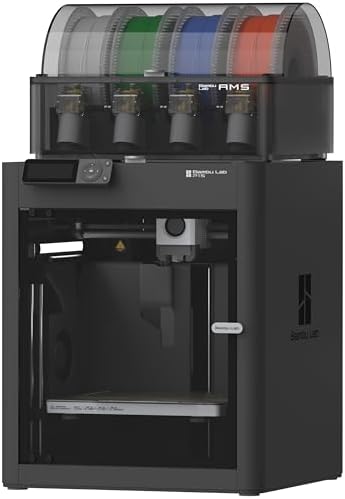
The P1S Combo leads because it's the colour printer with the biggest help community, and that counts for more than rank when you're learning. It sat at #6,241 across all of Amazon AU on the day I checked, behind the two FLASHFORGEs on rank, and it's $1,229 from Bambu Lab's own seller account. You get the P1S printer and an AMS, the four-spool filament unit, in the box. It's the machine most of the colour printing guides, profiles and community models online are written around, and that counts for a lot when you're learning how to cut purge waste or chase a jam. If you're new to this, that matters more than any spec line, because nearly every problem you'll hit has already been solved and written up by someone with the same printer.
The listing states up to 16 colours with AMS units chained, 500 mm/s with 20,000 mm/s² acceleration, a fully enclosed body, automatic bed levelling and setup in about 15 minutes. The enclosure is what makes it worth the extra over the lower-priced picks for most buyers: it lets you print ABS and ASA without the part cracking when a draught hits it. Bambu also gives a straight materials list, with PLA, PETG, TPU, PVA, PET, ABS and ASA as ideal, PA and PC as capable, and carbon or glass filled filaments not recommended, which I'd rather see than a vague claim that it prints everything. Automatic levelling and a 15 minute setup also mean you're printing on day one rather than fiddling with screws and paper under the nozzle, which is where a lot of first printers end up gathering dust.
It's still a single-nozzle system, so every colour change flushes plastic. That's normal for this design and the slicer settings matter more than the hardware. Bambu sells a deep range of spares, from hotends and cutters to feed tubes, and that makes the P1S an easy machine to keep running. Build volume isn't stated on this listing, so check it on Bambu's site if you print large parts. The AMS on the top of the printer also keeps the footprint tidy, which helps if it's going on a desk. Budget for a second AMS only if you find yourself swapping spools by hand every week, because most people never need one.
Honest caveats: Single-nozzle, so purge waste is real on many-colour prints. Sold by Bambu Lab Technology, the maker's own account, not Amazon AU itself. Carbon and glass filled filaments are listed as not recommended. Build volume and the AMS's moisture sealing aren't stated on this listing.
Best for: Most people buying their first colour printer who want an enclosure, wide material support and the biggest help community.
Colour system: AMS, 4 spools (up to 16 colours with more units) • Design: Single nozzle • Speed: 500 mm/s, 20,000 mm/s² • Enclosure: Fully enclosed • Materials (ideal): PLA, PETG, TPU, PVA, PET, ABS, ASA • Bed levelling: Automatic • Price: $1,229 at time of writing • Seller: Bambu Lab Technology • Rank: #6,241 overall on Amazon AU
View on Amazon AU
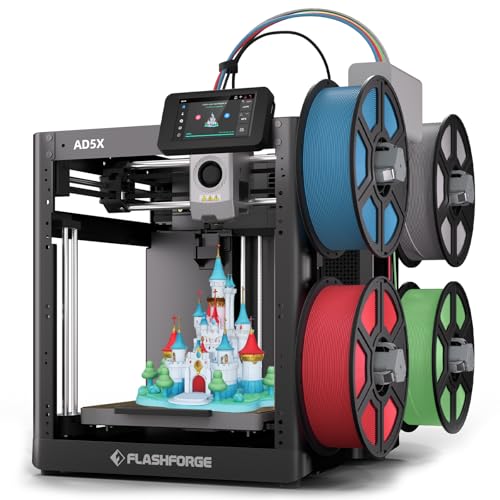
FLASHFORGE AD5X Multi-Color 3D Printer with IFS
ASIN B0DQWWCKL2 • $519 • Sold by Flashforge AU Official on Amazon AU
The AD5X is the lowest-cost colour printer in this guide at $519 from Flashforge AU Official, and it's the one I'd look at if $849 or more is a stretch. It sat at #2,461 overall on Amazon AU on the day I checked, a better rank than the Bambu P1S. The listing says it prints up to four colours at once through FLASHFORGE's Intelligent Filament System, so you get automatic colour changes without paying for a toolchanger. The build volume is stated as 220 x 220 x 220 mm, which is smaller than the pricier machines here but plenty for figurines, desk gear and most first colour prints.
The listing gives the main numbers. It describes a CoreXY structure with speeds up to 600 mm/s and 20,000 mm/s² acceleration, a dual channel fan, vibration compensation and a 300 °C direct-drive extruder. Four nozzle sizes are listed (0.25, 0.4, 0.6 and 0.8 mm), which is handy because a bigger nozzle makes fast, chunky prints and a small one gives finer detail. There's 1-click auto levelling, automatic filament feeding and retraction, a resume function after a power outage and remote control through the Flash Maker app. The power-outage resume is worth having on long colour prints, because a brief drop doesn't have to mean starting again.
The listing doesn't describe a toolchanger like the Creator 5's, so assume each colour change flushes some plastic and use the purge advice above. It also doesn't say whether the body is enclosed, how the filament system copes with damp spools or whether it reads RFID tags, so check FLASHFORGE's own site for those before planning ABS or ASA work. For PLA and PETG, which is what most people print, the listing gives you a lot of printer for the money. Keep spare spools in sealed tubs with fresh desiccant and the filament system will have a much easier life.
Honest caveats: Enclosure isn't stated on the Amazon AU listing. The listing doesn't say how the filament system seals against moisture. The 220 mm build cube is the smallest in this guide, and each colour change will flush filament. Sold by Flashforge AU Official, FLASHFORGE's own AU storefront.
Best for: A first colour printer for around $500 that still prints four colours at 600 mm/s.
Colour system: Intelligent Filament System, up to 4 colours • Design: CoreXY, direct drive extruder to 300 °C • Speed: 600 mm/s, 20,000 mm/s² • Nozzle sizes: 0.25, 0.4, 0.6, 0.8 mm • Build volume: 220 x 220 x 220 mm • Bed levelling: 1-click auto • Price: $519 at time of writing • Seller: Flashforge AU Official • Rank: #2,461 overall on Amazon AU
View on Amazon AU
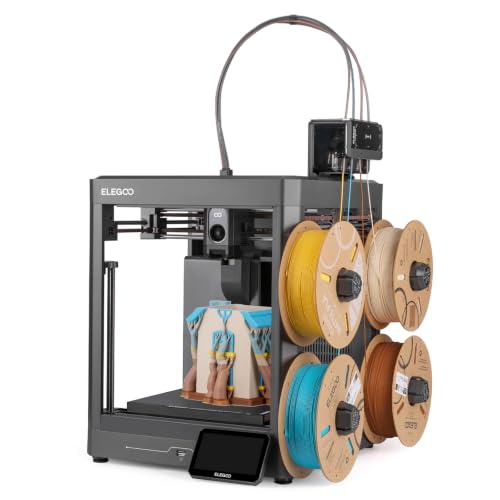
ELEGOO Centauri 2 Combo with CANVAS
ASIN B0GZZS11HG • $849 • Sold by ELEGOO Official AU on Amazon AU
The Centauri 2 Combo is ELEGOO's mainstream colour package and it's $849 from ELEGOO Official AU. It ranked #25,953 overall on Amazon AU on the day I checked, a much lower number than the Bambu or the FLASHFORGEs, but the listing appears to share a rank with its Carbon sibling, so read it as a family figure. You get the printer and CANVAS, ELEGOO's four-colour unit with independent motors, RFID filament recognition, instant colour switching and auto refill when a spool runs out. ELEGOO's AU storefront also sells spares and filament directly, which makes the ownership side easier than a brand with no local presence. That's a sensible way to start.
Where this one stands out is how much it tries to stop a print going wrong before you notice. ELEGOO lists full auto calibration, smart pre-print checks and 22 sensors watching the print as it runs. The motion side is a CoreXY system at 500 mm/s and 20,000 mm/s² with an aluminium frame and linear guides. There's a 5-inch touchscreen, a magnetic printhead cover, a semi-automatic belt tensioner and a nozzle wiper, and those last three are the small things that make maintenance less of a chore. Belt tension is one of the most common causes of poor print quality on fast printers, so a tensioner that helps you set it right is a practical touch, not a gimmick. The nozzle wiper also keeps the tip clean between colour changes, which cuts down on stray blobs on the print.
ELEGOO pairs it with its own slicer, a model library called Nexprint and the ELEGOO Matrix app for remote control. Enclosure, build volume and the list of supported materials aren't stated on this listing, so if you want ABS or ASA, look at the Carbon 2 next to it or the Bambu. For PLA and PETG, which is what most people print, it's a well specified machine for the money. Start with ELEGOO's default colour change settings, then lower the flush amounts once you've seen how much each colour actually needs to clear, and you'll cut a fair bit of waste without any colour bleeding into the next.
Honest caveats: No enclosure, build volume or material list stated on the listing. The overall rank is far behind the Bambu and the FLASHFORGEs and looks shared with the Centauri Carbon 2 listing. CANVAS sealing against moisture isn't described, so plan on dry storage for spare spools.
Best for: Beginners who want lots of automatic checks and easy maintenance on a colour printer under $900.
Colour system: CANVAS, 4 colours, RFID, auto refill • Design: Single nozzle • Speed: 500 mm/s, 20,000 mm/s² (CoreXY) • Sensors: 22, with pre-print checks • Screen: 5-inch touchscreen • Maintenance: Magnetic head cover, belt tensioner, nozzle wiper • Price: $849 at time of writing • Seller: ELEGOO Official AU • Rank: #25,953 overall on Amazon AU
View on Amazon AU
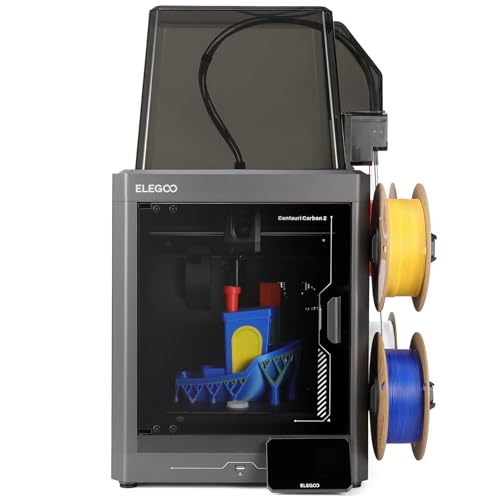
ELEGOO Centauri Carbon 2 Combo with CANVAS
ASIN B0G588PM5H • $999 • Sold by ELEGOO Official AU on Amazon AU
The Centauri Carbon 2 Combo is the one in ELEGOO's range aimed at harder materials, and it's $999 from ELEGOO Official AU. It shared the #25,953 overall rank with the Centauri 2 when I checked. It uses the same CANVAS four-colour unit, with instant colour switching, smart filament detection, auto refill and tangle detection, so the colour side works the same way. What you're paying the extra $150 for is the printer underneath. The two ELEGOOs share so much that the choice comes down to what you plan to print over the next couple of years, not the colour features, so think about the materials first. Both come from the same storefront.
ELEGOO says it prints across a wide range of materials, from basic to engineering-grade, through better process and temperature control. The listing doesn't name the materials or state the nozzle type, which is a gap, so check ELEGOO's own spec page before you buy a carbon filled spool for it. The motion side matches its sibling: CoreXY, 500 mm/s and 20,000 mm/s², a rigid aluminium frame and active vibration compensation. Calibration and monitoring are fully automated, and ELEGOO's line is that you load it, tap print and walk away. Abrasive filaments chew through soft brass nozzles quickly, so that one detail decides whether this is a materials step-up for you or just a slightly different printer. ELEGOO's support pages are the place to confirm it, and it's worth the five minutes before you spend on spools.
Tangle detection is the feature I'd value most here, because a tangle on a long engineering print is an expensive way to lose a day. If you know you'll only ever print PLA and PETG, the Centauri 2 does the same colour job for $150 less, and the money saved buys filament. If you're unsure, think about what you'd print in a year rather than this month. People who end up printing brackets, clips and car parts tend to move toward tougher materials, while people printing figures and gifts usually stay with PLA.
Honest caveats: The listing doesn't name supported materials, nozzle type, enclosure or build volume, so confirm them with ELEGOO before buying for engineering filament. The overall rank is low and shared with the Centauri 2. Single-nozzle, so purge waste still applies. Check the warranty terms too.
Best for: People who want ELEGOO's colour system with more headroom for tougher filaments later.
Colour system: CANVAS, 4 colours, auto refill • Design: Single nozzle • Speed: 500 mm/s, 20,000 mm/s² (CoreXY) • Detection: Smart filament and tangle detection • Materials: Basic to engineering-grade (not itemised) • Calibration: Fully automated • Price: $999 at time of writing • Seller: ELEGOO Official AU • Rank: #25,953 overall on Amazon AU
View on Amazon AU
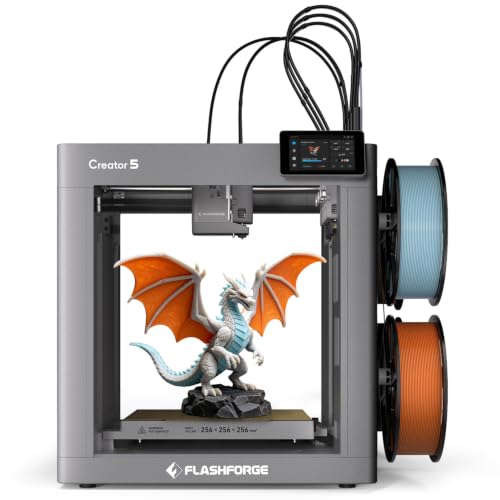
FLASHFORGE Creator 5 Multi-Color 3D Printer
ASIN B0H111VT7R • $1,049 • Sold by Voxelab AU Official on Amazon AU
The Creator 5 is the only toolchanger here, and it's the pick if purge waste is what's putting you off colour printing. It's $1,049 from Voxelab AU Official, the AU storefront that sells FLASHFORGE, and it ranked #1,099 overall on Amazon AU. Instead of one nozzle fed by a filament box, it has four independent extruders and swaps the whole print head to change colour. FLASHFORGE says that means minimal purge waste and colour printing up to five times faster than single-nozzle designs. For anyone printing models with lots of colour changes, that changes the economics of the hobby quite a bit, both in plastic and in hours.
The rest of the listing is solid. It states 600 mm/s with 30,000 mm/s² acceleration on an all-metal CoreXY frame, automatic platform levelling and independent offset calibration for each toolhead, which matters because four nozzles have to line up perfectly. There's filament run-out and tangle detection, a 4-inch touchscreen, a flexible PEI magnetic plate and a 256 x 256 x 256 mm build volume, the only build size stated in this guide. FLASHFORGE says nozzle changes take under 30 seconds with no tools and that replacement parts are available at competitive prices. A stated build size is useful on its own, and 256 mm each way is a generous cube for a colour machine. The PEI plate flexes so parts pop off without scrapers, and that saves a lot of nicked fingers and scratched beds.
The cost of the design is more hardware to look after. Four hotends means four heaters, four sensors and four nozzles to keep clean, and the docking mechanism needs to stay aligned. For someone printing colour most days, that trade is worth it. Keep the nozzles clean and run the offset calibration after any nozzle change, because a head that's a fraction out shows up as a colour that doesn't line up with its neighbours. Voxelab is FLASHFORGE's own AU storefront, which helps with warranty and parts. Spare nozzles are worth ordering with the printer.
Honest caveats: Four hotends to maintain instead of one, and more moving parts around the docking area. Enclosure isn't stated on the listing. It's limited to four colours, with no chaining like the filament box designs. Sold by Voxelab AU Official, FLASHFORGE's AU storefront, rather than Amazon AU.
Best for: People printing colour often who want far less wasted filament and faster colour changes.
Colour system: 4 independent toolheads • Design: Toolchanger, minimal purge • Speed: 600 mm/s, 30,000 mm/s² (CoreXY) • Build volume: 256 x 256 x 256 mm • Bed: Flexible PEI magnetic plate • Nozzle change: Under 30 seconds, tool-free • Price: $1,049 at time of writing • Seller: Voxelab AU Official • Rank: #1,099 overall on Amazon AU
View on Amazon AUSide-by-side comparison
| Product | Price | Best for |
|---|---|---|
| FLASHFORGE AD5X Multi-Color 3D Printer | ~$519 | First colour printer for around $500 |
| ELEGOO Centauri 2 Combo Multicolor 3D Printer | ~$849 | Beginners who want automatic checks |
| ELEGOO Centauri Carbon 2 Combo 3D Printer | ~$999 | Tougher filaments later |
| FLASHFORGE Creator 5 Multi-Color 3D Printer | ~$1,049 | Least purge waste if you print colour often |
| Bambu Lab P1S Combo | ~$1,229 | Enclosure and the biggest help community |
What we see fail in the workshop: multi-colour 3D printers
Most dead 3D printers that come in aren't really dead. They've usually got one failed part that stops the whole machine, and on colour printers there are more of those parts. These are the three faults that turn up most often, what causes them and how you'd spot them early, before a small fault becomes a long wait for parts.
Heater and thermistor faults at the print head
The cable to the print head bends with every move, and over months the wires inside the heater and thermistor leads can crack. You'll see it as a thermal runaway error, a temperature that jumps around on the screen, or a print that stops for no clear reason. On a toolchanger there are four of these circuits, so the odds go up. The fix is usually a new heater, sensor or harness rather than a new board. If the errors come and go when the head moves to one side, that's the cable, and it's worth fixing before it shorts.
Power supply and mainboard damage
Printers run for many hours with a heated bed pulling hard, so the power supply and the bed's switching parts get warm and stay warm. A storm, a power cut mid-print or a poor extension lead can take out the supply or the part on the board that switches the bed. The symptom is a printer that won't turn on, or one that powers up but won't heat the bed. These are board-level repairs, and they often cost far less than a replacement printer, but only if nobody's already swapped parts at random trying to fix it.
Feeders, cutters and snapped filament
On the single-nozzle combos the colour unit is the busiest part of the machine. Feeder gears clog with plastic dust, the cutter blade wears, and brittle filament snaps inside the feed tube and blocks it. The printer reports a load failure or keeps retrying the same colour. Most of the time it's cleaning, a new blade or a new tube, which you can do yourself with the maker's guide. Dry filament prevents most of it. If the unit doesn't respond at all, or one slot never feeds, it's more likely a motor or a sensor, and that's a repair job.
Decision tree: which one should you actually buy?
- Want a colour printer that does almost everything well, and the biggest help community? → The Bambu Lab P1S Combo at $1,229, enclosed with the AMS in the box.
- Want four-colour printing for around $500? → The FLASHFORGE AD5X at $519, with a 4-colour filament system and 600 mm/s speeds.
- New to 3D printing and want the machine to catch mistakes for you? → The ELEGOO Centauri 2 Combo at $849, with 22 sensors and pre-print checks.
- Planning to try tougher filaments with ELEGOO's colour system? → The ELEGOO Centauri Carbon 2 Combo at $999.
- Hate the idea of binning filament on every colour change? → The FLASHFORGE Creator 5 at $1,049, four heads and almost no purge.
- Printer won't heat, won't power on or keeps throwing temperature errors? → Bring it into our Erina workshop and I'll tell you whether it's the heater, the supply or the board before you spend anything.
Frequently asked questions
How much filament does a multi-colour 3D printer waste?
On a single-nozzle printer every colour change flushes some plastic, and on a small model with hundreds of changes the waste can weigh more than the model. As a rough example, half a gram per change across 400 changes is 200 grams. You can cut it a lot by printing several parts at once, flushing into infill or supports, and lowering flush volumes after testing. A toolchanger like the FLASHFORGE Creator 5 avoids most of the waste because each colour has its own nozzle.
Is a toolchanger better than an AMS-style filament box?
It's better for waste and colour change speed, because it swaps heads instead of cutting and flushing filament. It's not automatically better overall. You get four hotends to maintain instead of one, more moving parts around the docking area, and you're limited to the number of heads, which is four on the Creator 5. A filament box design like the Bambu AMS can chain to 16 colours and has one hotend to look after. If you print colour most days, the toolchanger wins. If colour is occasional, a box design is fine.
Can I use any brand of filament in these colour units?
Mostly yes. The RFID reading on Bambu and ELEGOO spools only fills in the filament settings for you, and other brands load fine once you set the type and colour by hand. Cardboard spools are the usual problem, because the edges shed fibres and can bind in the feeder, so many owners use plastic adaptor rings. Flexible TPU generally doesn't feed well through long tubes and is better fed straight into the printer without the colour unit.
Do I need an enclosed 3D printer?
Not for PLA or PETG, which print well on an open frame in a normal room. You want an enclosure for ABS and ASA, because those warp and crack when cool air hits the part as it prints. Of the five picks, only the Bambu Lab P1S listing clearly states a fully enclosed body, so check the others with the maker before planning that kind of work. ABS and ASA also have a noticeable smell while printing, so give the printer a ventilated spot away from living areas.
How do I stop filament jamming in the colour unit?
Keep the filament dry. Damp filament goes brittle, snaps when the unit pulls it back for a colour change and blocks the feed tube. Keep the desiccant in the unit fresh, store spare spools in sealed tubs, and dry any spool that crackles or snaps easily. Clean the feeder gears now and then, replace the cutter blade when cuts get ragged, and swap feed tubes that are worn at the bends. Tangle detection, which the ELEGOO and FLASHFORGE listings mention, stops a knot from wrecking a long print.
Can you repair a 3D printer that won't turn on?
Usually, yes. A printer that won't power up after a storm or power cut has often lost its power supply or a part on the mainboard, and one that powers on but won't heat may have a failed bed switching part, heater or sensor. These are board-level repairs and they're often well under the price of a new printer. The main thing is to stop swapping parts at random, because that makes it harder to find the real fault. Bring it in and we'll diagnose it before quoting.
Related buying guides
Printer stopped heating or won't power on? Bring it in
Most printers that come in with a temperature error or no power have one failed part: a heater, a sensor, the print head cable or something on the board that switches the bed. Bring it to Erina and I'll find the actual fault and tell you whether it's worth fixing before you spend anything on parts or a new machine.
Visit our Erina workshop Book Online