Prices from Amazon AU, updated daily.
Disclosure: This article contains affiliate links to amazon.com.au. If you buy through one of these links iFix may earn a small commission at no extra cost to you. It doesn't change which products we recommend. We focus on what actually lasts based on 16 years of repair-shop experience.
Quick summary3 picks
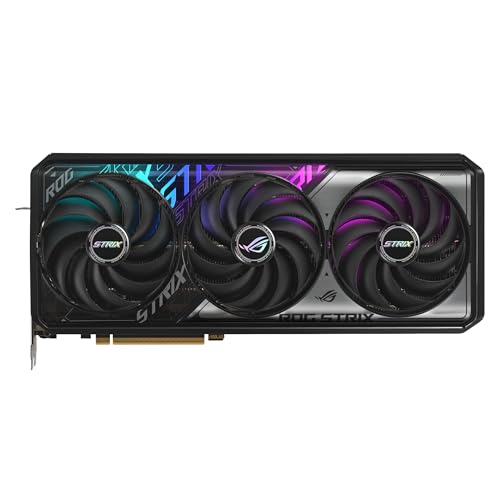
- Entry PickASUS ROG Strix GeForce RTX 5070 OC Edition… about$1,424.95RTX 5070 .
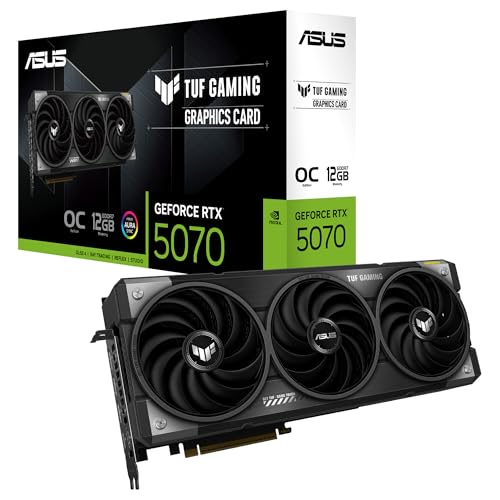
- ASUS TUF Gaming GeForce RTX ™ 5070 12GB… about$1,499
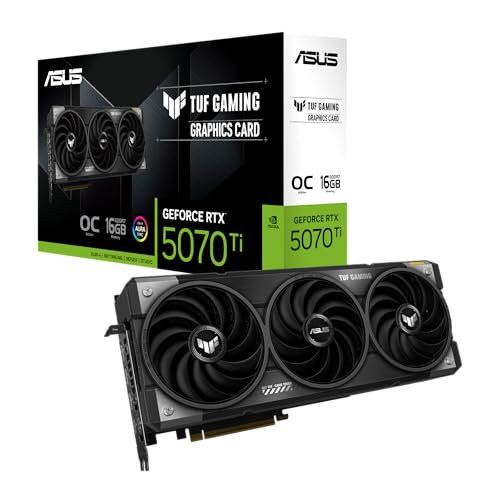
- Most PremiumASUS TUF Gaming GeForce RTX ™ 5070 Ti 16GB… about$2,029
Why this matters now
NVIDIA's Blackwell architecture has been on shelves since January 2025. Nineteen months later, the line-up is mature: drivers are stable, DLSS 4 with multi-frame generation is settled, AIB cooler designs have had their second and third revisions, and the 12V-2×6 power connector redesign has done what the original 12VHPWR couldn't. What has not settled is supply. Genuine Australian retail stock at the top of the stack has thinned out through 2026: the 5090 has all but vanished from reputable local shelves, and the tiers that remain in stock sit close to launch pricing rather than drifting down.
What's changed since launch is the buyer mix. Two years ago a Blackwell purchase was almost always for gaming. Today, perhaps half the GPUs we see being specced are doing some combination of gaming and local AI workloads: Stable Diffusion XL, Flux, locally-run language models in the 7-14B parameter range, occasional fine-tuning. The VRAM ceiling on each card matters as much as its raw rasterisation performance for those buyers, and the gaming-focused review media usually treats VRAM as a footnote.
The cost-of-living context matters too. With real wage growth at just 0.3% per ABS data and household savings ratios at historic lows, every dollar in a $1,000 to $2,300 GPU purchase needs to justify itself. This guide assumes you've already decided to buy. The question is which tier.
The Blackwell stack at a glance
All four cards in this comparison share key Blackwell features: DLSS 4 (including multi-frame generation), GDDR7 memory at 28–30 Gbps, PCIe 5.0 x16 host interface, 4th-gen ray tracing cores, 5th-gen Tensor cores for AI acceleration, and the 12V-2×6 power connector (replacing the 12VHPWR connector from RTX 40-series). The encoder/decoder block is the same across the line. AV1 encode is on every card.
What differentiates each tier is the silicon: CUDA core count, memory bus width, VRAM capacity, and TDP. These are not linear: the 5090 has 3.5× the CUDA cores of the 5070 but only 2.3× the gaming performance at 4K. The flagship buys you AI workload throughput and headroom more than raw frames per second per dollar.
The cards, ranked by what most readers should buy
One pick per tier where Australian retail stock actually exists, chosen for the combination of reliable board partner, sane Amazon AU pricing, and what we see hold up at the bench over 18 to 24 months. Prices are accurate at time of writing (August 2026); the Amazon AU buybox shifts week to week, so treat them as a guide. Both picks below are stocked by Australian retail on Amazon AU rather than grey-import resellers. The RTX 5080 and RTX 5090 tiers get their own notes further down: right now we can't recommend a buy on either in good conscience.

ASUS TUF Gaming GeForce RTX 5070 Ti OC Edition 16GB
ASIN B0DVH1Y9VN • $2,029.00 • Australian retail on Amazon AU
The 5070 Ti is the card most Australian buyers should land on, and the ASUS TUF Gaming OC Edition is one of the sturdier implementations you can actually buy from AU retail right now. 16GB GDDR7 on a 256-bit bus, a 300W TDP, a 2610 MHz boost in OC mode, and three axial-tech fans on a 3.125-slot fin stack that handles the load without screaming. TUF sits in ASUS's mid-tier, below ROG Strix but above the Dual and Prime cards, and it is the line that tends to give the best balance of build quality against price. Military-grade components and dual-ball fan bearings are the parts that matter for longevity.
The 16GB VRAM is the decision point. The 5070's 12GB is fine today for 1440p gaming, but the moment you touch any meaningful AI workload, SDXL at full resolution, Flux Dev quantised, a 13B parameter LLM, the 12GB cliff arrives hard. 16GB clears all of those at reasonable speed. It also future-proofs 4K gaming with high-res texture packs, which are getting hungrier each generation.
Best for: 1440p gaming at 144+Hz with everything on, 4K at high settings, occasional AI and content-creation work. The right call for roughly 70% of readers. Pair with a quality 750W PSU with a native 12V-2×6 cable, not an adapter.
VRAM: 16GB GDDR7 • Memory bus: 256-bit • Boost: 2610 MHz (OC mode) • TDP: 300W • PSU: 750W native 12V-2×6 • Slot width: 3.125-slot • Cooling: triple axial-tech fans
View on Amazon AURTX 5080: the tier lost its Australian retail listing
Availability, September 2026: the card this guide used to point at has gone off sale on Amazon AU, and nothing has replaced it. Every 5080 listed at a sane price today is sold by a grey-import reseller with no Australian warranty, which is the one thing this guide will not send you to. The tier still makes sense on paper, so the reference numbers stay below, but there is no card here we are willing to link until genuine AU retail stock returns.
For context, here is what the tier buys you over the 5070 Ti: roughly 20-25% more rasterisation, around 30% more AI throughput, and the same 16GB of VRAM on a wider 256-bit bus with higher memory bandwidth. If 4K gaming at 120Hz or 16GB-class AI work is on your roadmap, this was the easiest step up in the stack to justify. With no local-warranty stock to buy, the 5070 Ti above covers the same ground.
If you do find one in genuine AU retail: it is a triple-fan card pushing 360W of heat, so check case clearance and airflow before you commit, and budget for an 850W PSU with a native 12V-2×6 cable.
VRAM: 16GB GDDR7 • Memory bus: 256-bit • Boost: 2640 MHz • TDP: 360W • PSU: 850W native 12V-2×6 • Slot width: 3-slot (SFF-ready)
RTX 5090: the tier we can't recommend a buy on right now
Availability, August 2026: we have deliberately not linked an RTX 5090. Every reasonably priced 5090 on Amazon AU is currently sold by grey-import resellers with no local warranty, and the only listings from Australian-marked storefronts are scalped well past $16,000, roughly triple what the card should cost. We are not sending you to either. When genuine Australian retail stock returns at a fair price we will add a pick here. Until then, if you need a 5090 built into a rig, ask us in our Erina workshop and we will source one properly.
For context, here is what you would be buying. The 5090 is a different category of product. 32GB GDDR7 on a 512-bit bus delivers around 1.8 TB/s of memory bandwidth, useful only if you run workloads that actually saturate it. At 4K with everything maxed and DLSS 4 multi-frame generation enabled you get 240+ FPS in most titles, which a 5080 also delivers without breaking a sweat. The 5090 earns its premium in the workloads gaming reviews don't measure: running a 30B-parameter LLM locally with comfortable response times, generating Flux images at full precision in 4-6 seconds rather than 25-30, video encode and decode for 8K workflows, 3D rendering, and CUDA-accelerated scientific computing.
If you genuinely need one: budget for a 1000W PSU minimum and a case that can actually move 575W of heat, and insist on a native 12V-2×6 cable. No adapters at this wattage.
VRAM: 32GB GDDR7 • Boost: ~2410 MHz reference (partner cards clock higher) • TDP: 575W • PSU: 1000W native 12V-2×6 • Memory bus: 512-bit

ASUS TUF Gaming GeForce RTX 5070 OC Edition 12GB
ASIN B0DYPGW2KB • $1,499.00 • Australian retail on Amazon AU
The TUF 5070 is the less costly of the two cards this guide links, at $1,499, and it is the one for the reader who wants current-generation Blackwell and DLSS 4 without paying 5070 Ti money. ASUS lists 12GB of GDDR7, 1026 AI TOPS and an OC mode that boosts to 2640 MHz (2610 MHz by default). Cooling is three Axial-tech fans on a 3.125-slot design with a phase-change thermal pad, and the board carries a protective PCB coating plus a GPU Guard bracket that reduces the risk of cracks and keeps the mounting stable. This listing is sold by Computer Alliance Pty Ltd, an Australian retailer.
The honest framing on the 12GB VRAM: for 1440p gaming today, it's fine. Cyberpunk 2077 maxed at 1440p with DLSS 4 sits around 9-10GB of VRAM consumption. For 4K, you'll hit the wall in newer titles within 12-24 months; the 5070 is not a future-proof 4K card. For AI workloads, 12GB runs SDXL with FP16 precision, 7B parameter LLMs at Q4 quantisation, and Stable Diffusion 1.5 with comfortable headroom. Flux Dev, larger LLMs, or any kind of fine-tuning is off the table.
Check the case first: at 3.125 slots this is a wide, triple-fan card, not a compact one, so measure your case's GPU clearance before you order.
Best for: 1440p gaming at 144Hz on a budget, first-time GPU upgrades from a 3060 or 3070-era card, anyone who knows they will not be doing AI work. The price gap to the 5070 Ti is about $530, which is real money, so if you are certain about your use case, save it. If you are not certain, step up.
VRAM: 12GB GDDR7 • Boost: 2640 MHz (OC mode), 2610 MHz default • AI: 1026 AI TOPS • Cooling: three Axial-tech fans, phase-change thermal pad • Slot width: 3.125-slot
View on Amazon AUSide-by-side comparison
| Product | Price | Best for |
|---|---|---|
| ASUS ROG Strix GeForce RTX 5070 OC Edition… | ~$1,424.95 | |
| ASUS TUF Gaming GeForce RTX ™ 5070 12GB… | ~$1,499 | |
| ASUS TUF Gaming GeForce RTX ™ 5070 Ti 16GB… | ~$2,029 |
The maths has shifted with 2026 pricing. The 5070-to-5070-Ti step is now about $530, real money, and worth it only if 16GB VRAM earns its keep for you in AI work or high-res 4K textures. The 5070-Ti-to-5080 step is the one that looks easiest on paper: more rasterisation, more AI throughput, and a wider memory bus for content creation. As noted above, though, neither the 5080 nor the 5090 has sanely priced Australian retail stock to buy right now, so for practical purposes the 5070 Ti is the top of the current buyable stack.
AI workload performance: the VRAM cliff is real
If you're buying purely for gaming, skip this section. If any part of your workload involves local AI, whether Stable Diffusion, Flux, local language models or fine-tuning, VRAM is the cliff you can't engineer around. Doubling system RAM doesn't help. A faster CPU doesn't help. The model either fits in VRAM or it runs orders of magnitude slower while swapping to system memory.
Concrete VRAM thresholds for popular 2026 workloads:
- Stable Diffusion 1.5: 4GB minimum, 6GB comfortable. Every card here handles it.
- SDXL at FP16: 8-10GB. Every card here handles it.
- Flux Dev quantised (Q4_0): ~12GB: sits right on the 5070's ceiling. Comfortable on 16GB cards.
- Flux Dev at full FP16: 24GB. Only the 5090 handles this without quantisation compromise.
- Llama 3.1 8B at Q4: 6-7GB. Every card handles it.
- Llama 3.1 13B at Q4: 9-10GB: right on the 5070's edge.
- Llama 3.1 14B at Q4: 11-12GB: the 5070 chokes; 16GB cards are comfortable.
- Qwen 32B at Q4: 20GB: only a 32GB card runs this comfortably; 16GB cards run a heavily quantised version slowly.
- Llama 3.1 70B at Q4: 40GB: only a 32GB card with aggressive offload, and even then it crawls.
- Fine-tuning: Add at least 1.5× the model size as headroom. Effectively only the 5090 is a fine-tuning card for anything beyond toy models.
The 5070's 12GB is the cutoff that most often disappoints. People who buy a 5070 thinking "I'll just dabble in AI later" hit the wall the first time they try to run a current-gen image model or anything past a small chat LLM. If there's any chance you'll touch AI work, spend the extra $530 on the 5070 Ti.
What we see fail at the bench
Sixteen years repairing electronics, a fair share of high-end gaming rigs through the workshop, and a few recurring failure modes you won't find in the launch-day press reviews.
12V-2×6 connector seating: still a thing. The original 12VHPWR connector on the RTX 4090 had widely-reported melting incidents from 2022-2023. NVIDIA's response was the 12V-2×6 redesign that shipped with Blackwell: shorter sense pins that won't make contact unless the power pins are fully seated. The improvement is real, but the failure mode hasn't disappeared. We've still seen Blackwell connectors with localised heat damage. The pattern is always the same: a tight cable bend within 35mm of the connector, or an adapter from a previous PSU generation rather than a native 12V-2×6 cable. The fix is mechanical: native cable, gentle bend radius, and check at six months that the connector hasn't drifted out under cable weight.
Coil whine at 575W. The 5090 pulls so much current that every inductor under the load complains. Quality cards (the AORUS Master tier, ROG Strix tier) use inductors that whine less; less costly SKUs use inductors that whine more. Coil whine doesn't kill the card and isn't covered by warranty, but it'll drive you out of a quiet room. The Blackwell-era pattern we see: coil whine starts mild and gets noticeably worse over the first 3-6 months as the inductors age in. If yours is loud out of the box, return it under DOA before that window closes.
Fan bearings: the 14-month complaint. The single most common "my GPU is making noise" call we get is fan bearing failure on cards that were quiet new. Rifle bearings die at 12-18 months. Dual ball bearings last 4-5 years. Fluid dynamic bearings (FDB) can last 6-7 years. Board partners don't always disclose bearing type in the spec sheet, but cooler tier is a good proxy: the Ventus, TUF, AORUS Master tiers all use FDB or dual-ball. Bottom-tier SKUs (Dual, Eagle, Ventus 2X non-Plus) often still use rifle. If a card is significantly less costly than its tier-mates, that's often where the cost came out.
Thermal throttling that's not the GPU's fault. A 5080 pushes 360W of heat through a card-mounted cooler, and shifting that needs real surface area and real airflow. If the case has no front intake fans (more common than you'd think on prebuilts), that heat recirculates and the card throttles. We see this constantly: customer brings in a "slow" 5080 thinking the card is faulty; the actual fault is the case has been running with one rear exhaust fan and no intake since the day they built it. Front-to-back airflow with at least two intake fans is non-negotiable for 300W+ cards.
PSU undersizing: the hidden killer. The most expensive GPU failure we've seen at the bench in the last 12 months wasn't the GPU's fault. A customer ran a 5080 on a 650W PSU (recommended 850W) for 8 months. The PSU rails sagged on a transient spike during a gaming session, the 12V went out of spec, the GPU's VRM took damage, and we ended up replacing both. A quality 850W PSU costs $200-250. A replacement 5080 costs around $2,299. Don't be the customer with the receipt for the low-cost PSU you bought to "save money".
Transient power spikes. Blackwell cards have aggressive power management that lets them briefly exceed their rated TDP for a few milliseconds: a 575W 5090 can spike to 700W+ for short intervals. A correctly-rated PSU absorbs this. An undersized PSU drops its rail voltage, the GPU sees out-of-spec power, and over time this degrades VRM components. The PSU recommendations on each pick are not conservative. They're real minimums.
Memory chip thermal failures. GDDR7 modules run hot. Cards with a properly-engineered backplate that contacts the back-side memory chips via thermal pads run cooler than cards with a decorative-only backplate. Memory chip thermal failure typically shows as artifacts on screen, followed by BSODs, followed by the card not posting. The ASUS TUF cards in this comparison all have reinforced, vented backplates. Bottom-tier SKUs sometimes skip functional backplate cooling and you'll see the failure mode in the second year of ownership.
Hidden costs nobody budgets for
A GPU purchase is rarely just the GPU. Before you hit Buy on a $2,299 5080, check that you have:
A PSU rated for the card, with a native 12V-2×6 cable. Not an adapter, not a daisy-chain. Quality PSUs from Seasonic, Corsair, be quiet!, EVGA Supernova in the right wattage. Budget $200-300 if you need to upgrade.
Case clearance for the cooler. The 5080 and 5070 Ti are wide triple-fan cards. Check your case spec for maximum GPU thickness and length. SFF cases will struggle with every card here, the TUF 5070 included (it is a 3.125-slot design). Mid-towers handle the TUF 5070 and the 3-slot-class 5070 Ti and 5080 comfortably. A 5090 needs a full-tower or a mid-tower designed for high airflow.
A monitor that justifies the card. A 5080 paired with a 60Hz 1080p panel is wasted silicon. The 5070 Ti suits 1440p 144Hz+. The 5080 deserves 4K 120Hz minimum. The 5090 demands 4K 240Hz or higher. Monitor cost: $400 (decent 1440p 165Hz) to $2,000+ (4K 240Hz OLED).
Cooling capacity in the case. 300W+ of GPU heat needs intake. Plan for at least 2 front intakes and 1 rear exhaust, plus a top exhaust if you have one. Quality fans (Noctua, be quiet!, Arctic): $30-60 each.
Realistic full-stack budget for a 5080 build that doesn't bottleneck the card:
- GPU: $2,299
- PSU upgrade if needed: $250
- Monitor (4K 144Hz): $700-1,200
- Case fans: $150
- Total: ~$3,400-3,900 over and above your existing rig.
Decision tree
If you do X, buy Y.
- 1440p gaming on a budget, no AI work planned: ASUS TUF RTX 5070. Save the $530 for the rest of the build.
- 1440p gaming + content creation + occasional AI: RTX 5070 Ti, ASUS TUF Gaming OC. The default pick.
- 4K gaming at 120-144Hz + serious mixed workload: the 5080 tier, once Australian retail stock returns. Until then the 5070 Ti handles 4K at high settings.
- Local AI fine-tuning, 30B+ parameter LLMs, Flux full precision, professional content creation: this is 5090 territory, but see the availability note above. There is no sanely priced AU-retail 5090 right now, so it is a wait-for-stock or call-us job rather than a click-to-buy.
- You're unsure between the 5070 and 5070 Ti: 5070 Ti. The 12GB VRAM ceiling is the most common regret we hear.
- You're unsure between the 5070 Ti and 5080: 5070 Ti, unless you have a 4K 144Hz monitor already.
- You're unsure between the 5080 and 5090: 5080. The 5090's price premium only makes sense for workload requirements, not "want the best".
Frequently asked questions
Is the RTX 5070 Ti worth $530 more than the RTX 5070?
For most Australian buyers, yes. The 5070 Ti's 16GB VRAM (vs the 5070's 12GB) is the cutoff that matters for both 4K gaming with high-res texture packs and any local AI workload of meaningful size. The 5070 is fine for 1440p gaming today, but the 12GB ceiling will become a constraint inside 24 months.
What PSU do I need for the RTX 5090?
1000W minimum from a quality manufacturer (Seasonic, Corsair, be quiet!, EVGA Supernova). The 5090 has a 575W TDP but transient spikes can briefly hit 700W+. A native 12V-2x6 cable is mandatory. Do not use a daisy-chain adapter from a previous-generation PSU.
Will my old 12VHPWR cable work on a 5090?
Technically the connector fits, but it is not recommended. The new 12V-2x6 spec uses shorter sense pins designed to prevent the partial-seat melting that plagued the original 12VHPWR on RTX 4090s. If your PSU shipped before mid-2024 with a 12VHPWR cable, replace it with a 12V-2x6 cable rated for your wattage.
Does the RTX 5090 melt its connector like the 4090 did?
Less often than the 4090 era, but reports continue. The 12V-2x6 redesign helped with sense-pin detection of partial seating, but the underlying issue (16 pins carrying up to 600W) still requires correct seating, native cables, and avoiding tight cable bends within 35mm of the connector. Cards with extra cable monitoring (ASUS ROG Astral) reduce risk further.
How much VRAM do I need for local AI workloads?
12GB runs Stable Diffusion 1.5 and SDXL comfortably, plus 7-8B parameter LLMs at Q4 quantization. 16GB opens up Flux Dev with quantization and 13-14B LLMs. 32GB is the threshold for serious local work: Flux at full precision, 30-34B LLMs comfortably, 70B with aggressive quantization. The VRAM cliff is real and cannot be worked around by adding system RAM.
Will these cards get less costly later in 2026?
Probably not meaningfully. Blackwell launched in early 2025, mid-cycle pricing has stabilised, and there is no successor announced. Local retail stock is thinner than a year ago, which keeps AU prices firm, and the 5090 in particular is scarce in genuine Australian retail. Buy the tier you need when you find it in stock rather than waiting for a discount that is unlikely to come.
So what should you actually buy?
For most Australian buyers in 2026:
- The pragmatic default: ASUS TUF Gaming RTX 5070 Ti OC ($1,899). 16GB VRAM, sensible TDP, the best buying-decision-to-regret ratio in this stack.
- If 4K gaming is the goal: the 5080 is the right tier, but there is no Australian retail listing worth linking today. The 5070 Ti is the card to buy in the meantime.
- If your work genuinely needs 32GB VRAM: that is 5090 territory, but there is no sanely priced AU-retail 5090 right now (see the note above). Wait for stock or talk to us at the shop.
- If 1440p gaming is the only thing this PC will ever do: ASUS TUF RTX 5070 OC ($1,499). Honest entry point, but understand the 12GB VRAM ceiling.
The biggest mistake we see at the bench is not which card someone bought, but the corner-cutting around it: the undersized PSU, the case with no airflow, the adapter cable from the previous build. Spend correctly on the support cast and the card will last 4-5 years. Cut corners and you'll be back inside two.
For context on the broader power and home setup that supports a 575W gaming rig in Australia in 2026, pair this with our portable power station guide (for blackout coverage during a multi-hour gaming session) and our smart energy monitor guide (because a 5090 rig at full tilt for 8 hours is a measurable spike on your bill).
Not every gamer wants a tower or a desk, though. If you would rather take your library to the couch or on the road, a Windows handheld runs the same Steam and Game Pass games in your hands. We cover the Legion Go, ROG Xbox Ally and MSI Claw in our best gaming handhelds in Australia guide.
On the Central Coast and want a hand specifying a build around one of these cards, sizing the right PSU, or diagnosing a rig that's behaving badly? Bring it to our Erina workshop and we will take a look.
Need help building or diagnosing a high-end rig?
If you'd like a hand picking the right card for your case and PSU, or you've got a rig that's throttling, crashing, or making noises it shouldn't, we're happy to help on the Central Coast.