Prices from Amazon AU, updated daily. Swipe or use the arrows for more.
Disclosure: This article contains affiliate links to amazon.com.au. If you buy through one of these links iFix may earn a small commission at no extra cost to you. It doesn't change which products we recommend, we focus on what actually lasts based on 16 years of repair-shop experience.
Quick summary8 picks
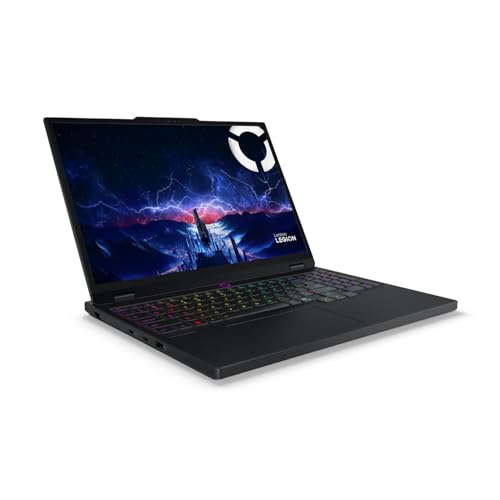
- Entry PickLenovo Legion 5i 15IRX10 15.1 Inch OLED… about$2,725.061TB SSD, 165Hz refresh, 15.1" screen.
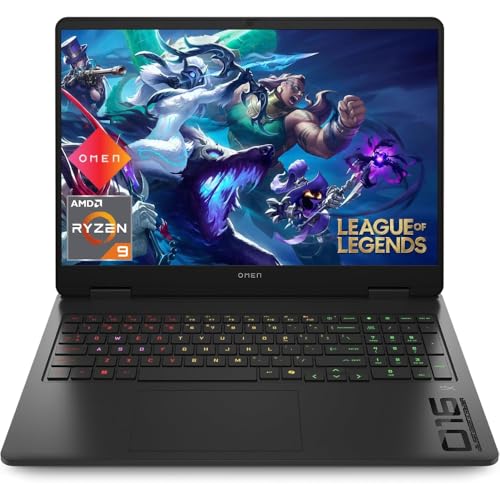
- HP 16″ OMEN Gaming Laptop about$3,79932 GB RAM, 1 TB SSD, 240 Hz refresh.
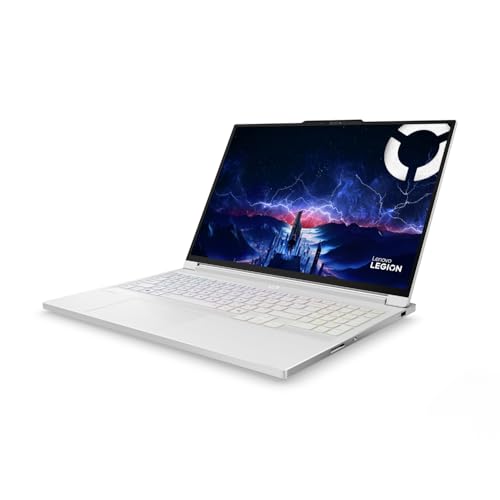
- Lenovo Legion 7i 16IAX10 16 Inch OLED 240Hz… about$3,799.001TB SSD, 240Hz refresh, 16" screen.
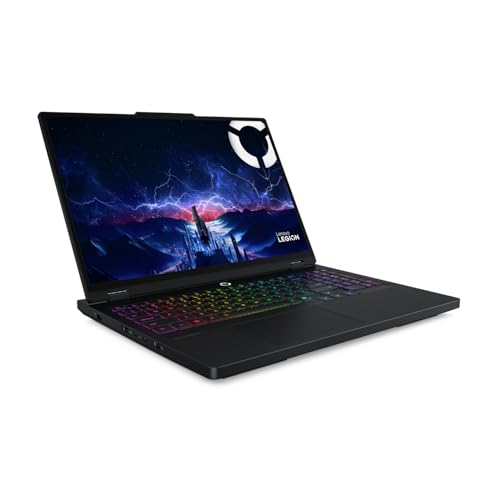
- Lenovo Legion Pro 5i 16IAX10H 16 Inch OLED… about$4,4991TB SSD, 240Hz refresh, 16" screen.
- Lenovo Legion Pro 7i 16IAX10H 16-Inch WQXGA… about$5,612.41240Hz refresh, OLED, RTX5080 .
- ROG Strix G16 G615LP-TS202W, 16" 2.5K WQXGA… about$3,749.0032GB DDR5, 1TB SSD, RTX 5070.
- MSI Vector 18 HX AI A2XWJG 18" 2K IPS 240Hz… about$8,300.9532GB RAM, 1TB SSD, 240Hz refresh.
- Most PremiumRazer Blade 16 - Ultra-Powerful 16 Inch… about$10,253.6964GB RAM, 2TB SSD, 240Hz refresh.
Why premium, and why now
Gaming laptops are one of the hardest jobs to build well, because you are asking a thin box to move the heat of a small desktop. That is also why they land on my bench so often. After 16 years across every brand, the failure pattern on gaming machines is consistent, and almost all of it traces back to heat and to how the chassis is built to handle it.
What I see fail: coolers packed solid with dust and pet hair until the machine throttles under its own heat; GPU solder joints that fatigue and crack after years of heating and cooling, the classic thumbnail of a machine that will not display; hinges and chassis that crack on heavy laptops carried in soft bags; display cables that wear where they fold through the hinge on high-refresh panels; and fan bearings that whir, tick and finally seize. None of that is exotic. It is the same short list, over and over.
Here is what the premium tier actually buys, and why I frame it as the less costly option over the life of the machine. Vapour-chamber cooling and a higher power limit mean the GPU holds its clocks instead of cooking itself and backing off. A metal chassis survives being carried. Serviceable RAM and a spare M.2 slot, where the model has them, mean you extend the machine rather than replace it. Better panels last and stay worth looking at. Pay up for cooling and build, and the laptop reaches year five or six as a repair, not a write-off. Skimp on them, and it is landfill at year two. The maths favours the better machine, which is the whole reason this tier exists.
What to look for in a premium gaming laptop
GPU power limit matters more than the GPU name. Every laptop GPU has a TGP, the wattage the machine is allowed to feed it, and makers set it differently. A 5070 Ti allowed 140 watts in a thick chassis will out-run a 5080 choked to 90 watts in a thin one. Find the TGP before you compare model numbers, because the badge is only half the story. If your budget is under $1,500, start with our guide to gaming laptops under $1,500, where the trade-offs are different.
The CPU. Intel's Core Ultra 9 275HX and 285H, and AMD's Ryzen AI 9 HX 370 and Ryzen 9 9955HX, are all more CPU than most games need, so this is rarely the bottleneck for pure gaming. It matters if you also render, compile or run virtual machines. The Ryzen AI chips add a strong NPU for local AI work, worth having if your job touches it and irrelevant if it does not.
Cooling design. This is the part that decides how long the machine stays fast. Look for a vapour chamber rather than plain heat pipes on anything above a 5070, and for exhaust that vents away from where your hand sits. A bigger chassis almost always cools better, which is why the 18-inch machines here run their GPUs harder than the thin ones.
The display. OLED gives perfect blacks, instant response and the best contrast, at some risk of burn-in over years of static interfaces. Mini-LED trades perfect blacks for far higher sustained brightness and no burn-in, which suits bright rooms and all-day work. IPS is the honest budget panel, and you will not find it on the better machines here. Match the panel to your room and your use, not to a spec-sheet contest.
RAM and storage you can service. This is the difference between a laptop you keep and one you replace. Several picks use SO-DIMM memory and a spare M.2 slot, so you add storage or RAM years later for the price of the part. The thinnest machines solder the memory down, so buy the capacity you need on day one, because there is no second chance.
Chassis and weight. Aluminium survives daily carrying in a way plastic does not, and it is worth the grams. Then decide honestly how far the machine travels. An 18-inch desktop replacement is the wrong buy for a commuter, and a 1.85kg thin-and-light is the wrong buy for someone who never moves it and just wants frames.
Warranty and your rights. These ship with a one-year manufacturer warranty, but Australian Consumer Law sits on top of it and expects goods to last a reasonable time for the price. On a machine costing thousands, a major fault at year two or three is a fair claim. Keep the receipt. If you would rather a local bench handle a fault than post it interstate, our published repair pricing shows what common jobs cost.
The 10 picks, by what you need
Listed from the entry premium machine up to the halo. Prices are approximate and shift week to week on premium stock, so treat every figure as a guide at the time of writing, August 2026. Every link goes to Amazon AU with our affiliate tag.

Lenovo Legion 5i, RTX 5060, 15.1-inch OLED
RTX 5060 8GB, 115W · Intel Core i7-14700HX · 24GB · 1TB · 15.1-inch OLED 165Hz · around $2,298 · Ships from Amazon AU
This is the sensible way into the premium tier without overpaying for a badge. You get an RTX 5060 at a healthy 115W, a 20-core i7-14700HX, and a 15.1-inch OLED running at 165Hz, which is a genuinely good panel at this price. It is the one machine here I would hand to someone stepping up from a $1,200 laptop who wants 1440p to run smooth and stay quiet.
The honest caveat is the 8GB of GPU memory. For 1440p today that is fine, but texture-heavy titles a few years out will lean on it. System memory is 24GB across two 12GB sticks in dual channel, and both the RAM and the short M.2 2242 SSD sit on standard slots, so you can service them later. That upgrade path is part of why it earns a place here.
Why the premium is justified: OLED contrast, a real H-series CPU, and a cooler built to keep a 115W GPU honest, all at the floor of this bracket. If you are weighing it against a sub-$2,000 machine, this is the point where cooling and panel quality stop being a compromise.
CPU: Intel Core i7-14700HX (20C/28T) • GPU: RTX 5060 8GB GDDR7, 115W TGP • Display: 15.1-inch WQXGA OLED 165Hz, 100% DCI-P3 • RAM: 24GB DDR5-4800 (2x12GB SO-DIMM) • Storage: 1TB PCIe 4.0 NVMe (M.2 2242) • OS: Windows 11 Home • Warranty: 1 year manufacturer + ACL
View on Amazon AU
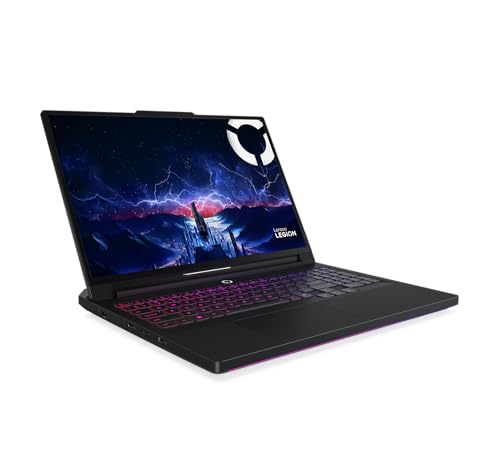
Lenovo Legion 7i, RTX 5070, 16-inch OLED 240Hz
RTX 5070 8GB, 115W · Intel Core Ultra 9 275HX · 32GB · 1TB · 16-inch OLED 240Hz · around $3,799.00 · Ships from Amazon AU
The 7i is where the range hits its stride. The RTX 5070 sits alongside the 24-core Core Ultra 9 275HX, and the 16-inch OLED steps up to 240Hz, so fast shooters look as sharp as the panel is capable of. For most people this is the machine that does everything well without pushing into four-figure GPU territory.
Two things to know. The 5070 here runs at 115W rather than the higher limits you see on thicker chassis, so it trades a little sustained performance for a slimmer, quieter build. And like the 5060 above it carries 8GB of GPU memory. Neither is a problem at 1440p, but if you want real headroom the Pro 5i below steps up to a 140W RTX 5070 Ti with 12GB of memory.
What the premium buys: a proper 240Hz OLED, a top-tier CPU for anything you throw at it, and dual SO-DIMM plus a full-length M.2 slot for later upgrades. The Glacier White chassis is the one people notice, but the serviceable internals are what make it last.
CPU: Intel Core Ultra 9 275HX (24C) • GPU: RTX 5070 8GB GDDR7, 115W TGP • Display: 16-inch WQXGA OLED 240Hz, G-SYNC, HDR True Black 1000 • RAM: 32GB DDR5-5600 (2x16GB SO-DIMM) • Storage: 1TB PCIe 4.0 NVMe (M.2 2280) • OS: Windows 11 Home • Warranty: 1 year manufacturer + ACL
View on Amazon AU
Lenovo Legion Pro 5i, RTX 5070 Ti at 140W, 16-inch OLED
RTX 5070 Ti 12GB, 140W · Intel Core Ultra 9 275HX · 32GB · 1TB · 16-inch OLED 240Hz · around $4,499 · Ships from Amazon AU
If you asked me to pick one machine on this list for the money, it would be this one. The step up from the 7i earns its keep where it matters: the RTX 5070 Ti runs at a full 140W, and it carries 12GB of GPU memory instead of 8GB. That combination is the difference between a card that holds its clocks and one that quietly backs off.
This is the point I make at the bench constantly. A 5070 Ti at 140W will beat a higher-numbered GPU that is starved of power in a thinner shell. The Pro chassis gives the cooler room to work, so the frame rate you see in the first ten minutes is the frame rate you keep in hour three.
You still get the 240Hz OLED, the Ultra 9 275HX, and serviceable memory and storage. For anyone who games seriously and wants the machine to still feel fast in three years, this is the value pick of the premium tier.
CPU: Intel Core Ultra 9 275HX (24C) • GPU: RTX 5070 Ti 12GB GDDR7, 140W TGP • Display: 16-inch WQXGA OLED 240Hz, G-SYNC, HDR True Black 1000 • RAM: 32GB DDR5-5600 (2x16GB SO-DIMM) • Storage: 1TB PCIe 4.0 NVMe (M.2 2280) • OS: Windows 11 Home • Warranty: 1 year manufacturer + ACL
View on Amazon AU
Lenovo Legion Pro 7i, RTX 5080, 16-inch OLED 240Hz
RTX 5080 · Intel Core Ultra 9 275HX · 32GB · 1TB · 16-inch WQXGA OLED 240Hz · around $5,612.41 · Ships from Amazon AU
This is the lowest-cost way onto an RTX 5080 here, and Lenovo builds it into the same Legion Pro line that makes the Pro 5i such a safe pick. The 5080 pairs with the 24-core Ultra 9 275HX and a 16-inch WQXGA OLED at 240Hz, and it is the machine to reach for when you want a real step up in graphics without paying flagship money.
The Legion Pro line is where the wattage goes to work. A 250W vapour chamber with Lenovo's Hyper Chamber design lets the 5080 hold its clocks, so this out-runs a thinner machine wearing the same badge. Smart-shift panel care guards the OLED against burn-in over the years you will stare at it.
You get the OLED, a top-tier CPU and the sensible, repair-friendly build Legion is known for. For most people who want a 5080 and do not need an 18-inch desk anchor, this is the value pick at the top of the mid-tier.
CPU: Intel Core Ultra 9 275HX (24C) • GPU: RTX 5080 • Display: 16-inch WQXGA (2560x1600) OLED 240Hz, anti-burn-in • RAM: 32GB DDR5 • Storage: 1TB PCIe 4.0 NVMe • Wireless: Wi-Fi 7 • OS: Windows 11 Home • Warranty: 1 year manufacturer + ACL
View on Amazon AU
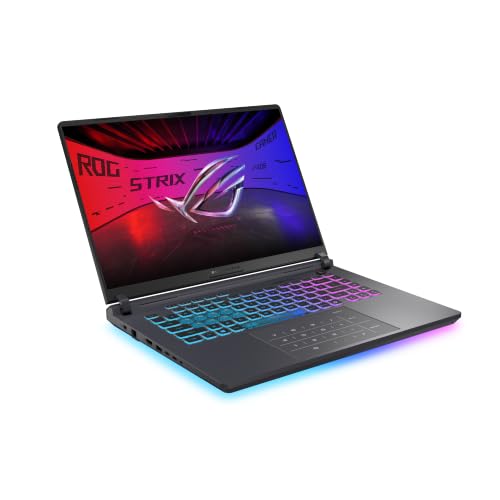
ASUS ROG Strix G16, RTX 5070, 16-inch 2.5K
RTX 5070 · Intel Core Ultra 9 290HX Plus · 32GB · 1TB · 16-inch 2.5K WQXGA · around $3,749.00 · Ships from Amazon AU
ASUS builds the Strix G16 as a full-size gaming machine rather than a thin one, and that is the reason it sits here. The Core Ultra 9 290HX Plus is the newest and highest Intel mobile part on this list, and it arrives with 32GB of DDR5, a 1TB SSD and an RTX 5070 behind a 16-inch 2.5K WQXGA panel. That resolution is well matched to that GPU, which matters more than chasing a badge the machine cannot feed.
Be clear about what you are buying at this price. The RTX 5070 here sits a step below the 5070 Ti in the Legion Pro 5i above, and the Lenovo costs less. What the ASUS gives you instead is the newer processor, a larger body with more room for the cooler, and ASUS service in Australia rather than a single import channel. If your work leans on the CPU as much as the graphics, that trade stacks up. If you only game, the Pro 5i is the better buy and I will say so plainly.
One thing to sort before you commit: the listing does not state the GPU power limit or the panel refresh rate, and both vary across the Strix range. Read the ASUS spec sheet for this exact G615LP build first, because a 5070 given room to run and one held back are two different laptops by hour three. That is the same advice I give at the counter for anything in this bracket.
CPU: Intel Core Ultra 9 290HX Plus • GPU: NVIDIA GeForce RTX 5070 • Display: 16-inch 2.5K WQXGA • RAM: 32GB DDR5 • Storage: 1TB SSD • Finish: Eclipse Gray • OS: Windows 11 Home • Warranty: 1 year manufacturer + ACL
View on Amazon AU
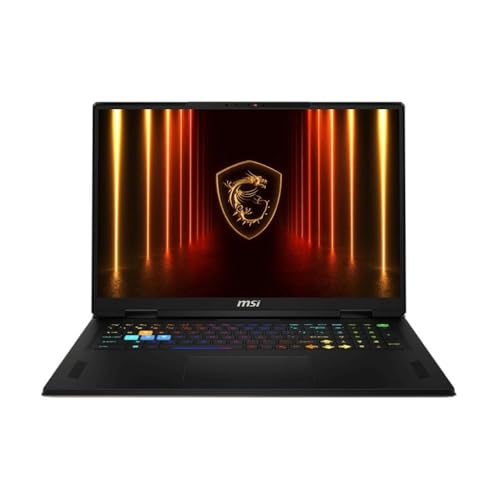
MSI Vector 18 HX, RTX 5090, 18-inch
RTX 5090 24GB · Intel Core Ultra 9 275HX · 32GB · 1TB · 18-inch QHD+ 240Hz · around $8,300.95 · Sold by a third-party seller on Amazon AU
This is the lowest-cost route to an RTX 5090 on the list, and that is its whole reason for being. The 5090 brings 24GB of GDDR7, which changes what the machine can do at 4K and in memory-hungry creative work. MSI wraps it around the Ultra 9 275HX, 32GB of RAM, a 1TB drive and an 18-inch 240Hz QHD+ panel.
The Vector line is built for output rather than looks, and the 18-inch chassis is the point: a big body has room for a serious cooler, so the 5090 gets fed instead of choking in a thin shell. The weight is real and the power brick is large, so feed it from the wall and treat it as a desktop replacement that folds, because this is not a GPU that behaves on battery.
If you want the top GPU without paying halo money for a thin body, this is the way in. You are buying the 5090 and its 24GB, and the plain 18-inch chassis is the price of getting it here at this figure.
CPU: Intel Core Ultra 9 275HX • GPU: RTX 5090 24GB • Display: 18-inch QHD+ 240Hz • RAM: 32GB DDR5 • Storage: 1TB NVMe SSD • OS: Windows 11 • Warranty: 1 year manufacturer + ACL
View on Amazon AU
HP OMEN 16, AMD Ryzen 9 8940HX, 16-inch 240Hz
Amazon AU • ASIN B0FMXCLKSH • $3,799 • Amazon AU direct
The only AMD option in this guide, and worth knowing about because Ryzen mobile chips generally run cooler for the same work than the Intel HX parts around them. In a gaming laptop, cooler means quieter fans and less thermal stress on the board over years, which is exactly what we see determine whether a machine reaches year five.
32GB of RAM and a 1TB SSD as standard, with a 240Hz panel at 2560 x 1600.
Honest caveat: It is an IPS panel, not OLED, so it will not match the Legion or Zephyrus for contrast. HP parts also come through a single channel in Australia, which can mean longer waits on a warranty repair.
Best for: Anyone who prefers AMD, or wants a quieter machine than the Intel HX field at this price.
CPU: Ryzen 9 8940HX • RAM: 32GB • Storage: 1TB SSD • Screen: 16" 240Hz IPS
View on Amazon AU
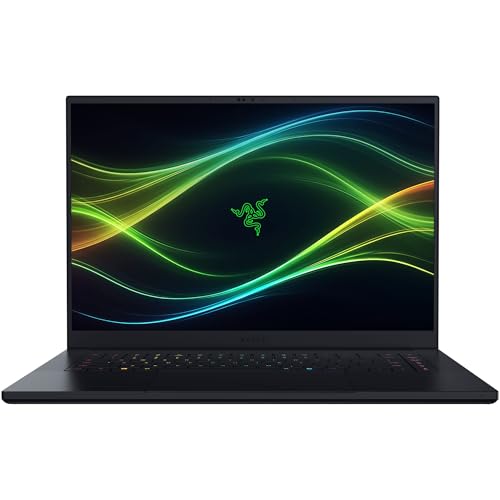
Razer Blade 16 (2026), RTX 5090, 16-inch OLED
RTX 5090 24GB, up to 165W · Intel Core Ultra 9 · 64GB · 2TB · 16-inch OLED 240Hz · around $10,253.69 · Ships from Amazon AU
The Blade 16 is the no-compromise machine, and it is priced like one. Razer fits an RTX 5090 running up to 165W and a next-gen Core Ultra 9 into a 14.9mm CNC aluminium unibody that has no business being this thin, alongside 64GB of memory and a 16-inch 240Hz OLED. It is the most desirable laptop here and, in the workshop, among the most beautifully built.
Vapour-chamber cooling is what lets it run a 165W 5090 in that shell, but physics still applies: worked hard it gets warm and the fans get loud. The 64GB of memory and the DisplayHDR True Black 1000 OLED make it as strong for creative work as it is for games, on a 2TB drive.
Nobody needs a Blade 16. You buy it because you want the best-built thin machine with the top GPU and one of the finest panels made, and you are willing to pay for it. As a purchase it is about desire as much as spec, and it is honest about that.
CPU: Intel Core Ultra 9 • GPU: RTX 5090 24GB GDDR7, up to 165W TGP • Display: 16-inch QHD+ OLED 240Hz, 0.2ms, DisplayHDR True Black 1000 • RAM: 64GB • Storage: 2TB PCIe 4.0 SSD • Chassis: 14.9mm CNC aluminium unibody, vapour-chamber cooling • OS: Windows 11 • Warranty: 1 year manufacturer + ACL
View on Amazon AUSide-by-side comparison
Prices are approximate and move week to week on premium stock. Figures are at the time of writing, August 2026.
Side-by-side comparison
| Product | Price | Best for |
|---|---|---|
| Lenovo Legion 5i 15IRX10 15.1 Inch OLED… | ~$2,725.06 | |
| HP 16″ OMEN Gaming Laptop | ~$3,799 | |
| Lenovo Legion 7i 16IAX10 16 Inch OLED 240Hz… | ~$3,799.00 | |
| Lenovo Legion Pro 5i 16IAX10H 16 Inch OLED… | ~$4,499 | |
| Lenovo Legion Pro 7i 16IAX10H 16-Inch WQXGA… | ~$5,612.41 | |
| ROG Strix G16 G615LP-TS202W, 16" 2.5K WQXGA… | ~$3,749.00 | |
| MSI Vector 18 HX AI A2XWJG 18" 2K IPS 240Hz… | ~$8,300.95 | |
| Razer Blade 16 - Ultra-Powerful 16 Inch… | ~$10,253.69 |
Why a premium gaming laptop outlasts a budget one
The reason budget gaming laptops die young is not mystery components, it is heat with nowhere to go. A budget machine pairs a hungry GPU with a thin cooler and a plastic shell, then runs it hot every session. Two things follow.
First, the whole machine cooks. Fans clog faster because the airflow path is meaner, temperatures climb, and the laptop throttles to protect itself, so the performance you paid for quietly disappears by year two. Second, and more serious, is heat cycling. Every session heats the GPU and its solder joints, every shutdown cools them, and the tiny expansion and contraction fatigues the joints over hundreds of cycles. On less costly boards with weaker thermal design, those joints crack, and a cracked BGA joint under the GPU is the classic no-display failure I see on machines around year two and three. It is repairable at chip level, but it is not a small job, and on a budget laptop it is often not worth it.
Premium machines push that timeline out. A vapour chamber and a metal chassis keep peak temperatures lower and swings smaller, so the solder lives longer. Run the numbers the way I do at the counter. A $1,400 gaming laptop written off at year two costs $700 a year. A $3,500 machine that games hard for six years, with one fan and one battery along the way, costs closer to $650 a year and is far nicer for every one of those years. The dearer machine is the less costly machine. That is the whole case for the premium tier, and it is why I would rather sell you a repair on a good one than a replacement for a bad one.
Common mistakes from the repair shop
A few habits account for most of the gaming laptops I see fail early. Avoid these and yours will outlast the warranty by years.
- Buying on the GPU name and ignoring the TGP. A 5080 starved of watts loses to a well-fed 5070 Ti. Always check the power limit before you compare model numbers.
- Never cleaning the cooler. Dust and pet hair choke the fans within a year or two. A yearly blow-out, and a proper strip and repaste every few years, is the single best thing you can do for the machine.
- Running it on a bed, couch or carpet. Soft surfaces block the intake underneath and the machine bakes. Use a hard surface or a stand.
- Gaming at full tilt on battery. It runs slower and stresses the cell. Plug in for anything demanding, and cap the charge at 80% for daily desk use where the option exists.
- Ignoring a loosening hinge. A hinge that has started to crack the chassis is inexpensive to sort early and costly once it has torn the display cable or lid. Sort the wobble when it starts.
- Skipping the ACL claim. On a laptop this dear, a major fault at year two or three is worth raising in writing with the retailer, not absorbing.
Which one is right for you?
- Stepping up from a sub-$2,000 laptop and want 1440p to run without a stutter? → Lenovo Legion 5i at around $2,298. OLED and a real H-series CPU at the floor of the tier.
- Want one machine that does everything well for the least money in the premium tier? → Lenovo Legion Pro 5i at around $4,499. The RTX 5070 Ti at a full 140W is the value sweet spot.
- Carry it every day? → ASUS ROG Zephyrus G16 at around $5,399. Thin, light, and cool enough to run a 5070 in an ultrabook body.
- Edit and render as well as game? → MSI Stealth A16 for a portable OLED creator machine, or the MSI Stealth A18 with 64GB if you want the big Mini-LED workstation.
- Want the most raw frames per dollar and rarely leave a desk? → Lenovo Legion Pro 7i for the RTX 5080, or the MSI Vector 18 HX for the lowest-cost way into an RTX 5090.
- Money no object, best-built thin machine? → Razer Blade 16 at around $9,959.
- Prefer a desktop you can upgrade for years? → A mini PC, or a self-built tower around a current graphics card, gives more performance per dollar and is far easier to repair.
- Do not really need a discrete GPU? → A value laptop is the smarter buy, and our under $1,500 gaming guide covers the entry tier.
Frequently asked questions
Is a $2,000+ gaming laptop worth it over a $1,500 one?
It is worth it when you run demanding games or creative work for hours at a time. The premium tier buys cooling that holds its clocks under sustained load, a higher power limit on the GPU, and a metal chassis that survives years of being carried around. In the workshop I see less costly machines fail at the cooler and the hinge first. Paying up for those two things is usually less costly across the life of the laptop.
Will a premium gaming laptop still throttle?
Every laptop throttles at some point, because there is only so much heat a thin chassis can move. The difference is where the ceiling sits. A machine with a vapour chamber and a 140W GPU holds its performance far longer than a thin one running the same chip at 90W. Keep the vents clear, sit it on a hard surface, and clean the cooler yearly, and throttling stays where it belongs, at the extremes.
OLED or Mini-LED for a gaming laptop?
Both are excellent and the choice is about use. OLED gives perfect blacks, near instant response and the best contrast, which suits fast games and dark scenes. Mini-LED pushes far higher sustained brightness and carries no risk of burn-in, which suits bright rooms and static work interfaces open all day. For a machine that games and earns its keep in daylight, Mini-LED is the safer pick. For pure contrast, OLED wins.
Can I upgrade the RAM and SSD later?
It depends on the model, and it matters more than most buyers think. Several picks here use SO-DIMM memory and a standard M.2 slot, so you can add storage or swap RAM years later. The thinnest machines solder the memory down, so the size you buy is the size you keep. If you want to extend the life of the laptop, favour a model with serviceable RAM and a second drive slot.
Desktop or laptop at this price?
A desktop gives more performance per dollar, runs cooler, and is far easier to repair and upgrade, so if the machine never leaves a desk, build a tower instead. A laptop earns its premium when you actually move it, to a lounge, a LAN, a client site or a lecture. Buy the laptop for portability, not because it is the less costly way to reach a given frame rate, because it is not.
How long will one of these last, and does Australian Consumer Law help?
Treated well, a premium gaming laptop runs five to seven years before it needs real work, usually a fan or a battery. Australian Consumer Law sits on top of the one year warranty and requires goods to last a reasonable time for the price paid. On a machine costing several thousand dollars, a major fault at two or three years is a fair ACL claim. Keep your receipt and raise it in writing with the retailer.
Related buying guides
Gaming laptop throttling, crashing, or will not display?
Before you replace it, bring it into our Erina workshop. Most "dead" gaming laptops are a clogged cooler, a tired fan, a worn charge port or a cracked GPU joint we can rework at the board, and they run for years more once sorted. We diagnose first, tell you straight whether it is worth fixing, and quote before any paid work. See our pricing guide for common jobs.
Visit our Erina workshop Book Online