Prices from Amazon AU, updated daily. Swipe or use the arrows for more.
Disclosure: This article contains affiliate links to amazon.com.au. If you buy through one of these links iFix may earn a small commission at no extra cost to you. It doesn't change which products we recommend. We focus on what actually lasts based on 16 years of repair-shop experience.
Quick summary8 picks
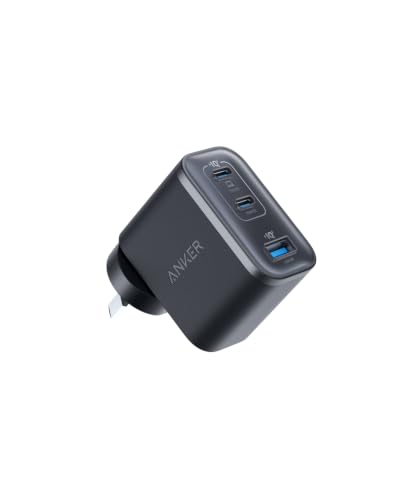
- Anker Nano 70W 3-Port USB C Charger about$55.9970W.
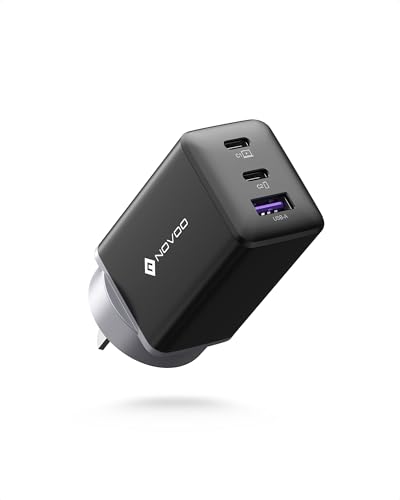
- NOVOO 67W GaN III USB C Wall Charger about$25.9967W.
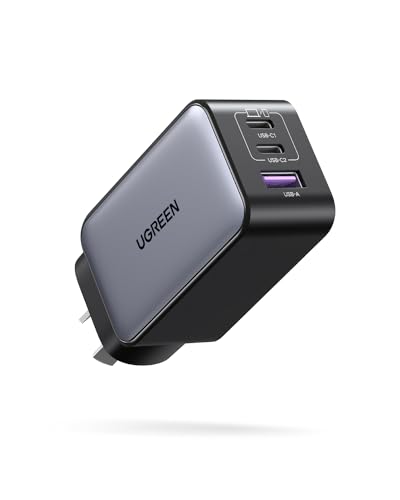
- UGREEN USB C Charger 65W Nexode 3 Ports PPS… about$34.9865W.
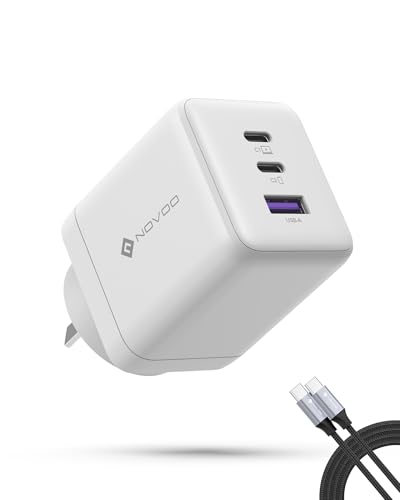
- NOVOO 100W USB C Charger about$40.79100W.
- UGREEN Nexode S 100W 4-Port Compact Charger about$59.9565W.
- ZYRON 100W 3-Port GaN III USB C Charger… about$59.99100W.
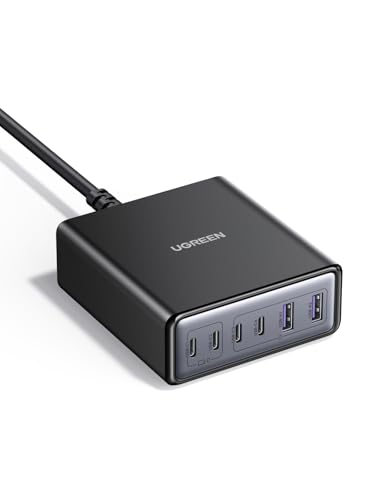
- UGREEN 100W Desktop Charger 6-Port USB C… about$55.99100W.
- UGREEN 100W USB C Charger about$79.95100W.
Why your drawer is full of bricks
Somewhere in your house is a drawer holding a decade of chargers. The 5W cube from an old iPhone. Two laptop bricks with proprietary barrel plugs. A tablet charger, three no-name units from petrol stations, and a tangle of cables that fit none of them. Every one of those was mandatory once, because every device negotiated power its own way, and the drawer is the fossil record of that era. USB-C Power Delivery ended it. One standard now charges phones, tablets, earbuds, laptops and handheld consoles, which means the whole drawer collapses into a single wall unit with enough ports and enough wattage. Count the bricks in your own drawer before reading on. The average we hear at the counter is eight, and two of them still have owners.
The chargers that make this practical are built on gallium nitride, GaN on the listings, and the four picks below run from a $34.98 three-port unit to a $79.95 five-port desk brick. Between them they cover a solo phone user, a Samsung fast-charge household, a laptop bag and a family charging shelf. The point is not that they are small, although they are. The point is that one deliberate purchase replaces a decade of accidental ones, and every device in the house stops competing for the one good charger. Nothing in the drawer needs to survive the transition, and the good cables you already own still work.
GaN in one paragraph, and why it runs cooler
Gallium nitride is a semiconductor that switches much faster than the silicon it replaces. Faster switching means the transformer and filter components inside the charger can be physically smaller, and less energy gets wasted as heat on every cycle. That is the entire trick. It is why a modern 65W unit is smaller than the 30W bricks of five years ago, and it is not marketing: put a GaN unit and an old silicon brick side by side under the same load and the temperature difference is obvious to your hand. The same physics is why GaN is spreading into laptop power supplies and EV electronics: less waste heat is worth money at every scale.
Heat matters more than size, from where I sit. Heat is what kills charging electronics: it dries out electrolytic capacitors, fatigues solder joints and cooks insulation, and a charger that runs 15 degrees cooler at the same load simply lasts longer. It also matters for where chargers actually live, jammed behind bedheads and couches with no airflow. A cooler brick in a bad location is a meaningful safety margin, not a spec-sheet nicety. GaN does not make a badly designed charger safe, but in a properly engineered unit it removes most of the thermal stress that sends silicon bricks to an early grave.
Wattage sharing: the only spec that matters on a multi-port brick
The number on the box is the combined budget, not what each port gets. Plug one laptop into a 100W unit and it can draw the full 100W. Add a phone and the charger re-deals the budget, maybe 65W and 30W, and most units briefly disconnect everything while they renegotiate, which is that flicker your laptop screen does when a second device lands. Add earbuds and the deal changes again. A charger is a small power authority running an allocation policy, and the difference between a good multi-port unit and a frustrating one is whether that policy is published on the listing.
So read the split table before you buy, and buy more headroom than today's devices need. The arithmetic on the picks: UGREEN's 65W three-port drives one laptop properly or a phone and two accessories. ZYRON's 100W pair of USB-C ports runs a full-rate laptop plus a fast phone at once. UGREEN's 100W five-port covers a whole desk, with a 100W ceiling on a single port when a serious machine lands on it. The business laptops we recommend nearly all charge at 65W, which is why that number keeps appearing in this guide: 65W per device is the practical floor for anything with a keyboard.
One habit worth keeping: give the laptop the port the listing designates for full wattage, usually the top USB-C, and let the phone take the lower slot. Random port assignment is where most of the 'my charger is slow' complaints we hear actually come from. It takes five seconds and ends most of the mystery. The remaining mystery is usually the cable, covered two sections down.
How many watts you actually need
Match the charger to the hungriest device you own, then add margin for sharing. The map from the bench: earbuds and watches sip under 5W. Phones accept 20 to 45W depending on brand, with Samsung's top rate needing PPS support, not just raw wattage. Tablets sit in the 20 to 30W band. Handheld consoles draw up to about 45W. Ultrabooks and MacBook Airs want 65W to charge properly while being used, and the bigger machines, MacBook Pros and serious workstations, climb to 100W and beyond. That last step matters: a 65W brick will still charge a 100W-class laptop, just slowly, and sometimes not at all while the machine works hard.
Now add the sharing margin. If the laptop needs 65W and a phone will fast-charge beside it, a 65W brick cannot do both at once, and a 100W unit is the honest minimum for that pairing. This is the arithmetic that catches most buyers: they spec the charger for one device and then use it for three. Price the next tier up before you settle, because in this category the step from 65W to 100W currently costs about thirteen dollars between the UGREEN entry unit and the ZYRON, which is the best value insurance in consumer electronics.
The opposite mistake also costs money. If your heaviest device is a phone, a 100W desk brick is capacity you will never draw, and the $34.98 unit already covers everything you own with headroom. Wattage you cannot use is not future-proofing unless a bigger laptop is genuinely on the shopping list. Buy for the devices you have plus the one purchase you can already see coming, and no further.
Counterfeits, RCM marks and the $15 brick that costs a motherboard
Chargers are the most counterfeited electronics category we deal with, because a charger is a box whose quality you cannot see and whose failures blame themselves on the device. A legitimate 65W unit contains proper isolation between the mains side and your device, filtering to keep the output clean, and protection that shuts it down when something goes wrong. The fakes skip all three. We have opened seized-up bricks where the mains-to-USB separation was a couple of millimetres of hope, and our bad chargers explainer walks through what that noisy, badly isolated output does to a phone's charging circuitry over months. The short version: the brick survives, the phone's charge IC does not.
In Australia the marker to look for is the RCM, the regulatory compliance mark that indicates the unit meets local electrical safety standards. Every pick here is sold by an Australian storefront or Amazon AU itself, which also puts Australian Consumer Law behind the sale. The failure pattern that pays for a chunk of the computer repair work that crosses the bench is depressingly consistent: marketplace brick at a third of the brand price, months of apparently fine service, then a dead charge port or a dead power rail on a laptop worth thirty times the saving. Buy the charger like it is connected to your most expensive device, because it is. Sixteen years of seeing that invoice pattern is why this guide will not list a marketplace special at any price.
PD, PPS and PD 3.1: the alphabet that actually matters
USB-C Power Delivery is the baseline: charger and device negotiate a voltage and current both sides can live with, which is why one brick can feed earbuds and a laptop without cooking either. Any charger worth buying states PD support plainly, and all four picks do. PPS, programmable power supply, is the extension that matters for Samsung owners: it lets the device adjust voltage continuously during the charge, and it is the difference between a Galaxy fast-charging at 45W and idling along at 15W wondering why you bothered. The UGREEN units all state PPS on their listings.
PD 3.1 is the newest revision and pushes the standard beyond 100W for the machines that need it. At 65W, PD 3.1 is less about raw wattage and more about certification discipline: a unit tested against the specification behaves predictably, which is why a listing that names its certification is worth more than one that only claims compatibility. None of this alphabet requires study. The practical rule is to buy a charger whose listing names its protocols, because vagueness on protocols is the reliable tell of a unit that also went vague on isolation and filtering, and match PPS to Samsung phones the way you match wattage to laptops. Everything else on a charger listing, the model codes and the trademark suffixes, is decoration around those two decisions.
Cables are half the system
A 100W charger with a random drawer cable is a 60W charger. USB-C cables carry a default ceiling of 3 amps, about 60W, and getting the full 5 amps requires a cable with an identification chip that tells both ends it can handle the current. Nothing warns you when the cable is the bottleneck. The laptop simply charges slower, the charger takes the blame, and the actual culprit goes back in the drawer to sabotage the next setup too.
ZYRON deals with this the sensible way by shipping a 100W-rated cable in the box, which is worth real money and stated plainly on the listing. For the other picks, budget for one properly rated USB-C cable per high-wattage device and mark it, because the 5A cables look identical to the 3A ones from the outside. Sixty-watt cables remain fine for phones and accessories. The rule of thumb from the bench: the cable that came with a device is matched to that device, and the moment you build a shared charging station, cable ratings become part of the system design whether you thought about them or not. A plain cable that states its rating honestly beats a premium-looking one that states nothing.
How I picked these four
Same gate as every guide in this series. Condition new, Australian storefront or Amazon AU as the seller, price inside the $30 to $180 band from the research queue, no import versions and no overseas sellers wearing local-sounding names. Then Amazon AU sales rank sorted the survivors, and this category made it easy: the UGREEN five-port sits at #23 and the ZYRON at #37 in Amazon AU's portable computer chargers category, while the three-port UGREEN holds #9 site-wide, which is enormous volume for a wall charger. Products that move at that rate get their faults surfaced in review sections within weeks, and these have held rank anyway.
Specs come from the listings alone, and where a listing stays silent, the review says so rather than inventing a number. Wattage claims in this category are mostly honest because USB-C PD is measurable, but port-splitting behaviour is where marketing still hides, so each pick below states what the listing commits to and flags what it does not. And if a charger has already done damage, a phone that will not charge, a laptop USB-C port that only works on one side, that is board-level territory: the bench in Erina replaces charge ports and power ICs weekly, and diagnosis starts with an honest answer about whether the repair is worth it. That policy costs this guide some impressive-sounding numbers, and it is not negotiable.
The 4 picks, $35 to $80
Prices are Amazon AU at time of writing (22 August 2026) and move week to week. Ranks are Amazon AU sales ranks, category where stated and site-wide otherwise, checked the same day.

UGREEN Nexode 65W GaN Charger, 2x USB-C + USB-A
ASIN B0CHVXYSVQ • $34.98 • Sold by UGREEN GROUP LIMITED AU on Amazon AU
At $34.98 this is the unit that makes the whole category argument in one purchase. Three ports, two USB-C and one USB-A, with a full 65W available to a single device, which means it charges a MacBook Air M2 to 51 per cent in 30 minutes per the listing while replacing the phone charger and the earbuds charger at the same time. UGREEN's GaN II platform gets the shell down to 48 per cent smaller than its old 61W silicon design, small enough that it disappears into a bag pocket, and the listing states its protocols plainly: PD with PPS, including 45W Samsung super fast charging for Galaxy owners. No cable ships in the box, so keep one good USB-C lead aside for it.
The port behaviour is managed by what UGREEN calls a smart power dispenser, which reallocates the budget as devices come and go. In practice that means the laptop gets the lion's share until a phone lands, then the split adjusts. It holds #9 site-wide on Amazon AU as I write this, which for a wall charger is serious volume, and volume at that level is its own quality signal: a charger with a heat problem or a port problem cannot hide from thousands of reviewers for long. It ships from UGREEN's Australian storefront with Australian Consumer Law behind the sale, at a price where the counterfeit-market alternative stops making any sense at all.
The limits are the honest kind. 65W is the total budget, so a laptop drawing hard while a phone fast-charges will see the split, and the listing publishes the combinations rather than hiding them. There is no display and nothing to configure, which is precisely what most people want from a wall unit. If your laptop wants more than 65W, or you are charging a desk full of devices at once, step up to the ZYRON or the five-port UGREEN below. For everyone else, this is the default answer at a price that ends the debate.
Honest caveats: 65W is the combined budget across all three ports, so simultaneous laptop and fast phone charging means a split. The listing does not state the exact per-combination wattage table in its summary, so check it before relying on a specific pairing. No cable in the box.
Best for: One-bag commuters who want a single brick for laptop, phone and earbuds at the lowest price here.
Max output: 65W single device • Ports: 2x USB-C, 1x USB-A • Technology: GaN II, PD, PPS, 45W Samsung super fast charging • Size claim: 48% smaller than UGREEN's older 61W unit (listing) • Charging claim: MacBook Air M2 to 51% in 30 min (listing) • Seller: UGREEN AU storefront on Amazon AU • Price: $34.98 at time of writing • Rank: #9 site-wide (Amazon AU)
View on Amazon AU
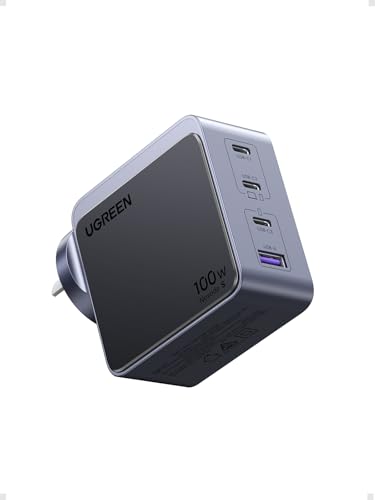
UGREEN Nexode S 100W Compact Charger, 3x USB-C + USB-A
ASIN B0DXFSJJ2X • $59.95 • Sold by UGREEN GROUP LIMITED AU on Amazon AU
The UGREEN Nexode S is the compact pick. It is a small 100W charger with four ports, three USB-C and one USB-A, and the listing says a GaNInfinity chip makes it small enough to fit in the palm of your hand, which is why it suits a laptop bag or a business trip. A single USB-C device can draw up to 100W at 5A, and the listing claims a MacBook Pro 16 inch goes from 0 to 42 per cent in 30 minutes.
All four ports can charge at once, so it is one deliberate purchase for a laptop, a phone, a tablet and earbuds. The listing names MacBook Pro and Air, iPhone, iPad, Steam Deck and Galaxy phones, with 60W Super Fast Charging 3.0 for the Galaxy S26 Ultra and 2.0 for the S25 Ultra, S24 and S23 series. It lists dynamic temperature sensors and an intelligent PWM chip for protection, which I read as a standard feature list rather than proof.
It ranks #391 site-wide on Amazon AU, sold by UGREEN GROUP LIMITED AU at $59.95. That is about $25 more than the three-port 65W UGREEN and within a few cents of the ZYRON, so the money is buying 100W from a body small enough to carry, plus a fourth port. Buy it if the charger lives in a bag or travels between desks; if it stays at home with one laptop, the ZYRON ships with a cable and a fixed AU plug.
Honest caveats: The 100W is shared when several ports are in use, so a laptop and a phone together will slow the laptop, and the listing does not state the split. The listing says some laptops cannot charge at full speed because of their own charging protocol, and it names Dell. It does not mention a cable in the box, and the listing does not describe the plug, so check it suits the sockets you will travel to.
Best for: Anyone who wants one compact 100W brick for a laptop, phone, tablet and earbuds from a single power point, and carries it between desks or in a bag.
Max output: 100W to a single USB-C port, shared when more ports are used • Ports: 3x USB-C, 1x USB-A • Fast charging: Galaxy 60W Super Fast Charging 3.0 on S26 Ultra (listing) • Charging claim: MacBook Pro 16 inch to 42% in 30 min (listing) • Chip: GaNInfinity (listing) • Seller: UGREEN GROUP LIMITED AU on Amazon AU • Price: $59.95 at time of writing • Rank: #391 site-wide (Amazon AU)
View on Amazon AU
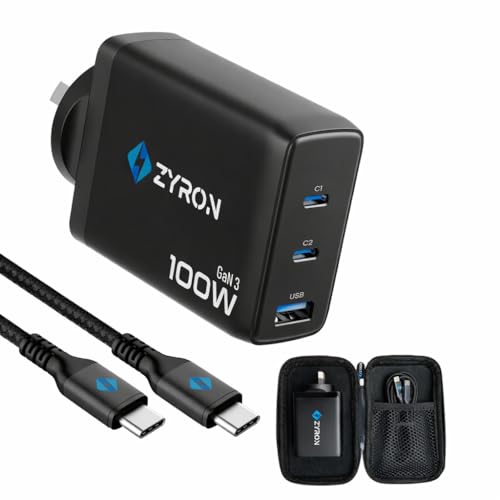
ZYRON 100W GaN III Charger, 2x USB-C + USB-A, with 100W Cable
ASIN B0CH2TY399 • $59.99 • Sold by Zyron Tech Australia on Amazon AU
ZYRON is an Australian tech brand, and this 100W unit is the strongest argument for buying local in the category. The layout is two USB-C ports carrying up to 100W plus a 30W USB-A, on GaN III, the newest generation here, with a fixed AU wall plug so there is no travel-adapter wobble between the brick and the socket. One hundred watts on a single port means it runs a MacBook Pro or any serious USB-C laptop at full rate, and the three-device capacity handles the laptop bag and the bedside table equally well. At $59.99 it costs about $25 more than the three-port 65W UGREEN but out-powers it by more than half, with the cable included.
The detail that shows someone thought about the whole system: a 100W-rated USB-C cable ships in the box. As the cable section above explains, a 100W charger on a standard 3A cable silently becomes a 60W charger, and most buyers never find out. ZYRON removing that failure mode at this price is worth more than another ten watts would be. The listing also states smart device detection that allocates power per port and over-charge protection, and the brand sells through its own Australian storefront on Amazon AU, so warranty conversations happen in this time zone under Australian Consumer Law. That is the whole system solved in one box, which none of the global brands on this page manage at any price here.
It holds #37 in Amazon AU's portable computer chargers category, which for an Australian challenger brand against UGREEN and Anker is a real achievement and says buyers keep it. The honest note is that ZYRON does not have the decade of global charger history the big names carry, and the fixed plug that is a feature at home makes it AU-sockets-only for travel. As the one-brick solution for a household with one hungry laptop and everything else USB, it is the most complete single-laptop kit on this page. Keep the included cable with the laptop it feeds, and the setup stays at full rate.
Honest caveats: Fixed AU plug means no folding pins and no use overseas without an adapter. The listing states 100W max across the two USB-C ports, so a two-laptop household will see the split, and the exact multi-device wattage table is not spelled out in the listing summary. Brand history is shorter than UGREEN's.
Best for: One-laptop households who want full 100W, a proper cable included, and an Australian brand behind it.
Max output: 100W single USB-C device • Ports: 2x USB-C (100W max), 1x USB-A (30W) • Technology: GaN III, PD, smart device detection • In the box: 100W-rated USB-C cable • Plug: Fixed AU wall pins • Seller: Zyron Tech Australia storefront on Amazon AU • Price: $59.99 at time of writing • Rank: #37 in Portable Computer Chargers & Power Supplies (Amazon AU)
View on Amazon AU
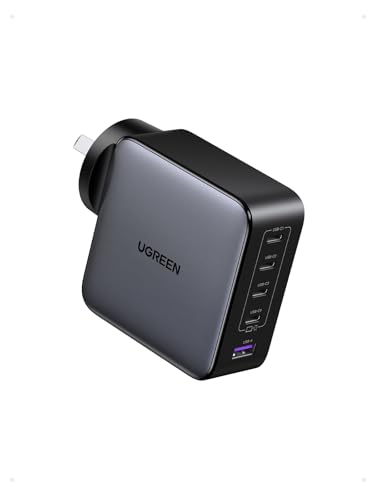
UGREEN Nexode 100W GaN Charger, 4x USB-C + USB-A
ASIN B0DL5PB3BS • $79.95 • Sold by UGREEN GROUP LIMITED AU on Amazon AU
This is the charging station disguised as a wall brick, and it is the highest-ranked wall unit in the guide's 100W tier: #23 in Amazon AU's portable computer chargers category at the time of writing. Five ports, four USB-C and one USB-A, sharing a 100W budget with the full 100W available to a single device on the primary port. That combination is what lets one power point behind a desk run a laptop, a phone, a tablet, earbuds and a watch simultaneously, which is exactly the job families and home offices keep buying multiple chargers to do badly. UGREEN's GaN II platform keeps the shell compact enough to travel, though a desk or kitchen bench is clearly where it expects to live.
The five-way allocation is the point, so understand what it means: every device you add re-deals the budget, and with five devices drawing at once nothing is fast-charging. That is fine. The overnight shelf does not need speed, it needs everything at 100 per cent by morning without a socket strip full of mystery cubes, and this consolidates that mess into one engineered unit with published behaviour. The listing states PD across the USB-C ports and UGREEN's usual protection stack against over-charging and overheating. When one device does need speed, the laptop on the 100W port while everything else sips, the primary port delivers the full rate. That is the correct engineering trade for a shelf that charges everything overnight.
At $79.95 it is the dearest pick here, ships from UGREEN's Australian storefront, and turns the household charging drawer into a single deliberate purchase. The trade against the ZYRON is the cable, because nothing ships in the box here, so add a 5A-rated lead for the laptop port and the ZYRON's price advantage narrows. Against everything else in the guide it simply does more, and the #23 category rank says a lot of Australian households have already worked that out. For a home office it is the last charger purchase for years.
Honest caveats: No cable ships in the box, so budget for a 100W-rated 5A lead to get full wattage to a laptop. 100W is the combined budget: five devices at once means nothing fast-charges, and the exact split table per combination is not stated in the listing summary. Larger than the single-laptop units here.
Best for: Desks, kitchen shelves and families consolidating five chargers into one engineered unit.
Max output: 100W single device on primary USB-C • Ports: 4x USB-C, 1x USB-A • Technology: GaN II, PD, over-charge and thermal protection (listing) • Use case: Five-device desk or family charging station • Seller: UGREEN AU storefront on Amazon AU • Price: $79.95 at time of writing • Rank: #23 in Portable Computer Chargers & Power Supplies (Amazon AU)
View on Amazon AUSide-by-side comparison
| Product | Price | Best for |
|---|---|---|
| Anker Nano 70W 3-Port USB C Charger | ~$55.99 | A 70W three-port brick from a big charging brand |
| NOVOO 67W GaN III USB C Wall Charger | ~$25.99 | A low-cost 67W brick with dual USB-C |
| UGREEN USB C Charger 65W Nexode 3 Ports PPS… | ~$34.98 | One brick for a laptop bag at the lowest spend |
| NOVOO 100W USB C Charger | ~$40.79 | A 100W three-port brick at a low price |
| UGREEN Nexode S 100W 4-Port Compact Charger | ~$59.95 | A compact 100W brick with four ports for a laptop bag |
| ZYRON 100W 3-Port GaN III USB C Charger… | ~$59.99 | A 100W laptop charger with the cable in the box |
| UGREEN 100W Desktop Charger 6-Port USB C… | ~$55.99 | A six-port desk charging station |
| UGREEN 100W USB C Charger | ~$79.95 | A whole family or a five-device desk |
What we see fail at the bench: USB-C chargers
Chargers cross the bench in two ways: as the thing that failed, and as the thing that killed what failed. The second category is worse and pays for more repairs. A dead charger costs you a charger. A bad charger that stayed alive costs you a charge port, a power IC or a logic board, and the invoice lands months after the purchase that caused it. Here is what actually goes wrong.
Strain relief and snapped tongues
The mechanical failures come first. USB-C sockets on chargers wear exactly like the ones on phones: the internal tongue that carries the contacts fatigues with every insertion, and a charger that lives behind a couch gets its cables levered sideways every time the vacuum cleaner visits. The symptom is a charge that only holds at certain cable angles, and people blame the cable, then the phone, then finally the brick. Wall-mounted units with fixed pins also crack at the pin base when they carry a heavy plugpack load in a loose socket. If a charger wobbles in the wall, the socket is worn too, and that is an electrician job, not a charger review.
The counterfeit teardown
Open a genuine 65W unit and a counterfeit side by side and the difference is not subtle. The real one has a physical gulf between the mains side and the output side, bulk filtering, and a controller that monitors its own temperature. The fake has a fraction of the components, isolation distances measured in optimism, and output noise that a phone's charging IC absorbs as damage, slowly. On iPhones that damage has a name we see weekly: a cooked charging chip that presents as a phone that will not charge or fills at a crawl. The brick that caused it usually still works fine, which is why nobody suspects it.
Heat cycling
Every charger ages on a thermal clock. Electrolytic capacitors dry out faster when hot, solder joints fatigue as they expand and contract through every charging session, and output stability degrades before the unit dies outright, so the last months of a failing charger are spent quietly stressing the devices it feeds. GaN pushes this timeline out by producing less heat for the same load, but placement still matters: a brick pinned between a mattress and a wall, or buried under a pile of cables, runs at the top of its thermal envelope every night. Give it a few centimetres of air and it repays the favour in years.
Decision tree: which one should you actually buy?
- One brick for a laptop bag, lowest spend? → The UGREEN 65W three-port at $34.98. Laptop, phone and earbuds from one unit, with PPS for Samsung fast charging.
- Laptop wants the full 100W, one purchase, no cable shopping? → The ZYRON at $49.97: 100W on a single USB-C port with a properly rated 100W cable already in the box.
- Whole family or a five-device desk? → The UGREEN 100W five-port at $79.95. One power point runs the entire charging shelf, with the full 100W held for the laptop port.
- Carrying one brick between desks or in a laptop bag? → The UGREEN Nexode S 100W at $59.95. Four ports, 100W for a laptop, and a body small enough for the palm of your hand.
- Samsung household chasing 45W super fast charging? → Any of the UGREEN picks: they state PPS support, which is the protocol Samsung's 45W mode actually requires. The $34.98 three-port covers most setups.
- Phone or laptop already charging slowly, or only at certain cable angles? → That is a port or power-IC fault, not a charger review. Bring the device past our Erina workshop for a board-level diagnosis before you spend anything on new hardware.
Frequently asked questions
Will a 100W charger damage my phone?
No. USB-C Power Delivery is a negotiation: the charger offers what it has, the phone requests what it wants, and power only flows at the agreed rate. A phone that charges at 25W draws 25W from a 100W brick, and the remaining capacity simply sits unused. This is why one charger can safely feed earbuds and a laptop. The exception that built this myth is the counterfeit market: a fake charger can misreport its capabilities or deliver noisy, out-of-spec power, and that genuinely does cause damage over time. The wattage number was never the risk. The quality of the unit behind the number is.
Do GaN chargers get hot?
Warm is normal, hot is a signal. Every charger converting mains power to USB-C makes some heat, and GaN units make noticeably less than the silicon bricks they replaced, which is most of why they can be smaller. Under a full laptop load a good GaN unit runs warm to the touch. If a charger is uncomfortable to hold, buzzing, or smells of anything at all, retire it immediately. Placement is half the story: a brick buried behind a bedhead with no airflow runs far hotter than the same unit in open air, so give any hard-working charger a few centimetres of breathing room.
What is the RCM mark and why does it matter on a charger?
The RCM, regulatory compliance mark, is the tick-in-a-triangle symbol indicating a product meets Australian electrical safety and EMC standards. On a mains-connected device like a charger it matters more than on almost anything else you buy, because the standards cover exactly the things that fail dangerously in counterfeits: isolation between the mains side and your device, insulation quality and fault behaviour. Units sold through Australian storefronts and Amazon AU carry it as a matter of course. The grey-market special shipped from overseas may carry nothing, or a printed copy of someone else's mark, which tells you what the rest of the unit is like inside.
Why does my laptop charge slowly when my phone is plugged in too?
Because multi-port chargers share one wattage budget across everything connected. A 100W unit with only a laptop attached gives it the full 100W. Add a phone and the charger re-deals, perhaps 65W to the laptop and 30W to the phone, and many units briefly drop all ports during the renegotiation, which is the flicker you sometimes see. This is normal behaviour, not a fault. The fix is buying enough total wattage for your real combination of devices, and putting the laptop on the port the maker designates for maximum output. The split tables are on the listings for exactly this reason.
Do I need a special cable to get 100W?
Yes. Standard USB-C cables are rated for 3 amps, which caps them around 60W regardless of what the charger can supply. Full 100W delivery needs a 5-amp cable with an e-marker chip that identifies its rating to both ends of the connection. Nothing tells you when the cable is the limit: the laptop just charges slower and the charger takes the blame. The 5A cables look identical to 3A ones from the outside, so label yours. The ZYRON pick in this guide ships with a 100W-rated cable in the box, and for the other 100W unit you should budget for one alongside the charger.
Can a bad charger really damage my laptop or phone?
Yes, and it is one of the more common root causes we find at the bench. A poorly made or counterfeit charger delivers electrically noisy power, and the charging circuitry in the connected device absorbs that stress continuously. The damage is cumulative: months of apparently normal service, then a phone that will not charge or a laptop USB-C port that has gone dead on one side. The charger itself usually still works, so it never gets suspected, and the replacement device often gets plugged into the same brick. If a device fails oddly, question every charger it lived on, and retire the suspects rather than redistributing them around the house.
Related buying guides
A $15 brick should not cost you a logic board
The damage a bad charger does lands months later, as a phone that will not charge or a laptop port gone dead. iFix diagnoses and repairs that damage at board level, charge ICs, power rails and USB-C ports included, with 16 years of bench work behind the verdict. Walk it in to Erina and find out whether the device or the charger is the real problem before you replace either.
Visit our Erina workshop Book Online