Prices from Amazon AU, updated daily. Swipe or use the arrows for more.
Disclosure: This article contains affiliate links to amazon.com.au. If you buy through one of these links iFix may earn a small commission at no extra cost to you. It doesn't change which products we recommend. We focus on what actually lasts based on 16 years of repair-shop experience.
Quick summary4 picks
- Intel ChromebookASUS Chromebook CX14, Core 3 N355, 8GB about$681.598GB RAM, 128GB eMMC, 14" screen.
- Lenovo IdeaPad Slim 3i 14IWC11 about$9998GB RAM, 512GB SSD, 14" screen.
- Lenovo Chromebook 14M8911 about$6478GB RAM, 128GB storage, 14" touch screen.
- ASUS Vivobook Go 15, Ryzen 5, 16GB about$99916GB RAM, 512GB SSD, 15.6" screen.
What $1,000 actually buys in 2026
The laptops that land on my bench with a 'this thing is useless' complaint are almost never faulty. They're three-year-old machines that were bought on price, with 4GB or 8GB of memory and a small drive, and they've simply run out of room to do their job. The hardware is fine. The spec was wrong on day one, and nobody told the buyer at the register. That's why this guide exists: between $700 and $1,000 you can now buy a laptop that won't hit that wall inside its natural life, but only if you read the spec line instead of the brand on the lid, because the brands in this band all sell both good and bad configurations side by side.
At this money you're choosing which compromise to accept, because you don't get to skip all of them, and anyone telling you otherwise is selling something. The Lenovo Chromebook 14M8911 is the easiest of the four to carry, with a 14-inch touch screen and 8GB behind it, but it runs ChromeOS rather than Windows and has just 128GB of storage. The Lenovo Slim 3i spends roughly $350 more on a taller 14-inch screen and a 512GB drive, and caps you at 8GB. The ASUS Vivobook Go 15 is the 16GB one, with a Ryzen 5 chip and a 15.6-inch screen, and it is the only machine here with 16GB. None of these trade-offs is wrong. They just suit different people, and the whole job of this page is matching you to yours.
Every pick here is sold by Amazon AU or an Australian retailer, listed as condition New, and sat inside the top of its Amazon AU laptop category the day I checked. No overseas marketplace sellers, no import versions, no grey stock with a warranty that lives in Hong Kong, no renewed units dressed up as new stock. Those gates knocked out more machines than they let through, which is the point of having them. If your ceiling is closer to $500 than $1,000, this band isn't for you, and I'd rather point you at the right page than stretch the picks to fit the wrong wallet.
RAM decides when the laptop dies
Memory is the spec that sets the useful life of a laptop, and it's the one buyers skim past on the way to the processor badge. A machine that feels quick in the shop with a fresh install slows down as browsers, Teams and Windows itself grow heavier every year, and 8GB is where that pressure shows first. Most of the 'slow laptop' jobs I see aren't failures at all, just machines swapping to disk because the memory filled, and I wrote up why laptops feel slow if you want the longer version with the Task Manager screenshots. Short version: the drive and the memory run out of headroom years before the CPU does.
The catch in 2026 is that you mostly can't fix it later. A lot of thin laptops solder the memory straight to the board, and listings in this band rarely tell you either way, which I'd call a quiet scandal if anyone asked. None of the four listings here says anything about upgrades, so the safe assumption is that what you buy is what you keep until the machine retires. Buying 16GB up front adds maybe $100 to the purchase. Discovering at year three that 8GB was a permanent ceiling costs you a whole laptop.
Among these four, only the ASUS Vivobook Go 15 carries 16GB. Both Chromebooks and the Lenovo Slim 3i carry 8GB, and that ceiling matters more than any of the processor badges do. For mail, browsing, streaming and documents an 8GB machine is fine today and will be for a while yet, which is why they are all here. But 16GB is the number to aim for if you're keeping the machine past a couple of years, and I'd weight it above any processor upgrade at the same price, so if that is you, the ASUS Vivobook Go 15 is the pick here, and the laptops under $1,500 guide is where more 16GB machines sit.
Storage fills faster than you think
A 256GB drive sounds like plenty until Windows takes its share. The operating system, an Office install, a browser cache and a year of updates will quietly eat 80 to 100GB before a single one of your files arrives, and Windows needs free space on top of that just to install its feature updates at all. Add a photo library, a few years of school work or one modern game and a 256GB machine is living above 90 per cent full within the first year. That's the point where updates start failing with cryptic errors and everything gets sluggish, and it's one of the most common walk-in complaints we get.
The two laptops here with a 512GB drive, the Lenovo Slim 3i and the ASUS Vivobook Go 15, carry the comfortable middle: big enough that most households never think about storage again, and the spec I wish every laptop in this band carried, because storage anxiety is the problem you never notice until it's yours, and then you think about it constantly. The two Chromebooks carry 128GB, so they suit cloud-first work, and neither of the other two is a 256GB model, which is deliberate. If you find yourself comparing one of these against a 256GB model somewhere else, count your gigabytes honestly before you let the lower number win.
A drive that's nearly full doesn't just cramp your files, it slows the whole machine down, because SSDs need empty cells to write into and garbage-collect around. If you're shopping for a student, size the drive for four years of coursework and a photo library, not for week one. My student laptop guide goes deeper on that trap, and the rule carries over here unchanged: buy the storage for the last year of ownership, not the first.
Screen size is the decision nobody plans for
Screen size is the spec people choose by accident and then live with for five years. These four machines span 14 inches to 15.6 inches, and in daily use that is a bigger difference than any of the processor gaps between them. A 15.6-inch panel gives you two documents open side by side at a size you can read without leaning in, and for anyone doing accounts, spreadsheets or a lot of reading, that is worth more than a faster chip. The catch is that it is less portable. It will crowd a tray table and it takes more room in a backpack than the 14-inch machines do.
Fifteen point six inches is the default for a reason: it is the size the parts supply is built around. Panels are common, inexpensive to source and quick to fit, and a 15.6-inch chassis has room for the ports and the cooling that thinner machines give up. The ASUS Vivobook Go 15 is the only machine that sits in that middle here. Fourteen inches buys portability at the cost of screen area you notice the moment a second document opens, and both Chromebooks and the Lenovo Slim 3i take that trade.
From the repair side, a touch panel changes the bill. A touch panel like the Lenovo Chromebook's costs more than a plain one because the digitiser and the glass are laminated to it. None of that should decide which machine you buy. It is worth knowing before you decide a sleeve is optional, rather than after the machine goes into a bag with a set of keys.
Hinges, screens and the plastic problem
Under $1,000 nearly every Windows laptop is plastic, and plastic itself isn't the issue. The issue is how the hinges anchor into it. The hinge screws bite into brass inserts that are heat-set into plastic bosses inside the lid and the base, and when a machine gets opened from one corner every day, or takes a knock while the lid is up, those bosses crack one by one. Once the first one lets go the load doubles on its neighbours, and a slightly wobbly lid turns into a lid that won't stay up inside a month or two. It's the most predictable failure sequence in this whole class of machine.
Screens themselves don't worry me in this band. A 15.6-inch FHD panel is a common part, held in with a bezel and a cable, and swapping one is routine work with sane parts pricing, usually done same-day when stock is on the shelf. You can see what that job costs across brands on our laptop screen replacement page before you ever need it, which is a better time to read it than after. Touch screens like the Lenovo Chromebook's add a laminated glass layer that raises the parts price.
Two free habits stretch the life of any of these: open the lid from the centre with two fingers, and never pick the machine up by the screen. If a hinge does start to click, grind or flop, get it seen early, because a modest hinge repair becomes a full lid-and-bezel rebuild once the cracked bosses start chewing the surrounding plastic. That's a job the workshop in Erina handles weekly, and the early arrivals always get the smaller bill.
Chargers and the USB-C port
The saddest laptop deaths I see start with a $19 replacement charger off a marketplace listing. A no-name brick with poor regulation feeds spikes straight into the charging circuit, and on a tightly integrated modern board that can take the machine with it, along with everything on the drive if you haven't backed up. I pulled a few of these bricks apart for a piece on what bad chargers actually do, and the photos of the missing filter components make the argument better than I can here. Buy the maker's charger or a known brand at the right wattage, every time, no exceptions.
Fast charging is now a standard listing bullet in this band. Lenovo quotes up to two hours of extra power from a 15-minute charge on the Slim 3i, and that's genuinely handy on the mornings you forgot to plug in. Heat is the price of speed though, and lithium cells age faster warm than cool. If the machine spends its life on a desk near a wall socket, charging it slowly, or letting the maker's battery-care mode cap the charge at 80 per cent, will usually leave you with noticeably more battery capacity at year three than daily fast charges will. The feature is for travel days, not for every day.
Treat the charge port itself as a wear item. Cables levered sideways under the weight of the laptop, bricks yanked out by the lead, and school bags packed with the plug still in are what bring most charging complaints to our computer repair bench. On most of these machines a worn port is a repairable fault rather than a new-laptop event, but the job costs a lot less when it's just the connector and not the board tracks behind it, so fussy charging is a book-it-in symptom, not a live-with-it one.
How I picked these four
The gates were simple and I didn't bend them for anyone. Sold by Amazon AU or an Australian retailer, condition New, priced under $1,000 on the day, and selling well enough to rank inside an Amazon AU laptop category the same day, because a machine people are actually buying tells you something a spec sheet can't. Import versions and overseas marketplace sellers were out regardless of how good the price looked, because a warranty you have to post offshore isn't a warranty in any useful sense, and the AU keyboard and charger plug aren't details you want to discover missing on day one.
Plenty of machines fell at those gates, and one is worth describing because it's a useful lesson in reading listings. A 15-inch laptop in this band had a title that said one processor and spec bullets that said a completely different one, newer and better. I'm sure the laptop inside the box is fine, whichever chip it carries. But if a listing can't tell you plainly what you're buying, you can't compare it against anything else, and you certainly can't hold anyone to it afterwards, so it didn't make the page. The Lenovo Slim 3i has a smaller version of the same wrinkle, with its title and one bullet naming the chip differently, so I flagged it in that pick's caveats. Specs you can verify beat specs you have to guess, at any price.
If this band is more than you need, my budget laptop guide covers $397 to $1,098 including the configurations I'd actively avoid and why. If you want a machine that shrugs off five years of daily commuting and being dropped into bags, the business laptops guide covers the band above this one, where the extra money mostly buys build quality rather than speed. Between those two pages and this one, the whole sane laptop market under $2,000 is covered.
The 4 picks, $647 to $999
Prices are Amazon AU at time of writing (29 October 2026) and move week to week. Ranks are Amazon AU category sales ranks, checked the same day.

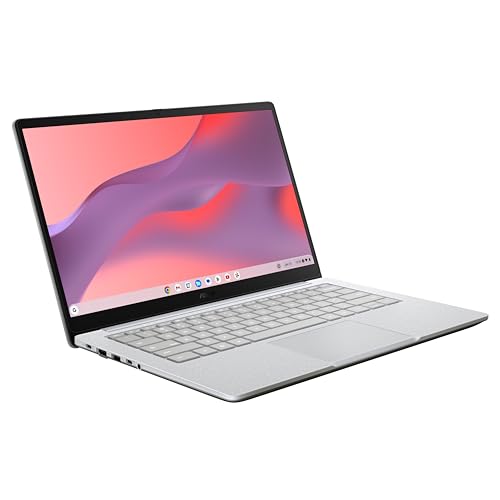
ASUS Chromebook CX14, Core 3 N355, 8GB, 128GB eMMC
ASIN B0F6XM9Y8K • $681.59 • Ships from Amazon AU
The ASUS Chromebook CX14 is a plain, light ChromeOS laptop with the ports most Chromebooks leave off. ASUS lists it at 1.39kg with a 14-inch FHD (1920x1080) display, an Intel Core 3 N355 processor and 8GB of LPDDR5 memory, and it was sitting at #83 in Amazon AU's Traditional Laptops the day I checked.
The I/O is the practical draw: an HDMI port, which the listing calls a rare inclusion at this price, plus two USB 3.2 Gen 1 Type-C ports, one Type-A port and a 3.5 mm combo audio jack, so a monitor and a mouse plug straight in without an adapter. Per the listing it has been through 24 US military-grade durability tests, and it carries a Titan C security chip and a webcam shutter.
Buy it if your work lives in Google Workspace or Microsoft 365 on the web and you want a machine that connects to a monitor without a dongle. It will not run Windows desktop software, and 128GB of eMMC storage means it suits cloud-first work rather than a big local photo library.
Honest caveats: ChromeOS will not run Windows programs, so check anything you rely on before you buy. The listing does not say the 8GB of memory can be upgraded, so assume it is fixed for life. No touch screen is mentioned, and the listing gives no battery runtime, so do not assume all-day numbers.
Best for: A cloud-first user who wants a light 14-inch Chromebook with an HDMI port and no adapters.
CPU: Intel Core 3 N355 • RAM: 8GB LPDDR5 • Storage: 128GB eMMC • Display: 14-inch FHD (1920x1080) • Ports: HDMI, 2x USB-C 3.2 Gen 1, 1x USB-A • Weight: 1.39kg • OS: ChromeOS • Rank: #83 in Traditional Laptops (Amazon AU)
View on Amazon AU
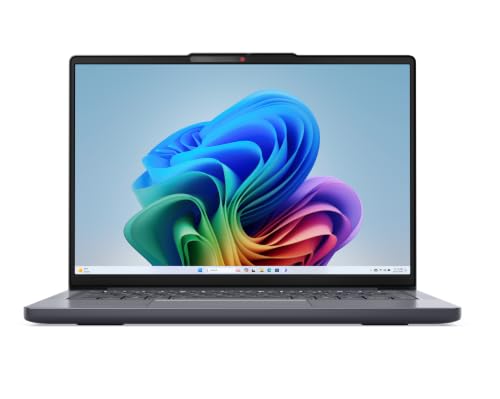
Lenovo IdeaPad Slim 3i 14IWC11, Core 5 320, 8GB, 512GB SSD
ASIN B0H6M1FD7X • $999 • Sold by Amazon AU
Spend about $350 more than the Lenovo Chromebook 14M8911 and you move to a 14-inch laptop with a 512GB drive and a taller 16:10 screen. The title lists a 14-inch WUXGA IPS panel that is anti-glare and rated at 400 nits, and Lenovo says the taller shape shows more of the page before you scroll. It was sitting at #209 in Amazon AU's Traditional Laptops the day I checked.
The ports are the practical part. Lenovo lists two USB-A ports, a USB-C port for data and charging and an SD card reader, so a USB stick, a mouse and a camera card all plug in without a dongle. Lenovo also quotes Rapid Charge Boost giving up to two hours of extra power from a 15-minute charge, and the screen carries TUV low blue light certification. The title names the processor as an Intel Core 5 320, alongside 8GB of RAM and a 512GB SSD.
Buy this one if you want a 512GB drive in a 14-inch body and you are happy to spend right up to the ceiling for it. What it will not do is grow. The 8GB is the ceiling, and if you want more memory the ASUS Vivobook Go 15 below is the 16GB route at the same price, or step up to the laptops under $1,500 guide.
Honest caveats: 8GB of RAM is the number that will age, and the listing says nothing about upgradeability, so assume it is fixed for the life of the machine. The listing does not state which operating system the laptop ships with, so read that line on the listing before you order. The title names an Intel Core 5 320 while one listing bullet refers to an Intel Core Ultra Series 3 processor, so check the processor line too. At $999 it has no room left under the $1,000 ceiling if the price moves, and the listing gives no weight or battery runtime, so don't assume all-day numbers.
Best for: A 14-inch laptop with a 512GB drive and a taller screen, for anyone who can live inside 8GB.
CPU: Intel Core 5 320 (per the title) • RAM: 8GB • Storage: 512GB SSD • Display: 14-inch WUXGA IPS, 16:10, anti-glare, 400 nits • Ports: 2x USB-A, 1x USB-C, SD card reader • Charging: up to 2 hours of extra power from 15 min (listing claim) • Model: 83RQ0019AU, Luna Grey • Rank: #209 in Traditional Laptops (Amazon AU)
View on Amazon AU
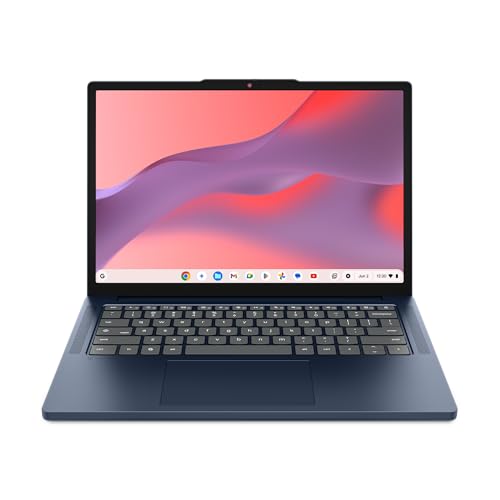
Lenovo Chromebook 14M8911 (Kompanio 540, 8GB)
ASIN B0GN2LD6ZL • $647 • Ships from Amazon AU
This is the odd one out on the page, and I would rather say so up front: it runs ChromeOS, not Windows. If your work lives in a browser, with Google Workspace or Microsoft 365 on the web, that is no hardship, and the 14-inch 1920x1200 touch screen is anti-glare and rated at 400 nits. Lenovo lists the machine as built to MIL-STD-810H durability testing, which is not something you usually see at this money. It was sitting at #11 in Amazon AU's Traditional Laptops the day I checked.
What you are really buying is a light, simple machine with 8GB of LPDDR5x behind it. The listing says that memory is soldered down, so 8GB is what it keeps for life, the same ceiling the Lenovo Windows machines here carry. The MediaTek Kompanio 540 is an eight-core Arm chip with integrated Mali graphics, which is the right answer for browsing, documents, video calls and streaming and the wrong answer for games or video editing.
Honest caveats: ChromeOS will not run Windows desktop software, so check any program you rely on before you buy. Storage is 128GB of UFS, the smallest drive on this page, so it suits cloud-first work rather than a big local photo library. The listing calls the battery long but gives no runtime figure, so do not assume all-day numbers from it.
Best for: A cloud-first user who wants a light, tough 14-inch touch screen and lives in a browser rather than in Windows programs.
CPU: MediaTek Kompanio 540 • RAM: 8GB LPDDR5x, soldered • Storage: 128GB UFS 2.2 • Display: 14-inch WUXGA (1920x1200) IPS touch • Graphics: Arm Mali-G57 MC2, integrated • OS: ChromeOS • Model: 83SX000MAU, Cosmic Blue • Rank: #11 in Traditional Laptops (Amazon AU)
View on Amazon AU
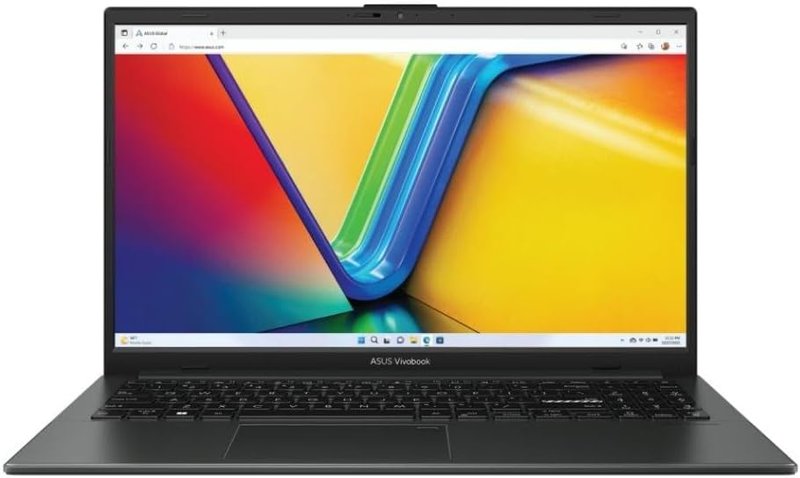
ASUS Vivobook Go 15, Ryzen 5 7520U, 16GB, 512GB SSD
ASIN B0FR8NNSDS • $999 • Sold by Computer Alliance Pty Ltd
This is the only machine on the page with 16GB of RAM, and memory is the spec the rest of this guide keeps coming back to. The ASUS Vivobook Go 15 pairs 16GB with a 512GB SSD and Windows 11 Home, and at about $999 it was sitting at #285 in Amazon AU's Traditional Laptops the day I checked. The processor is an AMD Ryzen 5 7520U, and the memory is twice the 8GB the Lenovo Slim 3i above carries. It suits office work, a browser with plenty of tabs and streaming, and is not the chip for sustained video editing.
The screen is a 15.6-inch Full HD IPS panel, and the listing adds WiFi 6E. The rest of the listing is generic marketing copy, so I am not going to claim ports, weight or battery runtime, because the listing gives none of them.
Buy it if the laptop lives on a desk or a lounge-room table and you want to keep it for four or five years. 16GB is the number that ages best, and this is the only route to it under $1,000 that passed my gates on Amazon AU. If the machine has to ride in a backpack five days a week, one of the 14-inch picks above will suit you better.
Honest caveats: this one is sold by Computer Alliance Pty Ltd, an Australian seller, rather than by Amazon AU itself, and at $999 it has no room left under the $1,000 ceiling if the price moves, so check it before you order. The listing says nothing about whether the memory can be upgraded, so treat 16GB as fixed for life. No touch screen is mentioned, and the listing gives no battery runtime, so do not assume all-day numbers.
Best for: Anyone keeping the laptop for four or five years who wants 16GB of RAM under $1,000 and a full-size 15.6-inch screen.
CPU: AMD Ryzen 5 7520U • RAM: 16GB • Storage: 512GB SSD • Display: 15.6-inch Full HD IPS • Wireless: WiFi 6E • OS: Windows 11 Home • Rank: #285 in Traditional Laptops (Amazon AU)
View on Amazon AUSide-by-side comparison
| Product | Price | Best for |
|---|---|---|
| ASUS Chromebook CX14, Core 3 N355, 8GB | ~$681.59 | Cloud-first user who wants HDMI and a light body |
| Lenovo IdeaPad Slim 3i 14IWC11 | ~$999 | A first or second household laptop on a set budget |
| Lenovo Chromebook 14M8911 | ~$647 | A light, tough 14-inch touch screen for browser work |
| ASUS Vivobook Go 15, Ryzen 5, 16GB | ~$999 | Keeping it four to five years with 16GB of RAM |
What we see fail at the bench: laptops in this band
Sub-$1,000 laptops don't die of exotic causes. They die of the same three things, in roughly the same order, and all three are either preventable outright or quick and inexpensive to fix when they're caught early. The pattern below comes from what actually rolls through the door week after week, not from spec sheets or forum theory, and it's remarkably consistent across every brand on this page.
Hinges that tear out of the case
The hinge itself almost never breaks. What breaks is the plastic it's screwed into: brass inserts heat-set into bosses inside the lid and base, which crack under the twist of one-corner opening or a knock while the lid is up. The first symptom is a soft click when the lid moves, then wobble, then a corner of the case lifting visibly. Caught at the click stage it's a small, tidy repair. Caught at the lifting stage the surrounding plastic is usually chewed as well, and the job becomes rebuilding mounts or replacing the whole top case, at several times the price and the wait.
Batteries cooked by heat and habit
Lithium packs in this band mostly age out from living at 100 per cent charge on a warm desk, not from cycle count. A laptop that's docked and plugged in year-round holds its cells at full voltage, and full voltage plus warmth is precisely how you age lithium fastest. Most makers, ASUS and Lenovo included, ship a battery-care mode that caps charge around 80 per cent, and switching it on is the single best free thing you can do for year-three battery health. A swollen pack pushing up a trackpad or keyboard deck is the end state, and that's a stop-using-it-today fault, not a next-week one.
Charge ports and the bricks that kill them
Charging faults arrive two ways. Mechanical: the port worked loose from cables levered sideways or a bag packed with the plug still in, which stays a repairable fault when it's caught before the board tracks tear away. Electrical: a no-name replacement charger with poor regulation feeding the board spikes until something gives, which can mean anything from a dead charge circuit to a dead laptop with your unbacked-up photos on it. The first is bad luck and habit, and habits can change. The second is a $19 purchase that turns into a $400 lesson, and we see it often enough that I wrote a whole page about it.
Decision tree: which one should you actually buy?
- Want a 14-inch machine with a 512GB drive? → The Lenovo IdeaPad Slim 3i at $999. A taller 16:10 screen, a real SSD and an SD card reader, as long as you can live inside 8GB and check the operating system line on the listing first.
- Want the lightest, toughest 14-inch machine and live in a browser? → The Lenovo Chromebook 14M8911. It runs ChromeOS, so no Windows programs, and the drive is 128GB, so it suits cloud-first work.
- Want 16GB of RAM without going over $1,000? → The ASUS Vivobook Go 15 at $999. It is the only 16GB machine here, with a 512GB SSD and a 15.6-inch screen, so it suits a desk better than a backpack.
- Planning to keep it five years or more? → Spend on capacity, not the badge: a 512GB drive like the Slim 3i's will age better than a faster chip beside a small drive. If the machine also has to survive daily commuting, read the business laptops guide for the band above.
- Already got a laptop that's slow, won't charge or has a floppy hinge? → Don't buy anything yet. Bring it to our Erina repair bench first, because an SSD, a battery or a hinge repair is regularly a quarter the price of any laptop on this page.
Frequently asked questions
Is 8GB of RAM still enough in 2026?
For mail, browsing with a sensible number of tabs, streaming and documents, yes, and every machine on this page is built for exactly that life. The problem is the trend line, not today: browsers and Windows itself get heavier every year, and 8GB machines are the ones arriving at our bench feeling slow at year three. If the laptop is a short-term tool, 8GB is fine. If you're buying for four or five years, 16GB is the safer number, and the ASUS Vivobook Go 15 is the one here that gives it to you, so look at that or the laptops under $1,500 guide if that matters.
Can I upgrade the RAM or storage later?
Assume no unless a listing says otherwise. Thin laptops in this band increasingly solder memory to the board, and none of the four listings here states that RAM is upgradeable. Storage is sometimes a standard M.2 drive that can be swapped, but again, none of these listings commits to it. That's exactly why I weight RAM and storage so heavily at purchase time: the config you buy is realistically the config you'll own on the day you retire the machine.
Is 256GB of storage enough for a family laptop?
Only with cloud discipline. Windows, Office and a year of updates take 80 to 100GB before your files arrive, and Windows needs free space beyond that to install feature updates. A 256GB machine holding local photo libraries is usually over 90 per cent full within a year, which slows the drive and starts breaking updates. If your files genuinely live in OneDrive or Google Drive it works fine. If you're not sure they do, they don't, and you want 512GB or more.
Is a 15.6-inch laptop too big for everyday use?
It depends entirely on whether it moves. On a desk, 15.6 inches is a comfortable step up from 14 for a long working day, because two documents fit side by side at a readable size and you stop leaning into the screen by three in the afternoon. Carried daily it's less friendly: it takes more room than a 14-inch machine, it won't fit most 14-inch sleeves, and it will crowd a tray table or a train seat. If the laptop lives in one place and travels occasionally, take the big screen. If it's in a backpack five days a week, one of the 14-inch machines will make you happier, and the 15.6-inch ASUS is a desk machine.
Are these grey imports or marketplace stock?
No. Every pick on this page was listed as sold by Amazon AU or an Australian retailer, condition New, on the day I checked, and I excluded import versions and overseas marketplace sellers regardless of price. That matters for two reasons: keyboard layout and charger plug are the AU versions, and warranty claims run through an Australian seller under Australian Consumer Law rather than through a seller in another country. Prices move week to week, so confirm the seller line on the listing before you buy.
What should I do with the old laptop I'm replacing?
Wipe it properly before it leaves the house, not just by deleting files. Sign out of accounts, turn off any activation locks, and do a full factory reset with drive encryption enabled so the old data is unrecoverable. If it's slow rather than broken, consider keeping it as a spare after an SSD or battery refresh, and if it won't power on at all, we can usually still recover the data off the drive before you recycle the chassis. Recycle through a proper e-waste program either way.
Related buying guides
Slow laptop? Ask us before you replace it
Most laptops that feel dead aren't. A tired drive, a full disk or a worn battery makes a three-year-old machine feel finished, and all three are routine fixes at a fraction of any price on this page. Bring it in to the Erina workshop and we'll tell you straight whether a repair makes sense or whether your money is better spent on a new machine, before you spend anything.
Visit our Erina workshop Book Online