Prices from Amazon AU, updated daily. Swipe or use the arrows for more.
Disclosure: This article contains affiliate links to amazon.com.au. If you buy through one of these links iFix may earn a small commission at no extra cost to you. It doesn't change which products we recommend. We focus on what actually lasts based on 16 years of repair-shop experience.
Quick summary5 picks
- Lenovo IdeaPad 5 2-in-1 14 (Snapdragon X, OLED) about$1,59716GB RAM, 512GB SSD, 14in OLED.
- Lenovo IdeaPad Slim 15.3 (Core Ultra 5, 16GB) about$1,068.1516GB RAM, 512GB SSD, 15.3in screen.
- HP OmniBook 3 16-inch (Ryzen AI 5) about$1,39716GB RAM, 512GB SSD, 16in screen.
- Lenovo ThinkBook 14 G9 (Core 7 240H) about$1,48916GB RAM, 512GB SSD, 14in screen.
- ASUS Vivobook S14 14, Ryzen 7 260, 16GB, 1TB about$1,39916GB RAM, 1TB SSD, 14in OLED screen.
Why $1,000 to $1,500 is the band I point people at
There's a pattern in what comes across my bench for end-of-life advice, and it's consistent enough that I'll state it as one. The machines bought under $700 arrive at year three, out of memory, out of storage and out of patience, with owners convinced the brand let them down. The machines from this band arrive at year six, usually wanting nothing more than a battery, and their owners are shopping for the same model again. The difference isn't luck and it isn't the badge on the lid. It's that somewhere around $1,100 the makers stop cutting the corners that shorten a laptop's life: memory jumps to 16GB across the board, drives get roomier, and the cases and hinges get built to a standard rather than down to a number.
This guide covers the gap between two pages I've already written, and it's a genuine gap rather than filler. Below it sits my roundup of laptops under $1,000, where every machine makes one deliberate compromise and your job is choosing which. Above it, business machines take over and you start paying for fleet-grade build that a kitchen-table laptop doesn't need. In between is this band, which I reckon is quietly the best value in laptops right now: every pick below has 16GB of memory, at least 512GB of storage, a current or near-current processor, and nothing about it that you'll curse in year four. That combination simply doesn't exist below $1,000 yet.
The five picks run from $1,056 to $1,489 and were all listed as condition New on the day I checked, three sold by Amazon AU itself and two by an Australian reseller fulfilled by Amazon, with import listings and overseas marketplace sellers excluded at every price. They cluster near the top of the band, and that's deliberate rather than lazy. Below about $1,000 the machines that passed the sourcing gates were mostly the same configurations as the band underneath wearing a slightly bigger drive, and gaming hardware is its own topic with its own page. Where the spend genuinely stops earning anything, I'd rather say so plainly than pad the list to a rounder spread.
The chip names decoded: Core Ultra, Ryzen AI and Snapdragon
Three different processor families appear on this page and the naming deserves a minute, because the makers have made it genuinely confusing. Intel's Core Ultra chips are the current generation, and their party trick is a split between performance cores and low-power efficiency cores, so the machine sips power through mail and browsing and only wakes the big cores when you ask for real work. The IdeaPad Slim 15.3's Ultra 5 322 is the only Core Ultra chip on this page, and the ThinkBook 14's Core 7 240H is a different Intel series that its listing doesn't label Ultra. The 16-inch OmniBook 3 goes a different way with AMD's Ryzen AI 5 430, and its listing pairs it with a 50 TOPS NPU and the Copilot+ label, meaning the silicon includes dedicated hardware for running AI features on the machine itself rather than in the cloud. The title of the IdeaPad 5 2-in-1 carries the Copilot+ label as well. The Vivobook S14 also uses an AMD chip, the Ryzen 7 260, and its title doesn't carry that label.
One pick takes a plainer route. The Vivobook S14 pairs a Ryzen 7 260 with 16GB and a 1TB drive, the only 1TB drive on the page, but its listing doesn't name the memory type where the 16-inch OmniBook 3 and ThinkBook 14 listings quote DDR5. In day-to-day feel that matters less than the marketing implies, because everyday computing stopped being processor-bound years ago for most people, and I'd take the bigger drive over a memory-spec footnote for a household that stores more than it renders.
The wildcard is the Snapdragon X in the IdeaPad 5 2-in-1, an Arm chip rather than an Intel one, the same family of processor design that phones run. Windows on Arm has matured a lot in the last two years: the big-name browsers, Office and most mainstream apps now run natively, and the payoffs are battery life and instant-on behaviour that Intel machines are still chasing. Lenovo's listing for the IdeaPad 5 2-in-1 promises long-lasting battery life but quotes no hours, so I can't hold it to a number. The catch is the leftover few per cent of software, usually older utilities, some VPN clients and printer or scanner tools, which may run through emulation or occasionally not at all. If you depend on one niche program, check it runs on Arm before buying, not after. That's the entire risk of the platform, and it's a knowable one.
OLED in this band: what you get and the two cautions
Two of the five picks carry an OLED screen, and this band is where that stopped being exotic and started being the default question. Against the FHD panels in machines under $1,000, an OLED shows you true black instead of backlit dark grey. The IdeaPad 5 2-in-1's panel is quoted at 400 nits with 100 per cent DCI-P3 colour coverage, which is the wider colour range photographers and video people actually grade against. Text looks carved into the glass, films look the way they were mastered to look, and going back to a standard panel afterwards is genuinely difficult, which is the nicest and most expensive thing I can say about it. The Vivobook S14's title names a WUXGA OLED panel too, though its listing quotes no brightness or colour coverage figure. None of the other three listings names an OLED panel, and for plenty of households that's the right call.
First caution: OLED laptop panels are usually glossy, and no amount of nits fully beats physics. In a lounge room in the evening the gloss is part of why the picture looks so good. Facing a sunlit window at midday it becomes a mirror with a movie behind it, and the anti-glare IPS panel on the OmniBook 3 will be the more usable screen in that room every single time. Where the laptop will actually live should decide this spec, not the showroom wow, and it's worth being honest with yourself about which room that is before you pay for the panel.
The second caution comes from the repair side of the counter. OLED panels cost meaningfully more than FHD panels to replace, so screen damage on the IdeaPad 5 2-in-1 or the Vivobook S14 is a dearer event than on the plain machines, as our screen replacement pricing shows across brands. Long-term image retention on static elements like the taskbar is the other question mark, covered properly in the FAQ below. I haven't seen a wave of it in the workshop yet, but OLED laptops are young as a category, so I hide the taskbar on mine and treat it as free insurance.
Soldered memory and the year-four test
Here's the spec-sheet detail that matters most and gets read least. None of the five listings says whether its memory is soldered, and in this band that silence usually means it is: the memory you buy is welded to the board, and no shop, mine included, is upgrading it later at money that makes sense. The right response isn't to avoid these machines, because you mostly can't anymore. It's to buy the memory you'll need in year four on day one. Every pick on this page carries 16GB, which is exactly why every pick is on this page and several popular machines aren't.
Sixteen gigabytes is the number that keeps a laptop feeling healthy deep into its life, and the reasoning is boring and mechanical rather than clever. The slow decline people blame on age is usually memory pressure, a nearly full drive, or both at once, a pattern I've pulled apart with actual Task Manager evidence in the slow-laptop write-up. Browsers grow, Windows grows, the photo library grows, and the machine that started with headroom absorbs it all quietly. Start at 16GB with a half-empty drive and you've bought yourself years of never thinking about either, which is what the money in this band is really for.
Storage is the one spec that still sometimes forgives a wrong choice. M.2 drives are normally a swappable part, which leaves a door open, though none of the five listings promises it and I'd never buy any specific machine on the assumption it can be opened and upgraded, because vendors change internals mid-run without telling anyone. The safer read of this page: the Vivobook S14 ships with 1TB from the factory and never needs the question answered, the other four carry 512GB, and you should pick the number that fits how you actually store things rather than how you intend to.
Size and build: what 14, 15 and 16 inches change
Weight changes behaviour in a way spec sheets don't capture, and this page has a gap in the data: only the 16-inch OmniBook 3's 1.64kg is quoted, in its title, and the other four listings print no weight at all. That's worth knowing, because a 15-inch machine at 1.7kg gets consciously packed for trips and otherwise stays home, while a kilo-and-a-bit 14-incher goes into the bag by default every morning, which is the whole point of owning a laptop instead of a desktop. The ThinkBook 14 and the Vivobook S14 are the two 14-inch clamshells here, so they're the likeliest to ride in the bag daily, though neither listing prints a weight. The 15.3-inch IdeaPad Slim 15 and the 16-inch OmniBook 3 are bigger machines than that, so plan on carrying them when you need to rather than every day, and check the weight on the Amazon page before you buy. Being honest about which of those you need before buying is how you end up liking a perfectly good laptop instead of resenting it.
Build claims in this band come with paperwork attached when they come at all. Where a listing quotes a durability standard or a special shell material, I read the claim the way I read all durability marketing: a machine that's been through the published test list is likelier to be screwed together properly and to survive the small daily insults, but no standard on earth protects a hinge from being opened by one corner every morning, or a lid from a bag with a charger brick pressed into the back of it on a commute.
What actually protects a laptop is boring and free: a padded sleeve, two-handed opening from the centre of the lid, and never carrying the machine by the screen or with the lid open. The faults that reach our computer repair bench from this price band are overwhelmingly mechanical and habit-driven rather than electronic, and the habits cost nothing to change. The electronics in this class are genuinely good now. The plastics and the humans are where the failures start.
Wi-Fi, fast charging and the claims worth reading
The ThinkBook 14's title names Wi-Fi 6E, the IdeaPad 5 2-in-1's title names Wi-Fi 7, the Vivobook S14's title names Wi-Fi 6, and the 16-inch OmniBook 3 and IdeaPad Slim 15 listings don't name a Wi-Fi generation at all, which is its own small tell. Here's the honest translation: none of them will feel any different on the router most Australian homes run today. The newer standards matter for one reason, which is that the laptop outlives the router, usually by two router generations. Buy Wi-Fi 6E or better now and the machine is ready the day the router catches up; buy plain Wi-Fi 6 and you're capped at very-good-for-2024 for the life of the laptop. It's a tiebreaker spec between otherwise equal machines, not a headline one, and I'd never pay real money for it alone, but at equal prices take the newer radio.
Charging claims deserve a closer read than they get. Lenovo's IdeaPad 5 2-in-1 listing promises rapid charging without a figure, and the other four listings quote no fast-charge number at all, so any top-up promise you read on a product page is a maker's best case rather than a working day. A quick top-up is a useful feature, and on machines this efficient a half-hour on the charger can cover an evening's work. The physics tax is heat, and heat is what ages lithium cells fastest, so the way to own these machines is to save the fast charging for the days you need it, and if the machine lives on a desk, cap the charge at 80 per cent in the maker's software and let the battery live an easier life. Year-three you will notice the difference.
One thing I'll keep repeating until it stops being profitable for the wrong people: use a proper charger. Every one of these machines charges over USB-C, which means every one of them can be plugged into a $15 brick of unknown parentage from a marketplace listing, and I've written up what those bricks actually do to charging circuits, with the teardown photos to match. The charger in the box, or a known brand at the right wattage. That's the whole rule, and it's a lot shorter than the repair quote that follows breaking it.
How I picked these five, and what I left out
Same gates as every guide I write, applied the same way: sold by Amazon AU directly (or, for two picks, by an Australian reseller fulfilled by Amazon), condition New, inside the $1,000 to $1,500 band on the day, ranked inside its Amazon AU laptop category the same day, and no import versions or overseas marketplace sellers at any price, because a warranty that involves international post isn't one. The 16-inch OmniBook 3 sat at #93 in Amazon AU's Traditional Laptops when I checked, the Vivobook S14 at #40 and the IdeaPad Slim 15 at #20. These aren't obscure machines I've dug up to look clever. They're the ones Australians are actually buying this month, filtered down to the ones they're right to buy.
Two machines got left out on principle rather than on rank, and both are instructive. One was a $1,299 15-incher carrying 8GB of memory, which fails the year-four test on day one at that price, whatever the rest of the spec sheet says. The other was a $1,097 machine built on a 2021-era processor with Wi-Fi 5, which sells strongly on the badge on its lid and would have been the wrong advice at that money. Sales rank tells you what's popular this week. It doesn't tell you what's right for a five-year ownership, and the difference between those two lists is most of the reason this page exists.
If you landed here meaning to game, this is the wrong page and I've already written the right one: gaming laptops under $1,500 spends the same money on a discrete GPU and accepts the weight and the fan noise that come with it. And if the machine is for work travel every week rather than the kitchen table, the business-grade machines a band up spend the extra money on sturdier chassis, better keyboards and serviceability rather than speed. Different jobs, different tools, and no single laptop does all three well.
The 5 picks, $1,056 to $1,489
Prices are Amazon AU at time of writing (29 October 2026) and move week to week. Ranks are Amazon AU category sales ranks, checked the same day.

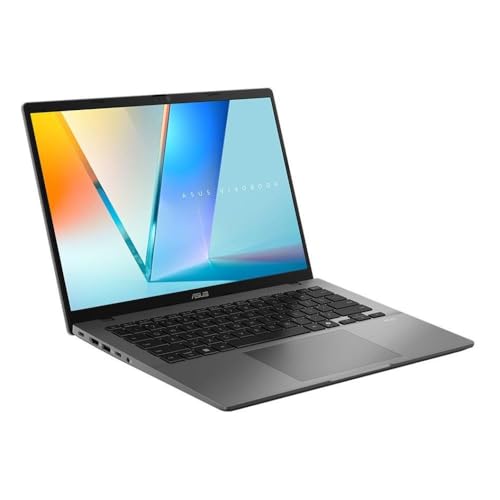
ASUS Vivobook S14 14-inch OLED, Ryzen 7 260, 16GB, 1TB
ASIN B0GW4RL8M3 • $1,399 • Sold by KS Computer, Fulfilled by Amazon
The value maths on this one is simple enough to do standing in the shop: 1TB of storage and 16GB of memory behind a 14-inch OLED for $1,399, and no other pick on this page carries a 1TB drive. It sat at #40 in Amazon AU's Traditional Laptops the day I checked. ASUS pairs an AMD Ryzen 7 260 with the 16GB and 1TB, and the title names a 14-inch WUXGA OLED display.
What the listing leans on is short and plain: the Ryzen 7 260 for productivity, content creation and browsing, a 16:10 WUXGA OLED display, an ultra-slim, lightweight design and Windows Hello facial recognition. The title gives Windows 11 Home and Wi-Fi 6. ASUS prints no weight, battery capacity, brightness figure, port list or memory type, and doesn't say whether the screen is touch, so I'm putting no figure or feature on any of them. The model code on the listing is M3407HA-SF062W in Matte Gray.
Buy it if capacity beats glamour in your ordering of the world, and you'd still like the screen to be a good one. 16GB plus 1TB is the combination that means you'll never manage storage, never close tabs out of guilt, and never think about this machine at all, which is the highest compliment a work laptop ever earns. It's the only pick here that pairs a 1TB drive with an OLED panel, which is the case for it over the IdeaPad 5 2-in-1 if you'd rather have the storage than the Arm chip.
Honest caveats: At $1,399 it sits $101 under this page's $1,500 ceiling, so confirm the price before you order. The listing gives no weight, no battery capacity and no runtime, names no memory type, and doesn't say whether the memory is soldered, so assume 16GB is for life and buy the configuration you will want in year four. The title names Wi-Fi 6 rather than 6E or 7. As an OLED it carries the same screen replacement and image retention cautions as the IdeaPad 5 2-in-1. The seller is KS Computer rather than Amazon AU, so check the 'sold by' line and the seller's returns terms at checkout.
Best for: Households who keep photos, video or a games folder on the laptop and want 1TB, 16GB and an OLED screen in one machine.
CPU: AMD Ryzen 7 260 • RAM: 16GB • Storage: 1TB SSD • Display: 14-inch WUXGA OLED, 16:10 • Wi-Fi: Wi-Fi 6 (per the title) • OS: Windows 11 Home • Model: M3407HA-SF062W, Matte Gray • Sold by: KS Computer (Fulfilled by Amazon) • Rank: #40 in Traditional Laptops (Amazon AU)
View on Amazon AU
HP OmniBook 3 16-inch, Ryzen AI 5 430, 16GB, 512GB
ASIN B0H6V3TLPG • $1,397 • Ships from Amazon AU
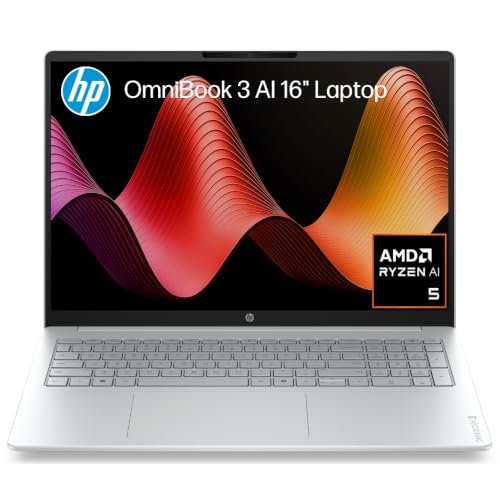
This is the pick for the person who works at a desk or a kitchen table and wants the screen to be the biggest thing about the laptop, and it's the biggest screen on the page: it sat at #93 in Amazon AU's Traditional Laptops the day I checked. HP fits a 16-inch anti-glare panel at 1920 by 1200 in the taller 16:10 shape, which gives you more vertical room than a 16:9 panel of the same size, with AMD's Ryzen AI 5 430, 16GB of DDR5 and a 512GB PCIe NVMe drive behind it.
The processor is the part worth a word. HP's listing pairs the Ryzen AI 5 430 with a 50 TOPS NPU and the Copilot+ PC label, and has Radeon 840M graphics doing the everyday visual work. It's the same Copilot+ label the IdeaPad on this page carries from a different chip maker, which makes it a spec you can compare rather than a reason to buy.
Buy it if the laptop lives on a desk most of the week and the size is the feature. A 16-inch panel fits two documents side by side without squinting, and the anti-glare finish keeps it readable in a bright room, which a glossy screen can't promise. The trade is the carry: it's the biggest machine on the page at 1.64kg, so don't assume it travels like a 14-incher.
Honest caveats: The title gives 1.64kg, but the listing gives no battery capacity or runtime and no Wi-Fi generation, so I'm putting no figure on either, and it doesn't say whether the memory is soldered, so assume 16GB is for life. 512GB is the storage compromise at this price, so buy the configuration you will want in year four.
Best for: Desk and kitchen-table users who want a big, anti-glare 16:10 screen and 16GB of DDR5 without paying for OLED.
CPU: AMD Ryzen AI 5 430 • RAM: 16GB DDR5 • Storage: 512GB PCIe NVMe M.2 SSD • Display: 16-inch 2K (1920 x 1200) IPS, anti-glare, 16:10 • Graphics: AMD Radeon 840M • NPU: 50 TOPS, Copilot+ PC • Model: D46XCPA, Glacier Silver • Rank: #93 in Traditional Laptops (Amazon AU)
View on Amazon AU
Lenovo IdeaPad 5 2-in-1 14, Snapdragon X, 16GB, 512GB SSD
ASIN B0F2F75ZFL • $1,597 • Ships from Amazon AU
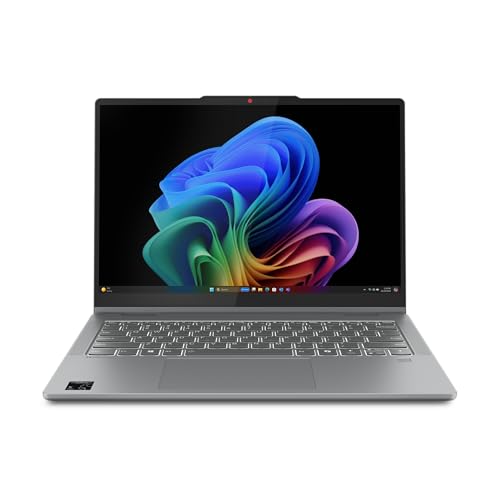
This is the pick for someone who wants an OLED screen and an Arm chip in the same 14-inch laptop, with a touchscreen thrown in. Lenovo pairs a Snapdragon X (the X1-26-100, per the title) with 16GB of RAM and a 512GB SSD behind a 14-inch WUXGA OLED touch display in a taller 16:10 shape, and the listing says the Snapdragon platform gives it long-lasting battery life. It sat at #15 in Amazon AU's 2 in 1 Laptops the day I checked, which is a different chart from the Traditional Laptops ranks used elsewhere on this page, so don't compare the numbers directly.
The screen and the body are the other draw. Lenovo quotes the OLED at 400 nits with 100 per cent DCI-P3 coverage, so the colour is wider than sRGB, and the 16:10 shape shows more of a page than a 16:9 panel does. The listing adds Wi-Fi 7, a body as thin as 17.5mm and a metal A cover with MIL-STD 810H testing, which is a maker's claim rather than a promise. Touch is the other difference: the title names a touch display, which none of the other four titles on this page mention.
Buy it if the laptop goes everywhere and the charger stays home, and buy it knowing there is one piece of homework attached. This is an Arm machine, so the handful of programs that still refuse to run on Snapdragon are your risk to check, not mine to wave away, and the FAQ below spells out how. If your software is mainstream, which for most households in 2026 it honestly is, this is the machine on the page that changes how you use a laptop rather than just how fast it runs.
Honest caveats: It's an Arm machine, so check that any niche Windows programs, VPN clients or printer utilities you depend on run on Snapdragon before ordering. The listing promises long-lasting battery life but gives no hours, so there is no figure here to hold Lenovo to. It states no weight, and memory upgradeability isn't stated, so assume 16GB is for life. OLED panels cost more to replace than a plain FHD panel, and touch screens are a fragile part of any 2-in-1, so a padded sleeve is low-cost insurance.
Best for: Daily carriers who want a 14-inch OLED touchscreen and an Arm chip's battery life, and whose software runs on Snapdragon.
CPU: Qualcomm Snapdragon X (X1-26-100) • RAM: 16GB • Storage: 512GB SSD • Display: 14-inch WUXGA OLED touch, 16:10, 400 nits • Colour: 100% DCI-P3 • Wi-Fi: Wi-Fi 7 • Body: 2-in-1, as thin as 17.5mm, MIL-STD 810H (listing claim) • Label: Copilot+ PC • OS: Windows 11 Home • Model: 83GH0039AU, Luna Grey • Rank: #10 in 2 in 1 Laptops (Amazon AU)
View on Amazon AU
Lenovo ThinkBook 14 G9, Core 7 240H, 16GB DDR5, 512GB
ASIN B0GVM7B6HH • $1,489 • Sold by KS Computer, Fulfilled by Amazon
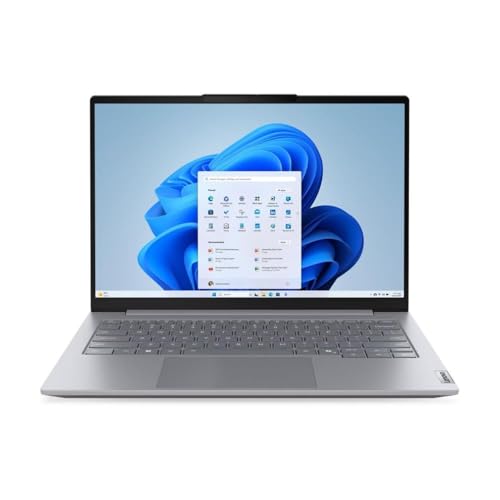
The ThinkBook 14 G9 is the pick for the person who wants a work-first 14-inch with Windows 11 Pro already on it. Lenovo's listing names an Intel Core 7 240H (ten cores, six performance and four efficiency, up to 5.2GHz), 16GB of DDR5-5600 supplied as two 8GB modules, a 512GB PCIe 4.0 NVMe drive and a 14-inch WUXGA IPS display, which is 1920 by 1200 in the taller 16:10 shape. Wi-Fi 6E is in the title, one step up from the plain Wi-Fi 6 that would otherwise cap a machine like this. It sat at #69 in Amazon AU's Traditional Laptops the day I checked.
Two details set it apart from the rest of this page. The memory is listed as 2x 8GB SODIMM, which is the removable laptop memory format rather than chips soldered to the board. The listing doesn't promise you can upgrade it, so confirm that before relying on it, but it is the one pick here where the year-four memory question might have an exit. And it's a business-line model with Windows 11 Pro rather than Home, which suits work use.
Buy it if the laptop's job is work, you want 14 inches rather than 15 or 16, and you'd like Windows 11 Pro and a faster Wi-Fi radio at a price that still clears the $1,500 ceiling. It is sold by KS Computer, an Australian reseller, with Fulfilled by Amazon delivery rather than by Amazon AU itself, and the condition is New.
Honest caveats: At $1,489 it sits $11 under this page's $1,500 ceiling, so confirm the price before you order. The listing prints no weight, no battery capacity or runtime, and doesn't say the panel is anti-glare, so I'm putting no figure or finish on any of them. The seller is KS Computer rather than Amazon AU, so check the 'sold by' line and the seller's returns terms at checkout. 512GB is the storage compromise at this price.
Best for: Work-first buyers who want a 14-inch with Windows 11 Pro and Wi-Fi 6E.
CPU: Intel Core 7 240H (10 cores, 6P + 4E, 16 threads) • RAM: 16GB (2x 8GB DDR5-5600 SODIMM) • Storage: 512GB M.2 2242 PCIe 4.0 NVMe SSD • Display: 14-inch WUXGA IPS (per the title) • Graphics: integrated Intel Graphics • Wi-Fi: Wi-Fi 6E (per the title) • OS: Windows 11 Pro • Model: 21UY001VAU, Arctic Grey • Sold by: KS Computer (Fulfilled by Amazon) • Rank: #69 in Traditional Laptops (Amazon AU)
View on Amazon AU
Lenovo IdeaPad Slim 15.3, Core Ultra 5 322, 16GB, 512GB
ASIN B0GVHPGBQJ • $1,068.15 • Ships from Amazon AU
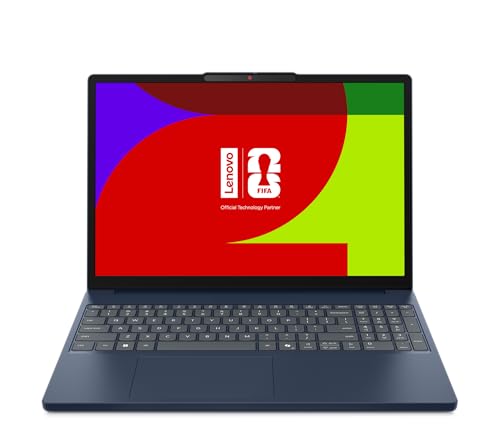
This is the pick for someone who wants a roomy 15-inch screen at the lowest price on the page. Lenovo's listing names a hexacore Intel Core Ultra 5 322, 16GB of RAM and 512GB of storage behind a 15.3-inch display, and the title gives the resolution as 1920 by 1080. It sat at #20 in Amazon AU's Traditional Laptops the day I checked, which makes it one of the strongest sellers on this page.
One thing in the listing deserves a read before you buy. The title calls it an Intel Core i3 while the feature list and the ULT5 code in the same title point to a Core Ultra 5 322, so I've gone with the processor the feature list names and I'd check the chip line on the Amazon page before ordering. The rest is plain: 16GB of RAM for multitasking, 512GB for documents, media and applications, and a slim, lightweight design pitched at travel and office use. Lenovo prints no weight, battery capacity, Wi-Fi generation or model code, so I'm putting no figure on any of them.
Buy it if you want a roomy 15.3-inch Intel screen with 16GB of RAM and don't need 1TB: it costs about $340 less than the Vivobook S14, which carries twice the storage.
Honest caveats: The title and feature list disagree on the processor name, so confirm it on the listing. 512GB is the storage compromise at this price, there is no weight, battery or Wi-Fi figure, and the listing doesn't say whether the memory is soldered, so assume 16GB is for life and buy the configuration you will want in year four.
Best for: Buyers who want a 15.3-inch Intel laptop with 16GB at the lowest price on the page.
CPU: Intel Core Ultra 5 322 (hexacore, per the feature list) • RAM: 16GB • Storage: 512GB • Display: 15.3-inch, 1920 x 1080 (per the title) • Rank: #20 in Traditional Laptops (Amazon AU)
View on Amazon AUSide-by-side comparison
| Product | Price | Best for |
|---|---|---|
| Lenovo IdeaPad 5 2-in-1 14 (Snapdragon X, OLED) | ~$1,597 | OLED touchscreen with an Arm chip |
| Lenovo IdeaPad Slim 15.3 (Core Ultra 5, 16GB) | ~$1,068.15 | Intel on a roomy 15.3-inch screen, lowest price |
| HP OmniBook 3 16-inch (Ryzen AI 5) | ~$1,397 | Big anti-glare 16:10 desk screen |
| Lenovo ThinkBook 14 G9 (Core 7 240H) | ~$1,489 | Work-first 14-inch with Windows 11 Pro |
| ASUS Vivobook S14 14, Ryzen 7 260, 16GB, 1TB | ~$1,399 | 1TB storage with an OLED screen |
What we see fail at the bench: $1,000 to $1,500 laptops
Machines from this band are better built than the ones below it, and it shows clearly in what arrives for repair: fewer hinge disasters, fewer dead boards, and more faults that are really economics questions wearing a hardware costume. The three patterns below are what this class of laptop actually brings through the door, and the useful thing about two of them is that they're decided at purchase time, not repair time.
Screens that cost real money to replace
OLED panels transform the buying experience and then, occasionally, the repair quote. A standard 15.6-inch FHD panel is a common part at a common price; an OLED can run several times that, and on thin machines the screen assembly is often the single dearest part in the whole machine. None of that is a reason to avoid these screens, because they're genuinely better to live with. It's a reason to add a padded sleeve, keep the machine out of checked luggage, and think honestly about who else in the house will be handling it and how.
Soldered memory turning small faults into board decisions
When memory is soldered to the board, a failed RAM chip stops being a quick stick swap and becomes board-level rework or a replacement motherboard, and the economics of that get marginal fast on a machine that already owes you three years of service. Actual memory failures are uncommon, which is the genuine good news in this story. But the soldering is also why I keep hammering the buy-16GB-up-front rule: on these platforms you don't get a second bite at the decision, either for capacity or for repair, so the configuration you click at checkout is the entire game, played once.
USB-C ports doing three jobs and wearing out
In this band the USB-C port is usually the charge port, the dock port and the display port all at once, which means it cycles dozens of times a week and carries the machine's full charging wattage while it does. Worn ports announce themselves as charging that needs the cable held just so, or a dock that drops the external monitor whenever the desk gets bumped. Caught early it's a port-level repair with the machine back quickly; ignored, the connector can take board tracks with it and the job changes category. Charging on the machine's second port, where it has one, spreads the wear for free.
Decision tree: which one should you actually buy?
- Keep a lot of photos or video on the laptop? → The ASUS Vivobook S14 at $1,399. It's the only pick here with a 1TB drive, and it comes with 16GB and a 14-inch OLED screen.
- Work at a desk and want the biggest screen? → The HP OmniBook 3 16-inch. A 16-inch anti-glare 16:10 panel, 16GB of DDR5 and a Ryzen AI 5 430, and an anti-glare finish that also stays readable in a bright room where a glossy OLED turns into a mirror.
- Want a roomy 15-inch screen for the least money? → The Lenovo IdeaPad Slim 15.3 at $1,056. A Core Ultra 5 322 with 16GB and 512GB on a 15.3-inch panel, and the listing's title and feature list disagree on the chip name, so check that line before you order.
- Want a work-first 14-inch with Windows 11 Pro? → The Lenovo ThinkBook 14 G9 at $1,489. A Core 7 240H, 16GB of DDR5 as two SODIMM modules and 512GB on a 14-inch WUXGA IPS panel, sold by KS Computer with Fulfilled by Amazon delivery.
- Want an OLED and an Arm chip's battery life, and your software is mainstream? → The Lenovo IdeaPad 5 2-in-1 at $1,297, provided your software is mainstream enough for an Arm chip. Check your one weird program first.
- Current laptop slow, hot or refusing to charge? → Get a diagnosis before you spend $1,200 on a replacement. Bring it in to our Erina workshop, because a battery, a drive or a charge port fix costs a fraction of any pick on this page.
Frequently asked questions
Is a Snapdragon laptop safe to buy, or will my programs not work?
For most people it's now a safe buy. Browsers, Office, the mainstream video-call apps and most everyday software run natively on Windows for Arm, and what doesn't usually runs through emulation without you noticing. The risk sits in the corners: older specialist programs, some VPN clients, and utility software for printers, scanners and niche hardware. Before buying the IdeaPad 5 2-in-1, list the programs you can't live without and check each one against Snapdragon compatibility. Ten minutes of homework covers the one real risk of the platform.
Does OLED burn in on laptops?
Long-term image retention on static elements is the theoretical risk, since parts of the Windows interface like the taskbar sit in the same place for thousands of hours. Manufacturers counter it with pixel-shifting and refresh routines that run automatically, and I can't say burnt-in OLED laptops are arriving in the workshop in numbers. But the technology in laptops is young enough that year-six data doesn't exist yet. Auto-hiding the taskbar and using a dark theme are free habits that remove most of the static content, and I'd adopt both on any OLED machine.
What does the extra $400 buy over a laptop under $1,000?
Mostly the removal of compromises rather than headline speed. Under $1,000 you choose which corner gets cut: memory, storage or build. In this band 16GB is standard on every pick, an OLED option appears, current-generation chips replace last-generation ones. In workshop terms, the under-$700 machines come back at year three and this band's machines come back at year six, and that difference is worth more than the $400 spread over the ownership.
Is 512GB enough storage at this price?
For most people, comfortably, provided photos and videos have a cloud or external home. Windows, Office and updates take their 80 to 100GB, which still leaves roughly 400GB of working room, and that suits a documents-and-browsing life for years. The people who should insist on 1TB are the ones keeping local photo libraries, video projects or a games folder, and in this band the Vivobook S14 delivers 1TB at $1,399, so those people don't have to settle.
Do I actually need a Copilot+ AI laptop?
Need is a strong word. The Copilot+ label means the chip carries dedicated hardware for running AI features on the machine rather than in the cloud, and Windows is steadily adding features that use it, like live translation and image tools. Today, none of that is essential, and a machine without the badge does everything most people buy laptops for. The sensible way to read it: at the same price, take the Copilot+ machine for the future-proofing, but don't pay a premium for the sticker alone. Two of the five picks here carry it anyway, the 16-inch OmniBook 3 and the IdeaPad 5 2-in-1, going by their listings.
Are these Australian stock with local warranty?
Yes. Three picks were listed as sold by Amazon AU itself and the ThinkBook 14 G9 and Vivobook S14 by KS Computer, an Australian reseller, fulfilled by Amazon, all condition New on the day I checked, which means Australian stock with warranty handled under Australian Consumer Law. I excluded import listings and overseas marketplace sellers at every price, because at $1,300 a warranty that involves posting a laptop overseas is worth roughly nothing. Sellers on a listing can change week to week, so glance at the 'sold by' line before you order and make sure it still says Amazon AU (or KS Computer for the ThinkBook and Vivobook S14).
Related buying guides
Not sure the old laptop is actually finished?
Half the machines replaced at this price didn't need replacing. A worn battery, a full drive or a flaky charge port makes a good laptop feel dead, and each is a routine repair. Bring the old one in to Erina before you order, and we'll tell you honestly whether $150 of repair gets you three more years or whether one of these five is the right call.
Visit our Erina workshop Book Online