Prices from Amazon AU, updated daily. Swipe or use the arrows for more.
Disclosure: This article contains affiliate links to amazon.com.au. If you buy through one of these links iFix may earn a small commission at no extra cost to you. It doesn't change which products we recommend. We focus on what actually lasts based on 16 years of repair-shop experience.
Quick summary6 picks
- Entry PickGiantex Modern TV Stand for up to 70" TVs about$11670" screen.
- Artiss 160cm TV Entertainment Unit 2… about$158
- Artiss 180cm TV Unit Entertainment Cabinet… about$18070" screen.
- Merryluk TV Entertainment Unit about$186
- Oikiture 180cm TV Cabinet about$192
- Most PremiumArtiss Extendable TV Unit 200CM 3 Storage… about$26085" screen.
Size the unit to the TV, not the other way round
Most people pick a TV unit by width and colour, and width does matter, but not quite the way you'd think. A lot of big TVs now stand on two feet set near the ends of the screen rather than one pedestal in the middle, so the unit has to be wider than the span of those feet, with a few centimetres to spare on each side. Look up your TV's foot spacing on its spec sheet before you look at furniture.
As a rough guide, a 180cm unit suits most screens up to 70 inches, which is what the Artiss 180cm listing quotes, and a 160cm unit suits a smaller room or a 55 to 65 inch set, though the 160cm Giantex is rated to 70 inches too. Our 75-inch TV picks list stand widths for each set, and a 75 or 85 inch screen is where an extendable unit starts to make sense, since it lets the top run wider than the TV's feet.
Height is the other number. The middle of the screen ideally sits somewhere near eye level when you're seated, and with a big screen that usually means a low unit. The Giantex is only 30cm tall, the two 160 and 180cm Artiss units sit at 40 to 45cm, and the extendable Artiss doesn't give a height at all. Measure your couch and your TV before deciding, because a unit that's too tall leaves you craning your neck.
Load ratings and what a big TV weighs
Three of the five picks give a tabletop load rating: 80kg for the Artiss 180cm and the extendable Artiss, and 60kg for the Artiss 160cm. The Oikiture and the Giantex don't give one, which doesn't mean they're weak, only that you're relying on the photos and the build description. For a big screen, a stated number is worth having.
TVs vary a lot by size and brand, so check your set's weight with its stand on the spec sheet rather than guessing. In general, a 65 inch TV is lighter than people expect and an 85 inch one is heavier, and the weight sits on two small feet rather than spread across the whole top. Then add the soundbar, a console or two and an AV receiver if you have one, because the load rating covers everything on top, not just the TV.
The figure to worry about is the sag over time, not a sudden collapse. Particleboard and MDF slowly bow under a constant load, especially across a long span with no support underneath, and a top that's bowed even a few millimetres makes the TV's feet sit unevenly. A full-floor base, like the one on the Artiss 180cm, spreads the load to the floor along its length, while a unit on legs carries it through the frame and the legs.
Keep the heaviest things in the middle and toward the back, over a divider or a support if the unit has one. If you notice the top starting to dip in the middle, move the TV over a divider before the bow becomes permanent. And never sit on a TV unit or let kids climb on it, because a rating for a TV spread over two feet isn't a rating for a person standing on one corner.
Anchor the unit, and the TV, to the wall
A TV unit with a big screen on top is top heavy, and a child pulling on an open drawer or climbing the front can tip the lot over. That's the single most important thing in this whole guide. The Artiss 180cm, the extendable Artiss and the Artiss 160cm all come with an anti-tip kit or wall attachment hardware, and I'd fit it on day one. The Oikiture and Giantex listings don't mention one, so buy a furniture anchor strap for those.
Anchor into a stud or masonry, not just plasterboard. A plasterboard plug can pull straight out under the sudden load of a unit tipping, which is exactly when you need it to hold. A stud finder costs very little and takes the guesswork out, and on a brick or block wall the right masonry plug is the answer.
The TV needs anchoring too. A TV standing on its feet on top of a unit can tip forward on its own even when the unit is fixed, and big screens are heavy enough to do real damage. Most TVs have threaded holes on the back for a wall mount, and an anti-tip strap from those holes to the wall or the back of the unit is a simple fix. If you'd rather skip that step, wall-mounting the TV and using the unit only for gear underneath removes the problem altogether.
Heat: consoles, receivers and closed doors
This is the part a repair shop cares most about. Game consoles, AV receivers and set-top boxes all make heat and need air to get rid of it, and a closed cabinet with the doors shut is about the worst place to put them. The console pulls in warm air it's already pushed out, the fan runs harder, dust builds up faster, and over a couple of years that shows up as noise, shutdowns or a dead machine.
Open shelves are the better home for anything that runs hot. The extendable Artiss has an open display shelf the listing describes as keeping devices well ventilated, the Giantex has two open-back shelves, and the Oikiture has a row of open compartments in the middle with cable openings behind them. Put the console or receiver there and keep the closed cabinets for remotes, controllers and games.
If a console has to live behind a door, leave the door open while it's running, keep a few centimetres of clear space on every side, and never stack anything on top of it. An AV receiver is the same, and our AV receiver guide covers how much heat those put out. Blow the dust out of the vents every few months, with the console off and unplugged.
Cable holes, powerboards and the mess behind
Four of the five picks mention cable management, and the detail varies. The Artiss 180cm has two cable holes at the back, the Artiss 160cm has a 6cm hole, the Oikiture has openings behind its open shelves, and the Giantex leaves its shelves open at the back. The extendable Artiss doesn't mention cable holes, so its leads go out through the open shelf. Before you assemble anything, check the holes line up with where your power point and aerial socket actually are.
Behind the unit is where the powerboard ends up, and it's worth thinking about. A TV, a soundbar, a console and a router together draw far less than the 2,400W a standard socket can supply, so overloading isn't usually the issue. The problems are heat and dust when a powerboard is buried in a closed cabinet, and leads crushed when the unit is pushed hard against the wall. Our surge powerboard picks cover what's worth having behind the TV.
Leave a gap of a few centimetres between the back of the unit and the wall so plugs and leads aren't bent hard against the plug body, and so air can move behind the gear. Never daisy-chain one powerboard into another to reach the far end of a long unit, use one board with enough outlets instead. Label the plugs while you're down there, which makes the next change far quicker.
Wi-Fi routers and remotes inside cabinets
The modem and router often end up in the TV unit because that's where the internet comes into the room. Wood and doors aren't as bad for Wi-Fi as metal, but a router shut inside a cabinet, behind a TV and surrounded by other electronics will cover less of the house than one sitting in the open. If you can, put it on top or on an open shelf, antennas up.
If coverage drops after you've moved the router into a new unit, that's usually why, and it's worth trying it out in the open for a day before blaming the internet provider. Our home Wi-Fi router guide has more on placement. A router also makes heat, so it benefits from an open shelf for the same reasons a console does.
Infrared remotes need line of sight, so a set-top box or Blu-ray player behind a closed door may not respond to its remote. Consoles and most streaming boxes use Bluetooth or Wi-Fi and don't care, but older gear and some soundbars do. Push-to-open doors, like the ones on the Artiss 160cm, look clean but mean opening the cabinet every time you need to point a remote at something inside.
Particleboard, MDF and getting it home
The three Artiss units state particleboard, MDF or a mix, with melamine or painted finishes, and the Oikiture and Giantex don't name their boards, though at this price it's nearly always the same family of materials. These boards are strong enough for the job but hate water. A pot plant that overflows or a drink spilled and left overnight can make the edge swell, and swollen particleboard doesn't shrink back. Wipe spills straight away and keep plants on a tray.
Assembly is where most flat-pack furniture gets its long-term wobble. The cam locks and screws that hold these units together bite into the board, and over-tightening strips the hole, which is hard to fix later. Snug them up by hand rather than with a drill on full power, and check everything is square before you put a TV on top. The Artiss 160cm ships in one package, and most of the other listings don't say how many boxes to expect.
If you have a robot vacuum, check the clearance under the unit. The extendable Artiss has a raised base the listing describes as robot-vac friendly, while a full-floor base like the one on the Artiss 180cm sits flat on the floor and gives the vacuum nothing to clean underneath, but nothing to get stuck under either. Our robot vacuum picks list each one's height.
Moving the TV onto a new unit
Moving a big TV is where screens get broken, and a cracked screen on a modern TV is rarely worth repairing. Carry it upright with two people, hold it by the frame rather than the screen, and never lay it flat on its face. Leave the stand off until it's near the unit, then fit the feet and lift it into place together.
Unplug everything and photograph the back of the TV and the gear before you start, so you know which HDMI lead went where. Pull HDMI plugs straight out rather than levering them sideways, because a bent or loosened HDMI port is one of the most common console faults we see, and moving furniture is a classic way to cause it.
If a console stops showing a picture after the move, try a different HDMI lead and port on the TV first, since that's often all it is. If the console's own port is loose, bent or the console won't power on, bring it to our Erina workshop and we'll check the port and the board and tell you what it'll cost before you spend anything.
Once everything's back in place, give it a day before you pack the cabinets full. Check the TV sits level on both feet, the anti-tip straps are snug rather than slack, and nothing presses on the back of the console. Leads that were stretched to reach a new socket are worth rerouting or swapping for longer ones, since a tight lead is the one that gets yanked out of a port when someone vacuums behind the unit.
The 5 picks, $116 to $260
Prices are Amazon AU at time of writing (2026-11-11) and move week to week. Ranks are Amazon AU sales ranks in the TV Stands & Multimedia Centres category, checked the same day.

Artiss 180cm Fluted TV Entertainment Unit with 4 Cabinets and Anti-Tip Kit (White)
ASIN B0HJQN54WQ • $179.95 • Sold by Artiss Furnishings on Amazon AU
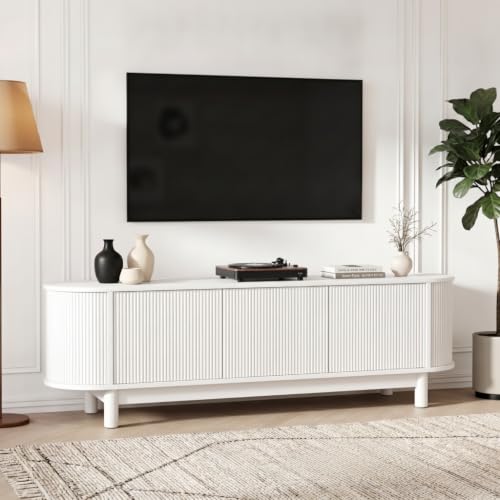
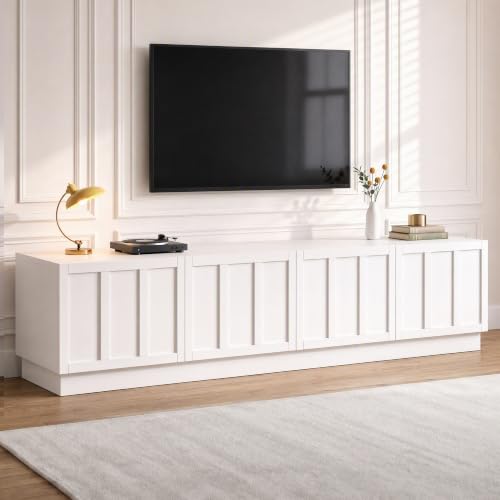
This is the TV unit I'd start with, because its listing tells you the things that matter. It's a 180cm white entertainment unit with fluted doors on four storage cabinets, rated for TVs up to 70 inches and a tabletop load of 80kg. It's built from E1 MDF and sits on a full-floor base, which spreads the weight along the whole length rather than through a few legs. There are two cable management holes at the back, soft-close hinges on the doors and an anti-tip kit in the box. The listing gives the size as 180 by 40 by 40cm. It ranks #8 in Amazon AU's TV Stands & Multimedia Centres category and is sold by Artiss Furnishings at $180.
Four closed cabinets give you plenty of hidden storage, but they're the wrong home for a console that runs hot. Keep the doors open when a console's running, or keep it on top beside the TV, and use the cabinets for controllers, remotes and games. The two cable holes need to line up with your power point and aerial socket, so check where they fall before assembly. Fit the anti-tip kit into a stud or masonry on day one, before the TV goes on top. At 40cm tall it sits fairly low, which suits a big screen and a normal couch height. A soundbar in front of the TV shouldn't block the TV's infrared sensor either.
The rank is the best of any single-model listing among the picks. The full-floor base means no robot vacuum can get under it, but nothing gets lost under it either. Wipe spills off the MDF straight away, since swollen edges don't recover. Snug the cam locks by hand rather than with a drill. If the doors start to drop over time, adjust the hinge screws to line them up again. For a 55 to 70 inch TV in a family lounge room where the unit needs to be anchored and hold a stated 80kg, it's my pick.
Honest caveats: Closed cabinets trap heat, so consoles and receivers need the doors open or a spot on top. There's no open shelf. The full-floor base sits flat, so a robot vacuum can't clean underneath. It needs assembly, and the package count isn't stated.
Best for: A 55 to 70 inch TV in a family lounge room where a stated load rating and anchoring matter.
Price: $179.95 (Artiss Furnishings) • Model: FUR-S-TV180-4D-WH-AB • Size: 180 x 40 x 40cm • TV size: Up to 70 inches • Load: 80kg tabletop • Storage: 4 cabinets, soft-close hinges • Build: E1 MDF, full-floor base • Extras: 2 cable holes, anti-tip kit • Rank: #8 in TV Stands & Multimedia Centres (Amazon AU)
View on Amazon AU
Artiss 160cm Fluted TV Entertainment Unit with Side Cabinets and Solid Wood Feet (White)
ASIN B0H5VRQK7Z • $157.95 • Sold by Artiss Furnishings on Amazon AU
For a smaller lounge or a bedroom, the Artiss 160cm is the one I'd look at. It's a white entertainment unit with fluted doors on two side cabinets and a central cabinet with two shelves inside, all with push-to-open fittings and soft-close hinges. It's built from 15mm particle board with a melamine veneer and stands on solid wood feet with pads. The listing rates the top to 60kg and each internal shelf to 10kg, and gives the size as 160 by 40 by 45cm. There's a 6cm cable hole at the back and wall attachment hardware in the box. It's sold by Artiss Furnishings at $158 and ships in a single package.
Push-to-open doors give a clean, handle-free front, but they mean opening the cabinet every time you point a remote at anything inside, so keep infrared gear like a set-top box on top. The middle cabinet with its two shelves is the natural spot for a console, as long as the door stays open while it runs. A 6cm cable hole is a good size, big enough for a powerboard plug to pass through. Fit the wall hardware into a stud before the TV goes on, and run the powerboard plug through the hole before the unit goes against the wall. The listing doesn't give a maximum TV size, but 160cm suits most 55 to 65 inch sets with feet near the ends.
The rank of #2 is shared across a group of Artiss units, so it's the range that sells rather than this exact unit alone. Solid wood feet lift it slightly off the floor, which helps a little with airflow underneath. The 10kg shelf rating is modest, so keep heavy receivers on the top. Wipe the melamine with a damp cloth and keep plants on a tray. Check the foot pads are still in place whenever you move it. For a 55 to 65 inch TV in a smaller room, with gear tucked away behind clean doors, it's the one I'd buy.
Honest caveats: No maximum TV size is stated. Push-to-open doors hide infrared gear from its remote. The internal shelves are rated to 10kg each. The rank is shared across a group of Artiss units, so it doesn't measure this model on its own.
Best for: A 55 to 65 inch TV in a smaller lounge or bedroom.
Price: $157.95 (Artiss Furnishings) • Model: FURNI-N-TV160-WH_RL • Size: 160 x 40 x 45cm • Load: 60kg top, 10kg per shelf • Storage: 2 side cabinets, middle cabinet with 2 shelves • Build: 15mm particle board, melamine, solid wood feet • Extras: 6cm cable hole, wall hardware, one package • Rank: #2 in TV Stands & Multimedia Centres (Amazon AU), listing shared across a group of Artiss units
View on Amazon AU
Artiss Extendable TV Unit 200 to 380cm with 3 Drawers and Open Shelf (Dark Walnut and Black)
ASIN B0HKVL89F9 • $259.95 • Sold by Artiss Furnishings on Amazon AU
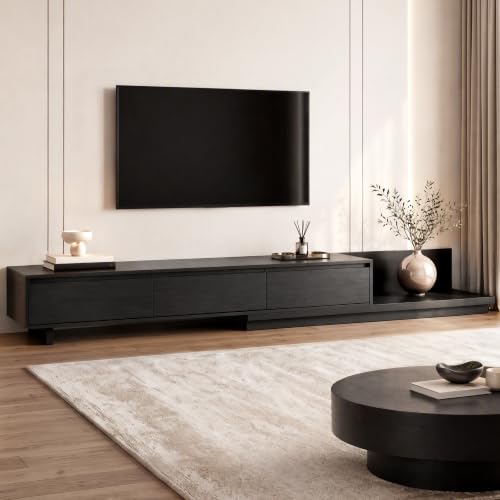
If your TV is 75 inches or bigger, this is the unit I'd look at first. It's an extendable design that slides out from 200cm to 380cm, so the top can run well past the feet of a big TV, and the listing rates it for screens up to 85 inches and a load of 80kg. It's built from 15mm and 12mm particleboard in dark walnut and black, with three drawers on metal runners, groove handles and an open display shelf for a soundbar, console or receiver. The base is raised for a robot vacuum, and it comes with an anti-tip kit. It's sold by Artiss Furnishings at $260, the highest-priced of the five picks.
The open shelf is the best spot among the picks for gear that runs hot, since the listing describes it as keeping devices ventilated, and that's where I'd put a console or receiver. Drawers are better for games and controllers than for electronics. An extendable top has a join where the sections slide, so put the TV's feet on the solid part rather than across the gap, and check the join stays level once everything's loaded. At 80kg it carries an 85 inch TV and a soundbar, but add up your gear before you load it. Fit the anti-tip kit before anything goes on top. Slide the top out to its width before loading anything, never with the TV standing on it.
The rank is shared with a different Artiss extendable unit, so treat it as a range figure. The listing doesn't give a height or the number of packages. The raised base clears a robot vacuum but also lets dust collect underneath, so it's worth checking our robot vacuum guide for heights. Keep drinks off the particleboard. Check the anti-tip strap again if you change the extended width, since the balance point moves with it. For a 75 to 85 inch TV with a soundbar and console, where you want the unit wider than the screen, it's my pick.
Honest caveats: The height isn't stated, and neither is the package count. The sliding join in the top needs checking once it's loaded, and the TV's feet should sit on the solid section. The rank is shared with a different Artiss extendable unit. At its full 380cm it needs a long wall.
Best for: A 75 to 85 inch TV with a soundbar, console or receiver that needs an open shelf.
Price: $259.95 (Artiss Furnishings) • Model: FURNI-N-EXT01-TV200-WDBK-AB • Width: 200 to 380cm, extendable • TV size: Up to 85 inches • Load: 80kg • Storage: 3 drawers on metal runners, open shelf • Build: 15mm and 12mm particleboard, raised base • Extras: Anti-tip kit • Rank: #10 in TV Stands & Multimedia Centres (Amazon AU), listing shared with another Artiss extendable
View on Amazon AU
Oikiture 180cm TV Cabinet Entertainment Unit with 4 Cabinets and Solid Wood Legs (Natural)
ASIN B0H8YGDCC3 • $191.92 • Sold by Oikos 1943 on Amazon AU
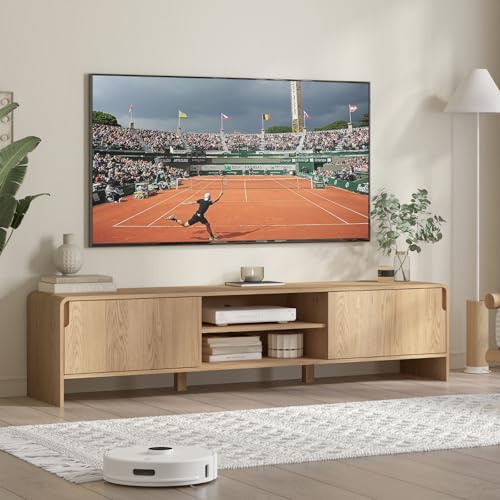
The Oikiture is the 180cm pick for anyone who wants open shelves in the middle and closed cabinets at the ends. It has four handle-free cabinet doors on steel hinges, a run of open compartments in the centre with cable openings behind them, metal runners and solid wood legs, in a natural woodgrain finish. The listing rates the top for TVs up to 65 inches. It doesn't give a load rating, a height or a material for the boards, which is less than the Artiss units state. It's sold by Oikos 1943, the seller behind the Oikiture range, carries a one-year warranty and costs $192. It ranks #35 in Amazon AU's TV Stands & Multimedia Centres category.
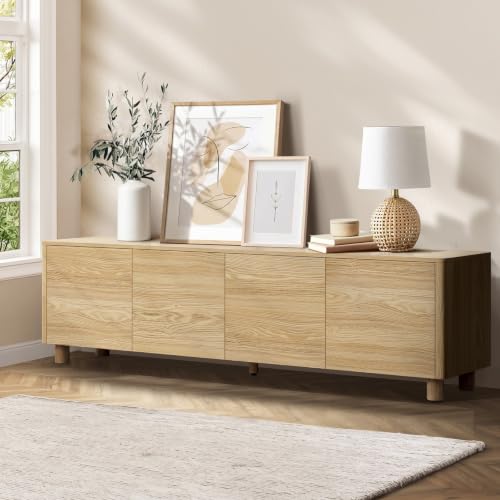
The open compartments in the middle are the reason to buy it. They give a console, receiver or router somewhere to sit with air around it, and the cable openings behind them mean the leads go straight through to the powerboard without passing through a closed door. Keep the closed cabinets at the ends for games, controllers and remotes. Legs lift the unit off the floor, which helps airflow but means the load goes through the legs and frame rather than a full base. With no stated load rating, I'd keep it to a 55 to 65 inch TV and a soundbar rather than a big screen and a heavy receiver.
The listing doesn't mention an anti-tip kit, so buy a furniture anchor strap and fix it to a stud before the TV goes on. The part number is a 93-prefix barcode, the Australian GS1 prefix, rather than a model code. Wipe spills off the finish straight away. Check the legs are tight a week after assembly and again every few months. Keep the open compartments clear of clutter so the gear in them gets air on every side. For a 55 to 65 inch TV with gear that needs to breathe, it's the one I'd choose.
Honest caveats: No load rating, height or board material is stated, and no anti-tip kit is mentioned, so buy an anchor strap. It's rated for TVs up to 65 inches, smaller than the 180cm Artiss. Legs need checking for tightness now and then.
Best for: A 55 to 65 inch TV with a console or router that needs open shelf space.
Price: $191.92 (Oikos 1943) • Part number: 9358412097455 (barcode) • Width: 180cm • TV size: Up to 65 inches • Load: Not stated on the listing • Storage: 4 cabinets, open middle compartments • Build: Steel hinges, metal runners, solid wood legs • Warranty: 1 year • Rank: #35 in TV Stands & Multimedia Centres (Amazon AU)
View on Amazon AU
Giantex 160cm Low Profile TV Stand with 2 Doors and Open Shelves (Natural)
ASIN B0GXV29Q9Z • $115.95 • Sold by Giantex AU on Amazon AU
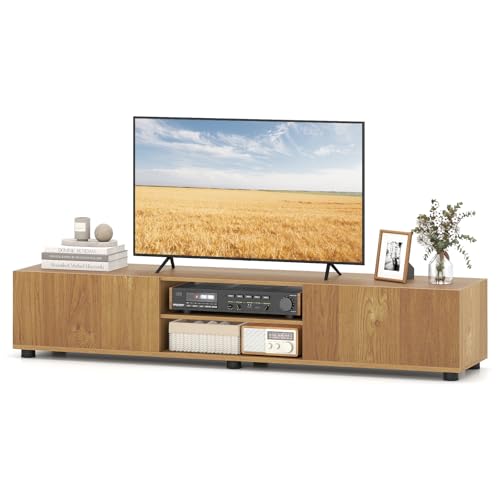
The Giantex is the pick for a big screen on a low unit, and the lowest-priced of the five at $116. The listing gives its size as 160 by 35 by 30cm, so it's the lowest of the picks by a good margin, which puts the middle of a big screen nearer eye level from a low couch. It's rated for TVs up to 70 inches, with two side cabinets on soft-close metal hinges and two open-back shelves in the middle. It stands on six support feet rather than a full base. It's sold by Giantex AU, with an AU-suffixed model code, IW21925DGAU, and ranks #26 in Amazon AU's TV Stands & Multimedia Centres category.
The open-back shelves are a good home for a router or console, since there's nothing behind them to trap heat and the leads run straight out the back. The listing makes that point itself about keeping routers ventilated. Six feet spread the load better than four, but the listing doesn't give a load rating, so I'd treat it as a stand for a 55 to 65 inch TV and a soundbar rather than a 70 inch set with a heavy receiver. There's no anti-tip kit mentioned, which matters more on a low, wide unit than you might think, because kids can climb onto it easily. Six feet also mean six points to level on uneven floorboards.
At 30cm it's too low for the TV to sit at eye level from a dining chair, so it suits a lounge room with a low couch. Buy a furniture anchor strap for the unit and one for the TV. Keep a gap behind it for the leads. Check the feet are level on carpet so the top doesn't rock. Wipe the finish with a damp cloth rather than a spray cleaner that can lift the edges. For a big screen in a lounge where you want the TV sitting low and the router out in the open, it's my pick.
Honest caveats: No load rating or anti-tip kit is stated, so buy an anchor strap and keep heavy gear modest. At 30cm tall it's very low, which suits a low couch but not a dining chair. The open-back shelves show the leads behind.
Best for: A big screen in a lounge with a low couch, where the TV should sit low.
Price: $115.95 (Giantex AU) • Model: IW21925DGAU • Size: 160 x 35 x 30cm • TV size: Up to 70 inches • Load: Not stated on the listing • Storage: 2 side cabinets, 2 open-back shelves • Build: 6 support feet, soft-close metal hinges • Rank: #26 in TV Stands & Multimedia Centres (Amazon AU)
View on Amazon AUSide-by-side comparison
What we see fail in the workshop: TV units
Furniture doesn't come through our door, but the gear that lives in it does. Game consoles cooked inside closed cabinets, HDMI ports snapped when a unit was moved, and powerboards packed with dust behind the TV all turn up regularly, and most of it comes down to where the gear sat on the unit and how it was wired. None of it needs an expensive unit to avoid, just a bit of thought about placement.
Consoles cooked inside closed cabinets
A console shut in a cabinet breathes its own warm exhaust, so the fan works harder and pulls in more dust. After a year or two the heatsink is matted with fluff, the console gets loud, and eventually it starts shutting down mid-game or won't turn on. If yours sounds like a hair dryer, it's overdue. Cleaning the fan and heatsink and replacing dried-out thermal paste often brings it back. The fix for next time takes little effort: open shelf, or door open while it runs, and a dust-out every few months with the power off.
HDMI ports snapped in a move
Moving a TV unit with the console still plugged in, or tripping over an HDMI lead stretched across the floor, puts a sideways load on the port that its solder joints aren't built for. The result is a port that's loose, a picture that cuts in and out, or no picture at all. Replacing a console HDMI port is a board-level job, so it's not one to try at home. Unplug everything before moving furniture, pull plugs straight out, and leave some slack in every lead. A right-angle adapter takes strain off a port that sits close to the wall.
Powerboards packed with dust
A powerboard buried behind a TV unit for years collects a thick layer of dust, and in a closed cabinet it sits in the warm air from the gear around it. Dust near live contacts and heat build-up are a poor mix, and we sometimes see boards with scorch marks around one outlet. Keep the board off the carpet, and pull it out once a year, unplug it and wipe it down, check every plug sits fully home, and replace any board with discolouring, a loose socket or a damaged lead straight away.
Decision tree: which one should you actually buy?
- Want a stated load rating and an anti-tip kit for a 55 to 70 inch TV? → The Artiss 180cm fluted unit at $180 is rated to 80kg and ships with an anti-tip kit.
- Fitting a smaller lounge or a bedroom? → The Artiss 160cm at $158 has a 60kg top, a 6cm cable hole and wall hardware in one package.
- Is your TV 75 inches or bigger? → The extendable Artiss at $260 runs from 200 to 380cm, is rated for 85 inch screens and has an open shelf for a console.
- Got a console or router that needs open shelf space? → The Oikiture 180cm at $192 has open middle compartments with cable openings behind. Add an anchor strap.
- Want the TV sitting low in front of a low couch? → The Giantex at $116 is just 30cm tall with open-back shelves. Add an anchor strap.
- Console lost its picture or won't power on after the move? → Try a different HDMI lead and TV port first. If the console's own port is loose or it won't start, bring it into our Erina workshop and we'll check it and tell you the cost before you spend anything.
Frequently asked questions
What size TV unit do I need for a 65 inch TV?
Check your TV's spec sheet for the distance between its feet, since many big TVs stand on two feet near the ends rather than one pedestal. The unit needs to be wider than that span with a few centimetres spare on each side. In general a 160cm unit suits most 55 to 65 inch sets and a 180cm one gives more room, while 75 inch and bigger screens often need 180cm or more, which is where an extendable unit helps. Check the load rating against the TV's weight too.
Do I really need to anchor a TV unit to the wall?
Yes, especially with kids in the house. A TV unit with a big screen on top is top heavy, and a child pulling on a drawer or climbing the front can tip it over. Three of the picks include an anti-tip kit or wall hardware, and for the other two an anchor strap is easy to buy. Fix it into a stud or masonry rather than plasterboard alone, and strap the TV as well, since a TV can tip forward off a unit that's fixed.
Is it safe to put a PlayStation or Xbox inside a TV cabinet?
It's fine as long as it can breathe. A console in a closed cabinet pulls in its own warm exhaust, which makes the fan work harder and builds up dust faster, and over time that leads to noise, shutdowns and failures. Put it on an open shelf if the unit has one, or leave the door open while it's running, with a few centimetres of space on every side and nothing stacked on top. Clean the vents every few months with it switched off.
How much weight can a TV unit hold?
Only as much as the listing states, and not every listing states it. Among the picks, the Artiss 180cm and the extendable Artiss are rated to 80kg and the Artiss 160cm to 60kg, while the Oikiture and Giantex give no figure. The rating covers everything on top: TV, soundbar, console and receiver. Keep heavy items in the middle and toward the back, and if the top starts to dip, move the weight over a divider before the bow becomes permanent.
Will my Wi-Fi be worse with the router inside a TV unit?
Often a little, yes. A router shut inside a cabinet, behind a TV and surrounded by other electronics usually covers less of the house than one in the open. Wood and doors are better than metal, but they still absorb some signal. Put the router on top of the unit or on an open shelf with its antennas up. If coverage drops after you've moved it into a new unit, try it out in the open for a day before blaming the internet provider.
How do I stop particleboard TV units swelling?
Keep water off it. Particleboard and MDF are strong when dry, but water that soaks into an edge or a screw hole makes the board swell, and it doesn't shrink back. Wipe spills straight away, put pot plants on a tray, and don't place the unit where a window or door lets rain blow in. Snug the cam locks by hand during assembly, since a stripped hole in particleboard is hard to fix and lets the unit wobble.
Related buying guides
Console running hot or lost its picture?
A console that's lived in a closed cabinet often gets loud, shuts down mid-game or stops showing a picture, and a move can loosen the HDMI port. Don't keep forcing it back on. Bring it into our Erina workshop and we'll check the fan, the heatsink and the port and tell you what it'll cost before you spend anything.
Visit our Erina workshop Book Online